
Shopify AI product descriptions work best when you start with verified product facts, generate a draft, check every claim and variant, and release a small approved batch before expanding. The useful result is a product page that answers buying questions accurately—not simply more words produced faster.
For an Indian ecommerce business, that means connecting the description to the product photograph, size or compatibility information, delivery terms and the actual checkout experience. Better copy cannot fix an unavailable size, a surprise shipping charge or broken purchase tracking.
This guide provides a practical workflow, an editable prompt and a review checklist. The examples are hypothetical illustrations, not client case studies or results from a live Shopify tool test. Platform instructions were checked on 10 October 2026.
What creates Shopify AI product descriptions today?
You may encounter the term Shopify Magic product descriptions in older tutorials. Shopify’s current documentation describes the product-description text generator as using Sidekick. The current product-editor workflow is documented for desktop; this is different from Sidekick chat, which is also available in the Shopify mobile app. Do not assume a mobile tutorial shows the same controls you will see in the product editor. See Shopify’s current description-generation instructions and Sidekick setup guidance.
Shopify also notes that AI-feature availability can vary by plan, device and language. Check the controls available in your own admin before planning a catalog-wide process. The reviewed documentation does not state an India-specific exclusion for this writing workflow, but this article does not confirm access in every Indian merchant account. Third-party apps can have separate fees, permissions and limits. Shopify’s AI tools overview explains the distinction.
How do you prepare reliable inputs before generating copy?
Create one fact sheet per product family and a separate record for differences between variants. Assign a person who can resolve missing information. A product photo can show a pocket; it cannot establish a load rating, fabric certification or warranty.
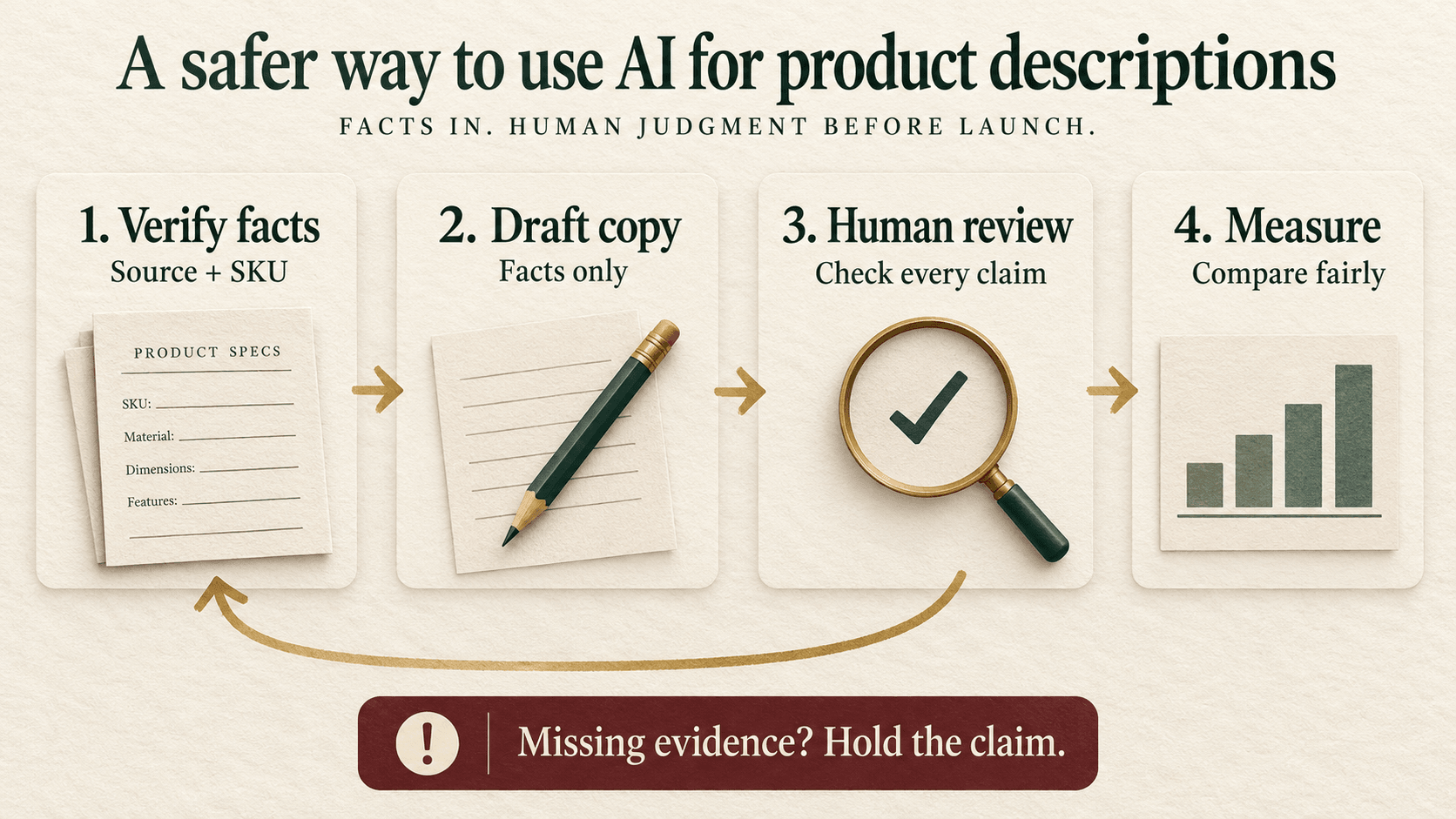
Use this product fact ledger as a reusable worksheet. For each entry record the value, source, date checked, applicable SKU and reviewer. Mark unsupported information “unknown” instead of inviting the tool to fill the gap.
- Identity: product name, SKU, category and included items. Confirm that a photographed accessory is actually supplied.
- Specifications: material, dimensions, capacity, fit and compatibility, using a supplier document or other accountable source.
- Use and limits: what the item is intended for and where that use has not been established. Separate an appealing use case from a tested performance claim.
- Care and support: approved cleaning instructions, warranty terms and the policy page that owns them.
- Variant differences: colour, size, pack quantity and any material changes. A shared paragraph must remain true for every variant that displays it.
- Buyer questions: questions gathered from public reviews, permitted internal research or staff knowledge. Remove personal information before using an external tool.
- Prohibited claims: unsupported certifications, environmental claims, health outcomes, guaranteed delivery or invented customer endorsements.
Keep price, stock and location-dependent delivery promises in the fields or components designed to stay current. Repeating those values inside static prose gives the team another place to maintain when an offer changes.
How do you generate a description in Shopify step by step?
- On desktop, open Products in Shopify admin and select the intended product.
- In its description editor, choose the Generate text icon.
- Enter the product facts, buyer context, tone and restrictions in your prompt, then submit it.
- Review the wording inserted into the description field. Edit it before saving.
- Choose Save only when approved. Shopify says a saved description on a published product appears immediately.
These are documentation-based steps, not a claim that we tested your account. For practice, use an unpublished draft product or another controlled review environment. Keep the previous approved copy separately so you can restore it if necessary. A generated suggestion is not a factual approval.
What should an AI product description prompt include?
Specify the facts the tool can use, the reader’s decision and the output you want. A request to “write persuasive SEO copy” leaves too much room for generic benefits and unsupported promises. The prompt below is an editorial template; it has not been run as a benchmark or live-store test.
Write an English product-description draft for the following Shopify product. Use only the approved facts below. Do not infer missing specifications from the category, product name or photograph.
Product and SKU: [insert].
Approved facts and sources: [insert verified facts].
Buyer and decision: [who is considering it and what they need to know].
Variant differences: [insert].
Search phrase: [one relevant phrase, only if it accurately describes the item].
Brand voice: [plain, helpful, specific].Return a short opening answer, scannable factual details, and any useful care or compatibility information supported by the input. Avoid superlatives, invented reviews, certifications, sustainability claims, performance promises and delivery guarantees. Use the search phrase naturally only where helpful.
Keep a separate reviewer-only list of missing information and claims needing approval. Do not put that list in customer-facing copy. Do not publish, save changes or update any other product.
If the interface gives you only a description field, keep the reviewer notes outside it. Otherwise an internal question such as “confirm material” could accidentally become visible to customers. Ask for one revision at a time: remove an unsupported benefit, simplify the opening, or separate a variant detail. Repeatedly asking for “more persuasive” copy can reintroduce the claims you just removed.
What does a useful description look like in practice?
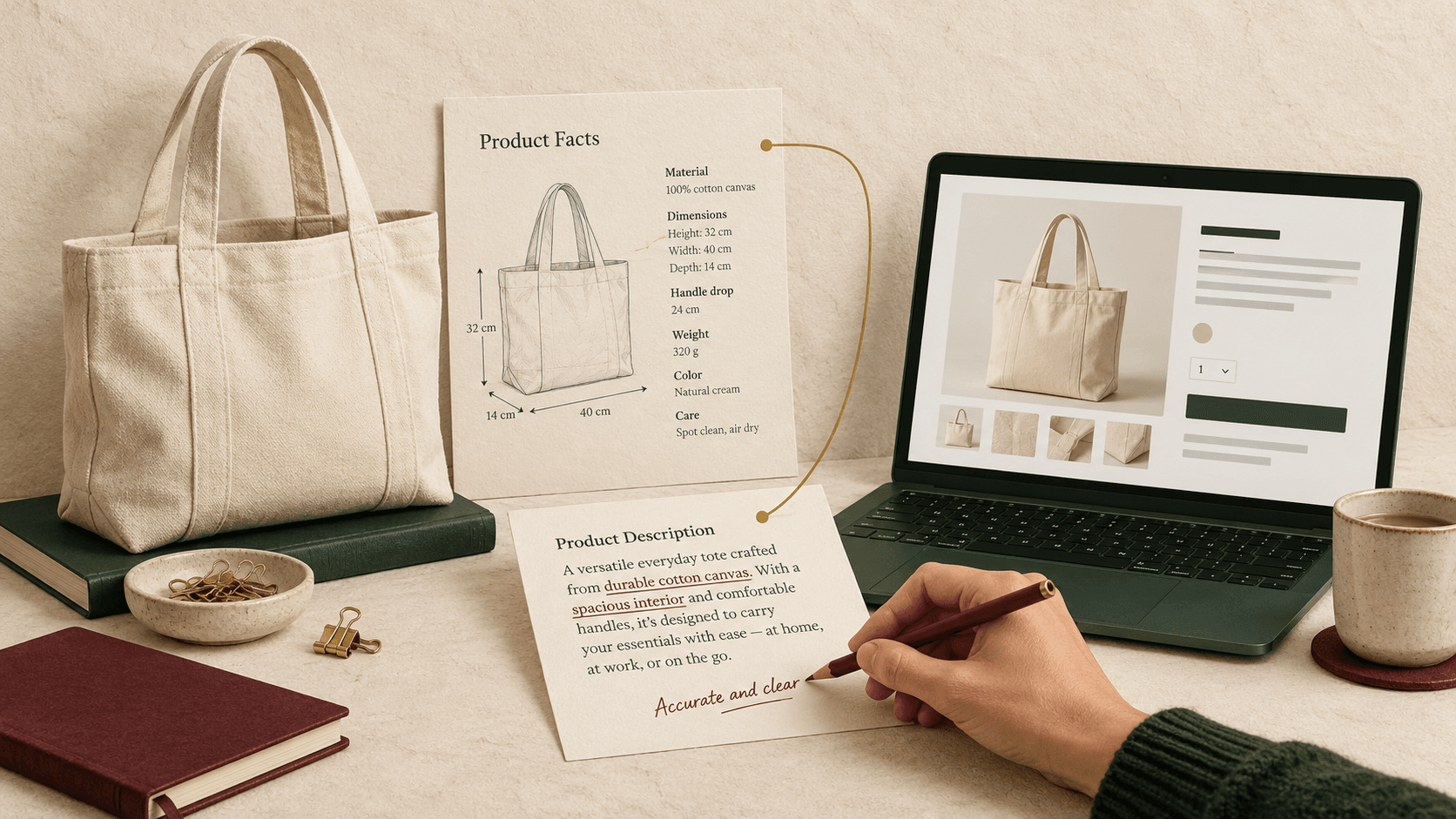
Hypothetical example: an Indian home-and-lifestyle store sells a cream tote. For this illustration, assume its approved record specifies cotton canvas, 40 cm width, 32 cm height, 14 cm depth, one internal pocket and spot-clean care. These invented example specifications are not evidence about a real product.
A draft that says “The ultimate eco-friendly tote carries your heaviest groceries and lasts a lifetime” creates three problems. “Eco-friendly” needs support, the carrying claim needs a relevant test, and the lifespan promise is unsupported. Fluent writing has concealed missing evidence.
Illustrative edited version: “This cream cotton-canvas tote has a main compartment and an internal pocket for separating smaller items. It measures 40 cm wide, 32 cm high and 14 cm deep. Check these dimensions against what you plan to carry. Spot clean according to the supplied care instructions.”
The wording is deliberately restrained because the record does not establish waterproofing, load capacity or machine washing. If a buyer needs those answers, the next task is product verification—not a stronger adjective. More evidence can support more helpful copy later.
For fashion, scrutinise size, fit and fabric differences. For accessories, check exact device compatibility and included components. For products involving safety or health claims, route the relevant statements to a qualified reviewer. Do not turn “suitable for some uses” into “safe for everyone.”
How do you check each claim before accepting the draft?
Review in two passes. First compare the text with the fact ledger, including numbers, units, care instructions and variant applicability. Then read it as a customer deciding whether the product suits them. Accurate but incomplete copy can still leave the main buying objection unanswered.
- Accept: the statement is supported by the correct SKU record and helps the buying decision.
- Rewrite: the underlying fact is correct, but the wording exaggerates it or obscures a qualification.
- Hold: the claim has no adequate evidence. Remove it from the draft and ask the product owner to resolve it.
For example, “internal pocket” is a specification. “Keeps valuables secure” adds a security implication that an open pocket may not justify. This review prevents a small wording change from becoming a different product promise.
Check the description against real product photography as well. If the copy describes one compartment but the image shows another variant, fix the mismatch. Our Shopify product-page optimization guide connects those checks with mobile layout, trust information and the path to purchase.
How should you handle Shopify product description SEO?
Start with the buyer’s language and the actual product. A specific product page and a broad collection page often answer different needs. Avoid forcing a product description to target every related category phrase. Use the ecommerce category-page SEO guide to decide where broader selection and comparison information belongs.
Write a clear product identity, useful distinguishing details and answers to relevant purchase questions. Review the search title, meta description and image alt text separately; do not assume changing body copy automatically improves every field. Keep descriptions as long as the decision requires, rather than adding paragraphs to reach a keyword-density or word-count target.
Google’s guidance warns that generating many pages without adding value can violate its scaled-content-abuse policies. It also calls for accuracy checks on generated content and metadata. AI authorship alone does not provide a ranking advantage, and this workflow cannot guarantee rankings. Read Google’s generative-AI content guidance.
Does Google Merchant Center require a separate check?
Yes, if you submit AI-generated product descriptions to Merchant Center. Google says these descriptions must use structured_description, with the content and a digital_source_type value of trained_algorithmic_media. AI-generated titles have a corresponding structured_title requirement. These are product-data attributes, not instructions to insert those labels into a shopper-facing paragraph. Google’s AI-generated product-data rules explain the requirements.
Ask whoever manages your feed or sales-channel integration to inspect the actual submitted attributes. Do not assume a connector handles this merely because the storefront description looks correct. Record the copy’s origin, check the integration’s current support and validate the submitted item before expanding. This article does not certify a particular feed app or account configuration.
How can you scale the process without spreading mistakes?
Choose a small pilot that includes your main product types and at least one variant edge case. The pilot size should fit your review capacity; there is no universal number of products that makes a rollout safe. Give each record a status: facts incomplete, drafted, fact-checked, approved, released or rollback required.
Separate the writer’s role from the final product approver where possible. Preserve the original description, proposed replacement, reviewer, approval date and affected SKUs. A bulk operation that cannot show which records changed or restore the previous version is difficult to audit.
When considering an app, evaluate a concrete task with permitted test data. Can it keep products unpublished? Does it preview each change? Which fields can it overwrite? Does it distinguish product and variant information? Can it export a change log and restore copy? What data leaves the store, and what does each plan charge for? Verify these answers in the current app documentation and a controlled test before connecting the full catalog.
Do not treat an image-to-description feature as a specification-verification service. Nor should you automatically approve an entire batch because a few samples sound natural. Review every factual claim before publication; automate formatting checks where appropriate, while keeping accountable approval for the product promises.
How do you measure whether the new descriptions help?
Measure two different things: the efficiency of producing approved copy and the experience of shoppers who see it. Faster generation with more corrections may not save the team time.
- Editorial time per approved product: total preparation, drafting and review minutes divided by approved products. Include rework; keep the product mix comparable.
- Claim correction rate: reviewed descriptions requiring at least one factual correction divided by reviewed descriptions. Label this as your internal quality measure, not a platform benchmark.
- Product-page progression: where tracking supports it, compare sessions viewing a product and adding it to cart, using the same session definition and period.
- Completed purchases and customer questions: examine order outcomes and recurring clarification or return reasons, allowing enough time for those outcomes to occur.
Do not divide an item-level event count by an unrelated storewide session total and call it product conversion rate. Document the denominator, attribution approach and whether refunds or cancellations are included. Keep missing data blank and explain the gap.
Compare equal-length complete periods, while recording changes to price, stock, promotions, traffic source and delivery terms. Where a suitable controlled experiment is available, plan it before rollout. A before-and-after comparison is useful evidence to investigate, but cannot isolate the effect of copy when other things changed.
Hypothetical diagnostic: if product-to-cart progression improves but purchases do not, investigate checkout and delivery friction before rewriting the description again. If questions about dimensions continue, move the relevant information closer to the purchase decision and check whether the units are clear. If traffic is very low, prioritise accuracy and usability while collecting more evidence instead of declaring a winner.
What belongs in an AI product copy checklist?
Copy this checklist into your product approval process and assign an owner to each unresolved item.
- Product identity, sources and applicable SKUs recorded.
- Missing specifications resolved or omitted; no inference from photographs.
- Materials, units, dimensions, care and compatibility checked.
- Variant copy remains true for every option displaying it.
- Benefits stay within evidence; no invented endorsements or guarantees.
- Opening answers the buyer’s main product question.
- Search wording is natural; title, metadata and alt text reviewed separately.
- Product photographs and included-item descriptions agree.
- Feed-specific AI attributes checked where Merchant Center is used.
- Reviewer-only notes removed from customer-facing fields.
- Mobile preview, formatting and purchase journey checked.
- Previous copy, approval, release date and measurement plan saved.
Need help connecting copy to the rest of your store?
If your Shopify descriptions are being rewritten but customers still hesitate, Digi Amenity can review the product facts, copy, mobile page journey and purchase tracking together. Explore our web development services before scaling catalog changes or acquisition spend.
Frequently asked questions
Are Shopify Magic and Sidekick the same thing for product descriptions?
Older tutorials call the feature Shopify Magic. The current product-description Help page attributes generation to Sidekick. Follow the current documentation and the controls in your admin rather than expecting an old tutorial’s exact interface.
Can I generate product descriptions on my phone?
The documented product-description editor generation flow is desktop-only. Sidekick chat is separately available in the Shopify mobile app, while its setup guidance excludes the mobile browser. Those are different access paths; check which task and interface the instructions describe.
Will AI-written descriptions automatically improve Google rankings?
No. Accurate, helpful product information is the objective, but generation does not guarantee visibility. Search performance also depends on whether the page can be discovered and indexed, fits the search intent and competes effectively with alternatives. Avoid scaling pages that add little value.
Can a photograph provide all the facts needed for a description?
No. It may support visible attributes, but not necessarily material composition, load capacity, safety certification or compatibility. Use accountable product records for those facts and resolve conflicts before publishing.
Should I rewrite my whole catalog at once?
Start with a reviewable pilot and a restore plan. Expand after you understand the error patterns, approval workload and integration behaviour. A large batch is only useful when the team can verify the information and identify every changed product.
Do I need a separate AI-writing app?
Not necessarily. Begin by checking whether the native workflow meets your task. Consider an app when a specific operational need justifies it, such as review management or catalog-scale processing. Verify current permissions, pricing, preview controls and rollback support instead of selecting from marketing promises alone.
How long should I wait before deciding the copy worked?
There is no universal waiting period. Choose complete comparison periods and enough observations for the decision, allowing for purchase and return delays. Record promotions and stock changes. With a small sample, report uncertainty and continue collecting evidence rather than attributing every change to the description.
