

Lead magnets are useful resources or incentives offered in exchange for contact details. They can be checklists, templates, buying guides, calculators, webinars or trials. A lead magnet works commercially when it solves a problem relevant to your likely buyer, delivers what it promises and creates an appropriate next step toward a purchase or qualified conversation.
A large download count is not enough. An Indian service business may need a handful of suitable project enquiries; an online store may need customers who choose the right product and return to buy again. The offer, form, website, follow-up and measurement must support that outcome together.
This guide explains the types, practical lead magnet examples, creation process and measurement decisions. The business examples and calculations below are hypothetical planning examples, not Digi Amenity client results or tested performance claims.
What makes a lead magnet different from ordinary free content?
The difference is the exchange. An open article helps anyone who visits. A gated resource asks for information before access or delivery. A newsletter invitation asks for an ongoing relationship; a lead magnet offers a specific immediate benefit that may introduce that relationship.
For example, “join our mailing list” is a subscription invitation. “Get the editable website-project brief to compare development proposals” promises a concrete tool. That promise should explain the resource, intended audience and delivery method without making the reader guess what happens after signup.
A coupon can also be an incentive, but it attracts price-sensitive interest rather than necessarily proving product fit. A free consultation offers human attention, but consumes capacity and needs a clear scope. The format alone does not determine lead quality.
When should you gate content—and when should you leave it open?
Use a gate when the resource is valuable enough to justify the friction, contact information is needed for delivery or a relevant relationship, and someone owns the next step. A specialised worksheet can justify signup more readily than a PDF that repeats a short public blog post.
- Leave basic education open when discovery, trust and reach matter more than identifying every reader. Explain the main answer publicly; offer a useful editable companion if appropriate.
- Offer a direct enquiry route when the visitor is already ready to discuss a project. Do not force a quotation request through an unrelated ebook funnel.
- Avoid a gate you cannot support. Broken delivery, unanswered replies or an unmaintained calculator turn an apparently low-cost asset into a poor experience.
- Consider a hybrid. Publish the checklist openly and offer an editable worksheet by email. Make the additional value clear rather than hiding essential information.
Digi Amenity’s practical view is to design the lead magnet around the buying decision. If your sales team repeatedly needs a defined scope before recommending a solution, a preparation worksheet may be more useful than another broad industry guide.
Which types of lead magnets fit different buyer problems?
Choose the smallest format that helps someone complete a useful task. These lead magnet ideas illustrate possible fits, not guaranteed winners.
| Type | Hypothetical use case | Trade-off to check |
|---|---|---|
| Checklist | A retailer checks product-page information before a sale. | Must contain actionable checks, not obvious advice. |
| Editable template | A founder prepares a website brief before requesting proposals. | Include a completed synthetic example and instructions. |
| Calculator | A business estimates acquisition costs under different conversion assumptions. | Show inputs, formula limitations and assumptions; estimates are not forecasts. |
| Buying guide | A furniture customer compares dimensions, materials and care needs. | Help the decision fairly rather than disguising a sales brochure. |
| Comparison worksheet | A team compares software against its required workflows. | Keep vendor facts current; distinguish requirements from preferences. |
| Diagnostic or quiz | A business identifies gaps in its enquiry-handling process. | Explain scoring; do not present an unvalidated score as an expert diagnosis. |
| Webinar | A founder learns how to prepare for a website migration. | Requires delivery, reminders and a genuine reason to attend live. |
| Short course | A store owner works through a sequence of product-photography exercises. | Completion effort can exceed the audience’s available time. |
| Research report | A buyer examines properly sourced sector findings. | Needs a defensible method, dates and limitations—not invented survey data. |
| Sample or trial | A buyer tests a product or a limited software workflow. | Make eligibility, limitations, billing and expiry clear. |
| Discount or offer | A shopper receives a clearly defined first-order incentive. | Check margin, exclusions and repeat-purchase behaviour. |
| Scoped assessment | A service prospect receives a limited review of one defined problem. | Set boundaries and staff capacity; avoid promising a full audit for every signup. |
For Indian audiences, verify that examples, currencies, product availability and delivery terms fit the actual customer. Local relevance should help a decision; inserting city names does not make a generic asset more useful.
How do you create a lead magnet that supports real enquiries?
1. Choose one audience and one decision
Replace “small businesses interested in marketing” with a recognisable situation: “service-business owners comparing proposals for a website rebuild.” List what they need to know, what they are worried about and what information is currently missing.
Use genuine sales questions, support issues and public audience research where available. If you have no customer evidence, describe the audience assumption as a hypothesis and validate it with conversations. Do not invent customer quotes to make the brief look researched.
2. Define a suitable lead before designing the asset
Write a qualification rule your team can apply consistently. For a website project, this might mean a real business, a relevant service need, access to a decision-maker and a plausible project window. Budget fit can be established in a conversation rather than making every early reader disclose a number.
A download demonstrates interest in a resource. A suitable lead requires additional evidence. Do not silently classify every student, competitor, supplier, duplicate or existing customer as a new sales opportunity.
3. Promise a useful output and build it completely
Specify what the reader will finish: a project brief, shortlist, calculation or inspection checklist. Give instructions, a blank version and a clearly labelled worked example. Check every formula and link. Use readable layouts, descriptive headings and a version date for material that can become outdated.
An AI-assisted first draft still needs subject review. Verify facts and examples, test calculations and remove fabricated evidence. A polished cover cannot compensate for a template that someone cannot actually use.
4. Build a landing page that matches the promise
The page should show who the resource is for, the task it helps with, what is included and what happens after submission. A preview of a real page or worksheet is more informative than a generic mockup with no visible substance.
Hypothetical example: a Mumbai service-business website brief. The proposed resource includes a requirements worksheet, a proposal-comparison table and a launch-readiness checklist. It helps a business prepare for a development discussion; it does not promise a particular price, delivery date or enquiry increase.
Headline: Compare website proposals using the same project brief.
Supporting copy: Map your pages, required integrations, content responsibilities and launch checks before requesting quotes.
Button: Send me the editable website brief.
Delivery note: We’ll email the resource link. Any optional marketing subscription is explained separately.
Keep the main action obvious on mobile, use visible field labels and show understandable errors. Test the actual form integration and successful-submission state. A landing page and website implementation must handle delivery and tracking as well as appearance.
5. Ask for information you can justify
Email may be enough for resource delivery. A relevant role or project-type question can help route follow-up, but only collect it when it changes the experience. Making a phone number mandatory can discourage a person who wants a worksheet rather than a call.
Explain the purpose of collection and the expected communication. Separate optional ongoing marketing choices from the requested resource delivery. An email download should not silently enrol someone into unrelated WhatsApp promotions. Provide a clear way to stop marketing and make sure your system respects it.
If you choose double opt-in, test the confirmation step as part of the journey. Mailchimp’s documentation explains that its audience setting applies to Mailchimp signup forms; integrations and APIs can require separate handling. Do not assume a setting in one tool controls every form connected to it.
6. Test delivery before paying for traffic
Use a durable resource link and explain whether the user will receive it on the thank-you page, by email or both. Mailchimp documents file delivery through hosted download links. Verify the equivalent behaviour in your chosen tool rather than assuming attachments or automations work the same way everywhere.
Test a fresh contact, an existing contact and a repeated submission. Check confirmation-pending behaviour, email arrival, file permissions, mobile access and broken-link recovery. Ensure the resource does not require an unexpected account login. Assign someone to handle delivery failures.
7. Plan follow-up around the reader’s next task
For the hypothetical website brief, a short sequence could deliver the worksheet, help the reader separate essential requirements from optional features, then offer a scope discussion. Suggested subjects might be “Your website brief and comparison sheet,” “Which integrations are essential for launch?” and “Have a project brief ready to discuss?”
These are proposed messages, not a tested sequence or a universal timing formula. Send educational marketing only to eligible contacts, coordinate human replies and stop irrelevant booking reminders after someone books. The welcome email sequence guide explains entry conditions, exclusions and launch tests in more detail.
8. Choose distribution based on intent
A resource about comparing website proposals belongs beside related educational content and relevant social discussions. A direct service enquiry page may be more appropriate for a high-intent searcher ready to hire. For paid campaigns, match the ad promise, audience, landing page and lead qualification rule.
Use email, organic content, partner distribution or paid ads where the audience already has the relevant problem. Do not promote an asset everywhere simply because it exists. Record source and campaign consistently so one channel’s cheap downloads do not hide another channel’s stronger buyer fit.
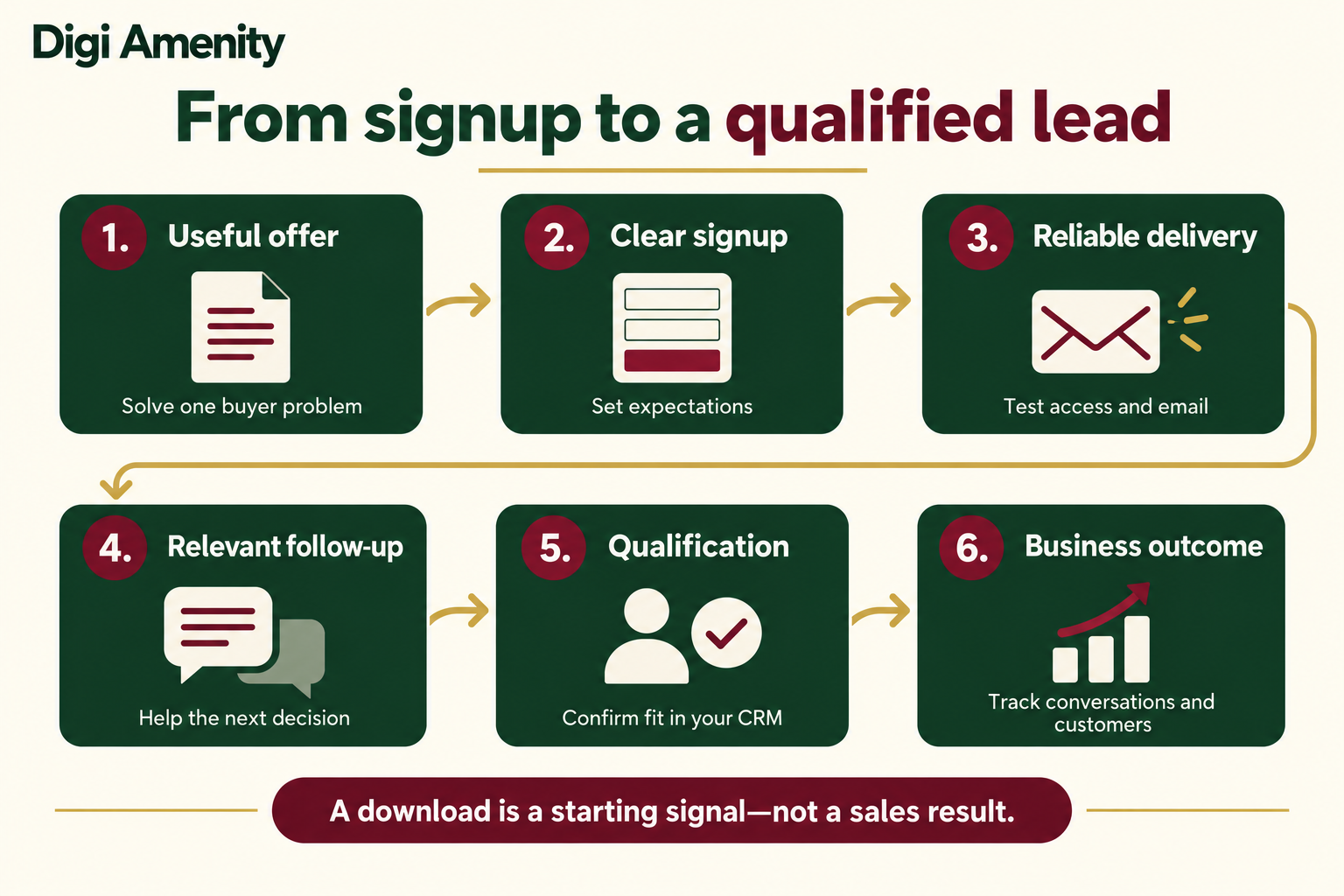
How should you measure a lead magnet’s performance?
Define the reporting unit first. A form event is not necessarily a unique contact, and an email address is not necessarily a new customer. Use deduplicated CRM records for contact-level commercial outcomes, remove tests and obvious spam, and document how returning contacts are treated.
The following are proposed campaign-reporting definitions. Your platform’s built-in metrics may use different denominators.
| Measure | Calculation or evidence | What it tells you |
|---|---|---|
| Session signup rate | Eligible landing-page sessions containing a successful signup ÷ eligible landing-page sessions × 100 | How effectively the page converts measured visits; count each successful session once. |
| Delivery success | Successful resource-access tests and delivery logs; investigate failures | Whether the promised experience works. Email acceptance alone does not prove reading. |
| Qualification rate | Unique qualified contacts ÷ unique valid new contacts in the same cohort × 100 | Whether the offer attracts people who meet your documented criteria. |
| Paid-media cost per contact | Media spend ÷ unique valid new contacts attributed under your reporting rule | Acquisition cost before production, tools and handling costs. |
| Paid-media cost per qualified contact | Same media spend ÷ qualified contacts from that cohort | A more useful comparison when cheap signups have different buyer fit. |
| Customer conversion rate | Unique new customers ÷ unique valid new contacts from the cohort × 100 | Observed downstream conversion within a defined follow-up period. |
Google provides recommended events including generate_lead, qualify_lead and close_convert_lead. They require implementation and the correct business signals; GA4 does not automatically determine whether someone qualifies. See Google’s recommended lead events. Keep the CRM qualification rule and analytics implementation aligned, and test for repeated firing.
Do not send names, email addresses or phone numbers in ordinary Analytics event parameters or page URLs. Google’s Analytics guidance on personally identifiable information explains the restriction. Use non-personal campaign labels and keep contact details in the appropriate customer system.
Why can the cheaper signup be the more expensive lead?
Hypothetical calculation—not a benchmark or experiment result: suppose two campaigns each spend ₹20,000 on media. Offer A attracts 400 valid new contacts, of whom 20 qualify. Offer B attracts 160, of whom 40 qualify under the same rule and equal follow-up window.
| Measure | Offer A | Offer B |
|---|---|---|
| Media spend | ₹20,000 | ₹20,000 |
| Valid new contacts | 400 | 160 |
| Qualified contacts | 20 | 40 |
| Cost per valid contact | ₹50 | ₹125 |
| Qualification rate | 5% | 25% |
| Cost per qualified contact | ₹1,000 | ₹500 |
Offer B has the higher signup cost but the lower qualified-contact cost in this example. That does not prove it will produce more profitable customers. Include production, software and sales-handling costs when assessing total economics, then examine sales conversion, margin and retention where applicable.
Compare mature cohorts over equal observation windows—for example, each contact’s first 30 days—rather than comparing a month-old campaign with one launched yesterday. That window is an illustrative reporting choice, not a recommended sales-cycle length for every business. Different audiences, channels and follow-up quality can confound the comparison. A controlled test can help isolate an offer change; a small number of outcomes does not justify declaring a reliable winner.
Why do lead magnets fail to produce useful enquiries?
- Few relevant visits: investigate distribution and audience intent before redesigning the download.
- Visits but few completed forms: check the promise, preview, mobile usability, unnecessary fields and form errors.
- Signups but poor access: inspect confirmation rules, delivery logs and file permissions.
- Many contacts but little buyer fit: narrow the problem and audience; review whether the incentive attracts people who only want the free item.
- Suitable contacts but few conversations: check routing, response expectations and whether the next step asks for too much commitment.
- Conversations but few sales: investigate scope, pricing, product fit and sales handling. More downloads may not repair these problems.
Change the stage supported by evidence. Rewriting a headline will not fix an email integration that never delivers the worksheet.
What should your lead magnet strategy include before launch?
Copy this campaign worksheet into your planning document. It is an original planning tool, offered openly so your team can use it without another form.
- Audience and trigger: Who needs this, and what decision are they facing now?
- One useful outcome: What can they complete with the resource?
- Format and proof of value: What will the preview show? What is included?
- Qualification rule: What evidence makes a contact suitable, and who checks it?
- Gate and fields: Why is each field needed? What communication is expected?
- Delivery and exceptions: What happens for new, existing, repeated or unconfirmed contacts?
- Follow-up and owner: Who handles replies? What stops obsolete reminders?
- Distribution: Which audience, channel and landing page will be used first?
- Measurement: Define valid contacts, costs, attribution and the observation window.
- Review: Name the owner, review date and decision: keep, improve, replace or retire.
Launch checks: verify the promised asset exists; review facts and calculations; test mobile form submission and errors; open the actual delivered file; check repeat submissions; confirm marketing preferences and opt-out handling; validate analytics against test records; assign reply ownership; confirm campaign links; and set a resource-maintenance date. Mark an untested item as pending rather than assuming it works.
Frequently asked questions about lead magnets
What is the best lead magnet for a small business?
The best candidate solves a specific problem for a likely buyer and fits your delivery capacity. A checklist or template is often a manageable starting format, but a buying guide, product sample or scoped assessment may suit the decision better. Choose using buyer need and follow-up economics, not a universal format ranking.
Does a lead magnet have to be a PDF?
No. It can be an editable document, spreadsheet, calculator, video, webinar, trial or other useful resource. Choose the format that makes the task easier. A calculation belongs in a usable calculator or spreadsheet; turning it into a static PDF can remove much of its value.
How long should a lead magnet be?
Long enough to deliver the promised result, with no filler. A short checklist may be sufficient for a repeatable inspection, while a comparison workbook may need instructions and examples. Evaluate whether a real intended user can complete the task, rather than setting a page-count target.
Should I ask for a phone number?
Ask when a phone conversation is a clear part of the offer and the purpose is explained. Do not require it simply because sales might want it later. You can offer an optional callback or collect further details when someone requests a discussion. Test effects on both completion and suitable enquiries.
How much should creating a lead magnet cost?
There is no single useful price. Scope writing, design, subject review, development, hosting, email integration, promotion and ongoing maintenance. A spreadsheet with formulas or a live assessment has different costs from a simple checklist. Evaluate total effort against qualified opportunities and customer economics.
Can the same lead magnet work for every traffic source?
Sometimes, if the audience problem is the same. A reader researching basics may need education, while someone comparing providers may want a requirements worksheet or direct consultation. Keep the resource promise consistent and report outcomes by source before deciding to scale it everywhere.
What is a good lead magnet conversion rate?
There is no universal number that proves success. Define whether you mean session signup, contact qualification or customer conversion, then compare equivalent audiences, costs and observation windows. A high signup rate can coexist with poor buyer fit; a smaller pool of suitable enquiries can be commercially more useful.
Need help connecting the offer to qualified enquiries?
If your downloads are growing but suitable enquiries are not, Digi Amenity can review the offer, landing-page form, delivery, email follow-up and qualification tracking before you increase promotion spend.
