
To choose a website builder in 2026, start with what your website must accomplish, identify the features you cannot compromise on, and shortlist platforms your team can maintain. Then compare the full cost over two years and test your real customer journey before committing. A store, a lead-generation website and a publication need different capabilities. The platform that creates the most attractive homepage in a demo may not handle your payments, enquiries or content workflow well.
This guide explains how to choose a website builder for an Indian business, with a practical comparison, a cost model and a downloadable evaluation worksheet. Platform details were checked on 14 October 2026. Recommendations below are based on documented capabilities and business requirements; they are not claims that Digi Amenity conducted a hands-on benchmark of every product.
Download the website builder selection checklist (PDF, 3 pages) and use it while evaluating two or three finalists.
What does your website actually need to do?
Write one sentence describing its main job. “Generate qualified enquiries for industrial equipment” gives you a better starting point than “look modern”. The first sentence defines the pages, forms, measurement and follow-up you need.
| Business model | Primary website job | Capability to prove before buying |
|---|---|---|
| Consultant or local service business | Turn relevant visitors into qualified enquiries | Service pages, enquiry routing, reliable notifications and booking if needed |
| Online retailer or D2C brand | Complete and fulfil profitable orders | Catalogue, variants, eligible payments, shipping, refunds and inventory |
| Publisher or content-led business | Publish and maintain a growing resource library | Content types, categories, author workflow, internal links and bulk editing |
| Designer, photographer or portfolio business | Help prospects assess work and make contact | Galleries, image handling, mobile presentation and enquiry capture |
| Membership, marketplace or custom portal | Run an ongoing service with user-specific access | Permissions, billing, data workflows and integration architecture |
Next, separate requirements into must have at launch, needed within 12 months and optional. A required payment gateway is a must-have. An animation style usually is not. If the business depends on complex permissions or custom workflows, compare an application architecture as well as website builders.
Should you choose a hosted builder, WordPress or a custom website?
A hosted builder combines editing and hosting in one service. This reduces the infrastructure work your team handles, but the service controls supported integrations, plan limits and export options. You still own responsibility for content, account access, customer processes and the tools you connect.
Self-hosted WordPress gives you a choice of hosting, themes and plugins. That flexibility creates decisions about updates, backups, security, compatibility and support. You can delegate these to a managed hosting provider or maintenance partner, but write down who does what. “WordPress is free” describes the software, not a complete business website. See the WordPress project’s overview.
WordPress.com and WordPress.org are not interchangeable buying options. WordPress.com is a hosted service with plans. Its current documentation says plugin installation is available on all paid plans; older comparisons that reserve it exclusively for higher tiers may be outdated. Other capabilities and limits still vary. Check the current WordPress.com plan documentation.
Custom development makes sense when an essential workflow cannot be delivered reliably through available products. It also needs a realistic maintenance budget and a technical owner. A custom build does not automatically produce better SEO or a faster website.
AI generation is another way to create or edit a site, rather than a separate answer to all these architectural questions. Ask where the generated site runs, who can maintain it and which parts can be exported.
Which website builders should you shortlist in 2026?
Use this website builder comparison as a starting point. “Consider” means the platform deserves a requirements check, not that it is universally the best choice.
| Platform | Consider it when… | Main trade-off to evaluate | Your acceptance test |
|---|---|---|---|
| WordPress with suitable hosting | You need a substantial content site or adaptable business integrations | Hosting, plugin and maintenance responsibilities must be clear | Have the actual editor publish a page; confirm backup restoration and integration ownership |
| Shopify | Product sales and order operations are central | Plan, app, gateway and transaction costs; checkout flexibility and regional eligibility | Test a representative product, shipping rule, payment and refund workflow |
| Wix | You want a hosted visual builder for a service or small-business site | Plan-specific business features and dependence on Wix hosting | Demonstrate your booking or enquiry workflow, including notification and export |
| Squarespace | You want to evaluate a template-led portfolio or business presentation | Confirm integrations and local commerce needs; content export is selective | Build a representative gallery and enquiry page; inspect the proposed migration route |
| Webflow | A design-capable team wants visual layout control and structured content | Learning effort, Site/Workspace plan requirements and limits of exported functionality | Create a CMS item, hand editing to its future owner and test the export requirements |
| Framer | You are comparing options for a visually distinctive marketing site | Check content operations, integrations and the lack of supported HTML self-hosting export | Edit a real page on mobile and desktop; document how an eventual rebuild would work |
| Hostinger Website Builder | You want to evaluate a hosted drag-and-drop route for a straightforward site | Renewal terms, exact business features and partial content portability | Build the required pages and confirm what content can move to WordPress |
Vendor references for the shortlist include Shopify’s India plan comparison, Wix’s feature overview, Framer’s product overview and Hostinger’s India builder page. Migration details are linked below. Exact support for your workflow must be confirmed on the plan you intend to buy.
If your decision has narrowed to an online store versus a flexible content and commerce setup, use our WordPress vs Shopify comparison for that more specific decision.
Do not treat an older pricing screenshot as current evidence. Webflow, for example, announced changes beginning 13 May 2026, with different transition dates for existing accounts, including a November phase. Review the official plan-change schedule before estimating renewal costs.
What should Indian businesses check before committing?
A global “accept payments” feature does not prove that your business can accept the methods its customers need. Check the complete chain: business eligibility → platform integration → customer payment → confirmed order → settlement → refund and reconciliation.
As checked on 14 October 2026, India is not listed among Shopify Payments’ supported countries. An Indian Shopify store should evaluate eligible third-party providers rather than assume Shopify Payments is available. Paying a platform subscription in INR is a separate issue from accepting customer payments.
- Payment methods: confirm UPI, cards or other methods your audience uses with the gateway and integration you will actually deploy.
- COD and delivery: if required, test postcode rules, shipping charges, order notifications and cancellation handling.
- Refunds and settlement: identify who initiates a refund, what fees remain payable and how transactions reach your accounting records.
- Invoices and tax fields: show a sample invoice to your accountant. Establish which fields are native and which require an app or separate accounting system.
- Subscriptions or overseas buyers: validate recurring-payment support, currencies and merchant eligibility separately from ordinary one-time checkout.
For gateway selection, our payment gateways in India guide explains the broader evaluation. Reconfirm the specific integration and commercial terms before signing up.
For a service website, the equivalent test is enquiry delivery. A WhatsApp button only proves that a visitor can open a conversation. It does not establish that a relevant enquiry arrived, received a response or became a qualified lead.
What makes an SEO-friendly website builder?
Evaluate the controls your site will need, not an “SEO score” shown in a sales presentation. During a trial, ask the provider or implementer to demonstrate these tasks:
- Edit a page title, meta description, URL slug, main heading and image alt text independently.
- Keep important pages accessible for crawling and indexing; manage unwanted duplicate or private pages appropriately.
- Set or inspect canonical URLs and create a redirect when a published URL changes.
- Build crawlable navigation and contextual internal links; locate the XML sitemap.
- Inspect structured data that matches the visible content, and establish how errors can be corrected.
- Verify Search Console and inspect how Google renders important pages.
Google’s SEO Starter Guide explains the underlying principles; no builder can guarantee indexing or rankings. A capable platform still needs useful content, coherent site structure and ongoing care. Once a platform is selected, use the SEO checklist for a new website to plan launch checks.
Will the real mobile page work well?
Preview your content, images, navigation, consent interface and forms together. Check text size, contrast, keyboard navigation, visible form labels and error messages. Avoid judging performance from a nearly empty demo while planning to add several videos, chat widgets and advertising tags later.
Use PageSpeed Insights for diagnostic information and test the customer journey on an actual phone. A laboratory result helps identify problems; it does not represent every visitor’s experience. Ask who will fix layout, accessibility or performance issues that the trial uncovers.
Can you measure enquiries and purchases correctly?
At Digi Amenity, the useful decision framework connects the website to the rest of the marketing process: traffic source, landing page, offer, form or checkout, tracking and follow-up. A platform should support that journey without forcing your team to rely on button clicks as a substitute for business outcomes.
For lead generation, distinguish a click on “Submit” from a successful submission, and a submission from a qualified enquiry. For commerce, distinguish a checkout visit from a confirmed paid order. Verify how your selected integrations handle transaction identifiers, duplicate events, refunds and consent requirements.
Record the implementation path for analytics, advertising tags and CRM integration: native connection, supported app, tag manager or custom work. Confirm plan restrictions and who maintains each connection. Use synthetic test data, and keep personal details out of analytics events. A screenshot showing that a tracking code was installed is not evidence that the right event fires once.
How should you calculate website builder cost in India?
Compare the cost of delivering the same requirements over 24 months. Separate the introductory offer, committed upfront payment and renewal rate. Include the time people spend keeping the website useful.
Two-year operating cost = setup + platform/hosting + domain/email + apps and licences + maintenance and editing + usage or payment charges + applicable taxes.
Budget a possible migration separately as a contingency; do not disguise it as a fee you will certainly pay. For commerce, apply payment-related percentages only to their actual eligible transaction base, using the provider’s terms.
| Hypothetical service website cost | Calculation | 24-month amount |
|---|---|---|
| Setup and content preparation | One-time budget | ₹20,000 |
| Platform subscription | ₹1,200 × 24 | ₹28,800 |
| Domain and business email | ₹3,000 × 2 years | ₹6,000 |
| Required apps | ₹500 × 24 | ₹12,000 |
| Editing and upkeep time | 2 hours × ₹600 × 24 | ₹28,800 |
| Illustrative economic cost | Before tax, payment fees and migration | ₹95,600 |
This is a fictional budgeting example, not a vendor quotation or Digi Amenity price. Of the total, ₹66,800 represents the listed cash expenses and ₹28,800 is an assumed value of staff time. Replace every input with your own evidence. Do not count hosting twice if it is included in the subscription.
Shopify documents that third-party transaction fees can apply in addition to the payment provider’s processing fees, with specific exceptions. That is why an online store must compare more than subscription prices. Check the official fee rules and your proposed gateway agreement.
What happens if you want to leave the platform?
Ask four separate questions: can you move the domain, export the content, retain the design and preserve the working functionality? A “yes” to one does not answer the others.
- Wix: its documentation says a Wix site needs Wix hosting to operate as intended. Content ownership does not mean the complete site can run on another host. Wix hosting guidance.
- Framer: it does not offer supported HTML export for self-hosting. Plan a rebuild if that exit route matters. Framer export guidance.
- Webflow: code export requires a paid Workspace plan; a Site plan alone does not include it. Exported code excludes important hosted functions, including CMS and ecommerce functionality and form processing. Webflow export documentation.
- Squarespace: the XML export covers selected content, not a complete reproduction of the site’s design and functionality. Squarespace export documentation.
- Hostinger Website Builder: its WordPress export excludes items such as layout, store, forms and SEO settings. Hostinger export guidance.
- WordPress.com: the standard content export is not a full backup of themes, plugins and actual media files. Use the appropriate backup or migration process for a complete move. WordPress.com export guidance.
Keep the business in control of domain registration, billing, administrator access and recovery methods. Retain original media and a URL inventory. Before cancelling an old service, confirm content transfer, forms, redirects and analytics on the replacement. Portability is a trade-off you can accept deliberately; it should not be a surprise.
How can you compare finalists without being distracted by features?
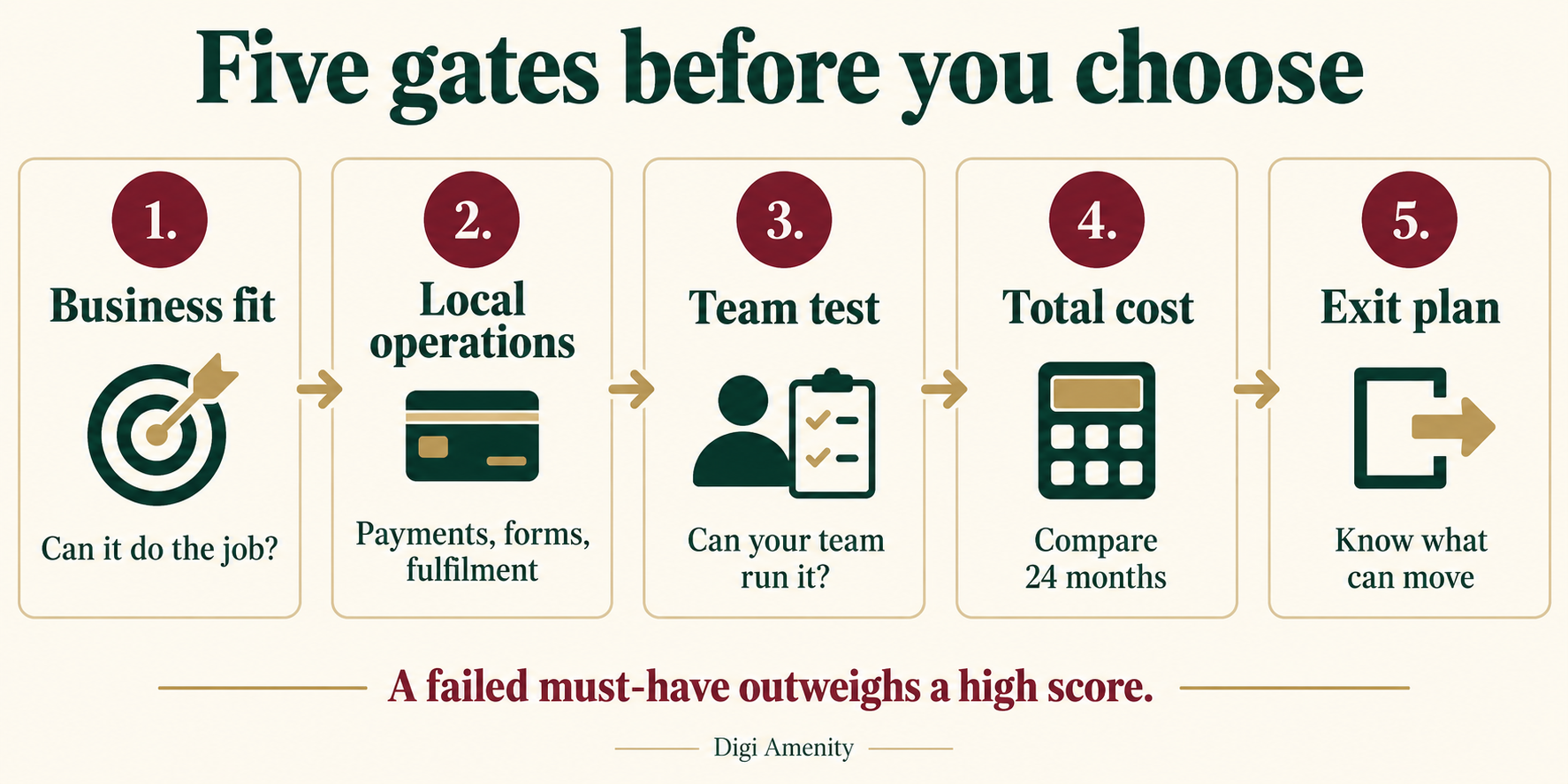
First eliminate any option that fails a must-have. Then score the remaining options against the same evidence. The weights below are a starting point for a small business, not research-derived industry benchmarks.
| Criterion | Weight | Evidence to collect |
|---|---|---|
| Business workflow and local operations | 30 | Demonstrated form, booking or order journey |
| Team usability and maintenance | 20 | Future operator completes routine edits; responsibilities documented |
| SEO, accessibility and mobile experience | 20 | Required controls demonstrated on a realistic page |
| 24-month cost | 15 | Written quote, renewals, add-ons and internal time estimate |
| Integrations, ownership and exit | 15 | Data transfer, access and integration responsibilities confirmed |
Rate each criterion from 1 to 5, where 1 means poor fit and 5 means a strong demonstrated fit. Calculate each contribution as weight × rating ÷ 5, then add the contributions for a score out of 100. Mark unverified items “unknown” and keep the evaluation incomplete. Do not reward a missing demonstration with an assumed score.
The downloadable selection worksheet provides space for evidence, unresolved questions and a decision owner. Adjust the weights before comparing vendors so the scoring reflects your business priorities.
What should you test before buying an annual plan?
Run the same small prototype on your two strongest candidates. Use one representative service or product page, one article and the main conversion path. A first evaluation session can uncover blockers; it is not a substitute for launch testing.
- Give the future operator your content and ask them to change a heading, image and navigation link without a developer completing the task for them.
- Check desktop and mobile layouts, including validation errors and the longest realistic product or service title.
- Send a synthetic enquiry or use a payment sandbox. Confirm the record reaches the intended destination and the notification is received.
- Inspect tracking events and required SEO controls. Document features that depend on a higher plan.
- Request a sample export and a demonstration of recovery from an accidental edit.
- Record setup time, unresolved blockers, recurring work and the final written commercial terms.
Before launch, also assign ownership of renewals, updates, backups, account recovery, forms and content. Confirm what the designer’s handover includes and what ongoing support costs. A site your team cannot operate is an incomplete delivery even when every page looks finished.
How would different Indian businesses make the choice?
Hypothetical example: a Mumbai B2B consultant. The business needs service pages, case-study publishing and enquiries routed to a CRM. It could compare a hosted service-site builder with managed WordPress. The deciding test is whether its marketing executive can maintain content and whether a completed form reaches the right person with the required context.
Hypothetical example: a home-decor D2C brand. Attractive product pages matter, but variants, delivery restrictions, payment eligibility, refunds and fulfilment are essential. Compare Shopify with an appropriately supported WordPress commerce setup using identical sample orders. A cheaper subscription should not win if the required operational workflow remains unproven.
Hypothetical example: a specialist publication. Publishing frequency, taxonomy, author permissions, content export and internal linking carry more weight than homepage animation. Compare a content-focused CMS with a hosted alternative using a realistic article library and the actual editorial team.
These are decision examples, not client stories or tested performance results.
Frequently asked questions
What is the best website builder for small business in India?
There is no single winner. A service business should prioritise enquiry handling and editing ease; a retailer needs reliable order operations and eligible payments. Shortlist platforms against the main workflow, then test the same tasks and compare the full cost.
Is a free website builder enough for a business?
A free plan can help you evaluate the editor or prepare an early prototype. Check custom-domain support, platform branding, forms, storage and integration restrictions before using it for a business launch. The relevant comparison is the least expensive plan that satisfies your actual requirements.
Is WordPress better than a hosted website builder?
WordPress can offer more choice over hosting and extensions, while a hosted builder can reduce infrastructure decisions. The better fit depends on content complexity, integrations and who maintains the site. Compare a complete managed setup with a complete hosted plan, rather than free software with a paid subscription.
Can an AI website builder create the whole website?
It may generate a useful initial design and copy, but you still need to verify facts, services, pricing, accessibility, legal pages and customer workflows. Test the resulting site’s editing, hosting and export arrangements. A plausible-looking page does not prove that payments, forms or tracking work.
Which website builder is best for SEO?
Choose one that supports your required technical controls and lets your team publish useful, well-structured content consistently. Check important pages, redirects and indexability in the trial. No platform, plugin score or AI feature guarantees Google rankings.
Can I move my website to another builder later?
Usually you can move some assets, but the amount of rebuilding varies. Content exports often leave out design, integrations or hosted functions. Ask for an export sample and a migration plan before purchase, and keep control of your domain and original assets.
How much should I budget beyond the monthly subscription?
Allow for setup, content, domain renewal, business email, required apps, maintenance and staff time. Stores also need payment-related and operational costs. Calculate cash expenditure separately from the economic value of internal time so the budget remains useful.
Do I still need a developer or agency if I use a builder?
Not for every routine edit. Specialist support becomes useful when you need custom integrations, migration, complex commerce, tracking or technical quality checks. Buy a clearly scoped outcome and handover, and identify which tasks your own team will manage afterwards.
Need help choosing a platform around your business requirements?
If you are deciding between website builders, Digi Amenity can review your page structure, Indian payment needs, enquiry or checkout journey, tracking requirements and maintenance capacity before recommending a build approach. Explore our website development services to start with the requirements that will shape the decision.
