

Regex for Google Search Console helps you group search queries or page URLs using a text pattern. Use it to compare brand terms, find question-led searches, isolate service topics or review a set of landing pages. Start with a business question, test what your pattern includes and excludes, then inspect the pages behind the numbers. A clever filter is useful only when it leads to a defensible SEO decision.
This guide includes twelve copyable patterns, common errors and a practical audit workflow for Indian businesses. The examples were checked locally against synthetic strings using Google’s RE2 Python wrapper: 63 match tests passed, and three unsupported-syntax examples were correctly rejected. These are syntax tests, not results from a client’s Search Console account.
Documentation and examples checked on 16 October 2026.
What is regex, and what does it change in Search Console?
A regular expression, or regex, describes a text pattern. For example, seo|ads looks for either sequence of letters. A more precise expression can require whole words, an exact phrase, a particular URL path or a minimum number of space-separated tokens.
Think of it as a way to define a reporting group. A regex query filter works on reported search-query text; a Page filter works on reported URLs. Neither edits your website nor improves rankings by itself. It also cannot inspect an HTTP response code, tell you whether a visitor became a customer or reveal the person who typed a query.
Use the ordinary “contains” filter for one straightforward term. Choose regex when a group needs several alternatives or a more specific structure. More complex syntax is not automatically a better analysis.
How do you use regex for Google Search Console?
- Open the correct property and its Search results performance report.
- Select a suitable search type and complete reporting dates.
- Choose Add filter, then Queries or Pages.
- Select Custom (regex).
- Paste the pattern without surrounding quotation marks or JavaScript-style slash delimiters.
- Choose the matching or non-matching option, then apply it.
- Inspect returned rows before exporting or drawing conclusions.
Google documents RE2 syntax, partial matching and case-insensitive matching by default. That default applies to query and URL regex filters. Use anchors for whole-string matching; use (?-i) only when you intentionally need case sensitivity. Different filter dimensions combine with AND. See Google’s advanced-filtering documentation.
Choose the reporting context before writing the expression. Text-query analysis is different from visual discovery; our guide to Search Console multimodal reporting explains the distinction. A missing query dimension is not something a regex can recreate.
Which regex symbols should an SEO practitioner learn first?
| Syntax | Meaning | Practical use |
|---|---|---|
| |
Either alternative | Group several service terms. |
(...) |
Group a pattern | Apply anchors to the whole set of alternatives. |
^ and $ |
Beginning and end | Separate an exact term from a longer phrase. |
\b |
ASCII word boundary | Avoid matching “seo” inside “seoul”. |
\s and \S |
Whitespace and non-whitespace | Count space-separated tokens. |
?, *, + |
Zero or one, zero or more, one or more repetitions | Allow an optional slash or repeated spaces. |
{n,} |
At least n repetitions | Set a minimum token count. |
\. |
A literal dot | Match a domain precisely. |
Consult the official RE2 syntax reference for supported constructs. In particular, lookahead, lookbehind and backreferences are unsupported. The familiar \w and \b shortcuts use ASCII word definitions; do not treat them as universal word handling for Indian scripts.
Which Search Console regex examples are useful in real audits?
Each example below uses Matches regex unless specified otherwise. The shown matches are synthetic examples. Copy the pattern itself, choose the correct dimension and adapt business names or URL paths before use.
1. Group related service queries
Dimension: Query. A theme group gives you a focused starting point for reviewing demand around services you actually sell.
\b(seo|google\s+ads|meta\s+ads)\bMatches: SEO audit; google ads help.
Does not match: seoul travel; advertising guide.
Do not merge unrelated offers simply because the expression can include them. Keep separate groups if their landing pages and buying decisions differ.
2. Compare a small set of exact search terms
Dimension: Query. Anchoring the grouped alternatives restricts the entire query. This is useful when a broad topic group hides the performance of short head terms.
^(seo|google ads)$Matches: seo; GOOGLE ADS.
Does not match: seo audit; learn google ads.
Notice the parentheses: ^seo|google ads$ is not equivalent. That version anchors the alternatives differently and can admit longer strings.
3. Find queries that begin with a question word
Dimension: Query. Use this group to inspect questions that an existing guide or service page might answer more clearly.
^(what|why|how|when|where|who|which|can|does|is|are|should)\bMatches: how to audit seo; Is SEO useful.
Does not match: island holidays; wholesale supplies.
This is a question-prefix heuristic. It misses questions without these opening words and can include phrases that are not genuine questions. Read examples before proposing FAQs.
4. Look for comparison wording
Dimension: Query. Comparison phrases can reveal decisions your content needs to support: platform choice, alternatives, suitability or trade-offs.
\b(vs|versus|compare|comparison|alternatives?)\bMatches: wordpress vs shopify; compare builders.
Does not match: comparisonshopper; reverse proxy.
The presence of “vs” or “compare” does not prove buying readiness. Match the content to the actual comparison and avoid declaring a universal winner.
5. Inspect pricing and hiring language
Dimension: Query. Use these terms to review whether a visitor can understand cost inputs, scope and the next step on the destination page.
\b(price|pricing|cost|quote|hire)\bMatches: website cost in india; hire seo consultant.
Does not match: costume shop; quotation marks.
A pricing word is a clue, not a conversion event. Educational research, competitor research and job-related searches can still appear. Review the rows manually.
6. Create a transparent brand-name group
Dimension: Query. This expression allows a joined name, spaces or hyphens between Digi and Amenity. Replace the brand components for your business.
\bdigi[\s-]*amenity\bMatches: Digi Amenity; digiamenity reviews.
Does not match: digital amenity; digiamenityx.
For a non-brand view, select Does not match regex with the same expression. Add real spelling variants only after observing them; an overbroad brand pattern can hide relevant non-brand queries.
7. Find queries that mention Mumbai
Dimension: Query. Use location wording to examine whether local service information answers the query. Navi Mumbai is included because it contains the separate word Mumbai.
\bmumbai\bMatches: seo mumbai; Navi Mumbai agency.
Does not match: mumbaikar tips; delhi seo.
This does not establish where the searcher lives. Someone outside India can type “Mumbai”. Use the country dimension for country-based reporting; do not label this a Mumbai-user audience.
8. Find queries with six or more tokens
Dimension: Query. The first non-space token plus five or more space-and-token groups means at least six tokens. This avoids relying on ASCII-only word characters.
^\s*\S+(?:\s+\S+){5,}\s*$Matches: how to choose an seo agency; how to choose an seo agency .
Does not match: how to choose seo agency; seo-agency in mumbai.
Tokens are an operational counting rule, not linguistic words. “seo-agency” counts as one token. Longer text does not automatically mean high intent, low competition or an AI-generated search.
For exactly four whitespace-separated tokens, use:
^\s*\S+(?:\s+\S+){3}\s*$9. Group blog and resource folders
Dimension: Page. Use a Page filter to examine defined content sections. Replace example.com and the folders with your actual canonical URL structure.
^https://(?:www\.)?example\.com/(?:blog|resources)/Matches: https://example.com/blog/seo/; https://www.example.com/resources/template/.
Does not match: https://example.com/blogger/; https://other.com/blog/a/.
This pattern requires a slash after the folder. It excludes /blogger/ and the bare /blog URL. A site with articles at the domain root needs a different rule.
10. Compare two exact service-page URLs
Dimension: Page. This Page pattern includes the web-development and email-marketing URLs, with or without a final slash. It deliberately excludes descendants and query strings.
^https://digiamenity\.com/(?:web-development|email-marketing)/?$Matches: https://digiamenity.com/web-development/; https://digiamenity.com/email-marketing.
Does not match: https://digiamenity.com/web-development/pricing/; https://other.com/email-marketing/.
An exact URL set is useful for a stable review cohort. Keep a versioned list when pages are added, removed or redirected so the comparison does not silently change.
11. Require two terms in either order
Dimension: Query. This expression matches SEO followed by Mumbai, or Mumbai followed by SEO. It gives a simple two-term AND-style rule within one query without lookahead.
(\bseo\b.*\bmumbai\b|\bmumbai\b.*\bseo\b)Matches: seo agency in mumbai; Mumbai SEO services.
Does not match: seo in delhi; mumbai web design.
The terms can have other text between them. They do not need to be adjacent. For a large or complex classification system, export locally and document the rules rather than maintaining an unreadable filter.
12. Spot Devanagari characters for manual language review
Dimension: Query. The Unicode script class can surface strings containing Devanagari characters, including mixed-script queries.
\p{Devanagari}Matches: मुंबई seo; वेबसाइट डिझाइन.
Does not match: seo mumbai; café marketing.
Devanagari is a script, not a language label. It is used by Hindi, Marathi and other languages. Have someone who understands the query assess meaning; non-ASCII characters alone do not mean “non-English”.
How do advanced regex filters combine with other reporting controls?
Separate the logic inside the expression from the logic between dimensions. seo|mumbai accepts either term. Recipe 11 requires both terms. A Query pattern plus a Page filter answers a different question: which matching searches produced reported performance for this particular page group?
A useful analysis definition might be: selected service queries, selected service pages, India, mobile and two equal-length complete periods. Write that definition down before comparing numbers. Changing the device or page group halfway through creates a different comparison, even if the regex stays identical.
Should you use regex or Google’s branded-query filter?
They answer related but different questions. A custom brand regex is an explicit list of text rules. Google’s branded-query classification uses AI and can recognise associated terms that do not contain the brand name. It can also misclassify queries. Google’s March 2026 update says the feature is available to eligible sites; availability still depends on the property and sufficient activity. See the official branded-filter announcement and update.
Choose one method for a reporting series, record it and review sample rows. If you switch methods, label the break in the series. A difference between the two groups does not automatically mean either implementation is broken.
Why does a Google Search Console regex return the wrong results?
- The pattern is too broad. A bare service fragment can match part of an unrelated word. Test likely near-misses.
- The anchors do not cover the whole alternative group. Put alternatives inside parentheses when the whole string must match.
- A URL dot is unescaped. A plain dot matches a character; a literal domain dot needs a backslash.
- The quantifier applies to one character.
review*repeats the final “w”; it does not mean any words after “review”. - The tester uses another engine. Success in a JavaScript or PCRE tester does not establish RE2 compatibility.
- The dimension is wrong. A URL expression pasted into a Query filter is unlikely to answer the intended question.
- Another filter removes the data. Check dates, property coverage, country, device and page selection before rewriting a working pattern.
For exclusions, use the report’s non-matching option. A leading minus is not a regex “NOT” operator. Google introduced negative matching in 2021; the original Google announcement provides historical context. Do not copy negative-lookahead recipes such as ^(?!.*brand).*$ into an RE2 filter.
When preparing patterns in code or JSON, a backslash may need escaping in that programming format. The actual Search Console input should contain the regex itself. Copying an encoded string with extra backslashes can change its meaning.
What can filtered data tell you—and what can it miss?
Search Console does not expose every query. Its table has a row limit, some queries are anonymised, and other rows can be truncated. Matching and non-matching totals may therefore fail to sum to the unfiltered chart. Google explains these reporting discrepancies. Label counts as reported query rows, not the total number of keywords for which the business ranks.
Most performance data is assigned to canonical URLs. That matters when a Page pattern targets a duplicate, redirected or alternate URL. Check the reported canonical before diagnosing a zero-result filter. See Google’s dimensions guidance.
CTR is clicks divided by impressions, multiplied by 100. For a grouped calculation, sum clicks and impressions first; do not average each row’s CTR equally. If the denominator is zero, the rate is undefined. Average position describes aggregated exposure, not a fixed rank for every person. Google’s performance overview explains the metrics.
Also keep property and page aggregation consistent, and avoid comparing preliminary data with complete periods. Exports can encode some unavailable values as zero, so preserve the meaning of missing data when building your worksheet. Refer to Google’s data-counting notes.
Regex examines text. A long conversational query cannot prove that AI generated it or that it came from a particular AI experience. Use the relevant official report dimensions where available. Similarly, two pages appearing for a query are a reason to inspect intent and page roles, not automatic proof of harmful cannibalisation.
How would a Mumbai business turn a regex segment into an SEO action?
Hypothetical example—not a Digi Amenity client result: A website-development business serves Mumbai and wants to understand whether its content helps people assessing project cost. Its team starts with a pricing-language group and checks the returned queries for relevance to website projects.
It selects the relevant service page, India and mobile, then compares two complete 28-day periods. Suppose the selected cohort has 2,000 impressions and 40 clicks in the earlier period, then 3,000 impressions and 45 clicks in the later period. CTR falls from 2% to 1.5%, even though clicks rise.
The first action is to inspect the query and position mix. If the later group includes many newly visible, broad research queries, rewriting the title alone may not address the issue. If suitable cost-related queries consistently lead to a page that never explains project scope or cost inputs, a clearer pricing-explanation section is a concrete proposal.
The team also checks mobile enquiries and follow-up. Search clicks do not show whether visitors can understand the offer, complete the form or receive a useful response. A poor lead outcome may involve the page, tracking or sales process as well as search intent.
Our guide to local landing pages for Mumbai businesses explains how to connect genuine coverage and useful service information. Finding a location phrase is not a reason to create dozens of near-identical area pages.
Record the proposed change, owner, implementation date and next complete 28-day review period. Keep the same cohort definition. Note promotions, seasonality and other site changes; a simple before-and-after comparison does not establish causation.
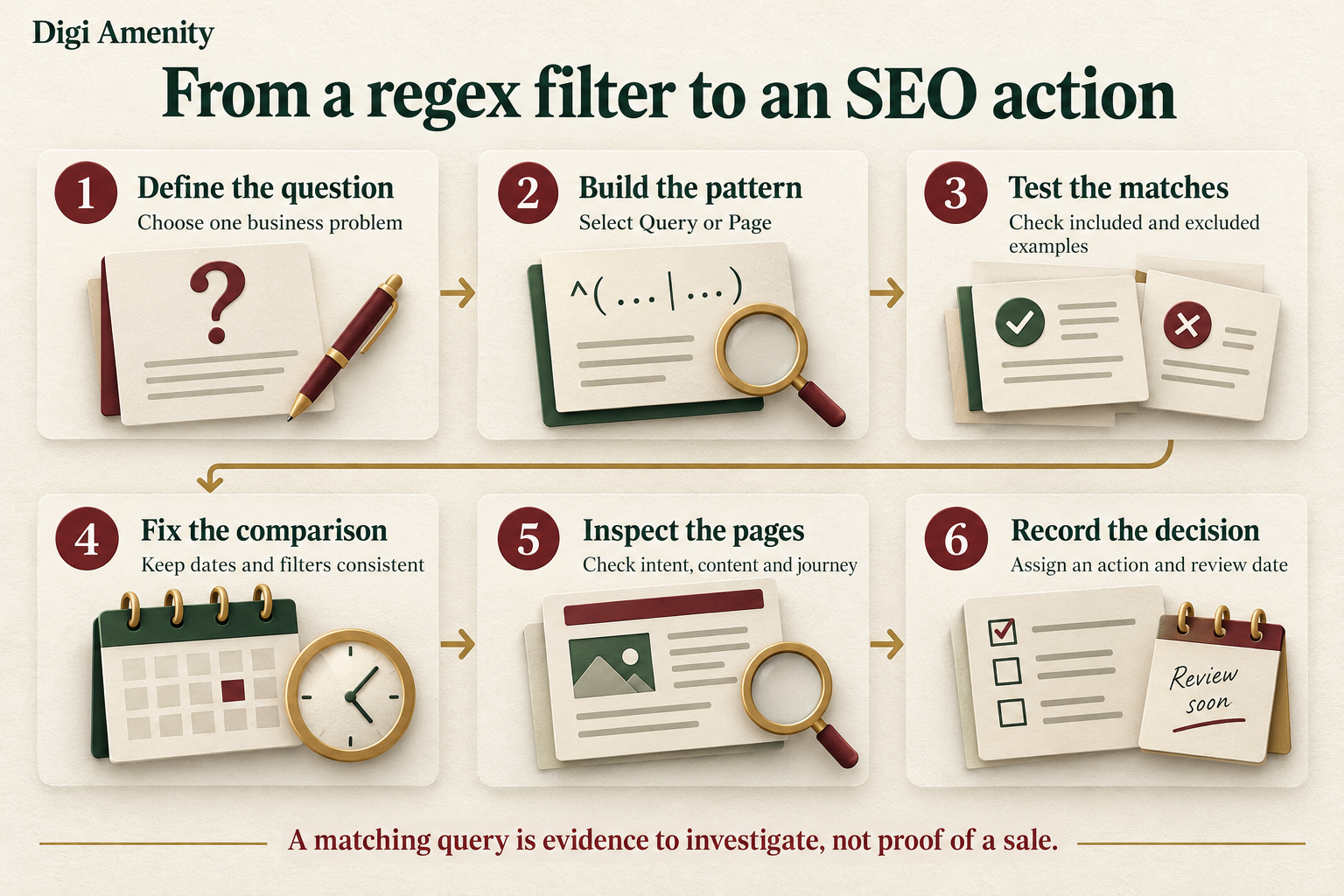
What should go in your reusable regex audit worksheet?
Use one record per business question. This keeps the filter connected to a decision instead of accumulating a folder of exports nobody acts on.
- Question and scope: property, business problem, search type, country and device.
- Pattern definition: exact expression, Query or Page, match mode and version date.
- Test evidence: expected matches, expected exclusions, actual outcomes and known omissions.
- Comparison: complete date ranges, page cohort and data-extraction date.
- Search evidence: clicks, impressions, weighted CTR, average position and reported-row coverage.
- Business evidence: relevant landing-page behaviour and verified enquiries or orders, with attribution limits.
- Decision: keep, improve, expand or investigate; one action, owner and review date.
Before saving the analysis, inspect several included rows and deliberately test near-misses. For brand expressions, check joined names and spelling variants. For page expressions, check dots, folders, trailing slashes and unexpected parameters. Keep private query exports in approved local systems; synthetic examples are usually enough to ask someone for help with syntax.
Frequently asked questions
Do I need coding experience to use regex in Search Console?
No. Start with one narrow task and a short pattern. The important skill is stating which strings should match and testing whether that happens. Avoid adopting a long expression you cannot explain or maintain.
Are query and Page regex filters case-sensitive?
They are case-insensitive by default. If a case-specific check is intentional, (?-i)^SEO$ matches uppercase SEO and excludes lowercase seo. Document that override so another analyst does not mistake it for normal behaviour.
How do I exclude brand searches?
Use a tested brand expression and select the non-matching option. Inspect the excluded and retained samples. A misspelling absent from your pattern may remain in the non-brand group, so the label describes your rule rather than perfect knowledge of every branded search.
Can regex identify high-intent or AI-generated searches?
It can identify wording you choose, such as pricing terms or longer phrases. It cannot establish motivation or provenance from those features alone. Validate meaning with query and page review; measure commercial outcomes separately.
Can I use lookahead to include one word and exclude another?
RE2 does not support lookahead. Use the report’s match mode for a straightforward exclusion. For a more complex include-and-exclude classification on the same query, process an approved export locally and document the rule instead of presenting an incompatible expression as a solution.
Why does my regex tester match but Search Console shows nothing?
First confirm the tester uses RE2 and equivalent matching options. Then check the selected dimension, actual reported strings, property, dates and other filters. A correct expression can still return no rows when the selected report has no corresponding data.
Will these filters improve rankings automatically?
No. Their value is helping you choose a useful investigation or change. Prioritise the page’s relevance, content, usability and measurable business journey; save the baseline so you can review the result without assuming the filter itself caused it.
If your Search Console reports contain plenty of queries but no clear priorities, Digi Amenity can review query groups, landing-page fit and conversion measurement through a focused SEO audit before you invest in more pages.
