
Ecommerce category page SEO means making a product group easy to discover, understand and shop. Start with a category that matches buying intent, give it a clear title and useful product selection, connect it through crawlable links, and control filter URLs deliberately. Then check whether visitors reach suitable products and complete purchases. Adding a long description beneath an unhelpful grid will not solve the whole problem.
For an Indian store, product discovery also depends on practical details: size, material, availability, delivery coverage and accurate charges. Digi Amenity’s approach is to review search visibility and the shopping journey together, so more visits do not simply lead to the same unanswered questions.
What should a category page help the shopper do?
A category page groups products around a recognisable need, such as cotton bedsheets or office chairs. Some categories are navigation hubs that lead to smaller groups; others show a product listing directly. A small catalogue may need only the listing, while a broad catalogue can benefit from a hub that helps shoppers choose a direction.
The page should match the task behind the query. Someone searching for “cotton bedsheets” is usually comparing a selection. Someone searching for a specific bedsheet model needs an individual product page. A person asking how to measure a mattress may need a buying guide linked from both.
Use current search results, your Search Console queries and real customer questions to check that distinction. Do not create several nearly identical categories merely because keyword tools show different wording.
When should a filter become a permanent category?
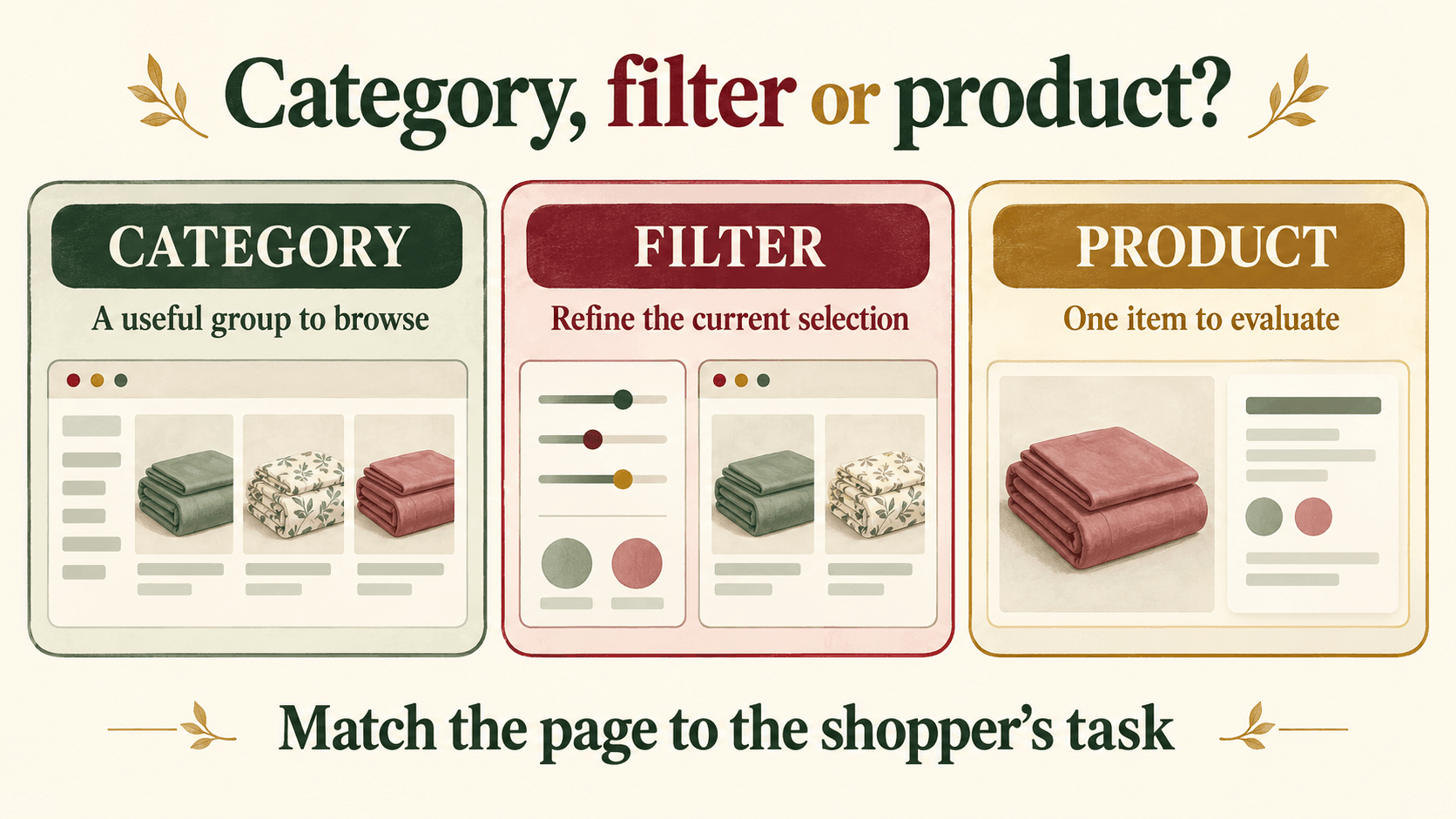
Category page optimization starts before the copy is written. A filter makes the current selection easier to browse; a permanent category needs a useful reason to exist independently.
- Check the intent: Does the phrase describe a group shoppers actually want, rather than a temporary sorting preference?
- Check the inventory: Can the store maintain a meaningful selection? There is no universal minimum product count; one near-empty group is rarely a helpful browsing destination.
- Check the difference: Would this page answer different selection questions from its parent or sibling categories?
- Check ownership: Who will maintain its products, links and claims when stock or policies change?
Hypothetical example: A home-linen store might create a cotton-bedsheet category and, if demand and inventory support it, a king-size cotton-bedsheet subcategory. “Price: low to high” remains a browsing control. A combination of one colour, one size and a temporary discount does not automatically deserve a separate search landing page.
What does a useful ecommerce category page SEO brief include?
Give the writer, merchandiser and developer one shared brief. This prevents a well-written heading from sitting above the wrong products.
Hypothetical brief: Cotton Bedsheets
- Shopper task: Compare cotton bedsheets by dimensions, fit, design and price.
- H1: Cotton Bedsheets.
- Example SEO title: Cotton Bedsheets: Compare Sizes & Designs | [Store].
- Example opening: Browse cotton bedsheets by size and design. Check the dimensions and whether each set includes pillow covers before choosing.
- Product cards: Clear photograph, descriptive name, current price, size or variant information and availability.
- Useful refinements: Size, fitted versus flat, colour and price, where the catalogue supports them.
- Supporting help: A size guide, washing guidance based on actual product instructions, and links to delivery and returns information.
The example is a planning template, not a client case study. Replace every attribute with verified catalogue information. Do not label a mixed-fibre product “100% cotton”, promise next-day delivery or advertise cash on delivery unless those claims are accurate for the relevant products and locations.
Keep the opening short enough that visitors can reach the selection easily. Add further explanation where it resolves a buying question: fitted-sheet depth, set contents or a meaningful material difference. There is no useful universal word-count target for ecommerce category descriptions.
Write a specific meta description rather than repeating the title. For this example: “Compare cotton bedsheets by size and design. Check set contents, care instructions and delivery details before choosing.” Add only benefits the store actually delivers.
What should you check on a phone?
Open the category on a real phone and complete a shopping task. Can you compare two products without losing the price or essential size information? Can you close the filter panel, remove a selected filter and return from a product page without losing your place?
Check that long product names wrap, sale and regular prices remain readable, and banners do not push the first useful products far down the screen. Use appropriately sized images and avoid a layout shift that moves the product just as someone taps it. Choose a grid density based on readability and product detail, not a fixed number of products per row.
Make delivery information accessible before checkout. If coverage or payment options depend on the pincode, say where the customer can check them. Avoid a site-wide “free delivery” message when exceptions apply.
The next page must fulfil the expectation set by the listing. Use the same product identity and accurate variant information across both. Our Shopify product page optimization guide covers the detail-page part of that journey.
How should categories, filters and pagination work for search?
Connect the catalogue with links Google can follow
Link relevant categories from navigation, then connect subcategories and products with ordinary links. A product should not be discoverable only through the store’s search box. Google’s ecommerce structure guidance recommends links through the category hierarchy to products.
Use descriptive category names and breadcrumbs that help people navigate. Keep useful established URLs stable; changing a working URL simply to insert another keyword creates migration work that may not be justified.
Give each crawl or indexing control a specific job
Faceted navigation SEO requires a decision about which combinations deserve search visibility. Unrestricted filter combinations can generate large numbers of low-value URLs. Review the actual URLs your platform creates before applying a site-wide rule. Google explains the options in its faceted-navigation guidance.
- Robots.txt: Controls crawling. It is not a guaranteed way to remove an already known URL from search.
- Noindex: Tells Google not to index the page when Google can crawl and read the instruction. Blocking that same page in robots.txt can prevent Google from seeing it.
- Canonical: Signals a preferred version when pages are duplicates or closely equivalent. It is not a universal substitute for either control.
For example, an unwanted sorting URL and a valuable king-size collection should not receive the same treatment simply because both contain parameters. If an unwanted page is already indexed, confirm the removal approach and crawler access before changing its rules. See Google’s noindex documentation.
Keep later products discoverable
“Load more” can work for shoppers, but Google generally does not click buttons to reveal additional products. Provide crawlable links to separately addressable pages. Each page in a paginated sequence should have its own URL and canonical, rather than every page pointing canonically to page one. Google no longer uses rel=next and rel=prev to identify these relationships. Follow its pagination guidance.
Test a product that appears beyond the first screen or page. Check the route to it, not just whether the first grid looks correct. In Shopify collection SEO or WooCommerce category work, inspect the rendered theme and installed apps rather than assuming the platform name guarantees the implementation.
Do not promise category-page stars from Product markup
Visible, authentic product ratings can help shoppers compare. That does not mean a category-wide rating should be invented or that Product markup will earn stars for the category. Google’s Product snippet guidance focuses on pages about a single product or its variants, rather than category lists. Match structured data to the actual page and validate any eligible implementation.
How do you measure whether the changes helped?
Begin with one important category and record the changes, date, stock availability and promotion context. Avoid changing the entire catalogue and every marketing campaign at the same time if you want a useful comparison.
Use Search Console with the exact category URL to review impressions, clicks, CTR and query relevance. Compare equal-length complete periods with the same filters. Separate seasonal demand and stock changes from your page edits; a before-and-after difference alone does not establish causation.
For the shopping journey, validate GA4 ecommerce events before interpreting them. Google documents view_item_list for displayed product lists and select_item for a product selected from a list. Consistent list identifiers help distinguish category browsing from recommendations. See the GA4 ecommerce measurement guide.
Then investigate the stage where visitors struggle:
- Relevant search impressions, few clicks: Review the query fit, title, description and actual search appearance.
- Category visits, few product selections: Inspect the assortment, filters, prices and product-card clarity; also check event implementation.
- Product views, few additions to cart: Investigate product information, offer and availability.
- Checkout starts, few purchases: Check delivery, charges and payment usability. The abandoned checkout recovery guide explains why reminders should follow diagnosis.
Use consistent session or event definitions rather than dividing unrelated report totals. For a low-traffic category, combine the limited data with reproducible usability findings and allow a longer observation window. Do not declare success from one sale or a single ranking check.
What should you fix first?
Start with a category that already matters to the business. Confirm it can be crawled and that its product links work. Correct misleading product or fulfilment details next. Then improve its query focus, title, opening and browsing controls. Have a developer review filter and pagination behaviour on a test environment before rolling out rules across the catalogue.
If shoppers reach your categories but struggle to choose or buy, Digi Amenity can review the category structure, product cards, tracking and checkout journey together through our ecommerce website development services, then prioritise a focused set of improvements.
Frequently asked questions
How is category page SEO different from product page SEO?
A category helps shoppers compare a group, while a product page answers questions about one item or its variants. Map the query to that task, then use links between the pages. Reusing the same description across both usually misses the different information each visitor needs.
How much text should an ecommerce category page contain?
Enough to identify the selection and answer meaningful buying questions without burying the products. Start with a concise opening, then add supporting help where needed. A simple category and a technically complex one should not be forced into the same word count.
Should every product filter be indexed?
No. A combination needs distinct buying intent, a useful selection and ongoing maintenance to justify a search landing page. Keep other filters useful for browsing and choose crawl or indexing controls according to their purpose and existing index status.
Can a Shopify collection act as a category page?
Yes. A collection can present a relevant product group. Its usefulness still depends on the selection, descriptive content, navigation and theme behaviour. Review the generated URLs, filters and later-page product links rather than relying on a default setup without checking it.
Is infinite scroll bad for category page SEO?
It is not automatically unsuitable. The important question is whether products beyond the initial view are accessible through crawlable URLs and links. Also test whether shoppers can navigate back, keep their place and reach useful controls on mobile.
What should happen when a category runs out of stock?
Distinguish a temporary stock gap from a permanently retired category. For a returning range, explain availability honestly and offer genuinely relevant alternatives. For a permanent change, review demand, links and replacement relevance before deciding whether to retire or redirect the URL. Avoid sending every discontinued category to the homepage.
How long does category page optimization take to show results?
There is no reliable fixed deadline. Crawling, demand, competition, stock and the size of the change all matter. Record a baseline, verify implementation and review complete comparable periods. Treat early movements as observations, not guaranteed proof of improvement.
