

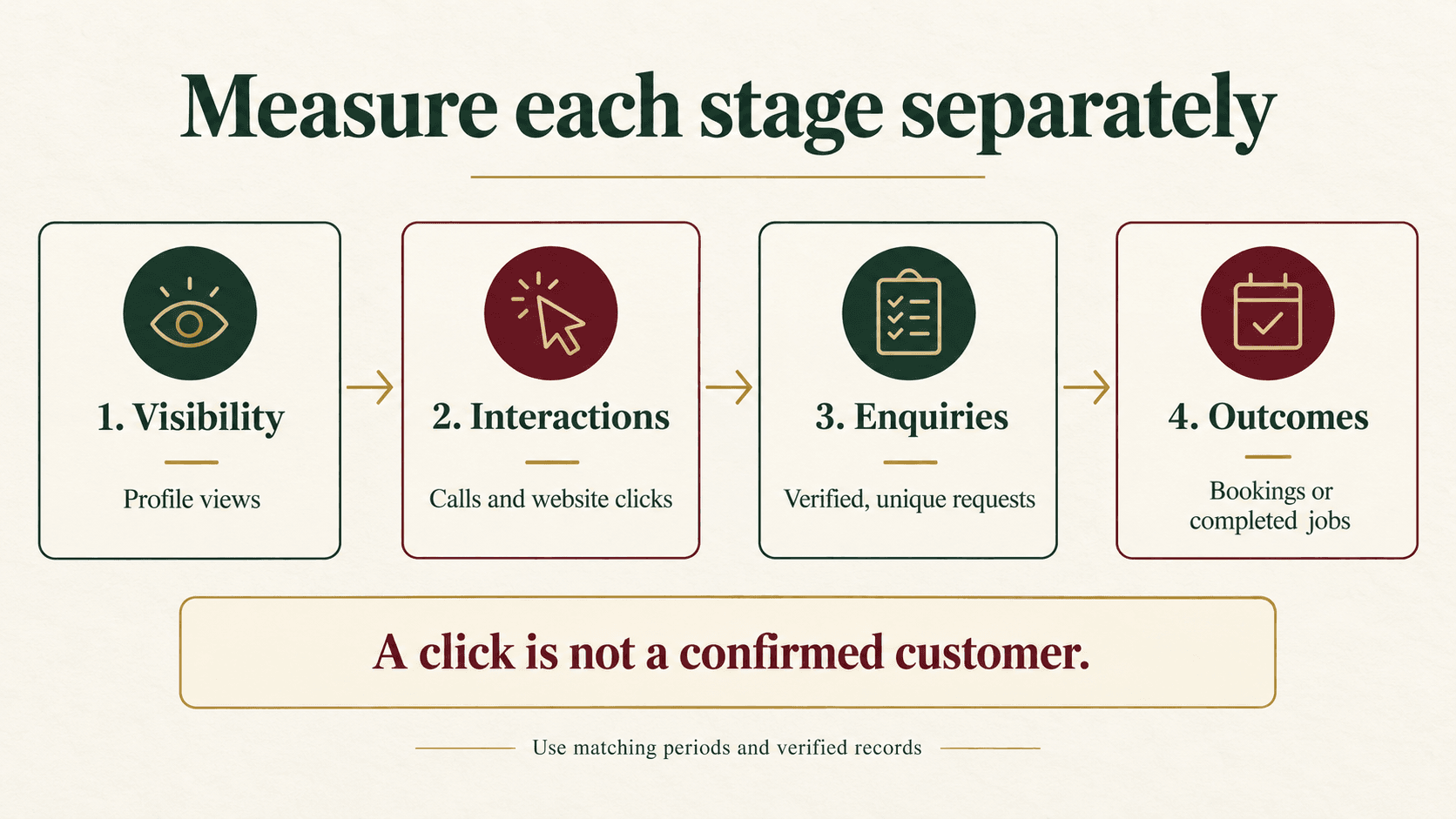
Google Business Profile performance is most useful when you separate visibility, profile interactions, verified enquiries and business outcomes. Review comparable periods, check what each metric actually counts, then investigate where potential customers stop progressing. More profile activity does not, by itself, prove that your Mumbai business is receiving more suitable work.
For a local service company, the useful question is whether people within its service coverage become qualified enquiries and completed jobs. For a shop, it may be whether enquiries lead to appointments or purchases. This guide gives you a practical reporting method, a monthly checklist and a hypothetical example you can adapt without treating clicks as customers.
Platform documentation checked on 11 October 2026. Available reports and metrics can differ by profile, business type and account.
Where do you find Google Business Profile performance?
Sign in with the account that manages your verified profile. In Google Search, open the profile and select Performance, choose a period and apply it. In the Google Maps app, open Business, then the performance section and select your dates. For bulk exports on a computer, Google documents selecting profiles in Business Profile Manager and using Actions → Insights to download a report.
Save the original export with its reporting period and extraction date. Google says the report can include both organic activity and Google Ads activity. Do not label its total “organic leads.” Search-query reporting is updated monthly and can take up to five days to appear at the start of the next month. See Google’s Business Profile performance guidance.
Keep one report per real business location. Record the profile name and identifier, not just a loosely written neighbourhood name. If you cannot access the correct profile, resolve the account or permission issue before interpreting an empty screen as poor performance.
Which Google Business Profile metrics should you monitor?
Use a small set of measurements with an explicit meaning. A dashboard becomes misleading when the same word—particularly “lead” or “conversion”—means different things to the owner, agency and person answering the phone.
Swipe the table sideways on mobile to see all columns.
| Measurement | What to record | What it does not prove |
|---|---|---|
| Profile visibility | Profile views, retaining the available Search/Maps and device breakdowns | Unique people across an entire month, enquiries or sales |
| Calls | Clicks on the profile’s call button | Answered calls, unique callers or qualified enquiries |
| Website clicks | Clicks on the profile’s website link | A matching number of recorded website sessions or form submissions |
| Directions | Requests for directions | Confirmed store visits or purchases |
| Bookings | The booking metric supported by the profile and its provider setup | Every appointment your staff records in another system |
| Search queries | The reported searches associated with profile discovery | Complete market search volume or a local ranking report |
Google’s daily metric definitions distinguish impressions by Search/Maps and device, define call and website clicks, and describe provider-based booking metrics. Their daily counting rules mean you should not add daily visibility figures and rename the result “unique monthly customers.” The API reference also marks some older metrics as deprecated; avoid building a new dashboard around an old tutorial’s field list.
Do not force every metric into every report. Directions may help a showroom investigate visit intent but be less useful for a service business that travels to customers. Report the actions relevant to the actual buying journey.
How do you connect profile activity with GA4?
Use the Business Profile link for aggregated reporting
Google documents a direct link under GA4 Admin → Product links → Google Business Profile links → Link. Select the appropriate profiles, review the data-sharing information and confirm. The person creating the link needs Editor or Administrator access in Analytics and Owner or Manager access to the profiles. Follow Google’s profile-linking instructions and check that the option is available in your account.
The linked reporting collection contains aggregated Business Profile metrics. Google’s current documentation limits these metrics to the last six months. With multiple linked profiles, the figures are combined: you cannot filter them down to one profile or use them in custom explorations, comparisons or filters. Subproperties are unsupported. These are documented limitations, not evidence that your Mumbai branch generated the combined result. See the GA4 integration requirements and limitations.
A chain with several locations should therefore retain its location-level exports. Central reporting can help the owner see overall activity while branch reports identify which team needs attention.
Use consistent campaign labels for the website journey
A tagged website link answers a different question: how does traffic from this link behave after reaching the site? For example, a fictional single-location business could use:
https://example.com/services/?utm_source=google&utm_medium=organic&utm_campaign=gbp_mumbaiThis is an example naming convention, not a Google requirement or a claim that every visit from a profile is organic. Agree how profile links, advertising links and existing campaign conventions should be distinguished before changing anything. Use a destination that explains the relevant service, location coverage and next step.
Google’s campaign URL documentation explains source, medium and campaign parameters and their case-sensitive values. Review the corresponding session dimensions in Traffic acquisition. Our UTM tracking guide for Mumbai businesses provides a naming and testing process.
Test the complete journey on a phone: final link, redirects, page, form and successful receipt of a test enquiry. Mark the test record so it is excluded later. Different counting rules, consent choices, collection problems and repeat visits can produce differences between profile clicks and Analytics sessions. Investigate those differences; do not make the two reports agree by changing their labels.
What counts as a qualified local enquiry?
Write the definition before you assess the marketing. A qualified enquiry should represent a real request that the business can potentially fulfil. For an appliance repair company, that might require a supported appliance, an address inside its genuine service coverage and a customer seeking a repair rather than a job application or supplier enquiry.
Use a restricted enquiry register with a unique enquiry reference, received date, reported or tracked source, service requested, serviceability, first response, appointment status and outcome. Keep customer contact information in the appropriate protected system rather than a widely shared marketing worksheet.
Agree how repeated contacts are handled. If one customer calls twice about the same repair, that may be one enquiry with two contact attempts. Two separate repair requests might be two enquiries. Apply the chosen rule consistently and record changes to it.
Also distinguish a form-button click from successful delivery of a form submission. A key event called “generate_lead” is only as useful as its trigger. Confirm that the expected success action produces one valid record and that failed submissions, repeated page loads and internal tests do not inflate the result.
When the source is unknown, retain “unknown.” A receptionist’s answer to “How did you find us?” is useful self-reported evidence, but it is not the same as a verified click-to-customer match.
How should you build a monthly reporting worksheet?
Start with four sections rather than one blended “performance score.” The following worksheet is an original planning template; it does not contain client results.
| Layer | Evidence to record | Decision it supports |
|---|---|---|
| 1. Visibility | Profile views and reported discovery queries, with date range and source | Is the business being discovered for relevant needs? |
| 2. Interactions | Call clicks, website clicks and relevant direction or booking activity | Are people taking an appropriate next step? |
| 3. Verified enquiries | Deduplicated requests, source confidence, qualified and unqualified reasons | Does the enquiry mix match the service and coverage? |
| 4. Outcomes | Appointments, completed work, cancellations and verified revenue where available | Does the response and delivery process turn suitable demand into business? |
For every row, add the current period, comparison period, extraction date, metric definition, business location, data source and owner. Include a short explanation of changes to opening hours, offers, campaigns, service coverage or tracking. Save the raw export alongside the commentary so someone else can reproduce the conclusion.
The final part of the worksheet should contain one specific action, the evidence supporting it, who will do it, its due date and the next measurement date. “Improve local SEO” is not an action. “Check the landing page’s coverage wording against the out-of-area enquiry reasons, then propose a correction” is.
Which calculations are useful—and which are misleading?
Calculate rates only when the numerator and denominator describe the same defined set of records. The following are business reporting formulas, not native Google Business Profile metrics:
- Qualification rate: qualified unique enquiries ÷ all unique enquiries reviewed × 100.
- Booking rate among qualified enquiries: enquiries with a booked appointment ÷ qualified enquiries × 100.
- Completion rate among booked enquiries: enquiries with completed work ÷ enquiries with a booked appointment × 100.
Specify whether you are following an enquiry cohort—for example, requests received in September—or counting events that happened during September. A job completed this month from an older enquiry belongs in a monthly operations total, but should not silently be added to the outcome of this month’s enquiry cohort.
Leave a rate blank when its denominator is zero or unavailable, with the reason beside it. Show the underlying counts, especially with small samples. Do not call “qualified enquiries divided by call-button clicks” a verified click-to-lead conversion rate: those datasets have different identities, duplication and coverage.
What would a Mumbai service-business example look like?
Hypothetical example—not a Digi Amenity client result. An appliance repair business reviews one cohort of 12 unique enquiries received during a month. Staff record how each customer says they found the business, but cannot verify every customer’s exact Google journey.
Eight enquiries meet the agreed service and coverage requirements. Six of those eight book an appointment. By the agreed follow-up date, four of those six have completed work, one has cancelled and one remains pending.
- Qualification: 8 ÷ 12 = 66.7%.
- Booking among qualified enquiries: 6 ÷ 8 = 75%.
- Completion among booked enquiries at the follow-up date: 4 ÷ 6 = 66.7%, with one appointment still pending.
These numbers describe the enquiry register, not Google-attributed revenue or an expected industry benchmark. The pending job could change the final cohort result.
The owner examines the four unqualified requests and finds three were outside the actual service area. The first proposal is to make service coverage clearer on the relevant page and during initial qualification. The team also checks why two suitable enquiries did not book. Buying more traffic would not answer either question.
How do you compare periods without drawing the wrong conclusion?
For a regular operational review, two complete 28-day periods provide the same number of each weekday. That is a practical comparison choice, not a Google reporting requirement. Monthly discovery-query data should be evaluated on its own completed monthly periods rather than forced into a daily comparison.
Keep profile selection, definitions and filters consistent. Note public holidays, seasonal demand, temporary closures, staffing changes and paid campaigns. A week when the phone was unattended cannot be interpreted in the same way as a week with normal response coverage.
Compare counts and rate changes together. Moving from one to two completed jobs is a large percentage change with very little evidence. Where seasonality matters and comparable historical records exist, add the same period from the previous year. Do not invent a year-on-year baseline for a new profile.
Use a simple change log: date, change, intended effect, affected location and person responsible. If profile details, offers, website forms and ad budgets all change simultaneously, you may observe improvement without knowing which change caused it.
What should you investigate when performance changes?
| Observed pattern | First investigation | Practical next step |
|---|---|---|
| Views rise; relevant interactions do not | Discovery queries, business fit and profile-to-offer consistency | Review whether customers can understand the service and next step |
| Call clicks rise; recorded enquiries stay flat | Call handling, missed calls, repeat contacts and source recording | Audit a sample of contact records before assuming poor lead quality |
| Website clicks rise; successful forms do not | Mobile landing page, form failures, consent and measurement | Test the exact journey and fix confirmed defects |
| Enquiries rise; qualification falls | Unsupported requests, coverage mismatch and unclear offers | Propose clearer service and qualification information |
| Qualified enquiries rise; bookings remain weak | Response time, availability, pricing objections and follow-up | Assign ownership to unresolved suitable enquiries |
These are diagnostic starting points, not proof of a cause. Review real records before recommending a change. If the profile’s information itself needs checking, use our Google Business Profile audit checklist.
Google describes local ranking in terms of relevance, distance and prominence. There is no reporting formula that removes the distance factor or guarantees a higher position. Keep information accurate and useful rather than adding unrelated services or places to chase a metric. See Google’s local ranking guidance.
What belongs in your monthly Google Business Profile reporting checklist?
- Confirm the correct verified profile and reporting owner.
- Select complete, comparable periods and preserve the original export.
- Record metric definitions and distinguish profile activity from website and enquiry data.
- Note paid campaigns, opening-hour changes, closures and tracking changes.
- Review whether reported discovery queries match real services.
- Test the website link and mobile enquiry journey.
- Check the enquiry definition, duplicate rules and test exclusions.
- Review unqualified reasons and unresolved suitable enquiries.
- Calculate cohort rates only from matching records; show counts and pending outcomes.
- Keep unknown or unavailable data distinct from a confirmed zero.
- Choose one evidence-backed action, owner and completion date.
- Set the follow-up period before changing the next part of the journey.
For local SEO reporting in Mumbai, the objective is a decision the business can act on: fix a broken form, clarify service coverage, answer suitable enquiries or investigate a change in discovery. A longer dashboard is useful only when it improves that decision.
Frequently asked questions
Are Google Business Profile insights and Performance the same thing?
Older tutorials often call the reporting area “Insights,” while current profile reporting uses “Performance.” Check the present interface and documentation rather than assuming every historical metric remains available. Preserve the definitions used in each export before comparing old and new reports.
Does a call in the report mean someone spoke to my business?
No. The metric records a click on the call button. Use your own contact records to establish whether a conversation occurred, whether the request was genuine and whether the business could fulfil it. Do not rename the metric “qualified calls.”
Why are profile website clicks different from GA4 sessions?
They measure different stages of the journey. A click does not ensure a page and Analytics collection complete successfully, and a website’s session rules are not the profile’s click rules. Check dates, redirects, consent, tagging and report dimensions before diagnosing lost traffic.
Can I use the GA4 link to compare my Mumbai branches?
The documented integration aggregates linked profiles and does not provide individual-profile filtering. Keep location-specific profile exports for branch comparisons. Review the current integration documentation before designing a report that depends on unavailable segmentation.
What is a good Google Business Profile conversion rate?
First define the conversion and denominator. A booking rate among verified qualified enquiries is different from a ratio of interactions to views. Use consistent historical records and service economics to set a useful target; a universal percentage can hide a mismatch in definitions.
How often should a small business review the report?
A monthly reporting review with a short weekly check of missed or unresolved enquiries is a workable starting routine. Increase operational checks during a campaign or after a tracking change. Avoid repeatedly rewriting the profile in response to a few days of fluctuating numbers.
Will improving these metrics guarantee better local rankings?
No. The report describes activity, while local visibility depends on several factors. Better enquiry handling can improve business outcomes without changing rankings. Judge each proposed action against its intended result instead of promising that every improvement will move the profile upward.
Need help connecting local visibility with real enquiries?
If your profile is generating activity but few suitable enquiries, Digi Amenity can review the profile, landing page, tracking and follow-up process together. Our SEO services in Mumbai can help identify what needs investigation before you invest in more traffic.
