
A Google Business Profile audit checks whether customers can find the right business, understand its services and successfully contact it. Start with eligibility, ownership and accurate details. Then check categories, reviews, photos and the website journey. Finish with a prioritised action list and a baseline for genuine enquiries. A high score from an audit tool does not guarantee a higher Maps position.
For a Mumbai business, that means checking practical details: whether customers can visit the listed address, which areas your team actually serves, and whether a mobile visitor can book without confusion. A complete-looking listing can still send someone to an old number or an unusable form.
What should a Google Business Profile audit include?
Use four questions to keep the audit useful: Are the facts correct? Can the customer take action? Is there credible evidence to trust the business? Can you measure the outcome? These questions connect local visibility with website experience and follow-up, which is how Digi Amenity approaches the customer journey.
You can complete the manual checks below using your public profile, authorised owner access, a phone and a simple document. A Google Business Profile audit tool can speed up field checks and competitor comparisons. It cannot establish whether your staff answered a call, whether an enquiry was relevant, or whether every recommendation fits your business.
Create one record for each finding. This reusable worksheet avoids a long list of suggestions with no accountable next step.
Profile/location:
Check and date:
Observed issue:
Evidence or screenshot:
Customer or policy impact:
Recommended correction:
Owner and due date:
Validation after correction:
Next review date:
Keep screenshots containing customer or account information in a private location. Do not put passwords, personal contact records or access tokens in a shared audit sheet.
Is the profile eligible, owned and attached to the right location?
Before editing, confirm that an authorised business representative controls the profile. Check the public listing against the owner view, including verification notices and pending changes. Record the profile URL and location so another team member cannot accidentally work on a similarly named business.
Check the real-world business name, an accurate address and the fewest categories needed to describe the core business. Adding service keywords or “best in Mumbai” to a name simply to chase rankings can create policy problems. Review suspected duplicates before making another profile. Google’s business representation guidelines explain the rules and exceptions, including businesses with multiple locations or practitioners.
Next, establish the business model:
- Storefront: customers visit the business at its eligible physical location.
- Service-area business: the business visits or delivers directly to customers and does not serve them at its address.
- Hybrid: customers can visit the location and the business also visits or delivers to them.
If customers are not served at your address, Google says to remove that address from the public profile and use a service area. Enter places you genuinely serve, not a wishlist of every locality. Check the service-area guidance against your setup.
Mumbai example: a home-visit repair business based in Andheri should check actual travel and appointment capacity before advertising coverage across the whole metropolitan region. A larger service-area list is not evidence that the business will appear prominently everywhere. This is an operational example, not a claim about a real client.
Do the public details match what customers experience?
Read the listing as if you were booking for the first time. Compare the business name, address where applicable, phone and website with the business’s own website and important directories. Focus on discrepancies that mislead people, such as an old branch address or disconnected number.
Test the phone link from a mobile device and confirm it reaches the right business. Check regular customer-facing hours where applicable, holiday exceptions and appointment requirements. Do not mark a business open 24 hours simply because a website form accepts messages overnight. Explain response or booking expectations on the destination page.
Look for pending edits, outdated offers and incorrect links. Keep evidence of each correction and check the public result after it is accepted. A saved edit and a visible, correct public listing are separate checks.
Do categories and services describe the work you actually want?
Choose the most appropriate available primary category for the core business. Add further categories only when they describe genuine parts of the business. A competitor’s categories are research inputs, not an instruction to copy them.
Then check your listed services against your current offer. Remove work you no longer provide and clarify confusing service names. In the description, explain what the business does and for whom. Keep promotional offers and links out of the description field, following Google’s rules.
Audit optional fields such as attributes, products, menus, booking links and social links when they are available and relevant to your profile. Mark a field “not applicable” when appropriate. Filling every possible field is not a substitute for accuracy.
Do reviews, photos and updates answer a customer’s doubts?
Read a manageable sample of recent reviews rather than recording only the star average. Group recurring questions or complaints: unclear pricing, late arrival, product quality, difficult parking or slow follow-up. Give each recurring issue an owner inside the business. Some problems require an operational correction before another marketing change.
Ask customers for honest feedback without rewards or pressure. Google’s review guidance prohibits incentives for posting, changing or removing reviews. Replies should address the issue professionally and protect the reviewer’s privacy. Our guide to getting more Google reviews provides a practical request process.
For photos, ask what a prospective customer needs to see: the entrance, service setting, actual products or representative work you have permission to show. Check whether the images still reflect the business. Avoid manufacturing customer proof with stock or generated images presented as real work.
Use updates to communicate useful changes or current offers where supported. Set a maintenance cadence your team can sustain. Do not treat a particular number of photos, posts or reviews as a universal Google ranking threshold.
Does your review request process follow Google policy?
Audit the request process as well as the reviews themselves. Google’s rating-manipulation policy prohibits selective positive-review requests, incentives, staff review quotas and requests for specific content, including staff identification. It also prohibits pressuring customers to review while on the premises. Avoid reviews involving conflicts of interest, such as employment or family relationships.
Review gating example: a survey sends satisfied customers to Google but directs dissatisfied customers only to a private form. Remove that filter. Offer the same voluntary review opportunity without screening for sentiment.
“Thank you for choosing us. If you would like to share your experience, you can leave an honest Google review here: [review link]. Your feedback is welcome.”
Test your QR code, email and WhatsApp request flows from start to finish. Check staff scripts and agency instructions too. Automated reminders should invite genuine feedback, not manufacture customer experiences or dictate ratings.
What should you check when Google reviews disappear?
A missing review does not by itself prove misconduct. Google lists moderation delays, recent profile merges and other causes in its missing-review guidance. Record when the change appeared, any profile changes and relevant notices. Investigate before attributing the loss to a new algorithm update.
Google’s 16 April 2026 announcement also describes temporary review pauses to protect businesses during spam spikes. A pause can therefore be protective. Read the notice to understand the situation. That announcement specifically describes Gemini catching misleading place-name edits; it does not establish a universal Gemini rule for every review.
If a review appears to break a policy, record its link, the relevant rule and supporting evidence privately. Report it through the profile or Reviews Management Tool and monitor the decision. A negative rating alone is not grounds for removal. If Google finds no violation, a one-time appeal may be available. Follow Google’s review-reporting instructions; do not promise removal or a fixed resolution date.
Practical response: correct a problematic request flow immediately, retain a dated record of the correction and assign someone to monitor the case. Keep handling genuine customer complaints while the platform review is pending.
What happens after someone taps your website or booking link?
Open every important destination on a phone. The linked page should match the location and service, load without a broken redirect and make the next step clear. For a specific branch, a useful location page may be more suitable than a broad homepage. Use our Mumbai local landing-page guide to assess that decision.
- Check that the service and relevant location are clear near the top.
- Test tap-to-call and booking controls. Look for overlays, tiny buttons and horizontal overflow.
- Submit an authorised test enquiry with a clear test label. Confirm receipt and remove the test from business reporting.
- Check the confirmation message and who follows up. A working form is only one part of the enquiry process.
- Record the final outcome in your lead system: unsuitable enquiry, qualified opportunity, booking or sale.
Use a consistent campaign label on the profile’s website link if you need to distinguish its visits in analytics. For example, a naming convention could use utm_source=google&utm_medium=organic&utm_campaign=gbp_andheri. This is an illustrative convention, not a required Google format. Test that tracking parameters survive redirects and never place customer details in them. See the UTM tracking guide and templates for implementation.
How should you compare nearby competitors?
Choose a small set of commercially relevant searches and record the searcher’s location, device, date and language. Compare businesses serving the same need in that area. An Andheri search and a Colaba search need not produce the same order.
Google explains local results through relevance, distance and prominence. A better profile cannot remove every geographic limitation, and no one can pay Google for a better organic local position. Use Google’s local ranking explanation to interpret the comparison.
Look for answerable customer questions, clearer service descriptions and useful evidence. Record what you can observe; do not infer a competitor’s bookings or revenue from its review count. If you use a geographic rank tracker, retain the same locations and queries for later comparisons.
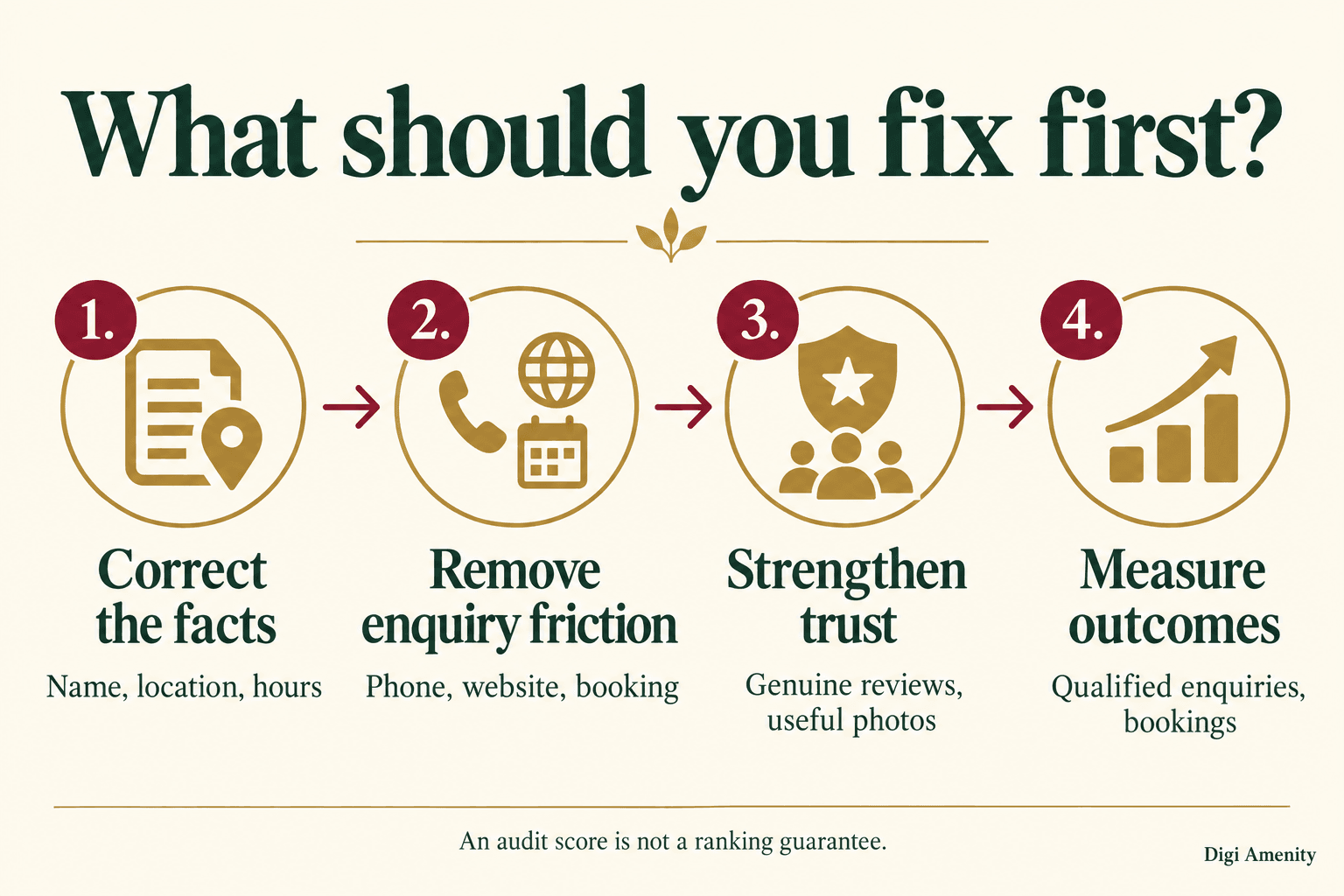
Which audit findings should you fix first?
Rank work by customer impact and the evidence available. An inaccessible account or incorrect phone number needs attention before a refreshed cover photo. The table below is an editorial prioritisation framework, not Google’s scoring system. On small screens, swipe the table horizontally.
| Priority | Example finding | How to validate the fix |
|---|---|---|
| Urgent accuracy or access | Wrong business details, ownership problem or misleading location | Authorised access and accurate public listing confirmed |
| Lost enquiries | Broken website link, unanswered phone or failed form | Test reaches the intended destination and responsible person |
| Weak customer information | Unclear services, stale images or unresolved common questions | Current information answers the actual concern |
| Ongoing measurement | Clicks recorded without enquiry outcomes | Defined actions are tested and lead outcomes reviewed |
Hypothetical example: a Mumbai repair company has current photos but an old phone number and a booking page that accepts requests outside its service coverage. Its first two tasks are to correct and test the number, then explain coverage before submission and route enquiries to a responsible person. Adding more photos would not resolve either problem. No performance result is assumed.
How will you know the audit helped?
Save a baseline before material changes. Compare equal-length complete periods using the same location and filters; note holidays, promotions and operational changes. For low-volume businesses, treat small movements cautiously and allow enough time to observe meaningful enquiries.
Keep three layers separate: profile visibility, profile actions, and actual business outcomes. In Google’s performance documentation, calls count call-button clicks, not confirmed connected conversations. Website clicks are also different from completed enquiries. Available metrics vary, and profile performance can include interactions from organic results and Google Ads.
Record qualified enquiries and bookings alongside the available platform metrics. Validate analytics events before interpreting zero as no demand. Maintain a change log so you can investigate what changed without claiming that a single edit caused every later increase.
A practical routine is to check contact details whenever the business changes, review customer-facing information monthly, and repeat the broader audit quarterly. Adjust that recommendation for locations with frequent service, staffing or seasonal changes.
Frequently asked questions
Can I do a Google Business Profile audit for free?
Yes. You can manually inspect the public listing and use authorised access to review profile information and available performance data. A paid tool may save time across many locations, but you still need to validate recommendations against the real business and test the enquiry journey.
Do I need owner access to audit a profile?
You can review public information without managing the profile. Owner or manager access is needed for a fuller check of private performance data, pending changes and management settings. Record this limitation when reviewing a profile you do not control, and do not request someone else’s password.
Does a perfect audit score guarantee a top-three Maps ranking?
No. Tool scores reflect that provider’s checks and weights. Search relevance, the customer’s location and prominence still matter. Use a score to organise possible fixes, then evaluate accurate information and customer outcomes rather than treating the score as a Google promise.
Should a home-based service business display its address?
If it visits customers and does not serve them at its business address, Google’s service-area guidance says to remove the address from the public profile. Businesses that genuinely receive customers need to check the applicable storefront or hybrid requirements rather than choosing an address setting for visibility alone.
How often should a small business repeat the audit?
Review important details immediately after changes to location, hours, phone numbers or services. A monthly information check and a quarterly full audit are useful starting routines. Increase the frequency if several people edit the profile or the business changes frequently.
Why can profile clicks rise without more bookings?
The listing may attract the wrong service enquiries, the landing page may be unclear, or follow-up may be slow. A call-button click may never become a connected conversation. Check the enquiry path and lead quality before assuming that more profile activity means more sales.
Will this audit make my business appear in AI answers?
Accurate business information and clear website answers make the business easier to understand, but this audit cannot guarantee inclusion in any AI answer. If you monitor such appearances, record the exact question, product, date and location context. Treat each result as an observation rather than a permanent ranking.
Can customers mention an employee in a Google review?
The solicitation rule does not make every voluntary staff mention a violation. Do not ask customers to include an employee’s name or set staff review quotas. Customers choose their own wording, subject to Google’s privacy and other content policies.
Need help turning audit findings into qualified enquiries? If your profile attracts attention but enquiries are inconsistent, Digi Amenity can review the listing, local landing page, tracking and follow-up together. Explore our local SEO support to identify the corrections that matter before adding more activity.
