

A useful website maintenance checklist protects the whole customer journey: keep recoverable backups, apply tested updates, check security alerts, and prove that visitors can submit an enquiry or complete an order. Then review mobile usability, broken links, indexing and measurement. Give every check an owner and evidence of completion; a website loading successfully does not prove the business is receiving leads.
For an Indian service business, a broken enquiry notification can be as disruptive as a broken page. For an online store, restoring yesterday’s backup without preserving today’s orders can create a different problem. Maintenance needs to account for what the website actually does.
Digi Amenity’s approach connects website operations with marketing: before increasing traffic, verify that the destination, tracking and follow-up process work together. The checklist below is a starting point to adapt to your platform, transaction volume and available support.
What should your website maintenance checklist include?
Organise work by consequence and urgency. Do not wait for a monthly appointment to investigate a failed checkout, suspicious administrator account or urgent security notice. Routine content checks can follow a schedule; faults affecting customers need a response when detected.
| When | Check | Owner and evidence |
|---|---|---|
| Continuously where supported | Availability, certificate expiry, backup failures and security alerts | Technical owner; alert destination tested and escalation contact documented |
| Each business day for a lead- or order-dependent site | New enquiries/orders reach the right team; investigate unexpected gaps | Operations owner; reconcile site records with the receiving system |
| Weekly, and after relevant changes | Important forms, call/WhatsApp links, mobile navigation and checkout path | Website owner; dated pass/fail record and a labelled test submission |
| Monthly starting point | Broken links, important content, Search Console issues, performance trends and access list | Marketing plus technical owner; specific issues, impact and next action |
| Planned recovery drills and before risky releases | Restore capability, staging checks and rollback readiness | Developer/host; successful isolated restore and release checklist |
| Before renewals and major campaigns | Domain, hosting, licences, payment integrations, capacity and ownership | Business owner; renewal contacts and campaign readiness sign-off |
This is a suggested operating cadence, not a universal standard. A frequently changing shop may need more frequent backups and checks than a small brochure site. Ask how much new work the business can afford to recreate and how long a fault can remain unnoticed.
How do you test the complete enquiry journey?
Use a clearly labelled test enquiry from a mobile browser. Agree the test with the receiving team so it does not become a sales task or a reported customer lead. Check four stages, recording the time and result at each one.
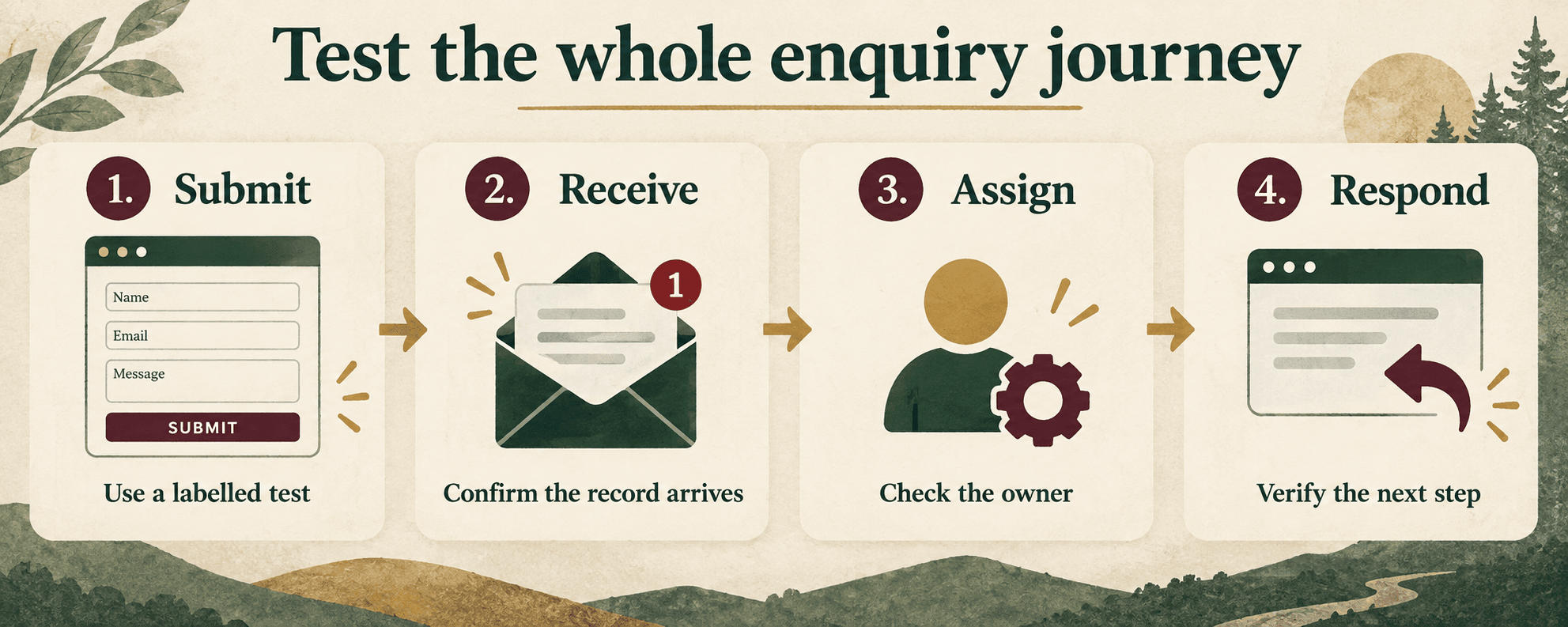
- Submit: can a visitor read the offer, complete required fields, understand errors and see confirmation? Try a small mobile screen and keyboard navigation.
- Receive: does the record arrive in the intended inbox or CRM with the correct fields? Check spam and integration errors when it does not.
- Assign: is there an accountable person and a usable contact method? A record sitting in an unmonitored inbox is not a completed handover.
- Respond: does the acknowledgement explain the next step, and can the responsible team follow up? Test routing and reply behaviour without treating a test as a customer interaction.
Keep the evidence lightweight: page URL, device/browser, test label, submission time, receipt time, assigned owner, pass/fail and issue reference. Use synthetic information approved for testing. Do not place customer names, phone numbers or email addresses in analytics event parameters or screenshots shared outside the team.
If the record exists but its notification is missing, investigate the notification integration and email deliverability. Rebuilding the form before locating the break can waste time.
What makes a backup useful when something breaks?
For WordPress, a complete recovery plan needs both the database and site files. They hold different parts of the website. WordPress’s backup documentation explains that distinction and recommends keeping backup copies separately from the site.
Ask for proof of a successful restore in an isolated environment. Record which backup was used, whether the site opened correctly, and whether important functions worked. “Backup completed” and “we can recover the business” are different conclusions.
Before a restore, identify what changed after the backup: orders, enquiries, inventory, bookings or content. Decide how those records will be preserved and reconciled. Blindly replacing a live database can remove legitimate new activity. For a busy store, recovery should be planned with the hosting provider or developer rather than improvised during an outage.
How should WordPress updates be handled?
WordPress recommends backing up before an upgrade in its update guidance. Combine that safeguard with a process suited to the site’s dependencies:
- Identify what is changing and whether a security issue makes it urgent.
- Confirm a current, usable backup and a person responsible for recovery.
- Test significant changes in staging, especially payment, booking, form and theme dependencies.
- Deploy during an appropriate window and record versions and changes.
- Repeat the live enquiry or order journey, then monitor errors and receiving systems.
A staging pass reduces uncertainty; it does not replace a live check. Production payment settings, email routing and caches may differ. Decide in advance which failures trigger rollback and how new transactions will be protected.
Also review who has administrative access and remove access that is no longer needed through a controlled process. Keep renewal and recovery ownership with the business, even when a supplier performs the work.
Which mobile, SEO and performance checks matter most?
Start with pages that attract visitors or support revenue: service pages, popular articles, contact pages, product pages and checkout. On mobile, look for clipped text, tables that force the whole page sideways, hidden buttons, intrusive overlays and fields that are difficult to complete.
Check links and redirects after URL changes, then inspect the intended canonical page in Search Console if indexing is uncertain. A page disappearing from a report requires investigation; it is not proof that a plugin update caused a ranking change. Compare dates, affected URLs and actual changes before drawing that conclusion.
Use performance tests to identify specific issues rather than chase a score without context. A large image on a key landing page may deserve attention before a minor issue on an unused page. Keep a before/after record under comparable conditions. For broader crawlability and content priorities, connect maintenance findings with an SEO review.
How can you tell tracking failures from lost enquiries?
Reconcile three records: the website’s successful submissions, the receiving system’s records and the analytics events intended to represent those submissions. Differences may arise from consent choices, tracking configuration, duplicate events or failed integrations. Do not assume every analytics event is a unique enquiry.
Hypothetical example: a training provider updates its form plugin. The website displays a success message, but the CRM receives nothing. A maintenance test catches the missing record. The team pauses the affected promotion, investigates the connection and confirms recovery with a labelled test. This is an operational example, not a Digi Amenity client result.
After fixing the connection, check whether any real submissions were stored locally and need a controlled handover. Do not simply declare the incident closed because the newest test worked.
What should a maintenance agreement actually promise?
Ask for scope and evidence rather than a long list of vague benefits. The agreement should identify supported platforms, included updates, backup retention and recovery work, monitoring coverage, response hours, escalation contacts and exclusions. Content changes, redesigns and emergency recovery may have different scopes.
A fixed price is difficult to judge without knowing integrations, site activity and support expectations. Ask who tests forms and checkout, who owns the backups, and how a completed task is demonstrated. Separate a response-time commitment from a resolution-time promise.
Frequently asked questions
How often should a business website be maintained?
Use ongoing alerts plus a planned schedule. Check business-critical flows after changes and at a frequency matched to the harm of a missed failure. Monthly housekeeping can be suitable for routine content checks, but urgent faults and security notices should not wait for that date.
Does WordPress update itself automatically?
Some WordPress updates can be automatic, depending on configuration and hosting. Verify what your own installation covers. Automatic installation does not confirm that a booking form, checkout or notification integration still works afterward.
Is a hosting backup enough?
It may be part of the solution, but check coverage, retention, access and restoration support. Confirm that files and database are included where needed, and prove recovery in an isolated test. Establish how recent orders or leads would survive a restore.
What should I check after a plugin update?
Test the functions that plugin affects and any connected journey: submission, record delivery, notification, payment or booking. Review mobile behaviour and errors. Keep the previous version and recovery plan accessible through your normal controlled release process.
Can maintenance improve SEO?
Maintenance can identify technical problems that obstruct access, indexing or usability. It does not guarantee higher rankings. Search intent, content quality, competition and the wider site also matter, so prioritise verified issues rather than assuming every score change affects visibility.
Can I maintain the site myself?
You can perform routine content, link and enquiry checks if you understand the process. Use specialist support for complex updates, suspicious activity, recovery or integrations you cannot safely test. Know who to contact before an incident occurs.
What is the most useful monthly maintenance report?
A short record of checks, failures, completed fixes and remaining risks is more useful than an unexplained green score. Include affected URLs, business impact, owners and deadlines, plus evidence that important customer journeys still work.
Need a practical starting point? Digi Amenity can review your website and its enquiry or checkout journey, then define maintenance priorities around the forms, integrations and customer actions your business depends on.
