
Server-side vs client-side tracking is a choice about where an event is collected, processed and sent. Client-side tracking uses code in the visitor’s browser to record interactions. Server-side tracking processes or sends events through a server. A practical setup often combines browser context with backend-confirmed business outcomes, while respecting consent and preventing duplicate events.
The crucial distinction: forwarding a browser event through your server does not turn it into an independently confirmed backend event. If the browser never generates that event, the forwarding server may have nothing to receive. A purchase recorded after your payment system confirms payment follows a different path.
This guide explains the architecture, tools, costs, implementation steps and checks Indian ecommerce and lead-generation businesses should use before changing their tracking. Technical references were checked on 12 October 2026. Examples below are hypothetical, not Digi Amenity client results.
What is the difference between client-side and server-side tracking?
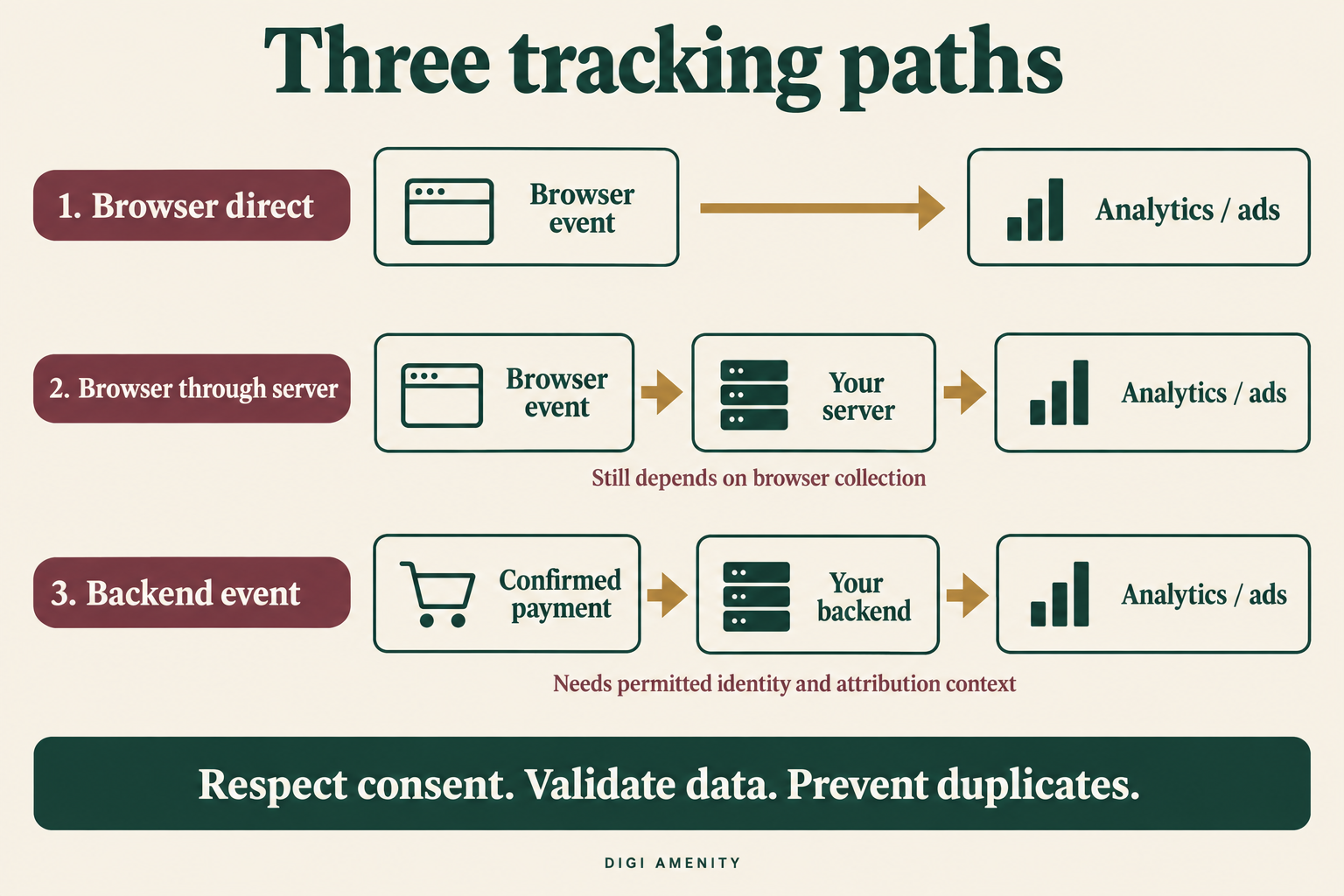
Think in three paths rather than a simple browser-versus-server contest.
1. Client-side tracking: browser directly to the destination
A visitor opens a product page. JavaScript reads an interaction, creates an event and sends a request to an analytics or advertising platform. Browser-based collection is useful for page views, interface interactions, form errors and the journey before a purchase. It can also send a purchase event when the site has reliable purchase information.
Its weaknesses are dependency on the page code, the visitor’s browser and successful delivery. A broken trigger, page exit or blocked request can interrupt that path. A button click also does not prove that the underlying business action succeeded.
2. Server-side tagging: browser to your server to the destination
The browser sends an event to a collection endpoint you operate or commission. The server processes it and sends permitted fields to the chosen destinations. This creates a place to control outgoing data and move some processing away from the browser. It still relies on the initial collection and request. Google describes the server container as an intermediary that complements the web container. Source: Google’s client-side and server-side tagging comparison.
3. Backend-origin tracking: a business system creates the event
An order system confirms payment, a subscription renews, or a CRM marks an enquiry qualified. That system generates an event and sends it through an integration. The event does not need a thank-you page to open. However, attribution may still depend on permitted identifiers and context captured earlier in the customer journey.
Collection, delivery and attribution are separate problems. Solving one does not automatically solve the other two.
Server-side vs client-side tracking: comparison table
| Question | Client-side | Server-side or hybrid |
|---|---|---|
| Where does the event originate? | Usually a browser interaction or page state. | Either the browser or a backend system. Ask which. |
| What context is available? | Interface state and browser journey, subject to permissions and implementation. | Backend business state; browser/session context must be passed or joined appropriately. |
| What can fail? | Triggers, scripts, browser requests and page transitions. | Those same upstream problems for browser-origin events, plus server, API, mapping and retry failures. |
| Can it improve speed? | More scripts can add work to the browser. | Moving work can reduce browser load; adding a server while retaining all scripts may not. |
| Does it remove consent requirements? | No. | No. Backend collection is not permission to disclose data. |
| What does it cost? | Setup, plugin/tag maintenance and QA. | Those costs plus integration, infrastructure, monitoring and operational ownership where applicable. |
| Does it guarantee accurate attribution? | No. | No. Matching, identity, attribution rules and processing still matter. |
Use this table to identify dependencies, not to award one method a universal score. A well-maintained browser implementation can be more useful than an unmonitored server integration.
Which events belong in the browser, backend or both?
Assign an authoritative source to each business fact. Then decide whether another route is needed for the same event or for complementary context.
| Event or outcome | Suggested source | Acceptance question |
|---|---|---|
| Product view, scroll or form error | Browser | Did the visitor actually see or perform the interaction? |
| Add to cart | Browser or successful cart operation | Was the item added, or was only the button clicked? |
| Paid ecommerce purchase | Confirmed order/payment state; optional matching browser copy | Is this the chosen paid-order definition, counted once? |
| COD order placed | Order system | Is order placement clearly separated from money collected? |
| Refund or cancellation | Order/payment system | Is the adjustment supported and mapped to the original transaction? |
| Lead submitted | Successful backend acceptance or verified submission response | Was a valid enquiry stored, rather than just a click? |
| Qualified lead or closed sale | CRM | Does the stage follow a documented rule and a real business record? |
| Subscription renewal | Billing system | Was the renewal successful, distinct from a retry or failed payment? |
These are implementation recommendations, not universal platform event names. Map each business event to the receiving product’s supported event schema.
Ecommerce example: a payment succeeds but the shopper leaves
Suppose a customer completes a UPI payment but closes the payment app before returning to the store. A purchase trigger tied only to loading the return page might never fire. A verified payment notification can let the backend record the outcome independently. The integration still needs to check the notification’s authenticity, order reference, payment status and whether it has already processed that notification.
For COD, define whether your advertising purchase event means an accepted order or collected revenue. Track delivery, cancellations and realised revenue separately in business reporting. Do not quietly combine prepaid cash receipts with unfulfilled COD order value and label the total collected revenue.
Lead-generation example: a form is not a qualified enquiry
A hypothetical Mumbai service business receives 100 valid forms, but only 25 meet its service-area and project-fit rules. A server integration that sends all 100 submissions more reliably has improved delivery of the submission signal. It has not made all 100 qualified. The useful next step is a documented CRM outcome and a supported destination mapping, with permitted matching context.
For the wider event and CRM audit, use our Google Ads Data Strength guide.
How do GTM, GA4, Meta CAPI and Shopify fit together?
Server-side Google Tag Manager is a processing layer
A server container runs separately from a web container. Incoming requests are interpreted by components called clients, which create event data for server tags. Google recommends a first-party domain and production configuration before live traffic. A first-party endpoint describes the collection route; it does not mean downstream advertising platforms stop receiving data. Source: Google’s server-side tagging introduction.
Do not add a server container and assume your website now sends data to it. The transport and receiving client must be configured. Google’s documentation also distinguishes sending a Measurement Protocol-formatted request to a server container from sending directly to the GA4 Measurement Protocol endpoint; feature behaviour is not identical. Source: sending data to server-side Tag Manager.
GA4 Measurement Protocol adds server events
Measurement Protocol can send backend or offline events to GA4. Google positions it as a supplement to existing collection through tagging or Firebase, with only partial reporting possible in a completely server-to-server setup. Preserve appropriate user and session context instead of expecting a server request to reconstruct a missing journey. Source: GA4 Measurement Protocol overview.
For applicable reporting, review fields such as client_id, session_id and engagement_time_msec against the web-stream documentation. These fields have different purposes; an order ID is not a substitute for a session ID. Do not invent engagement durations to make a report look complete. Source: Measurement Protocol reference.
Meta Conversions API is a destination integration
Meta Conversions API sends events to Meta. It is not another name for server-side GTM. It can be implemented through a supported partner or a custom integration, depending on the business’s platform.
For the same event sent through both Pixel and CAPI, Meta’s recommended deduplication approach uses matching event names and IDs: the Pixel’s eventID matches CAPI’s event_id. Meta documents a 48-hour receipt window for corresponding events sent to the same Pixel ID. Verify the implementation in Events Manager rather than treating two successful deliveries as two purchases. Source: Meta’s duplicate-event guidance.
Shopify merchants should inspect their existing integration first
Shopify’s Facebook and Instagram by Meta channel has data-sharing settings. Its documentation describes browser Pixel collection at Standard and Pixel plus Conversions API purchase sharing at Enhanced and Maximum, with differences depending on when the channel was installed. Review the actual channel configuration and privacy choices before adding another plugin or GTM implementation. An existing server connection may already cover the intended purchase event. Source: Shopify’s Meta data-sharing documentation.
On WordPress or a custom store, make an inventory of theme code, plugins, web tags and backend integrations. Give each destination event one clear owner. Two plugins with “conversion tracking” in their names do not automatically coordinate duplicate handling.
How should you implement server-side tracking step by step?
Step 1: Document the problem and baseline
Write a measurable problem: “paid orders are absent from the analytics event ledger when customers do not return from payment,” or “CRM-qualified enquiries never reach the intended advertising integration.” Avoid “we need server-side because everyone is moving.”
Record the current event definitions, installed integrations, consent behaviour and observed gaps. Keep comparable date ranges, time zones, order states and test-traffic exclusions. If conversions are failing because of a broken trigger, start with our conversion-tracking troubleshooting guide.
Step 2: Create an event contract
For every event, document its business meaning, source system, destination name, occurrence time, unique business reference, value/currency rules, permitted matching fields, consent requirements and owner. Agree how refunds, repeated forms and order edits behave.
For a hypothetical paid purchase, use a stable internal reference such as purchase:ORDER-1042 to represent one defined occurrence. Carry the corresponding identifier through any intentional duplicate route according to that destination’s rules. A later refund is a different business event. This is a design example, not a ready-to-send API payload.
Step 3: Choose the smallest suitable route
Evaluate an existing supported platform integration first. Choose server-side GTM when you need a managed tagging layer and controlled routing. Choose a direct backend integration when the business event exists in your application and the destination supports the required route. Use a specialist implementation partner when ownership or maintenance exceeds your team’s capacity.
Keep interface analytics in the browser where appropriate. There is little value in building backend machinery merely to imitate a harmless button interaction that your browser instrumentation already measures correctly.
Step 4: Design consent and data controls before sending
Document which purposes and fields are allowed, where permission is collected and how its state reaches each destination. Google’s server-side consent implementation starts with consent information collected on the website and passed into the server setup. Consent Mode changes tag behaviour; it does not collect consent on its own or determine your legal obligations. Basic and advanced implementations behave differently, so test the chosen configuration. Source: Google’s server-side consent guide.
Remove unnecessary information at collection where possible. Check URLs and free-text fields for personal or sensitive data. A later filter cannot undo disclosure that already occurred in a request or log. Hashing an identifier is not permission to collect or share it.
Step 5: Configure and secure the server route
Assign ownership for hosting, domain configuration, access, credentials, environments and billing alerts. Keep API secrets out of browser code. Validate backend notifications before trusting their contents; otherwise a forged request could create a false conversion.
In server-side GTM, use transformations to allow, exclude or modify event parameters for relevant tags. Google warns that removing required fields can impair measurement. Test both what is removed and what must remain. A field allowlist is useful only if it is maintained as destinations change. Source: GTM transformations.
Step 6: Prevent duplicates and plan failures
Handle repeated source notifications in your own integration so one occurrence is not processed repeatedly. This is often called idempotency. Separately, apply the destination’s rules when a browser and server intentionally send the same event. Do not assume Meta’s event-ID rules also govern GA4 or Google Ads.
Define retry behaviour for each API, preserve original occurrence times and IDs, and respect its accepted event age. Separate invalid data from temporary delivery failures. Avoid blindly retrying every response: some endpoints can acknowledge receipt even when an event is unusable.
Step 7: Test every stage, not only the final dashboard
Trace a test from its source record to the outgoing request and destination diagnostics. A green HTTP response is insufficient evidence. Google explicitly notes that the GA4 Measurement Protocol production endpoint can accept HTTP requests without returning errors for malformed data. Use its validation tools, then verify appropriate production reporting; validation requests themselves do not populate reports. Source: GA4 event validation.
Step 8: Release with a rollback and a named owner
Begin with a controlled scope and observe enough business outcomes to assess the failure cases. If old and new routes run simultaneously, keep experimental events out of production bidding or implement verified deduplication first. Retire obsolete tags only after acceptance checks pass.
Save the release date, configuration versions, baseline, change owner and rollback steps. Recheck after checkout, consent-banner, plugin or CRM changes. A tracking migration is an operational change, not a one-time installation badge.
What should your tracking launch checklist include?
Use this practical acceptance checklist with your marketer and developer. For every item, record an owner, evidence link, test date and pass/fail result. “Not tested” is not a pass.
- Business definitions distinguish clicks, accepted submissions, qualified leads, order placement and confirmed payment.
- Browser, plugin, platform and backend event sources are inventoried for each destination.
- Values, currency, discounts, taxes, shipping, refunds and time zones follow documented rules.
- Consent choices and changes propagate through all relevant routes; missing consent state has a defined safe behaviour.
- Only approved fields leave each system; personal information is absent from unintended URLs and logs.
- Stable occurrence IDs survive intended duplicate routes and retries without combining different real events.
- Credentials, endpoint access and backend notification authenticity are checked.
- Browser and server diagnostics agree with the selected test records.
- Accepted requests are distinguished from valid, processed, matched and attributed events.
- Alerting covers dropped events, invalid payloads, duplicate spikes, delayed queues and infrastructure cost.
- Old tags have a controlled retirement plan and the release has a tested rollback procedure.
- A named owner will recheck tracking after relevant website or integration changes.
Which failure scenarios must you test?
| Test | Expected evidence |
|---|---|
| Successful payment without reopening the thank-you page | The backend outcome is recorded; permitted destination delivery is traceable. |
| Thank-you page reload plus repeated webhook | One defined purchase remains after source processing and destination duplicate handling. |
| Failed, pending or abandoned payment | No event incorrectly claims a confirmed paid purchase. |
| Consent rejected or withdrawn | Observed behaviour matches the approved configuration on browser and server routes. |
| Missing session or matching identifier | Missing context is visible and investigated; no invented identifier is substituted. |
| Destination unavailable or invalid payload | Errors are classified; appropriate retries or repairs do not create duplicate outcomes. |
| Refund, cancellation or repeated lead submission | The documented lifecycle rule is applied, with a traceable source record. |
| Test customer and internal traffic | QA records can be isolated from operational reporting and advertising decisions. |
How do you measure whether the migration helped?
Maintain separate views of business truth, collection health and advertising attribution. Your accounting or order system records actual transactions. Your event ledger records the transmission process. An advertising report assigns credit under that platform’s rules. The totals answer different questions.
Use these operational measures, with the cohort definition stored beside every result:
- Eligible-event capture coverage: distinct eligible business-event IDs observed in the chosen event dataset ÷ distinct eligible business-event IDs in the source system × 100. Define eligibility by permissions, event state, destination scope and date rules.
- Duplicate excess rate: extra copies beyond one per expected occurrence ÷ expected occurrences × 100, measured at a named stage. Raw intentional browser/server copies and post-deduplication records are different stages.
- Delivery latency: elapsed time between the original occurrence and confirmed destination receipt or processing, clearly naming which milestone is available. Review the median and slower tail.
- Value reconciliation difference: event-ledger value minus source-system value for the same eligible IDs and value definition. Investigate currency and order-state mismatches before blaming attribution.
If the destination does not expose usable record-level evidence, label that measure unavailable and use intermediate logs plus sampled checks. Do not pretend a raw API acknowledgement proves processed-event coverage. Never divide an ad platform’s attributed conversions by all store orders and call that tracking accuracy.
Hypothetical example: more measured orders are not automatically more sales
A store has 1,000 eligible paid orders in a fixed audit cohort. Its old event dataset contains 820 distinct matching order IDs. A permitted, correctly deduplicated hybrid route records 930 from that same cohort.
Coverage moves from 82% to 93%: 11 percentage points, or 110 additional observed orders. Relative to the old observed count, the increase is approximately 13.4%. The store still made 1,000 eligible sales. This calculation shows improved observation, not 110 incremental sales or a proven advertising uplift.
Keep budget, attribution settings and business outcome definitions visible when reviewing CPA or ROAS after migration. Better measurement may change those reported ratios immediately even if customer behaviour has not changed. Claims about extra sales require a suitable experiment or stronger causal evidence.
How much does server-side tracking cost, and when is it worth it?
Request a quote that separates implementation from ongoing operation. Avoid comparing a monthly hosting price with the full cost of a maintained integration.
First-year ownership cost = setup + migration QA + 12 × recurring platform/hosting fees + monitoring and maintenance + expected change work.
Add relevant log storage, traffic charges, plugin subscriptions and incident support. Existing staff time also has a cost. Ask who responds when an API version changes or a checkout release breaks an identifier.
For a hypothetical budget only, ₹30,000 setup, ₹6,000 launch QA, ₹2,000 monthly infrastructure and ₹3,000 monthly support total ₹96,000 in the first year, before applicable taxes and additional change work. These are illustrative inputs, not Digi Amenity pricing or market benchmarks.
A sensible case exists when you have a material, evidenced measurement problem, accessible source events, a supported destination route and an owner who can maintain it. For a small site with a few enquiries, fix event definitions, form reliability and CRM discipline before committing to an elaborate server stack. For a business with significant backend transactions or delayed CRM outcomes, a supported server connection may solve a specific gap without replacing every browser tag.
What commonly goes wrong after implementation?
Events arrive, but attribution looks worse: inspect permitted identifiers, session context, event time and destination settings. A backend record can be valid without being matchable to a particular advertisement.
Purchases double: inspect overlapping plugins, mismatched occurrence IDs, repeated notifications and intentional browser/server copies. Find the duplication stage before disabling a useful source.
The website is not faster: check whether browser work was actually removed and compare performance under similar conditions. A server route added alongside all previous scripts may simply add complexity.
The server receives no event: trace the first browser request, transport configuration, receiving client and consent behaviour. Moving the destination does not repair a trigger that never fires.
Business revenue and dashboards differ: align currency, time zones, refunds, taxes, discounts and order states. Then separate collection discrepancies from attribution differences. Fixing the tracking architecture will not fix a weak offer, poor landing page or slow sales follow-up.
Frequently asked questions
Is server-side tracking better than client-side tracking?
It depends on the event and the problem. Browser collection suits interface behaviour; backend collection suits outcomes your business systems can confirm. A hybrid design can combine them, but introduces more implementation and maintenance work. Choose a source and acceptance test for each event.
Can server-side tracking bypass ad blockers?
A backend-to-platform request does not run inside the customer’s browser. However, browser-origin collection can still fail before an event reaches your server. Missing consent, missing identity, server errors and API restrictions also remain relevant. “Unblockable tracking” is an unsuitable promise.
Is server-side tracking cookieless?
Not necessarily. A server architecture may still use cookies or other identifiers. Hosting an endpoint on your domain does not by itself remove storage, consent or disclosure considerations. Assess the actual fields and purposes rather than treating the architecture’s name as a privacy classification.
Can we remove browser tags and send everything through GA4 Measurement Protocol?
Do not assume equivalent reports. Google describes Measurement Protocol as supplemental collection and warns that a fully server-to-server implementation may provide partial reporting. Review the interactions and context you would lose before removing browser instrumentation.
Do we need both Meta Pixel and Conversions API?
Meta recommends using CAPI alongside Pixel, with duplicate handling for overlapping events. First inspect existing platform integrations, then verify matching event names and IDs in the intended dataset. Adding a second purchase sender without a coordinated design can distort measurement.
Will server-side tracking increase ROAS?
It can change which conversions are observed or credited, but that is not proof of additional revenue. Better signals may help marketing decisions; results also depend on creative, offer, targeting, checkout and lead handling. Evaluate real business outcomes separately from a reporting change.
What should we ask an implementation agency to deliver?
Request the event map, consent and field rules, ownership details, duplicate strategy, test evidence, monitoring plan and rollback instructions. Include a handover that explains how to trace one order or lead end to end. A screenshot saying “connected” is not a complete acceptance test.
Need help choosing the right tracking setup?
If your advertising reports and confirmed orders or qualified enquiries disagree, Digi Amenity can review the event sources, consent flow, existing integrations and website journey before recommending additional infrastructure. Our web development and integration services can connect that review to the checkout or lead-capture changes the business actually needs.
