
A Local Services Ads account is where an eligible service business manages its Google Local Services Ads profile, verification, budget and incoming leads. The channel charges for valid leads rather than ordinary ad clicks. A charged lead is an enquiry, not a guaranteed booking or paying customer.
This guide explains the account, a practical setup sequence, cost controls and the lead-quality checks that should come before increasing spend. Platform details were checked on 4 October 2026; individual screens and requirements can vary by country and category.
What does a Local Services Ads account actually do?
Think of the account as a service-enquiry workspace. Your profile helps prospective customers understand what you do and contact you. The account also brings together screening requirements, service selections, advertising controls and lead reporting. Available contact methods vary; do not assume every business receives calls, messages and booking requests in the same way. See Google’s LSA overview.
The operational question is whether the business can fulfil the requests the profile attracts. An enquiry about an unavailable job, a missed call or an unanswered quote can still create wasted effort and poor economics. The account cannot repair an unsuitable service offer or an unstaffed phone line.
| Product | Main role | What to avoid confusing |
|---|---|---|
| Google Business Profile | Business information and local presence on Google | A profile is not proof of LSA eligibility. |
| Google Search ads | Paid search campaigns with campaign, targeting, ad and conversion controls | A Search campaign targeting a city is not automatically an LSA campaign. |
| Local Services Ads | Eligible service profiles and lead acquisition, subject to market and screening requirements | Lead delivery is not the same as a completed job. |
Are Local Services Ads available in India?
India was absent from the official signup country list we inspected on 4 October 2026. The list included markets such as the United States, United Kingdom and Canada. Even in a listed country, the service category and operating area must qualify. This is a dated observation of Google’s eligibility screen, not a prediction about future availability.
Use the official Local Services Ads entry page and check the actual country, region and job category offered in signup. A US marketing page, an Indian-language help page or an agency selling “local ads” is not evidence that the LSA product is available for your Indian location.
An India-based team may manage marketing for a legitimate business operating in a supported market. Eligibility belongs to that business and its real service location; it does not come from the agency’s address. Do not choose a false address or an unrelated category to get through signup.
How do you access an existing account without creating a duplicate?
First ask the owner whether an LSA account already exists, which Google account controls it and who receives lead notifications. Record the account identifier and business location in your internal handover document. Then use the sign-in route from Google’s official product page.
For team access, Google’s current instructions use Google Ads → Admin → Access and security. An authorised administrator chooses the access level and sends an invitation to the person’s own Google account. Payments-profile permissions are separate. Use the official account-access guide for the current role matrix and steps.
As a working practice, keep business ownership with the business, name a backup administrator and give each collaborator only the access needed. An agency handover should include billing ownership, lead-response responsibilities and the process for removing former staff. Sharing a password makes that handover harder to audit.
How do you set up a Local Services Ads account step by step?
Use this sequence for an eligible business. It is a documentation-based setup guide, not a claim that an LSA campaign was created or tested for this article.
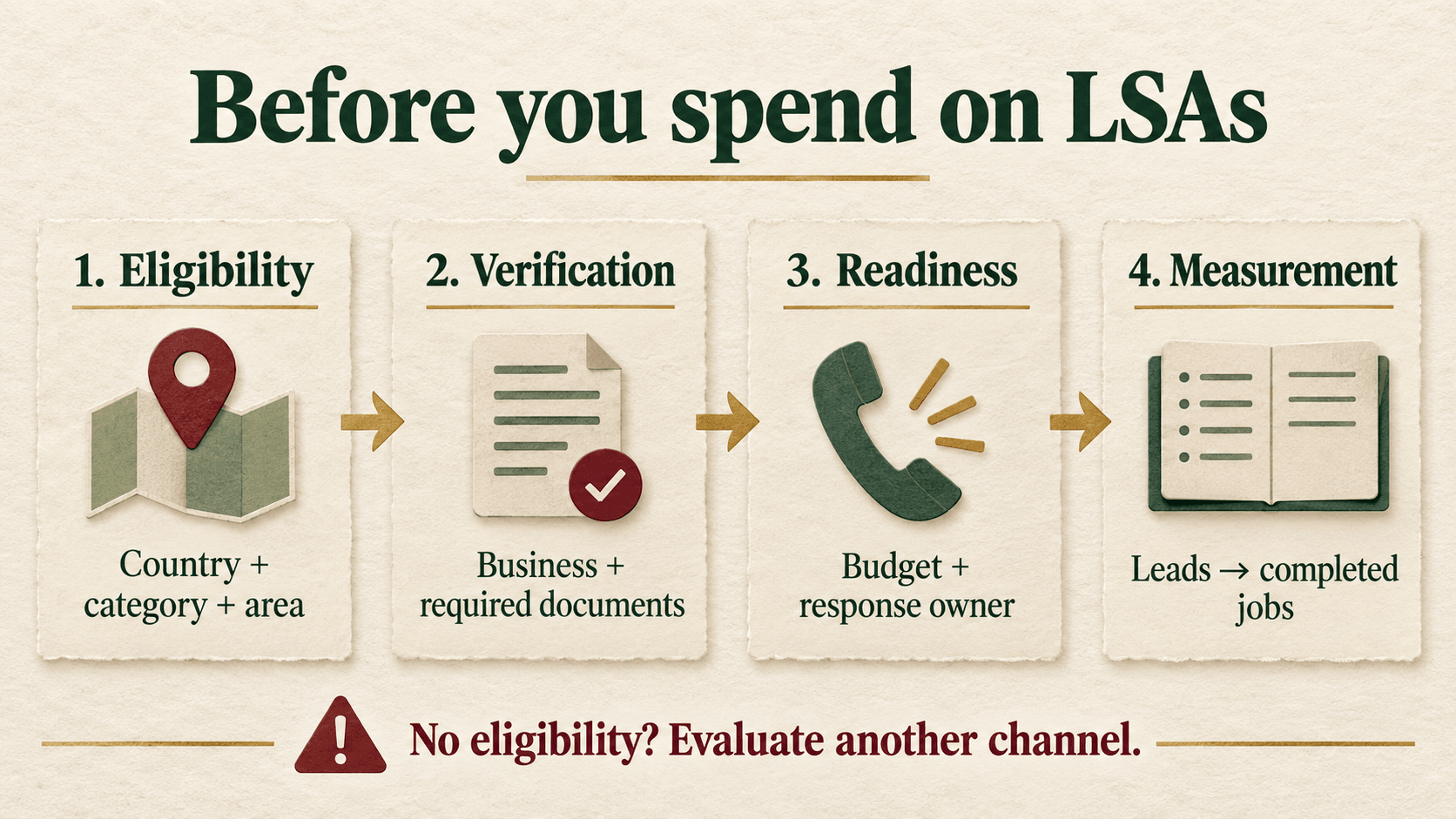
- Confirm country, category and area. Open official signup and check eligibility using the business’s real details. If the relevant option is missing, stop and investigate availability rather than selecting the nearest-looking category.
- Check the existing Business Profile and account ownership. Where prompted, choose the correct business profile. Compare the name, phone, operating location and website against current business records. Resolve mismatches before sending verification documents.
- Define the services you can actually deliver. Select suitable job types and realistic service areas. Write down exclusions and travel constraints for the person answering enquiries. A broad service label can attract work your team does not perform.
- Prepare the required verification evidence. Follow the country/category checklist shown by Google. Depending on the business, checks may involve registration, licences, insurance and relevant background checks. Keep document names and expiry dates consistent with the operating business. Requirements vary; there is no universal document pack or approval deadline. See how providers qualify.
- Set a commercially sensible budget. Decide what you can afford to spend while learning, using completed-job margins and response capacity. Then review the budget, bidding mode and billing settings presented in the account. Do not copy a competitor’s dollar cost-per-lead estimate as your forecast.
- Assign lead handling before going live. Name the person responsible for calls, follow-up, quotes and outcome logging. Check the business number through an ordinary test call. Create a short qualification script: requested service, area, timing, suitability and next action. Do not manufacture advertising leads to test the system.
- Review status and outstanding requirements. Confirm that verification, payment, profile and schedule settings are in the intended state. Follow any account-specific notices. Only activate advertising when the business owner has approved the budget and the team can handle enquiries.
- Start a lead-outcome log. From the first genuine enquiry, record the source, contact date, requested job, qualified status, booking, completed-job outcome and next follow-up. Store customer details in your restricted CRM; the reporting worksheet can use lead IDs.
What happened to Google Guarantee and Google Screened?
Older tutorials still show those badge names. Google’s current guidance describes the Google Verified badge and says new advertisers must complete the required screening to receive it. The same guidance states that the money-back guarantee associated with Google Guarantee is being discontinued, with reimbursement eligibility tied to services booked before 7 December 2025. Do not reuse an old reimbursement promise in current sales copy. Read Google’s current badge explanation.
A verification badge also does not promise ad placement, lead volume or profitability. Explain the checks accurately without presenting them as a blanket endorsement of every future job.
How much do Local Services Ads cost, and which bidding mode should you use?
There is no single reliable price for every advertiser. Google says lead pricing varies with factors including location, job type, lead type and bidding mode. You set an average weekly budget; spending can differ by week while remaining subject to the account’s monthly maximum. Review the displayed limit before approval. Google explains lead charges and budget behaviour here.
Current bidding documentation lists Maximize leads, Target cost per lead and Max per lead. Respectively, these automate bids for volume, work toward an average lead-cost target, or set a manual lead bid limit. The controls offered to an individual account should be checked before following a tutorial. See Google’s bidding instructions.
Google documents the editing path as lead inbox → menu → Profile & budget → edit Budget → choose bidding → set budget → Save. Treat changing these settings as a spending decision, not a routine reporting task.
For a small business, first establish an affordable cost per completed job. Work backwards using realistic lead-to-job conversion. If your team is already missing enquiries, more lead volume can magnify the problem. If the current sample is tiny or jobs take weeks to complete, keep the assessment provisional.
Can you get credits for poor-quality leads?
Do not build your budget around refunds. Google’s automated lead-credit system reassesses some charged leads and can issue credits, but availability and exclusions apply. Its current help page excludes healthcare verticals, tax specialists and advertisers in EMEA, and says credits are no longer supported for “job type not serviced” and “geo not serviced” leads. Use the current lead-credit policy rather than an old manual-dispute tutorial.
When a lead seems unsuitable, record why, review the service and location settings, and use the feedback controls available in the account. An enquiry that does not become a customer is not automatically a billing error.
What should your LSA dashboard measure?
Open the Local Services Ads inbox, then menu → Reports. Google’s reports include charged leads, spending, contact-channel breakdowns and credits. Some booking features are limited by country. Verify the fields available in your account against the official reporting guide.
Add a separate commercial view. The following are business calculations, not claims that every formula exists as a native LSA column:
| Measure | Definition | Decision it supports |
|---|---|---|
| Gross charged CPL | Gross lead charges ÷ charged leads in the same period | How expensive is the initial enquiry supply? |
| Qualified-lead rate | Qualified unique leads ÷ unique leads assessed from the same cohort | Are requests a fit for service, area and capacity? |
| Booking rate | Unique leads that booked ÷ unique assessed leads from that cohort | Does the response and quotation process work? |
| Cost per completed job | Attributed net ad cost ÷ completed jobs from the same lead cohort | Is acquiring actual work affordable? |
| Contact coverage | Unique leads meaningfully contacted ÷ contactable unique leads | Is follow-up capacity limiting results? |
Define “qualified” before reporting: an enquiry fits the service, area, customer need and business acceptance criteria. Deduplicate repeated contacts. Keep pending jobs separate from lost jobs, and leave rates blank when the denominator is zero. Reconcile credits against their original leads when possible; subtracting this month’s credits from unrelated new leads can distort the comparison.
Hypothetical example—not a client result or benchmark: an eligible US service business records $1,200 in net advertising cost for a lead cohort. It receives 30 unique assessed leads, of which 18 qualify, 9 book and 6 become completed jobs. Qualification is 60%, booking rate is 30% of assessed leads, and advertising cost per completed job is $200. At $500 contribution per completed job before advertising, those six jobs provide $3,000 contribution and $1,800 after this ad cost, before other acquisition costs and overhead.
That example does not establish a good LSA CPL. It shows why counting bookings alone would overstate the outcome. Wait for a comparable cohort to mature, account for cancellations, and separate agency fees or call-handling costs if evaluating total acquisition economics. Our guide to Google Ads lead quality develops the same enquiry-to-customer distinction.
Why is your ad not showing or producing useful enquiries?
Check approval and account notices, payment status, whether the ad is paused, the schedule, budget and location settings. Your own search is not a dependable delivery test: Google says an ad will not appear for every search. Use account evidence and its LSA troubleshooting guide.
If the account runs but quality is weak, group unsuitable leads by reason. Repeated wrong-job enquiries suggest checking selected services. Repeated unanswered calls suggest staffing or scheduling. Suitable enquiries that reject every quote suggest investigating the offer, price explanation or fit before changing bids.
Placement also depends on more than the bid. Google describes an auction that considers relevance, responsiveness and profile quality, including reviews and images. These are factors to improve, not a formula guaranteeing first place. See how LSA ranking works.
What belongs in your pre-launch and weekly checklist?
- Eligibility: real country, area and category checked; date and evidence recorded.
- Ownership: correct account/profile, business administrator and backup confirmed.
- Access: named collaborators invited with appropriate roles; payment owner identified.
- Evidence: required documents submitted, current and consistent; outstanding checks assigned.
- Offer: services, exclusions, travel boundaries and capacity written down.
- Budget: bidding mode, weekly budget and displayed monthly maximum approved.
- Response: working phone, lead notifications, staffed hours and follow-up owner confirmed.
- Measurement: qualification definition, unique lead ID, booked/completed states and cost basis agreed.
- Weekly review: inspect charges, credits, unsuitable-lead reasons, unanswered contacts and pending jobs.
- Decision: keep, adjust or pause; record the reason, owner and next review date.
Lead-log fields: lead ID; received date; service/area; contact outcome; qualification reason; quoted; booked; completed/cancelled/pending; recognised revenue; job contribution; attributed charge/credit; next action; owner.
What should a Mumbai business do if LSA signup is unavailable?
Choose a channel that is available and fits the buying journey. A local service business can evaluate a well-maintained Business Profile, useful local landing pages and appropriately targeted Search campaigns. These options still need accurate information, a relevant offer and reliable follow-up.
Start with the real service footprint. A repair team that cannot reliably reach distant customers should not promise citywide response simply to increase enquiries. The Mumbai Business Profile service-area guide explains that separate profile-setting task. Keep LSA eligibility checks separate from ordinary location targeting.
Frequently asked questions
Is an LSA account the same as a Google Ads account?
They are connected, but the LSA workflow has its own profile and lead-management controls. Google Ads manages LSA billing and account access. Knowing the owner login is not enough: confirm the correct business and account identifier before making changes.
Can an Indian agency manage Local Services Ads for an overseas client?
Agency location alone does not establish eligibility. The client must be a real, eligible business in the supported market and meet Google’s requirements. Use authorised account access and retain the client’s ownership and billing oversight; do not substitute the agency’s details for the operating business.
Do you pay only when a customer books?
No. The product charges for valid leads under its billing rules. A lead can fail to book or complete a job. Track those later stages separately and evaluate cost per completed job alongside initial lead cost.
How long does LSA verification take?
There is no universal timeline suitable for every country, category and business. Follow the outstanding checks shown in the account, provide consistent documents and respond to requests. Avoid committing to a launch date before the required checks are resolved.
Does a Google Verified badge guarantee first position?
No. Screening and ad placement are different issues. Google describes auction factors including bids, relevance, responsiveness and profile quality. Completing verification is not a promise of a particular position or a fixed number of leads.
Should you pause Search ads when testing LSAs?
Not automatically. Compare incremental qualified enquiries and completed jobs while keeping source records separate. Changing both channels and the offer at once makes the result difficult to interpret. Use an affordable test plan and account for the time it takes leads to become completed work.
What should you do if India is missing from signup?
Stop that setup path and check Google’s current availability guidance. Do not select another country using invented business information. Evaluate suitable local-search and advertising options, and revisit LSA eligibility if Google changes the supported markets.
Need help choosing a local lead-generation channel?
If you are unsure whether LSAs or a locally targeted Search campaign fit your business, Digi Amenity can review eligibility, service coverage, conversion tracking and lead follow-up before recommending where to spend. Explore our Google Ads services with those checks in mind.
