

GA4 form tracking should tell you which forms people use and which enquiries your business actually receives. Keep those measurements separate: a form interaction helps diagnose friction, while a confirmed enquiry needs a reliable success signal. Choose your tracking method from the way the form works, test failed and repeated submissions, and reconcile successful events with your website or CRM records before using the numbers to judge campaigns.
For an Indian service business, this distinction matters when Google Ads or Meta Ads appear to generate leads but the sales team cannot find them. The fault may sit in tagging, form delivery, spam handling or follow-up. Increasing the budget before locating the break can make the reporting problem more expensive.
What do form_start, form_submit and generate_lead mean?
Google’s enhanced measurement includes form_start for the first form interaction in a session and form_submit for a form submission. Available parameters include form ID, name and destination; the submission event can also include button text. These are useful observations, but you still need to establish what your particular website sends and when. See Google’s enhanced measurement documentation.
generate_lead is a recommended event for lead generation. It needs implementation; it is not a promise that GA4 has checked your CRM or assessed sales suitability. Google also distinguishes later lead stages such as qualify_lead and close_convert_lead. Use them only when the corresponding business milestone is actually known. Google’s event reference defines these stages and their parameters.
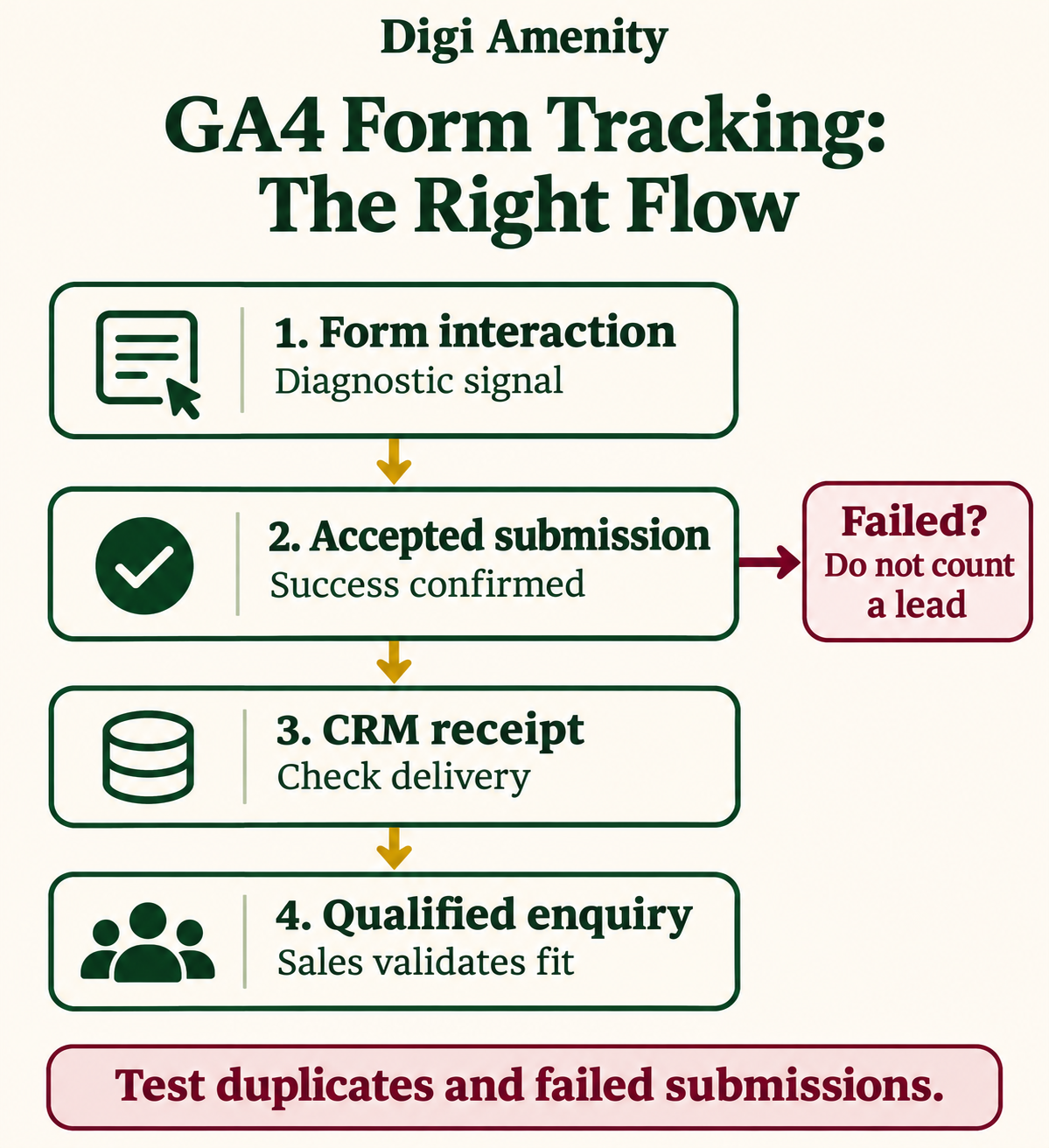
Our practical recommendation is to agree a four-stage measurement contract before configuring tags:
- Interaction: someone started using the form.
- Accepted submission: the website accepted the request successfully.
- Delivery: the enquiry reached the system your team uses.
- Qualification: a person or defined business process confirmed suitability.
A successful website response does not automatically prove email delivery, and an email receipt does not prove a qualified buyer. Give each stage an owner and an evidence source.
Which tracking method fits your form?
| Form behaviour | Starting approach | What to verify |
|---|---|---|
| Standard browser form submission | Scoped GTM Form Submission trigger | Validation failure must not create a success event; verify backend acceptance separately. |
| Dedicated thank-you page | Success-page event with a repeat guard | Direct visits, refresh and back navigation must not create additional leads. |
| Inline/AJAX confirmation | Documented success callback or developer dataLayer event | Trigger after a successful response, not after the button click or request start. |
| Third-party embedded form | Provider-supported integration | Check its event contract, iframe boundaries and destination property. |
| Only a visible success message available | Carefully scoped visibility trigger as fallback | Message is unique, appears only on success and cannot fire again accidentally. |
Google documents Check Validation and Wait for Tags for the native GTM trigger. Scope it to the relevant form and page. Check Validation is useful, but it does not substitute for testing your application’s server response or CRM delivery. Read the native form-trigger guidance.
Before adding another tag, inventory what already exists: theme scripts, plugins, GTM containers, Google tags and enhanced measurement. Assign one implementation to send each intended success event. Keeping a diagnostic form_submit event alongside generate_lead can be valid; counting both as interchangeable leads is the problem.
How do you set up a confirmed lead event in GTM?
The following is an implementation pattern for your developer and marketer to adapt. It is not a tested installation on your site.
- Define success. Document the form ID, success response, destination system and duplicate rules. Decide whether newsletter registration and sales enquiries need separate reporting.
- Create the success signal. Ask the developer to push an event only after the application confirms acceptance. Keep user-entered names, emails, phone numbers and free-text messages out of the analytics payload.
- Create a Custom Event trigger. Match the agreed event name exactly, then scope any additional conditions to the intended form.
- Create the GA4 Event tag. Use the correct Google tag/measurement ID and event name generate_lead. Map only approved, low-cardinality parameters such as a stable form label.
- Test before deployment. Use GTM Preview and inspect the event payload in GA4 DebugView. Compare the same test with the backend receipt.
- Approve reporting use. Only after successful QA, decide whether to mark the event as a key event and whether it belongs in advertising conversion reporting.
A synthetic dataLayer example:
window.dataLayer = window.dataLayer || [];
window.dataLayer.push({
  event: 'enquiry_accepted',
  form_type: 'service_enquiry'
});
This code does not submit the form, check a server response or prevent repeated firing by itself. The application must control when it runs and suppress duplicates for the same accepted request. The GTM trigger listens for enquiry_accepted; the GA4 tag sends generate_lead. Keeping these names distinct makes the implementation contract easier to audit. Google explains event-driven triggers in its data layer documentation.
If you assign a lead value, document how it was estimated and use the appropriate currency. Do not pass a full contract value simply because someone requested a quotation. A speculative value can distort later commercial decisions.
What changes for WordPress and Contact Form 7?
Use the form plugin’s documented success event rather than assuming every WordPress form behaves alike. Contact Form 7 documents wpcf7mailsent for the point at which sending email has successfully completed. Its example sends a custom analytics event. Adapt the event mapping to your measurement design and avoid running both a plugin integration and a second listener for the same success. Contact Form 7’s official tracking guide explains the hook.
That hook still needs a delivery check in your operational workflow. If enquiries enter an inbox before a team member creates CRM records, compare those stages separately. A spam folder, failed CRM integration or delayed manual entry should not be mistaken for an advertising targeting problem.
Which tests should pass before you trust the numbers?
Use this acceptance checklist for each important form. Run it on desktop and a real mobile browser, using clearly labelled test enquiries with permission. Keep test records out of normal lead-quality reporting.
| Test | Expected outcome | Evidence to retain |
|---|---|---|
| Valid submission | One success event and one accepted request | Tag trace, timestamp, backend receipt |
| Missing required field | No success event | Validation message and event trace |
| Server rejection or timeout | No false success | Application response and event trace |
| Double click or callback repeated | No duplicate for the same accepted request | Request and event counts |
| Refresh/direct thank-you visit | No new lead without a new accepted request | Navigation sequence |
| Consent choices | Tags respect the configured choice | Consent state and observed behaviour |
| CRM delivery | Receipt matches the intended destination | Sanitised operational record |
Google recommends enabling debug mode for your test device and inspecting events in DebugView. Privacy controls or denied Analytics-cookie consent can affect visibility; an absent DebugView event alone does not identify the cause. Use the documented DebugView troubleshooting workflow.
How should you compare GA4 with real enquiries?
Start with the same form, complete date range and timezone. Compare accepted backend requests, delivered CRM records and analytics success events. Investigate the differences; do not force the systems to match by deleting records or labelling missing analytics as zero leads. Consent, blockers, duplicate suppression, processing delays and scope differences can all matter.
Keep denominators explicit. A session-based completion rate is sessions with a confirmed enquiry divided by sessions in the same eligible form journey. A CRM qualification rate is qualified enquiries divided by the accepted enquiries in a defined cohort. Dividing raw form_submit event count by form_start event count can be misleading when one person retries, submits twice or returns in another session.
Hypothetical Mumbai example: an interior-design firm sees 40 analytics success events but only 25 CRM records in a test reporting period. The next action is to investigate the 15-record difference—not declare 15 leads lost. Perhaps one listener fires twice, some requests fail delivery, or the CRM view excludes duplicates. Reconcile these explanations before comparing channels or reducing follow-up staff.
Once measurement is credible, review the form’s usability and enquiry questions and the wider click-to-enquiry journey. Accurate tags cannot repair an unclear offer or an unanswered enquiry.
Frequently asked questions
Does GA4 track forms automatically?
Enhanced measurement offers form interactions when enabled for a web stream. Verify what it detects on each implementation. Automatic events do not remove the need to test accepted submissions and receipt in your business systems.
Should I count every form_submit as a lead?
Only if that event’s scope and behaviour match your agreed lead definition and pass testing. Search, login and newsletter forms may have different purposes. Prefer a deliberate success event for the sales enquiry you want to measure.
Why does an AJAX form fail to appear in GTM?
An AJAX implementation can use a different submission mechanism from a standard browser form. Inspect its documented callback or ask the developer for a success dataLayer event. A button-click workaround measures intent, not confirmed acceptance.
Is a thank-you page sufficient?
It can be a useful signal if it is reached only after success and repeated visits are controlled. Test direct access, refresh and back navigation. Otherwise it may count page visits as new enquiries.
Can I send email addresses as GA4 event parameters?
Do not send personal form contents to GA4 event parameters. Use safe form labels and inspect URLs and destination parameters for accidental personal data. Keep contact details in the approved operational system.
Why can qualified leads differ from GA4 leads?
They describe different stages. GA4 may record acquisition while the team later checks location, service fit or genuine intent. Compare a defined cohort and allow for qualification delay rather than treating different totals as an automatic tracking fault.
Need to trace the gap between forms and enquiries?
If your reports show leads that your team cannot find, Digi Amenity can review the form behaviour, tag setup, delivery path and follow-up process before you increase traffic spend. Start with a website and form implementation review tied to your actual enquiry workflow.
