

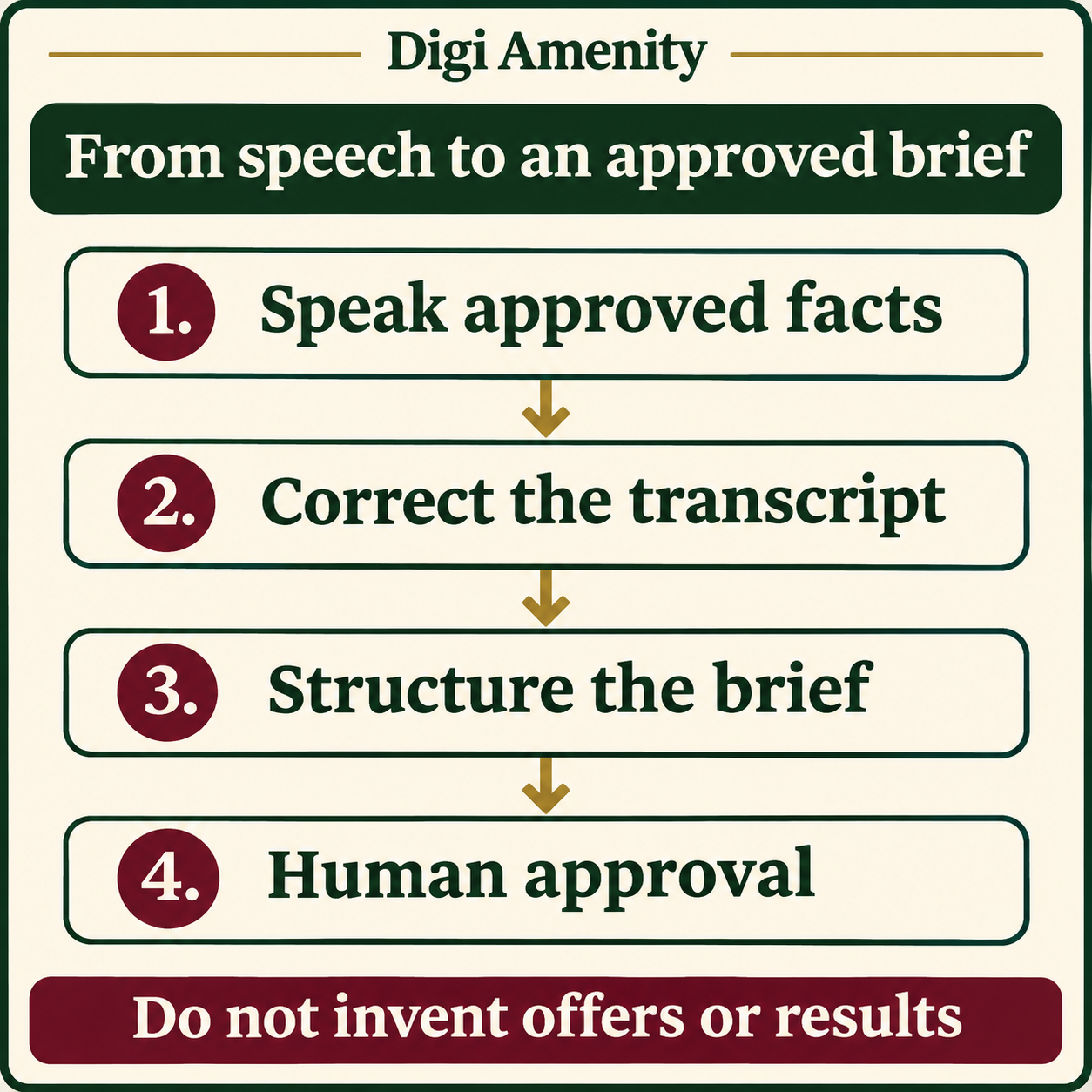
ChatGPT Live Dictation can help a business owner turn spoken product knowledge into editable prompt text. For marketing work, the useful process is: speak approved facts, correct the transcript, ask for a structured brief, then review every offer and claim before using the output. Faster capture is valuable only if it reduces the total work needed to produce an accurate brief.
Below is a practical workflow for Indian small businesses, including a hypothetical home-decor example, a reusable prompt and a simple measurement sheet. It is an untested demonstration, not a claim of client results or a benchmark of transcription accuracy.
What changed with ChatGPT Live Dictation?
OpenAI’s 18 November 2026 release notes announce live speech-to-text display, a control to show or hide the text through the waveform, and removal of the previous ten-minute recording limit. The announcement describes a global rollout to all ChatGPT plans on iOS, Android, web and desktop. Rollout language does not prove that the feature has reached your particular account. Check the official release notes and your app before changing a team process.
For an Indian business, this is a reason to try a small, approved task—not a reason to replace your existing briefing process immediately. Availability, microphone setup and your team’s correction effort still determine whether the workflow is useful.
Is dictation the same as ChatGPT Voice?
No. Official documentation distinguishes dictation, which creates prompt text before sending, from Voice, which supports a live conversation. Choose dictation when you want to inspect a written instruction before submitting it. Choose a conversation when back-and-forth discussion is the task. See ChatGPT’s feature documentation.
This article covers dictated input for a marketing brief. It does not recommend an audio API, promise automatic meeting transcription, or assume the capabilities of a voice conversation apply to dictation.
What should you prepare before speaking?
Prepare a small fact sheet first. Speaking without boundaries can produce an enthusiastic but unusable brief, especially when an owner mixes confirmed offers with ideas still awaiting approval.
- Audience: who the message is intended for and the buying problem.
- Product or service: exact name, relevant features and limitations.
- Approved offer: current price, eligibility and dates, only if verified.
- Evidence: the public page or approved document supporting claims.
- Action: the specific next step you want the audience to take.
- Boundaries: promises, discounts and superlatives the draft must not invent.
Use public or synthetic inputs for an initial trial. Do not read customer contact details, private analytics, unpublished client documents or credentials into the tool. Decide what your organisation allows before capturing information, rather than treating the later Send button as the first privacy decision.
How do you turn spoken notes into a usable brief?
- Check the input mode. Open ChatGPT and locate dictation’s microphone control. If Live Dictation has not reached your account, use an existing approved text-input method and keep the rest of this workflow.
- Speak one structured block. State the audience, product, verified facts, desired action and exclusions. Use short sentences. Spell unfamiliar brand or product names when necessary.
- Review the transcript before sending. Check names, rupee amounts, dates, quantities, locations and negations such as “not included”. These fields affect the offer, not just grammar.
- Request structure before copy. Ask for a brief with known facts, assumptions and unanswered questions. Resolve questions before asking for polished headlines.
- Approve the brief. Compare it against the fact sheet. A colleague should be able to find the supporting source for each material statement.
- Create a limited output. Start with one caption or one ad concept. Check whether the landing page and sales process can deliver what it promises before expanding into variants.
What could a business owner actually say?
Hypothetical example, not a tool test: a small home-decor shop wants enquiries for a lamp collection. The owner could dictate: “Prepare a brief for people furnishing a reading corner. The product is a table lamp with a fabric shade. Use only these supplied facts. The action is to view the collection. Do not add a discount, free delivery, warranty duration or brightness claim. Price and dimensions are not supplied; list them as questions rather than guessing.”
The expected useful result is a bounded brief: audience, use case, supplied facts, proposed angle, next action and missing information. It should not turn “reading corner” into an unsupported claim about eye health, or invent a limited-time sale to make the copy stronger.
Compare that discipline with the broader marketing-brief workflow. Dictation changes how facts enter the process; it does not remove the need to verify them.
Which reusable prompt keeps the output under control?
Turn the corrected notes below into a marketing brief. Use only supplied facts. Separate confirmed facts, creative suggestions and unanswered questions. Do not invent prices, discounts, delivery promises, certifications, customer feedback or performance results. Return: audience; problem; offer; evidence needed; suggested message angle; landing-page requirements; call to action; and a final approval checklist. If two notes conflict, show the conflict and ask for a decision. Notes: [insert approved, corrected text].
Keep the prompt with the approved fact sheet so another team member can reproduce the process. For ad variants after approval, the Google Ads copy guide covers a different downstream task. Do not treat a ready brief as permission to launch a campaign.
What privacy and accuracy checks matter?
OpenAI’s dictation FAQ says recorded audio is sent for transcription and the resulting text can be edited. Audio retention and model-improvement controls depend on the documented settings and account context; editing the transcript does not mean audio never left the device. Review the dictation FAQ and your organisation’s policy before using confidential material.
For mixed Hindi-English notes, do a short non-sensitive check using your own product vocabulary. This article has not tested language accuracy. If correcting the transcript takes longer than typing the same facts, use typed input for that task. For noisy environments, postpone important offer details until you can review them carefully.
How can you measure whether dictation helps?
Use a five-brief pilot as a practical internal experiment, not a statistically conclusive study. Choose comparable briefs and record:
- Capture time, including the fact-sheet preparation.
- Transcript correction time.
- Brief editing and approval time.
- Material errors caught: price, date, product, offer or unsupported claim.
- Whether a colleague could approve the result without asking for the original verbal explanation.
Compare total time to approval, not speaking speed alone. Keep quality requirements identical between typed and dictated briefs. If speed improves but material errors increase, refine the input checklist before extending the workflow.
Digi Amenity can help connect an approved brief with the creative, landing page and enquiry journey through its marketing and website services, so faster content preparation supports a clear business action.
Frequently asked questions
Is Live Dictation available in India?
The announcement describes a global rollout. That supports India relevance, but individual availability still needs checking in your account and app. This guide does not claim a completed India account test.
Do I need a paid plan for the announced rollout?
The announcement says all ChatGPT plans. Do not confuse that with the plan requirements of other Voice, Work or API features; check the exact product feature you intend to use.
Can I edit words that were transcribed incorrectly?
Yes, the dictation FAQ describes editable text before sending. Make offer-critical fields a deliberate checklist so a plausible sentence does not hide a changed amount or missing “not”.
Can I dictate in Hindi and publish the result in English?
You can design a workflow that requests English output, but verify names, meaning and product details yourself. No language-accuracy result was tested for this article; begin with non-sensitive sample notes.
Will this automatically create better-performing ads?
No performance outcome follows from the input method alone. The offer, audience, creative, landing page, measurement and follow-up still need to work together.
What should I do if the feature is missing?
Check the official rollout information and your app version, then use your existing approved input method. Do not delay a necessary brief or install an unrelated tool merely because a new feature is not visible yet.
