

Use ChatGPT for Google Ads copy by giving it an approved business brief, asking for distinct message angles, and reviewing every asset before testing it. Check the claims, character limits, combinations and landing page. Then judge the copy on qualified enquiries or profitable orders, rather than clicks alone.
This guide covers English responsive search ad copy for Indian businesses, with a hypothetical Mumbai service-business example. It includes prompts, a review worksheet and a testing checklist. It is about writing ads that run on Google, not buying advertising inside ChatGPT.
What can ChatGPT help with when writing Google Ads?
ChatGPT can turn a concise brief into alternative headlines, rewrite long sentences, suggest different ways to explain an offer and help identify repetition. The useful task is generating options for an editor to assess. It cannot establish that your business really offers same-day service, that a discount is current, or that a proposed message will produce better leads.
You can follow this workflow using text prompts and approved public information. It does not require connecting your Google Ads account or buying API credits. Features and usage limits depend on your ChatGPT account. Do not paste customer contact details, private analytics or confidential client material into an external writing service for this exercise.
OpenAI’s prompting guidance recommends supplying the goal, relevant context, desired output and important boundaries, then reviewing and refining the response. The process below applies those principles to paid-search copy.
What are the responsive search ad copy limits?
Google currently allows 3–15 headlines and 2–4 descriptions in a responsive search ad. Each headline can contain up to 30 characters, each description up to 90, and each display-path field up to 15. Assets need to work individually and in different combinations. Previewing an ad does not display every possible combination. Check the current Google responsive search ad specifications before uploading.
For this English workflow, count spaces and punctuation as well as letters. A sentence that fits the limit still needs editorial review: shortening “Get a cleaning quote” to “Get cleaning” changes the action and makes the promise less precise.
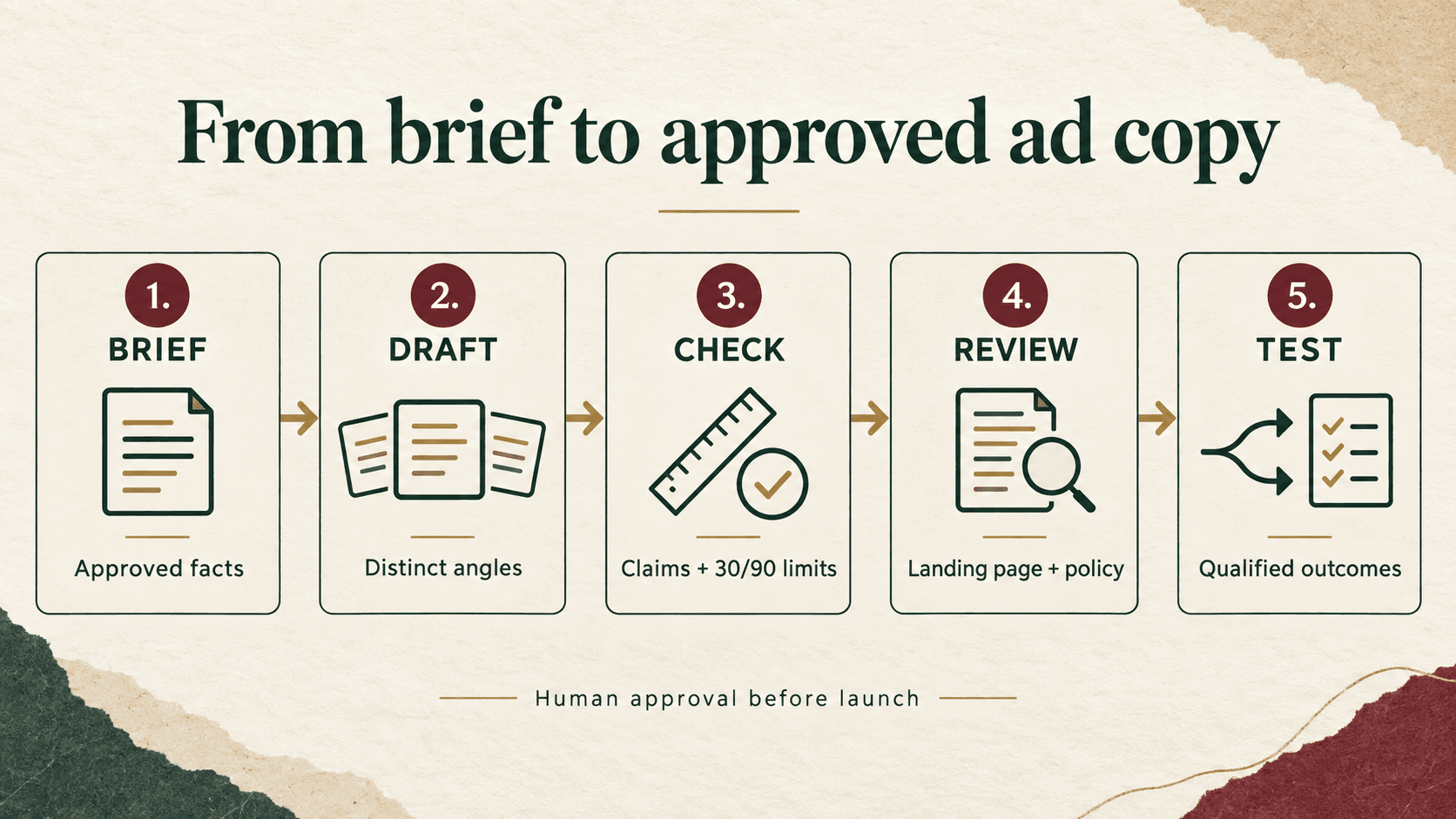
Step 1: What should go into the brief before you ask for copy?
Start with one ad group, one audience problem and one destination page. A broad request such as “write ads for my business” invites generic output. A useful brief explains the service, the search intent, the action after the click and the evidence supporting the offer.
Write down the geography you actually serve, eligibility conditions, product or service exclusions, approved pricing, available proof and prohibited claims. Include the landing-page URL and the specific passages that support the ad. A URL by itself is insufficient if the tool has not read it successfully.
Create a small claim ledger. Give each approved fact an ID so the reviewer can trace a headline back to evidence. An assumption should remain a question for the business owner; it should not become an advertising promise.
| Claim ID | Approved fact | Evidence to record | Expiry or review trigger |
|---|---|---|---|
| C1 | Service and customer type | Relevant service-page section | Service scope changes |
| C2 | Actual service area | Coverage policy confirmed by operations | Coverage changes |
| C3 | Available next step | Working quote form or booking journey | Form or process changes |
| C4 | Any offer or measurable proof | Approved terms or original evidence | Offer end date or evidence becomes outdated |
“Best in Mumbai”, “guaranteed results” and “24/7 support” do not become approved facts because they sound persuasive. If evidence is absent, leave them out.
Step 2: How do you choose useful angles instead of repeated headlines?
Separate the searcher’s problem from the business’s preferred slogan. Someone searching for office cleaning wants to know whether the provider handles offices, covers the location and offers a suitable next step. A headline about “transforming spaces” answers less of that decision.
Build a short angle list: service relevance, location, process, a verified differentiator and the next action. Use price or urgency only when supported. For e-commerce, useful angles may concern the product’s material, size range, delivery conditions or return terms. Each one needs a matching page detail.
Do not fill all available asset slots with synonyms. “Professional Office Cleaning”, “Expert Office Cleaning” and “Quality Office Cleaning” may consume three slots without adding three reasons to enquire. Choose assets that contribute different information.
Step 3: Which ChatGPT prompts should you use for Google Ads?
Use a staged conversation so you can correct the brief before reviewing dozens of lines. These are reusable prompt templates, not records of a campaign test.
Prompt A: check the brief
Help prepare English Google Search ad copy for one ad group.
Audience and search intent: [insert]
Service or product: [insert]
Location and exclusions: [insert]
Landing-page facts with claim IDs: [insert approved facts]
Desired action: [insert]
Tone: clear, practical and specific.

First list missing information and contradictions. Do not draft ads yet.
Use only the supplied facts. Do not invent prices, guarantees, awards,
availability, customer numbers or performance results.
Resolve material questions with the business owner. If the tool suggests a benefit you have not approved, place it in the questions list. Do not quietly move it into the brief.
Prompt B: produce distinct draft assets
Using the approved brief below, propose 12 headline candidates and
4 description candidates for a responsive search ad.
Keep headlines within 30 characters and descriptions within 90.
Use distinct angles: service relevance, location, verified process,
approved differentiator and next action. Omit unsupported angles.
Each asset must make sense on its own and alongside other assets.
Avoid repeated promises, generic hype and unsupported superlatives.

Return: asset ID, text, angle, supporting claim IDs, and review notes.
Flag uncertainty instead of filling gaps. These are drafts only.
Approved brief: [insert]
Twelve headline candidates is an editorial starting point, not a Google requirement. Choose the number that gives your reviewer useful variety without creating unnecessary work. Do not assume any character count printed by the model has been independently checked.
Prompt C: revise only the identified problems
Revise only assets [IDs]. The reviewer found these issues: [list].
Keep the approved facts and intended action unchanged.
Return the revised text, supporting claim IDs and what changed.
Do not introduce new claims to make the wording shorter.
What would this look like for a Mumbai service business?
Hypothetical example: a fictional office-cleaning provider serves Mumbai offices, prepares quotes based on requirements and lets prospects submit an enquiry. It has not supplied evidence for same-day appointments, fixed prices, awards or guaranteed outcomes. The examples below are editorial illustrations, not actual ChatGPT outputs or Digi Amenity client results.
| Draft headline | Characters | Why consider it? |
|---|---|---|
| Office Cleaning in Mumbai | 25 | Connects the service and verified location. |
| Request an Office Quote | 23 | Explains the available next action. |
| Cleaning for Your Office | 24 | Identifies the customer context. |
A possible description is: Tell us your office size and cleaning needs. Request a quote for your Mumbai office. It contains 84 characters including spaces and punctuation. Use it only if the form really collects those requirements and the service area is accurate.
Now compare an unsupported alternative: “Mumbai’s #1 Cleaners. Same-Day Service.” The problem is not merely tone. It asserts a ranking and availability that the brief did not establish. Removing those claims is more useful than asking for a more persuasive version.
For an e-commerce store, apply the same discipline. “Free Shipping Across India” is misleading if exclusions or a minimum order apply. A concise line such as “See Delivery Options” may be a better candidate when the destination clearly explains charges and coverage. The choice depends on the real offer.
Step 4: How do you check characters, combinations and claims?
Paste English assets into a local worksheet. Use one row per asset and calculate the length with =LEN(B2) when B2 contains the copy. Keep a separate limit column and use =IF(C2<=D2,"Within limit","Revise") if C2 is the calculated count and D2 is the applicable limit. Check the final text again in Google Ads or Ads Editor; this worksheet does not cover every language or dynamic insertion rule.
Next, read assets in several combinations. Look for repeated phrases, conflicting prices, awkward sentence fragments and a CTA that depends on another asset being present. Do not place a necessary qualification in a line that may not appear.
Google’s pinning guidance explains how to reserve positions for required wording. Pinning reduces the available combinations. If wording must always appear, review the documented Headline 1, Headline 2 or Description 1 options; do not rely on a third headline or second description for an essential qualification. Check the preview and policy implications with the person approving the offer.
Use Ad Strength as creative feedback. It does not directly decide serving eligibility and it is not evidence that an ad produces profitable customers. Do not replace a truthful, relevant message with an unsupported claim merely to improve a rating.
Copy this approval worksheet
Keep these fields together for each asset: asset ID → proposed copy → character count → message angle → claim IDs → landing-page evidence → reviewer → approve/revise/reject → test version. Add the review date and an expiry date for temporary offers.
A line is ready for the next stage only when it fits, reads naturally, has support for every factual claim and leads to a matching offer. If evidence is missing, the status is “revise” or “awaiting evidence”, not “approved”. Keep the rejected wording and reason in the local log so the same claim does not reappear in the next batch.
Step 5: What should you check on the landing page?
Open the destination on a phone. Confirm that the promised service, product, offer and conditions are easy to find. Submit a test enquiry through an approved testing process, or check the purchase journey without placing an unintended order. Verify that the CTA wording matches the actual next step.
Google’s misrepresentation policy prohibits misleading claims and unavailable offers. This makes the landing-page review part of copy approval. “Book now” creates a different expectation from “Request availability”; use the wording that reflects the customer journey.
Check the intended conversion before measuring a copy test. A button click, duplicate form event or thank-you-page reload should not be casually treated as another qualified enquiry. Use this Google Ads conversion-tracking troubleshooting guide when the numbers do not match actual submissions.
Step 6: How do you test the copy in Google Ads?
Write a hypothesis before launching: “Explaining the quote process will attract more suitable office-cleaning enquiries than generic quality language.” Choose a primary business metric and a guardrail, such as cost per qualified enquiry and qualified-enquiry volume. Google’s experiment guidance recommends isolating a variable and choosing the success measures in advance.
For a suitable responsive search ad test, Google’s documented ad-variation workflow is:
- Open Campaigns → Experiments → Ad variations and choose the add option.
- Select the intended campaign and responsive search ads. Use filters to limit the affected ads.
- Choose the relevant text-change option and inspect the proposed replacements.
- Name the variation, select dates and set the experiment split.
- Review the scope and budget implications before creating it. It starts automatically on the selected date.
Account navigation and available options can vary. Do not treat this as a saved-but-inactive draft workflow. If your intended test needs a different experimental setup, establish that design before making live changes.
Keep bids, audiences, offer and landing-page changes stable where practical. Record unavoidable changes. Comparing two independently serving ads is not automatically a controlled A/B test, and comparing this week with last week can mix copy effects with seasonality or auction changes.
Allow for the time between a click and a qualified outcome. A small early difference is a reason to keep observing, not proof of a winner. Set the review period around traffic, conversion delay and the cost of a wrong decision. If evidence remains weak, record “inconclusive” and keep the current approach or redesign the test.
Which metrics should determine whether the copy worked?
Use matching dates, attribution settings and outcome definitions for both versions. Keep brand and non-brand traffic separate when they represent different intent. The following calculations are a practical reporting framework, not universal performance targets.
| Measure | Calculation | Interpretation |
|---|---|---|
| CTR | Clicks ÷ impressions × 100 | Relevance signal; does not establish lead quality. |
| Average CPC | Ad spend ÷ clicks | Acquisition cost before the visitor converts. |
| Qualified-lead rate | Qualified leads ÷ recorded leads × 100 | Requires a consistent CRM definition and deduplication. |
| Cost per qualified lead | Ad spend ÷ qualified leads | Useful for service businesses when outcomes are attributable. |
| Purchase CPA | Ad spend ÷ attributed purchases | Use validated purchase tracking and examine cancellations. |
| Reported ROAS | Attributed purchase revenue ÷ ad spend | Revenue efficiency; not profit or proof of incremental sales. |
For lead generation, agree what “qualified” means before the test: relevant service, serviceable location, genuine contact and an opportunity the team can handle. Track response time and sales outcomes alongside the ad. Read Digi Amenity’s guide to Google Ads lead quality if more enquiries are not becoming better opportunities.
For e-commerce, examine purchases, revenue, margin, refunds and product availability. A discount-led headline can increase orders while reducing contribution. Keep gateway failures and checkout problems in view before blaming the copy.
Hypothetical calculation: two versions each spend ₹10,000. Version A records 40 leads, of which 8 qualify; B records 25 leads, of which 10 qualify. A has a ₹250 CPL and ₹1,250 cost per qualified lead. B has a ₹400 CPL and ₹1,000 cost per qualified lead. B looks more promising on qualified-lead cost, but these small counts alone do not establish a statistically reliable winner. This is an illustration, not a campaign result.
If a denominator is zero, report the rate as unavailable or undefined with its reason. Do not label missing CRM qualification data as zero qualified leads. Keep tentative observations separate from decisions.
What belongs in the final launch checklist?
- One clear ad-group intent and a relevant destination are documented.
- Every price, offer, location, proof point and availability claim is approved.
- Character counts are checked independently and the final assets pass the platform editor.
- Messages add distinct information and make sense in different combinations.
- Required qualifications remain visible; any pinning is deliberate.
- The mobile page, form or checkout matches the copy.
- Conversion events are validated and qualified outcomes have an agreed definition.
- The test hypothesis, scope, dates, primary metric and guardrail are recorded.
- An accountable person approves launch and owns the next review.
- The decision log allows keep, revise, stop or inconclusive, with supporting evidence.
Frequently asked questions
Can I paste ChatGPT’s Google Ads copy directly into an account?
Treat it as a draft. Check factual support, character counts, combinations, policy and destination relevance first. A fluent line can still promise something your business does not provide. Keep approval with a person who knows the offer.
Do I need a paid ChatGPT plan for this workflow?
The method uses ordinary text prompts and does not depend on an API or Google Ads connector. Use the capabilities available in your account and check current plan limits if volume, files or other tools matter. A paid plan does not replace factual review or campaign measurement.
How many headlines should I ask ChatGPT to write?
Request enough candidates to cover distinct, supported angles, then select a coherent set within Google’s current limits. The example requests twelve candidates to make review manageable. Filling every slot with near-duplicates is less useful than improving the brief.
Can ChatGPT guarantee that an ad will be approved?
No. Ask it to flag possible issues, then review the current policies and your landing page. Platform approval and business performance are separate checks. Regulated offers need the appropriate specialist review as well.
Should I choose the version with the highest CTR?
Use CTR to investigate relevance, then assess the preselected business outcome. Copy that attracts many unsuitable enquiries can look attractive on clicks while wasting sales-team time. For e-commerce, include purchase economics and refunds in the decision.
Can I use the same approach for Hindi or regional-language ads?
The brief, evidence and review process still applies, but use a fluent reviewer and verify text in the platform’s language-aware editor. Literal translation can change meaning or tone. The simple character worksheet here is intended for the English examples.
How often should I refresh AI-assisted ad copy?
Review when the offer changes, evidence becomes outdated or reliable performance observations justify a new hypothesis. Avoid an automatic weekly rewrite rule. Frequent uncontrolled changes can make it harder to learn which message helped.
Need help connecting the copy to real enquiries?
If your Google Ads attract clicks but few suitable enquiries, Digi Amenity can review the search intent, ad messages, landing page, tracking and follow-up process before you increase the budget. Explore our Google Ads management services in Mumbai to discuss that review.
Platform documentation checked on 7 October 2026. Examples are hypothetical. Interface labels and account options may change.
