

Shopify product page optimization starts by making the purchase easier to understand: show exactly what the customer gets, make the correct variant easy to select, explain delivery and returns, and keep the buying controls usable on mobile. Then measure whether those improvements lead to completed, profitable orders. A prettier page alone cannot fix irrelevant traffic, unavailable delivery or a payment failure.
For an Indian store, this often means answering practical questions before adding another widget: Is the price for one piece or a set? Does the item ship to my PIN code? Is cash on delivery available for this order? Will the colour I select match the photo? These details connect marketing promises to the order your team must actually fulfil.
This guide gives you a way to investigate those questions, prioritise changes and check the outcome. The examples are hypothetical, not Digi Amenity client results.
Where are shoppers leaving the purchase journey?
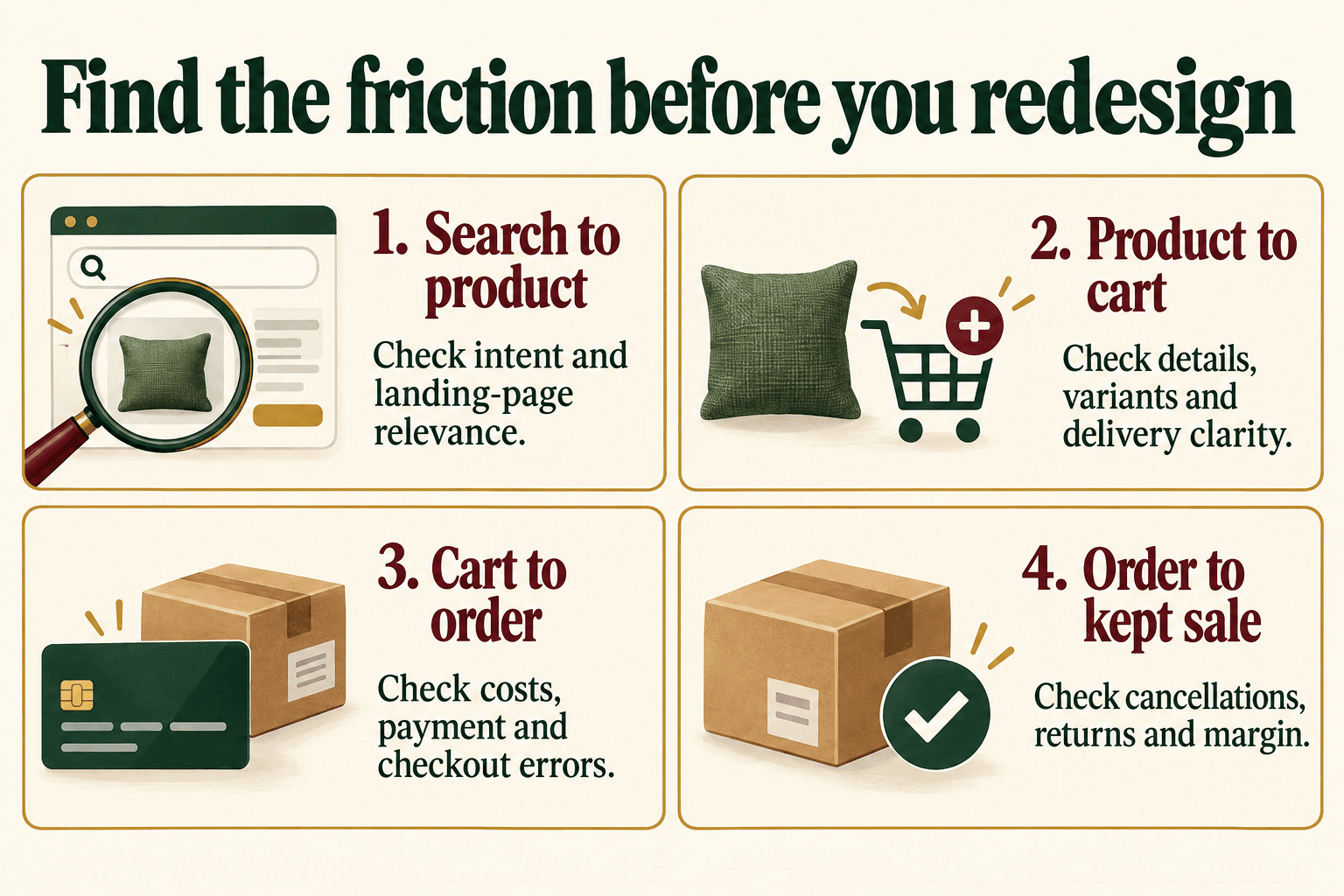
Start by separating discovery from buying. Search Console impressions and clicks tell you about search visibility. Product-page sessions and cart additions describe behaviour inside the store. Neither proves that the customer paid, received the right item or kept the purchase.
| Observed pattern | First checks | Useful next action |
|---|---|---|
| Search impressions, few clicks | Query intent, product availability, search title and competing results | Make the search listing accurately describe the product and its distinguishing feature. |
| Product visits, few cart additions | Ad promise, price, included items, fit, variants and delivery information | Resolve the biggest unanswered buying question. |
| Cart additions, few completed checkouts | Unexpected charges, payment errors, address eligibility and checkout friction | Test the whole order journey; do not assume a product-description problem. |
| Orders followed by cancellations or returns | Expectation mismatch, wrong options, fulfilment and return reasons | Correct the product promise and measure orders customers keep. |
These patterns are starting points for investigation. A visitor comparing several products is not necessarily experiencing a defect. Read customer questions and inspect a few real journeys before deciding what to change.
Which product pages should you optimise first?
Choose a manageable group that matters to the business: products receiving paid traffic, products with repeated support questions, or commercially important items whose visitors rarely progress. Include one simple product and one with several options so a template change does not work for only the easiest case.
Record the product, traffic source, device, stock situation and suspected problem. A sold-out bestseller and an unfamiliar premium item need different treatment. Prioritise confirmed faults—an unusable selector or incorrect pack quantity—before testing a new headline. Save an example of the existing page so the team can compare the change.
Digi Amenity’s approach is to examine the ad, product information, storefront and fulfilment together. If an ad promises a complete bedding set but lands on a single cushion cover, fixing the destination or promise is more useful than changing the Add to Cart colour.
What should customers understand near the buying controls?
The product name, selected option, price and next action should form a clear purchase summary. Supporting details can sit further down the page, but a customer should not have to open three tabs to understand what the price buys.
- Identity: a recognisable product type plus the material, model or other detail needed to distinguish it.
- Contents: one item, a pair, a multipack or a cover without its insert.
- Options: readable size and colour labels, a clear selected state and visible availability.
- Cost: the current price, genuine offer conditions and an explanation of charges calculated later.
- Next step: a working Add to Cart button with confirmation of what was added.
Keep the most important answer close to the choice it affects. Put fit guidance beside size selection and compatibility advice beside the model option. A long brand story can support the purchase later; it should not displace the information needed to select the right item.
How do delivery, COD and returns affect Indian shoppers?
Write delivery information your operations team can support. Separate dispatch time from arrival time. If eligibility or cost depends on the address, explain this and let customers check it before committing where your store supports that feature. Test both a serviceable and an unserviceable PIN code.
Only display UPI, card, wallet or cash-on-delivery options that are genuinely available through your checkout configuration. COD may have conditions such as location, order value or product eligibility; show the actual conditions instead of a store-wide promise that fails at checkout. Payment logos are not evidence that a method works.
Summarise the return window, item-condition requirements, exclusions and relevant fees, then link the full policy. For made-to-order, personalised or final-sale products, place those conditions where the customer chooses the item. Avoid invented countdowns or stock warnings.
Do not judge COD changes by placed orders alone. Review delivered orders, cancellations, return-to-origin costs and contribution after fulfilment. A higher order count can still create a weaker business outcome.
What does a useful product description look like?
Build the description from verified product information and common buying questions. Specific facts do more work than claims such as “premium quality” repeated several times. Use a brief like this before writing the final copy.
Hypothetical product brief: a cotton cushion cover
- One cream cotton cover, 40 × 40 cm; insert sold separately.
- Concealed zip; photograph the front, back and closure.
- State the verified care instructions and any measured size tolerance.
- Show each colour as the actual selected variant.
- Use the store’s real price, delivery estimate and return terms.
A concise opening could be: “A cream cotton cushion cover for a 40 × 40 cm insert, finished with a concealed zip. Includes one cover; the insert is sold separately.” These example specifications must be replaced with the facts of the item being sold.
Add useful context below that opening: texture, intended use, compatibility, what is excluded and how to care for it. Avoid unsupported claims such as stain-proof, medically beneficial or certified organic unless the necessary evidence exists.
Product photography should support the same facts. A styled image may attract attention, while a close-up answers a construction question and a scale reference clarifies size. Label accessories that are not included. Our ecommerce product photography shot list explains how to plan the supporting images.
Do variants and mobile controls work together?
Test a complete option change: choose a colour, change size, add the item, then read the cart. The photo, selected label, price, availability and cart item should agree. Test an unavailable option too; an error should explain what the customer can do next.
For Shopify product page design, treat mobile QA as a buying task rather than a screenshot exercise. Check that a customer can open a size guide, close it, select a variant, read the delivery terms and reach the cart. Verify keyboard access and visible focus as well as touch controls. A sticky buying bar must reflect the current selection and avoid covering chat, consent controls or important text.
Check speed on representative product pages after adding galleries, reviews or other tools. Google’s Core Web Vitals guidance sets good thresholds at LCP ≤2.5 seconds, INP ≤200 milliseconds and CLS ≤0.1, assessed at the 75th percentile. These measure loading, responsiveness and stability respectively; they are not a sales guarantee. Field data and a single laboratory test can differ.
Investigate the actual heavy element or broken interaction. Do not remove useful product evidence solely to chase a score, and do not install several overlapping apps without checking what they add to the page.
How should Shopify product page SEO and AI visibility work?
Match the page to the product a customer is searching for. A category query may belong on a collection; a particular model or specification may belong on a product page. Use the product’s distinguishing details naturally in its title, opening and specifications, without a target keyword density.
In Shopify admin, open the product and edit Search engine listing using its pencil icon. Review the Page title and Meta description, then save. Shopify documents the process in its product editing guide. Keep these fields descriptive; the preview is not a promise of the exact search appearance. Avoid changing an established URL casually.
Link from a relevant collection or buying guide so the product can be found through the store. Recommend compatible accessories or useful alternatives with a clear reason. For example, an insert of the correct dimensions is more relevant to a cushion cover than an unrelated bestseller.
Google’s product data documentation explains how Product structured data and Merchant Center feeds support eligibility for product search experiences. Keep price, availability and other details consistent with the visible page. Check the theme and installed apps before adding another schema generator, and validate the final output. Eligibility does not guarantee a rich result.
For AEO and GEO, make the product understandable: what it is, who it suits, its limitations and the terms of purchase. Google’s generative AI search guidance says there is no special schema or required AI text file for its search features. Clear answers help readers; they do not guarantee an AI citation. Other platforms have their own requirements.
How do you measure whether a change helped?
Choose the denominator before comparing rates. Shopify’s behaviour reports distinguish sessions with cart additions, sessions reaching checkout and sessions completing checkout. Their standard step rates use total sessions; open and closed funnels also count journeys differently. Orders and completed-checkout sessions can differ. Keep the definition consistent.
Hypothetical diagnostic, not a benchmark: imagine 1,000 sessions viewing one product, with 80 subsequently adding that product to cart, 50 reaching checkout and 20 completing its purchase in the same measured journey.
- Product-view-to-cart rate: 80 ÷ 1,000 = 8%.
- Cart-to-purchase progression: 20 ÷ 80 = 25%.
- Product-view-to-purchase rate: 20 ÷ 1,000 = 2%.
These custom ratios require the same product, session population and ordered journey. Dividing all-store purchases by raw product-view events would not reproduce them. If cart additions rise to 100 but completed purchases remain 20, investigate what changed before declaring success.
Compare equal-length complete periods with the same product set, device and traffic-source filters. Record stock changes, promotions and tracking releases. For low-traffic stores, a short before-and-after movement is only a directional observation. Do not claim a statistically reliable winner from a few orders.
Retain one primary measure and commercial checks such as completed orders, returns and contribution. Test one meaningful uncertain change when the available traffic supports it. Fix incorrect information and reproducible faults directly.
If the main loss occurs after checkout starts, use our Shopify abandoned checkout recovery guide alongside the diagnosis. Recovery messages cannot compensate for a product promise or payment flow that remains wrong.
What should the implementation record contain?
For each change, record the product or template, evidence, proposed correction, owner, release date, success measure and rollback option. A useful task reads: “Customers cannot confirm whether the insert is included. Add the contents statement beside the price, photograph the package contents and check the selected variant in cart.” That is specific enough for copy, design and operations to review together.
After release, test the full mobile purchase path again and preserve the measurement baseline. Extend the improvement to similar products only after checking their facts and requirements.
Frequently asked questions
What is Shopify product page optimization?
It is the process of improving the information, design and functionality that help a customer evaluate and buy a product. Useful work connects search intent, product accuracy, option selection, delivery and measurement instead of focusing only on visual styling.
What is a good product-page conversion rate?
There is no universal target for every store. Product category, price, stock, channel and the denominator all affect the number. Compare your own consistent product groups and periods, then check whether completed orders and commercial outcomes improve.
Do I need a paid app to improve product pages?
Often the first improvements are clearer copy, accurate media and better use of existing controls. Add an app when it solves a defined requirement your current setup cannot meet. Assess compatibility, performance, ongoing cost and data access before committing.
Should I use Add to Cart or Buy Now?
Keep a clear route that supports how customers buy your products. A direct checkout option may suit a simple standalone item, while a cart supports comparison, accessories and several products. Test each route with required options and explain the outcome of the button.
How can I improve pages without much traffic?
Start with customer questions, missing information and reproducible usability problems. Validate the revised journey with realistic tasks. Save the baseline and collect more data over time instead of treating a small number of orders as proof of an experiment.
Should I remove an out-of-stock product page?
First distinguish temporary unavailability from permanent discontinuation. A temporarily unavailable page can explain the situation and offer relevant alternatives. For permanent changes, review search demand, links and replacement relevance before deciding how to retire the URL. Avoid sending every discontinued item to the homepage.
Can FAQs or schema guarantee visibility in AI answers?
No. Product-specific answers and accurate structured data make information easier to interpret, but they cannot guarantee inclusion or ranking. Prioritise questions that help customers decide, and maintain consistent product facts across the storefront and applicable feeds.
If your Shopify store gets product visits but too few completed orders, Digi Amenity can review the ad-to-product journey, buying information, mobile controls and measurement before recommending a redesign. Explore our web development services to discuss the pages and purchase steps that need attention.
