

Product photography for ecommerce should answer the questions a customer would normally resolve by handling the item. Show the whole product, important details, realistic scale, relevant variants and exactly what is included. Plan the gallery around those decisions before choosing props or adding more images.
A beautiful photograph can attract attention while leaving a buyer unsure about size, finish or compatibility. For an Indian online store selling across cities, the product page has to carry those explanations without relying on an in-person conversation.
Which questions should your product photos answer?
Start with actual customer questions, support messages and documented return reasons. Group them by uncertainty: appearance, dimensions, material, use, included parts and variation. If there is no customer history yet, ask someone unfamiliar with the product to review the page and explain what they still need to know.
Digi Amenity’s view is that photography, product copy and the buying journey should support the same promise. An ad showing a complete styled room should not send shoppers to a page that leaves them guessing which item is for sale. Match the image, product name, variant and offer.
A practical ecommerce product photography shot list
Use the following as a planning framework, not a fixed number of photos every product must have. A simple accessory and a configurable piece of furniture need different explanations.
| Shot | Customer question | What to check |
|---|---|---|
| Clear overall view | What am I buying? | The item is recognisable, fully visible and not obscured by props. |
| Useful alternative angle | What does the side, back or underside look like? | The view reveals information absent from the first photo. |
| Material or construction detail | What is the finish or texture? | Lighting and editing preserve the actual surface. |
| Scale reference | How large is it in use? | The reference is realistic and dimensions also appear in text. |
| Included items | What arrives in the package? | Accessories and optional extras are clearly distinguished. |
| Variant view | Which colour, size or configuration am I choosing? | The displayed image matches the selected option. |
Give each planned image a purpose. Two nearly identical angles may add less value than one close-up that explains a clasp, connector or edge finish. When a feature is difficult to demonstrate in a still photo, consider whether a short demonstration would explain it more clearly. Shopify supports product media including images, video and 3D models; suitability depends on the product and store setup. See Shopify’s product media overview.
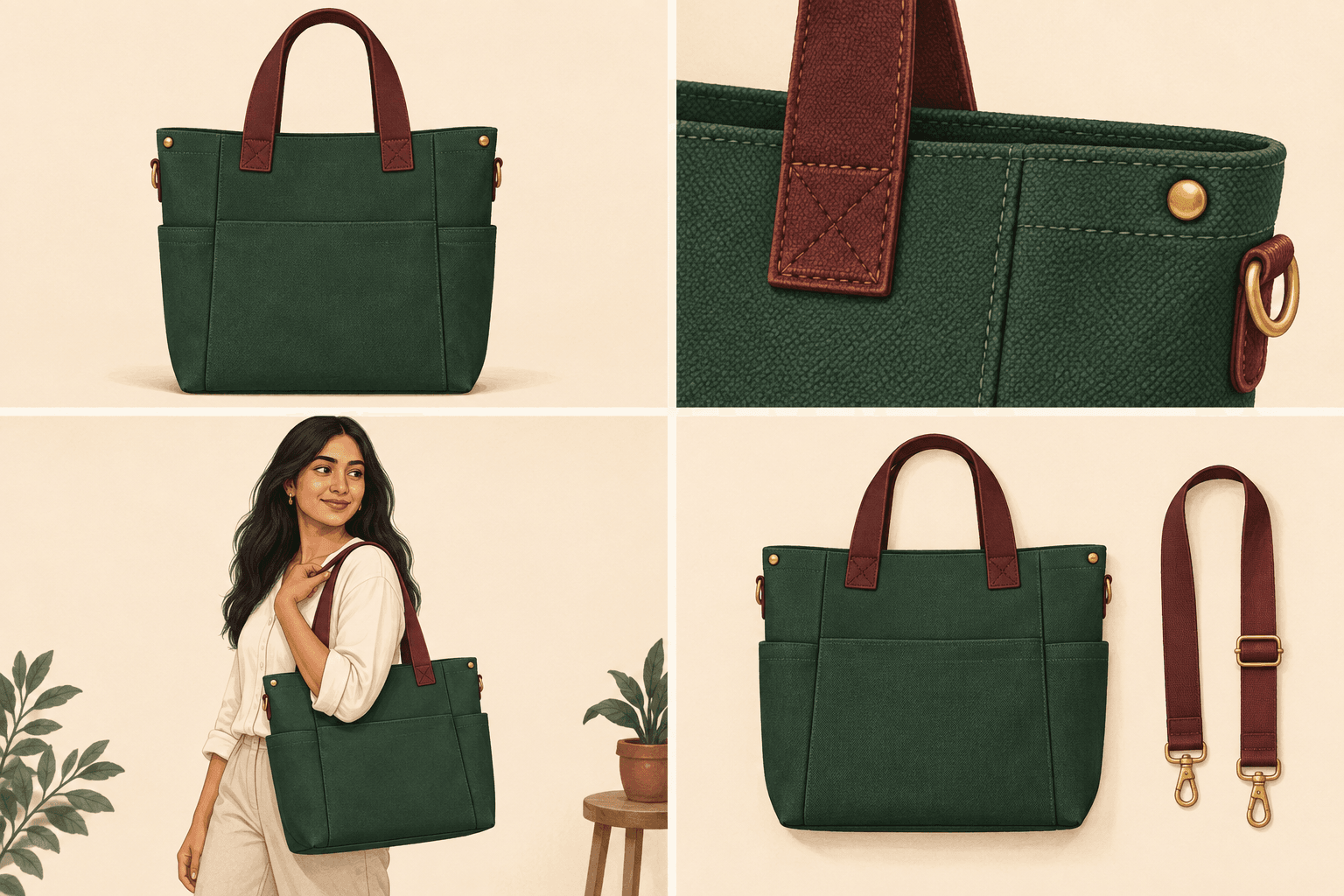
How do you show size without misleading the buyer?
Use a context shot with a familiar reference, but keep numerical dimensions available in normal page text. Camera perspective can make an object appear larger or smaller, so a lifestyle photo should support measurements rather than replace them.
Hypothetical example: A store sells a small tabletop vase. Its only image shows the vase against an empty wall, making scale hard to judge. A second photo on a desk with a familiar object can help, while the description states the verified height and widest diameter. If flowers or a tray are styling props, explain that they are not included.
For products that need to fit somewhere, identify the dimension that affects the decision. A bag’s outside width does not necessarily establish whether a laptop fits inside. A lamp’s total height may not answer whether its base fits a narrow shelf. Photograph or describe the relevant measurement after checking the actual item.
How should you prepare for the shoot?
Create a brief listing product codes, variants, required views and any features that must remain visible. Confirm which sample represents the version customers will receive. If the product changes after the shoot, the gallery may need updating too.
Keep a reference image of the approved lighting, framing and background for the session. Review a test shot at the size customers will see on a phone before photographing the whole range. A detail that looks clear on a large monitor can disappear inside a small product card.
Assign someone who knows the product to approve accuracy. The photographer may not know that a surface is intentionally textured, that an attachment is optional or that a particular mark distinguishes two variants. Record those details in the brief rather than expecting editing to resolve them later.
What should product photo editing change?
Editing can tidy presentation, but the delivered item must still match the promise. Keep a clear distinction between removing background distractions and altering the product’s material, construction or included features.
For handmade goods, discuss which variations are normal and how the page should explain them. Do not smooth a naturally uneven surface until the photograph suggests a different finish. Keep colour reasonably faithful to the reference product while recognising that customer screens and viewing conditions vary.
When using generated backgrounds or illustrative scenes, inspect the product carefully for changed edges, proportions, reflections and accessories. Do not present a generated product feature as evidence of something the real item has. Keep the original approved product files so corrections have a reliable reference.
How do you prepare product images for the website?
Organise files by product and variant, keeping high-quality originals separately from web exports. Choose export settings after testing the actual gallery: detail should remain clear when viewed or zoomed, while images should not be unnecessarily heavy. Avoid treating one file size or dimension as a universal answer for every theme and placement.
For product image SEO, Google recommends descriptive filenames, helpful alt text and placing images near relevant content. Alt text should describe the image in context rather than repeat a list of keywords. See Google’s image SEO guidance.
For example, “Green tote bag with detachable shoulder strap, front view” explains a specific image. “Best bag India cheap bag shopping bag” does not. Keep important facts such as measurements, care instructions and included parts in readable page text as well.
Review the gallery on the live theme. Check cropping, variant switching, zoom behaviour and whether the first image still identifies the product on collection pages. Our website development services address the product-page experience in which the images appear.
How can you judge whether the new gallery helped?
Choose a product group and document the gallery change. Track the questions buyers ask, product-page progression and confirmed orders over comparable periods. Where available, examine returns with relevant reasons such as size or appearance mismatch. These signals help locate uncertainty; they do not prove that photography alone caused a change.
Record simultaneous changes to price, promotions, traffic and delivery terms. A new discount or a different advertising audience can affect results even if the gallery stayed the same. Use our marketing funnel guide to connect product discovery with later purchase steps.
Before adding more photos, ask whether the existing images leave a specific decision unanswered. If customers understand the product but stop at checkout, investigate that later step rather than assuming another lifestyle shot will fix it.
If your product pages look polished but customers still ask basic questions about size, finish or what is included, Digi Amenity can review the photography brief, product information and page experience together before you reshoot the catalogue.
Frequently asked questions
How many photos does an ecommerce product need?
Use enough to answer the product’s important buying questions without unnecessary repetition. Start with the overall view, relevant details, scale and included items, then add views specific to the product.
Can I start product photography with a phone?
A phone can be a practical starting point if the resulting images show the product accurately and clearly. Test lighting, focus, consistency and the actual website display before deciding whether more equipment or a professional shoot is needed.
Do all product images need a white background?
No single background suits every website placement. A clean background helps identify the item, while a context image can explain use or scale. Check the separate image requirements of any marketplace or advertising feed you use.
What belongs in a product photography shot list?
Include the product code, variant, view, customer question, required detail and approval owner. This makes the brief specific enough to check whether the delivered images answer the intended questions.
Can I use the same photo for every colour variant?
Use images that accurately represent the option the customer selects. If an exact variant photo is unavailable, make the limitation clear rather than letting the gallery imply a different colour or finish.
What should product image alt text contain?
Describe the relevant product and view in concise, useful language. Include a distinguishing feature when it helps someone understand the image, and avoid stuffing search phrases into the description.
Will better photos guarantee more sales?
No. Photos can address uncertainty, but price, product fit, delivery, trust and checkout usability also affect purchase decisions. Evaluate the gallery alongside those parts of the journey.
