

User generated spam is unwanted or deceptive content that other people publish through your website’s comments, profiles, reviews, forums or submission tools. To control it, review risky submissions before they become public, decide which pages belong in search, and monitor both abuse and genuine customer activity. A filter alone is rarely a complete process.
On 26 October 2026, Google updated its guidance to explicitly address tools that publish shared pages, generated content and web apps. For an Indian business, the practical question is simple: can someone create a page on your domain faster than your team can check it? If yes, review that publishing route before increasing traffic to it.
This guide explains how to make that assessment, reduce WordPress comment spam and respond to a problem without accidentally hiding useful pages or blocking enquiries.
What changed in Google’s user generated spam guidance?
Google’s documentation changelog records a 26 October update covering indexing of link-shared content and monitoring abuse in Search Console. Its prevention guide now explicitly includes shareable pages, generated outputs and interactive tools, alongside familiar contribution channels.
The emphasis is on publishing purpose: a page created for direct sharing or collaboration may not be intended for search discovery. Google also recommends watching for unexpected indexing and search-activity patterns.
This is a documented guidance update. It does not, by itself, establish a new algorithm rollout, prove that every AI-generated page is spam, or show that a particular website has been penalised. The guidance is relevant to Indian websites using these features; there is no India-only activation step described.
Digi Amenity’s recommendation is to treat each public publishing feature as an ongoing business responsibility. Give it an owner, a review process and a way to reverse a mistaken decision.
Does this apply if your website only has an enquiry form?
Trace what happens after someone submits the form. An enquiry stored privately in your inbox or CRM is different from a submission that creates a public page. Inbox spam can waste sales time and contaminate lead reporting, but it does not automatically become indexable user-generated spam.
Three situations need different responses:
- Private form abuse: unwanted messages arrive in email or the CRM. Review submission controls and lead qualification.
- Public contribution abuse: a visitor’s comment, profile, review or uploaded document appears on your site. Review moderation, visibility and links.
- Unauthorised site changes: pages, scripts or redirects appear outside a legitimate contribution process. Investigate a possible security incident with your developer or host.
Do not label a genuine negative review as spam because it is inconvenient. Assess relevance, authenticity and policy compliance consistently. A real customer describing a poor experience needs a business response, not an automatic rejection.
For a service website, map the path from submission to notification, CRM entry, confirmation and any public display. For a store, include review apps and customer questions. For a software tool, include shared results, public profiles and uploaded files.
Which submissions should be public and indexable?
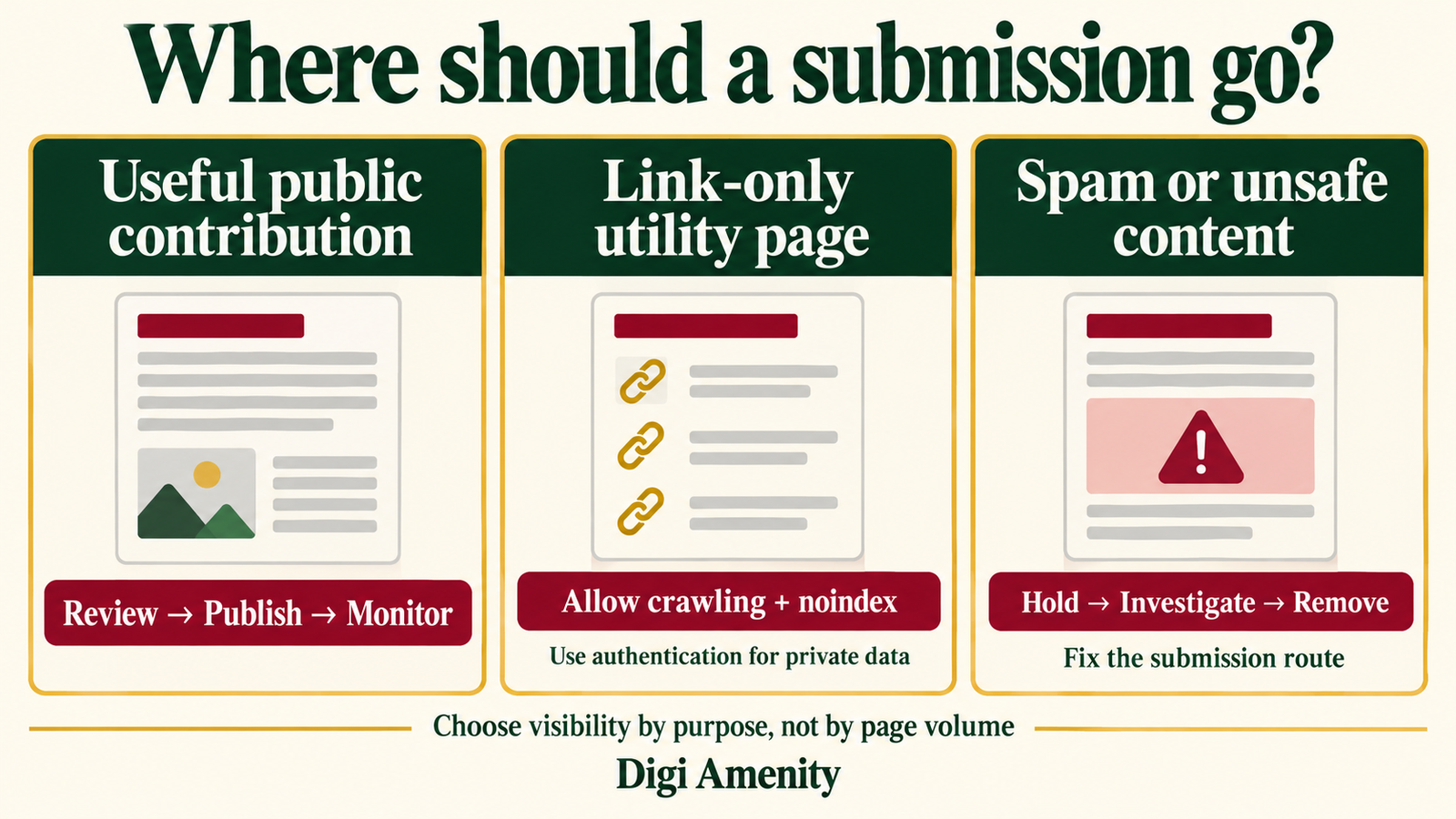
Use this decision table during a short meeting between the business owner, website developer and person handling customer enquiries. It is a planning framework, not a Google requirement or a promise of indexing.
| Surface | Sensible starting decision | What to verify |
|---|---|---|
| Relevant customer comment on an existing article | Moderate, then publish if it meets the policy | Unwanted links are removed or appropriately qualified; the article remains useful |
| Useful community question with a substantive answer | Review for public search discovery | The page helps someone beyond the original contributor and has an accountable owner |
| Generated result intended only for sharing by link | Keep out of search by design | The live response contains the intended indexing rule; confidential information requires access control |
| Private enquiry or customer document | Restrict access to authorised people | A copied URL does not expose the record to an unauthorised visitor |
| Clearly abusive standalone profile or page | Hold or remove through the approved process | Related spam is investigated and the route used to create it is fixed |
| Valuable page containing one spam comment | Remove the offending contribution | Useful editorial content and legitimate discussion remain available |
Avoid applying one global setting to every row. Putting an entire product page on noindex because one review is spam can sacrifice a useful sales page. Leaving a private quotation publicly accessible because its URL is difficult to guess creates a different problem.
How do noindex, robots.txt and link attributes differ?
These controls solve different problems. Mixing them up can leave unwanted URLs discoverable or hide useful content.
Use noindex for a page that should stay out of Google Search
A crawlable HTML page can carry <meta name="robots" content="noindex"> in its head. An X-Robots-Tag: noindex response header can serve the same indexing purpose, including for non-HTML resources. Google must be able to access the response to see the rule. If robots.txt blocks the URL, Google may never read its noindex instruction. Google’s noindex documentation explains this dependency.
For a link-only utility page that contains no confidential data, that distinction matters. For confidential material, use authentication and appropriate authorisation. Noindex is not a password and does not prevent someone with a working public link from reading the page.
Our robots meta tag guide explains the wider visibility controls. Before changing a template, inspect a representative URL and confirm that the rule applies only to the intended pages.
Use link attributes to describe the relationship
Google recommends rel="ugc" for links in user-generated content such as comments and forum posts. Multiple values, including ugc nofollow, are supported. These attributes do not remove the comment, make a destination safe or guarantee that the destination cannot be indexed. See Google’s outbound link guidance.
A suspicious link still requires moderation. Attribute handling is one part of a publishing policy, not permission to leave scams visible.
How can you reduce WordPress comment spam safely?
Start with the features already present. Adding another plugin before understanding the existing setup can create overlapping checks and make troubleshooting harder.
In WordPress, inspect Settings → Discussion. The official Discussion settings documentation describes manual approval, moderation conditions and controls for new articles. Individual posts can override defaults. Changing the default for new posts does not resolve every existing comment thread. Also, requiring a name and email address does not verify either identity.
Use a small, reversible implementation plan:
- Record the baseline. Save the current settings and a backup appropriate to the change. Note which plugin or service already handles comments, reviews and forms.
- Assign a reviewer. Decide who checks held submissions, how often and who covers absences. A queue without an owner eventually becomes unusable.
- Trial moderation on a controlled surface. Use staging where possible. Compare a legitimate contribution, an obvious spam example and an ambiguous submission using synthetic information.
- Check the published output. Review the visible comment, author link and any separate profile URL. Moderating the comment body while ignoring a public profile can leave another route open.
- Check unrelated forms. Confirm that enquiry, newsletter and checkout journeys still behave as expected. A comment setting should not be assumed to protect a separate form plugin.
- Keep a rollback note. Record the exact setting changed, when it changed and the previous value. If genuine submissions fail, restore the relevant change and investigate.
An anti-spam service can help classify submissions, but its account requirements, terms and data handling need review before connection. Test any challenge on mobile and with keyboard navigation. Avoid blocking broad groups of legitimate visitors merely because a single signal looks unusual.
For a developer-led implementation, agree on server-side validation and rate controls for the actual submission route. A visual warning in the browser is not enough evidence that the server refuses abusive submissions.
What should you do if spam is already appearing in Google?
Begin with a record of the affected URLs and the publishing route. Avoid a large deletion or redirect rule based only on a handful of search results.
Contain the route. Temporarily hold suspicious new contributions for review where your system supports it. Preserve enough evidence to understand the pattern, with access limited to the people investigating.
Separate good content from abuse. If an otherwise useful article has spam comments, clean the comments. If a standalone page exists only for abuse, remove it through the site’s controlled process. A URL that is permanently gone should return an appropriate not-found response, rather than an empty page reporting success. Google explains the distinction in its HTTP status guidance.
Check search and security reports. A traffic decline alone is not proof of a manual action. Read the actual report and its scope. If unfamiliar scripts or redirects are involved, investigate security separately from comment moderation.
Handle urgent search exposure deliberately. Search Console’s Removals tool can temporarily hide a result, but it does not remove the content from the internet or replace a permanent fix. Keep the underlying access, removal or indexing decision consistent with the page’s purpose.
Request review only when appropriate. For an actual manual action, follow the issue-specific instructions, fix the affected scope and document the changes. Google’s manual actions guidance asks for a clear account of the issue, the fix and its outcome. Do not use noindex as a shortcut for resolving a manual action on pages you want restored to Search. Verify that Google can review the corrected pages, and avoid repeated requests while a review is pending.
Never redirect every spam URL to your homepage merely to make a spreadsheet of errors look cleaner. The destination should make sense to someone following the original URL.
What should you monitor after making changes?
Use two sets of measures: abuse control and legitimate business activity. A fall in total submissions is ambiguous until you know which submissions disappeared.
For each reporting period, record:
- Total submissions by route, separating comments, enquiries, reviews and tool outputs.
- Number held for review and the age of the oldest unresolved item.
- Confirmed spam found after publication.
- Legitimate submissions incorrectly rejected, based on a reviewed sample or recorded appeals.
- Successful enquiry receipt and the separately confirmed count of qualified enquiries.
- Unexpected public URL creation and search queries unrelated to the business.
Define denominators before comparing rates. For example, confirmed spam among reviewed submissions ÷ all reviewed submissions measures the reviewed sample, not the whole website. If only suspicious items are reviewed, the result cannot describe overall spam prevalence.
Use a consistent weekly period and keep a dated note of each setting change. If an anti-spam control goes live during a paid campaign launch, a change in enquiries cannot automatically be attributed to the control. Review campaign traffic, form errors and the sales team’s qualification records together.
Google’s prevention guidance recommends Search Console monitoring, including unexpected page and query patterns. Use those signals to investigate. A larger indexed-page count could also reflect legitimate new content; a lower count could reflect intentional cleanup. Neither direction is automatically good or bad.
What does this look like for an Indian service business?
Hypothetical example, not a Digi Amenity client result: a training company accepts private course enquiries and public questions below its guides. Its marketing manager sees more submissions but the sales team reports little additional demand.
The team separates the two routes. Private enquiries are checked against CRM receipt and qualification. Public questions are reviewed for relevance and unwanted links. The investigation also includes public contributor profiles, which the team had not previously included in its review list.
Instead of disabling every form, the company holds new public questions for moderation and tests the enquiry journey on a phone. A genuine test enquiry is coordinated internally and excluded from lead reporting. The developer verifies that any link-only resource pages have the intended visibility settings.
The decision to keep the changes depends on evidence: fewer confirmed public spam items, a manageable review queue and working genuine enquiry paths. No improvement percentage is assumed in advance.
This is where website work and SEO meet. A search setting can be correct while a form confirmation is broken. A working form can coexist with an unmanaged public profile system. Both belong in the same acceptance checklist.
What should your team do in the next 30 days?
First day: list all contribution routes, their owners and whether submissions become public. Check current manual-action and security notices. Escalate active scams or exposed private material promptly.
First week: test one control at a time, correct the highest-risk publishing route and sample existing content. Verify the live response for each affected page type. Keep an approved rollback path and check mobile enquiry behaviour.
By day 30: review the queue, false positives and business outcomes across comparable periods. Decide which controls to keep, adjust or remove. Update the process when a new review app, public tool or submission feature is launched.
Copy these fields into your moderation log:
Date | URL or internal record ID | Submission route | Reason for review | Public visibility | Action | Owner | Verification | Follow-up date
Store personal details only where the team needs them, with appropriate access. The operational log should help someone reproduce a decision without spreading customer data across unrelated tools.
Frequently asked questions
Is all user-generated content bad for SEO?
No. Useful questions, reviews and discussions can help readers. Assess the value and authenticity of the contribution and manage its publishing route. The presence of user-generated content does not itself establish spam or a penalty.
Does a spam enquiry mean my website has been hacked?
Not necessarily. Someone may simply have used a public form. Investigate where the submission went and whether any unauthorised pages, files or redirects appeared. Public content created outside an expected workflow needs a separate security investigation.
Should I disable all WordPress comments?
That depends on whether comments serve a useful purpose and whether your team can manage them. Moderation may preserve a valuable discussion. If comments have no business purpose, review disabling them deliberately, including existing posts, rather than assuming a new-post default changes everything.
Will noindex remove spam from my website?
No. It is an instruction about search indexing, not content removal or access control. Visitors may still reach a public page. Remove harmful contributions and correct the publishing route; use access controls for information that should be private.
Is rel="ugc" enough to prevent website spam?
No. It describes a link relationship to Google. It does not authenticate the author, prevent a scam or remove unwanted text. Apply appropriate attributes as part of a broader moderation process.
Will one spam comment cause a Google manual action?
You cannot infer a manual action from one comment. Check Search Console for a confirmed issue and its scope. Remove confirmed spam and review related submissions, but avoid claiming that a specific ranking change was caused by that comment without evidence.
How quickly will Google reflect a cleanup?
There is no guaranteed timetable. Crawling, indexing and any manual-action review are separate processes. Keep dated evidence of the fix and follow the relevant report instead of repeatedly submitting requests or promising a recovery date.
How do I avoid losing genuine leads while blocking spam?
Change one control at a time and check mobile usability, server acceptance, notification delivery and CRM receipt. Separate test submissions, spam and qualified enquiries in reporting. If a new rule rejects legitimate users, investigate the rule and restore the previous setting where necessary.
Need help deciding which controls to change?
If your website is collecting spam or publishing unwanted pages, Digi Amenity can review the submission routes, indexing controls and enquiry journey together. Our web development service and SEO service can help turn that assessment into a prioritised implementation and verification plan before you apply broad blocks.