

A robots meta tag tells supporting search engines how to handle an individual page in search results. Use it when you have a specific visibility decision to make. For a business website, the first question is whether a page should attract search visitors, remain accessible without appearing in Search, or require authorised access. Those goals need different controls.
A useful starting rule: keep important service and product pages eligible for discovery, use noindex deliberately for appropriate public pages, and protect confidential material with authentication. Then verify the actual page response. A correct-looking plugin setting is only one part of the check.
What changed in Google’s guidance in October 2026?
On 21 October 2026, Google refreshed its guidance on controlling what you share with Search, bringing existing controls together, including page metadata, snippet restrictions, response headers and the Search generative AI control. This was a documentation refresh, not a new requirement to add tags to every page.
For an Indian business owner, the useful action is a review of intent: which pages should be discoverable, which should stay out of search results, and which should never be publicly accessible? There is no reason to make a site-wide change merely because the documentation was updated.
How do you choose the right visibility control?
Write the business objective before choosing a setting. “Hide this page” is too vague for a developer to implement safely. It could mean remove a search result, hide a paragraph from a preview, or stop an unauthorised visitor opening a proposal.
| Business objective | Control to evaluate | Evidence to request |
|---|---|---|
| Let prospects discover a service page | Remove unintended indexing restrictions; check crawl access and canonical signals | Correct live output, then separate Search Console indexing observation |
| Keep an ordinary public confirmation page out of Search | Page-level noindex, accessible to the relevant crawler | Exact affected URL and the final tag or response header |
| Protect a customer-specific document | Authentication and appropriate access permissions | Unauthorised access is denied, including at the file URL |
| Restrict search previews | Relevant snippet settings, scoped to the intended content | Correct implementation and later search-appearance review |
| Manage crawler access | robots.txt rules appropriate to the crawler and URL pattern | Intended paths matched; important pages and resources unaffected |
| Consolidate duplicate URL variants | A canonicalisation or redirect decision | Preferred URL, internal links and supporting signals agree |
This is a decision aid, not a set of rules to paste across a website. For example, a campaign landing page may also be the best organic answer to a customer question. Its use in advertising does not, by itself, justify excluding it.
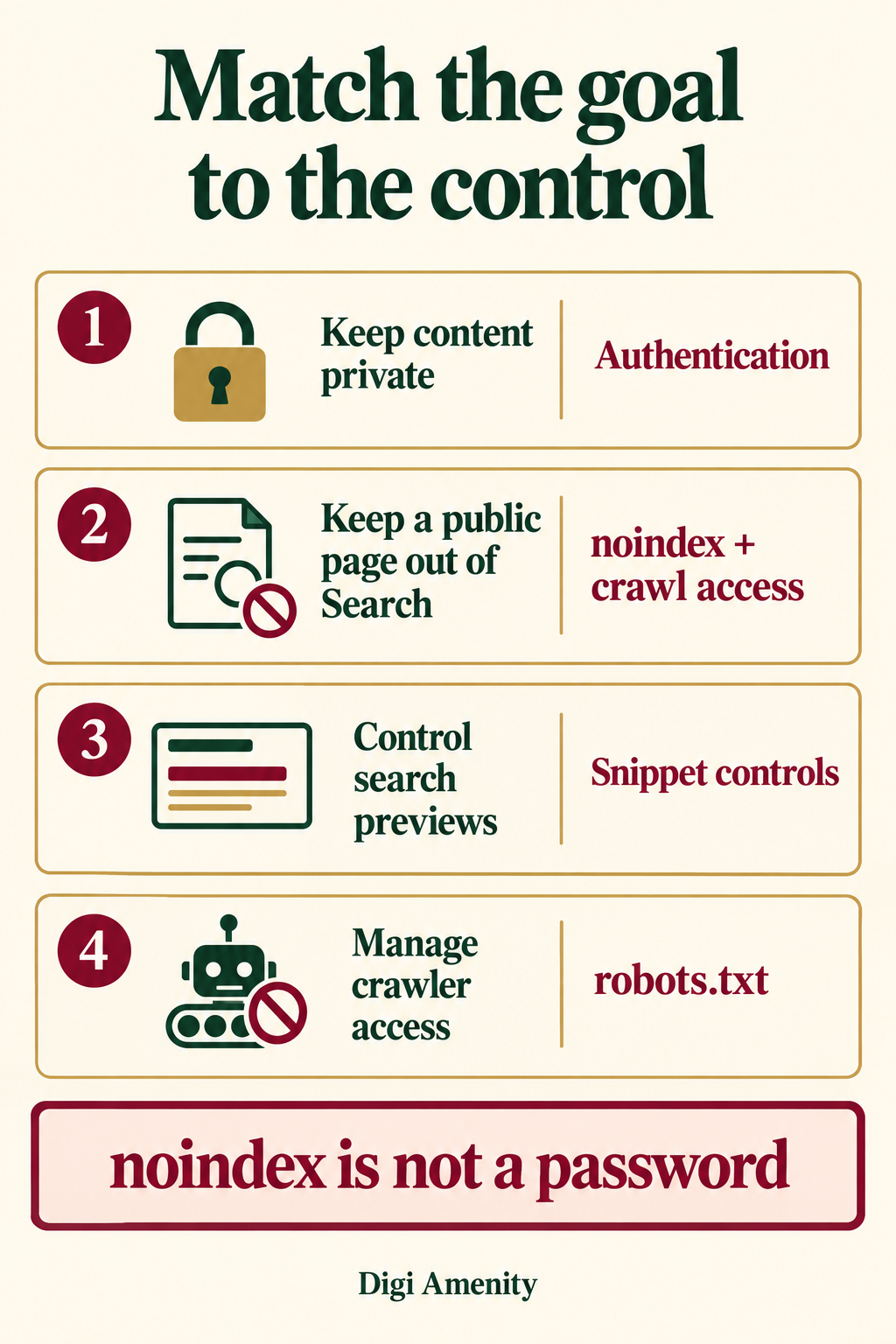
What does a robots meta tag look like?
A simple HTML example is:
<meta name="robots" content="noindex">Place the tag in the page’s head through the appropriate website mechanism. Google also supports an X-Robots-Tag response header, useful for resources such as PDFs. With conflicting Google robots instructions, a more restrictive instruction can determine the result. Old recipes also need care: Google no longer uses noarchive or nositelinkssearchbox. Check the current Google robots specification before applying a directive.
Do not add extra instructions just to make the configuration look complete. Google’s explanation of whether a robots tag is required says its absence is not itself a ranking problem. A configuration audit should establish what the site actually sends and whether that matches the page’s purpose.
Why does robots.txt vs meta robots matter?
Google describes robots.txt as a crawler-access control. Blocking a web page there does not reliably remove its URL from Search. A crawler may learn about that URL elsewhere without fetching its content.
For noindex to work, Google must be able to access the resource and read the instruction. Blocking that access can prevent the instruction being seen. Google does not support putting a noindex rule inside robots.txt. See the official noindex implementation guide.
Consider the handoff between an SEO specialist and a developer. The SEO specialist requests that one thank-you page leave search results. The developer blocks the entire campaign directory. That implementation could affect unrelated landing pages and still fail to communicate the intended indexing instruction. The change request should identify the exact URL and desired outcome, rather than just saying “block the campaign.”
For private content, do not resolve that conflict by opening access so a crawler can read a tag. Protect the content first. MDN notes that only cooperative crawlers follow robots instructions; these instructions are not an access-control system.
Should duplicate pages use noindex or a canonical?
Decide whether the alternative page should disappear from Search or be treated as another version of a preferred page. Google recommends canonical annotations rather than noindex when the aim is choosing a canonical among same-site duplicates. Canonicalisation is a signal about the preferred version, not password protection. See Google’s canonicalisation guidance.
For a small business, this often comes up after a website rebuild or campaign launch. A developer creates another version of a service page, and both remain linked from different menus. Before suppressing either, compare the content, incoming links, campaign destinations and intended customer journey. Fix the underlying ownership decision.
If the proposed solution also changes addresses, use a separate URL and redirect review. Combining a URL migration, content rewrite and indexing-rule change in one release makes diagnosis harder when visibility moves.
How should you handle WordPress noindex settings?
Start with one named page and one accountable owner. Record its current URL, purpose and settings before editing. Ask whether the instruction comes from the SEO plugin, WordPress settings, theme code, a hosting rule or another layer. Avoid making the same change in several places.
In Rank Math, the documented page-level workflow uses Advanced Mode and the Advanced tab in the post or page editor. Choose the appropriate robots setting and save. Its documentation also describes post-type and taxonomy defaults, which have a much wider scope. See Rank Math’s noindex instructions; interface details can vary by editor and version.
For an owner approving the work, request three things:
- Scope: the exact page or group affected, plus a few pages that must remain unchanged.
- Before-and-after evidence: the served metadata and response headers, not only a screenshot of a checkbox.
- Recovery: a saved previous configuration and the person responsible for reversing an unintended change.
A website development and maintenance review should connect this work with deployment and cache behaviour. If a plugin says a page is indexable but the server sends a restrictive header, changing the plugin again may accomplish nothing.
How do you verify the change actually worked?
Separate implementation proof from search-engine processing. First check the live public response. Then check what Google reports about its stored version. These are different observations.
- Open the exact final URL. Follow redirects and record the destination. Confirm that the page being checked is the one in the change request.
- Inspect the page and response. Review the robots metadata and any X-Robots-Tag header. Ask a developer to capture the final GET response where a basic header-only check could behave differently.
- Check the rule’s scope. Test the target page and an unaffected service page. For a file rule, include a file that must remain discoverable.
- Check the relevant crawl path. Confirm that the crawler can read a public noindex page. Keep access controls intact for confidential material.
- Compare stored and live inspection evidence. Record the crawl date, indexing status, canonical and the live-test result separately.
Search Console’s URL Inspection documentation distinguishes indexed data from a live test. A successful live test is not a promise of indexing or rankings, and it does not establish which canonical Google will select. Record “not checked” when evidence is unavailable rather than assuming a negative result.
If you are restoring a commercially important page, also check the route from that page to an enquiry or purchase. Search visibility without a working mobile form, clear offer and reliable follow-up will not solve the business problem. Keep a configuration fix and a conversion improvement measurable as separate changes.
What about Google’s AI search controls?
As checked on 25 October 2026, Google documents a Search generative AI control in Search Console Settings and says it rolled out worldwide by 31 August 2026. It covers specified Search AI features, supports inherited property settings and is separate from model-training controls. Exclusion is not used as a ranking or inclusion signal for other parts of Search. Review the current control documentation and the effective setting for the relevant property before deciding.
This is a business participation decision, not a reason to noindex every service page. Decide which exposure you want to change and who can approve it. This guide does not recommend changing a site’s AI participation setting by default.
What would a practical business example look like?
Hypothetical example: a Mumbai interiors business has a public renovation service page, an enquiry confirmation page, a private customer proposal PDF and a duplicate campaign URL. No client result or tool test is being claimed.
- Service page: retain search eligibility. If visibility has fallen, inspect evidence before assuming an indexing directive is the cause.
- Confirmation page: if it contains only a generic submission acknowledgement, evaluate page-level noindex while keeping the public form journey functional. If it contains customer details, address privacy and access separately.
- Proposal PDF: protect access to the file itself. Hiding a link in the website menu does not establish that protection.
- Campaign duplicate: compare it with the main service page. Decide whether it needs to remain a distinct customer destination or should consolidate with the preferred page.
The owner’s approval should describe those four outcomes. A single instruction such as “hide non-SEO pages” leaves too much room for a broad technical change that damages another channel.
What belongs in a visibility-change checklist?
Copy this worksheet into your task tracker before work starts. It is designed to make an SEO recommendation reviewable by the business owner and implementable by a developer.
- Page and purpose: exact URL, content type, owner and customer task.
- Desired result: discoverable, public but excluded from Search, preview-limited, or access-restricted.
- Current evidence: status, final URL, robots metadata, header, crawl access and canonical.
- Proposed change: the single configuration layer to edit and why it fits the objective.
- Scope and exceptions: affected URLs and representative URLs that must not change.
- Commercial dependencies: ads, internal links, downloads, forms and reporting tied to the page.
- Deployment record: implementer, approval, timestamp and previous configuration.
- Verification: live response, unaffected-page checks, mobile journey and later indexing observation.
- Rollback: exact reversal and owner if an unintended restriction appears.
- Follow-up: next review date, evidence still missing and decision to keep, improve or investigate.
For measurement, freeze the affected URL set and compare equal-length complete periods with the same filters. Use Search Console for page-level search evidence and analytics plus the enquiry system for business outcomes. Mark periods before a page existed as unavailable. Do not report “traffic recovered” from a single successful fetch or treat a form-button click as a qualified lead.
Frequently asked questions
Does every page need a robots meta tag?
No. Its absence is not automatically an SEO error. First determine whether a default behaviour needs to change. Adding tags across every template without a clear requirement creates another configuration to maintain and can introduce unintended restrictions.
Will adding index, follow guarantee that Google indexes a page?
No. A permissive instruction is not proof of indexing. Check the page’s actual response, access, canonical and Search Console evidence. If it is already eligible, investigate the page’s value and discovery rather than repeatedly changing a permissive tag.
Can I use noindex to protect a confidential proposal?
Noindex is not a security boundary. A confidential proposal needs appropriate access protection at the document URL. Do not rely on a hidden menu link, an obscure filename or search-result exclusion to control who can read it.
Should all Google Ads landing pages be noindexed?
No. Review each page’s purpose. A campaign-only acknowledgement page differs from a substantial service page that also helps organic visitors. Involve the paid-media owner before changing access or URLs, and recheck the enquiry journey after implementation.
Why can a page still appear after I added noindex?
The new instruction may not have been processed yet, or Google may be unable to read it. Check the exact URL, crawl access, served tag/header and crawl timestamp. A saved plugin setting alone does not show what the crawler received.
Can a plugin override a server’s X-Robots-Tag?
Do not assume it does. Inspect both layers and resolve the source of any conflict. Assign one owner to coordinate the change; otherwise an SEO editor and hosting administrator may each believe the other has fixed the restriction.
How should a business approve a site-wide robots change?
Require a URL sample, documented objective, affected templates, exceptions, backup and rollback plan. Check a limited representative set before broad deployment. Keep confidential areas protected and record the follow-up evidence needed before calling the change successful.
Need to check a page’s search visibility?
If an important page has disappeared from Search or you are unsure which content should be excluded, Digi Amenity can review the page metadata, response headers, crawl access, canonical signals and enquiry journey before a wider change. Start with a focused technical SEO review of the affected URLs.