

A social media calendar is a working plan for what your business will post, where it will appear, who will create and approve it, and what should happen after someone responds. To create one, choose a business goal, collect customer questions, select a manageable channel mix, assign content and deadlines, and record approval, publication and results in one place.
For a small Indian business, the useful starting point is a four-week plan with a realistic production budget. Filling every date is optional. Having a clear message, a working destination and someone responsible for enquiries is essential.
This guide includes a practical social media calendar template, a hypothetical twelve-post example, an approval workflow and measurement rules. Platform guidance was checked on 26 October 2026; account permissions and supported publishing formats should still be confirmed before scheduling.
What should your social media calendar help the business achieve?
Start with a sentence such as: “Help operations managers understand our service and request a relevant consultation.” That is more useful than “be more active on Instagram.” It identifies an audience, a decision and an action.
Choose one main business outcome for the month, then assign an appropriate role to each post. A tutorial can help people understand a problem. A process demonstration can reduce uncertainty. An offer can invite an enquiry. Expecting every educational post to generate an immediate sale can lead you to discard useful content too early.
Separate three things:
- Strategy: who you want to reach, why they should care and what you want to achieve.
- Calendar: the specific content, people, dates, dependencies and checks that put that strategy into practice.
- Scheduler: the software that submits an approved post for publication at a chosen time.
A content calendar for small business can organize a campaign without publishing anything. A scheduler can publish a campaign that has no clear purpose. Decide the purpose first.
Before planning, check the journey after the post. Does the linked page answer the same question? Does the form ask for information the sales team needs? Is someone available to reply? A calendar cannot compensate for an unclear offer or an unattended inbox.
Where do useful content ideas come from?
Review recent sales conversations, support questions, public reviews and existing content. Group the recurring questions by the decision customers are trying to make: suitability, price, implementation, risk, comparison or next steps.
Use anonymised summaries with permission where needed. Do not paste customer conversations or personal details into a public planning document. Public competitor posts can reveal topics and formats, but their apparent popularity does not prove sales performance.
An idea bank might contain “What does onboarding involve?”, “What is excluded from the quote?” and “When is this service the wrong fit?” These are more specific than a row labelled “educational post.” Digi Amenity’s guide to customer review analysis explains how feedback can inform messaging and customer objections.
For the first month, use a small set of content pillars:
- Explain: help someone understand or solve a relevant problem.
- Demonstrate: show a real process, product or permitted evidence.
- Address objections: clarify scope, suitability, cost drivers or limitations.
- Invite action: offer a useful next step for someone who is ready.
These are planning categories, not an algorithm rule. You do not need a universal 80/20 ratio. Review whether your mix answers the questions customers actually ask.
How many platforms and posts can your team support?
Choose channels using audience fit, available evidence and production capacity. A B2B consultancy might begin with LinkedIn. A visually demonstrable consumer product might justify Instagram. These are starting hypotheses, not universal recommendations for those industries.
If you already have accounts, compare their relevant conversations, website visits and qualified enquiries over the same complete period. Keep paid and organic activity separate. If you are starting from zero, select one primary channel and a secondary channel only when you can adapt content properly.
Hypothetical capacity calculation: a team has six hours each week for social media. It reserves one hour for review, one for replies and reporting, and four for creation. If its estimated production time is two hours for a short video and one hour for each of two simpler posts, three posts fit that week. These are illustrative estimates; record your actual time before increasing volume.
Repurposing should preserve the idea while adapting the execution. A LinkedIn explanation may become an Instagram carousel, but the opening, text density, crop and route to the destination need separate checks. Give each platform version its own row so that approving one does not accidentally approve all of them.
What fields belong in a social media calendar template?
Use one record per post and platform. Keep a simple monthly view for planning and a detailed record for production. The calendar should make the next required action obvious.
| Field group | What to record | Why it matters |
|---|---|---|
| Identity | Unique post ID, campaign, platform and account | Prevents confusion between versions and accounts |
| Purpose | Audience, question, pillar and intended outcome | Connects the post to a business decision |
| Content | Format, opening, caption and final asset link | Gives the creator a usable brief |
| Destination | CTA, landing URL and tracking parameters where applicable | Makes the next step testable |
| Responsibility | Creator, reviewer, publisher and response owner | Avoids work waiting for an unnamed person |
| Timing | Production deadline, review deadline, publication date, time and zone | Leaves time for corrections |
| Permission | Source checks, asset rights and customer consent where needed | Prevents unsupported or unauthorised material going live |
| Status | Idea, creating, in review, approved, scheduled, published or paused | Separates intention from completion |
| Evidence | Approval version, live URL, actual publication time and result window | Makes later checks possible |
For an India-based team, write Asia/Kolkata (IST, UTC+05:30) rather than just “10 AM.” If the audience is abroad, record its intended local time too and check daylight-saving changes where applicable.
Do not use colour as the only status indicator. A text label is easier to filter and less ambiguous. Keep an archive of completed records instead of replacing last month’s results with next month’s plans.
Copy this minimum post record
Post ID: [campaign-platform-number]
Audience question: [one specific question]
Goal and CTA: [intended action]
Account and format: [exact destination]
Caption and asset: [approved version links]
Creator / reviewer / response owner: [names]
Review deadline: [date, time, time zone]
Publish slot: [date, time, time zone]
Landing URL / tracking: [checked link, if applicable]
Status / approval: [status, approver, version, time]
Live URL / result review: [fill after publication]
Download the social media calendar template
Make a copy of the social media calendar in Google Sheets. Sign in to your Google account, then choose Make a copy to save an editable version in your own Drive. The shared master is view-only; add client and team details only to your private copy.
Download the social media calendar workbook (.xlsx). It includes a blank planning calendar with approval and status dropdowns, a four-week hypothetical example, a results tracker and instructions. Open it in Excel, or upload it to Google Drive and open with Google Sheets to create your own working copy. Enter client and team details only in your private copy.
What could a four-week content calendar look like?
The following is a hypothetical example for an Indian B2B operations consultancy, not a Digi Amenity client case study or a tested performance result. It assumes three LinkedIn posts per week and a consultation page that accurately explains scope. Replace the channel, topics and cadence with your own evidence.
| Week | Post idea and format | Reader’s next step |
|---|---|---|
| 1 | Checklist: signs a reporting process needs attention | Save the checklist |
| 1 | Short video: map a manual handoff using synthetic data | Identify one repeated task |
| 1 | Plain-text FAQ: what a discovery conversation covers | Read the consultation scope |
| 2 | Document post: a process-audit preparation list | Prepare the required inputs |
| 2 | Diagram: automation versus a process change | Compare the two options |
| 2 | Objection post: why a tool alone may not fix delays | Ask a specific suitability question |
| 3 | Short video: inspect a sample workflow before changing it | Review the example checklist |
| 3 | Process explanation: responsibilities during implementation | Share it with the internal owner |
| 3 | FAQ: factors that change the scope of a project | Read the scope page |
| 4 | Checklist: questions to ask before accepting a proposal | Save or discuss the checklist |
| 4 | Question post: which reporting handoff causes difficulty? | Describe a problem without private data |
| 4 | Consultation invitation with explicit fit and exclusions | Submit a relevant enquiry |
This is a content outline. Before scheduling, add the specific account, actual dates, owners, reviewed copy, assets and approval. The twelve rows do not establish a recommended frequency for every business.
For e-commerce, replace consultation topics with product selection, usage, compatibility, delivery, returns and genuine product evidence. Check stock and fulfilment before an offer goes live. For a local service, include coverage, availability and what happens after an enquiry. A festival greeting should not crowd out these useful buying questions.
How do you move from an idea to an approved post?
Use a short workflow with a clear handover at each stage. Your social media posting schedule should show production deadlines as well as publication slots. The creator owns the draft, the reviewer checks accuracy and suitability, and a named publisher confirms the destination and schedule. A small business may assign several roles to one person, but the checks still need to happen.
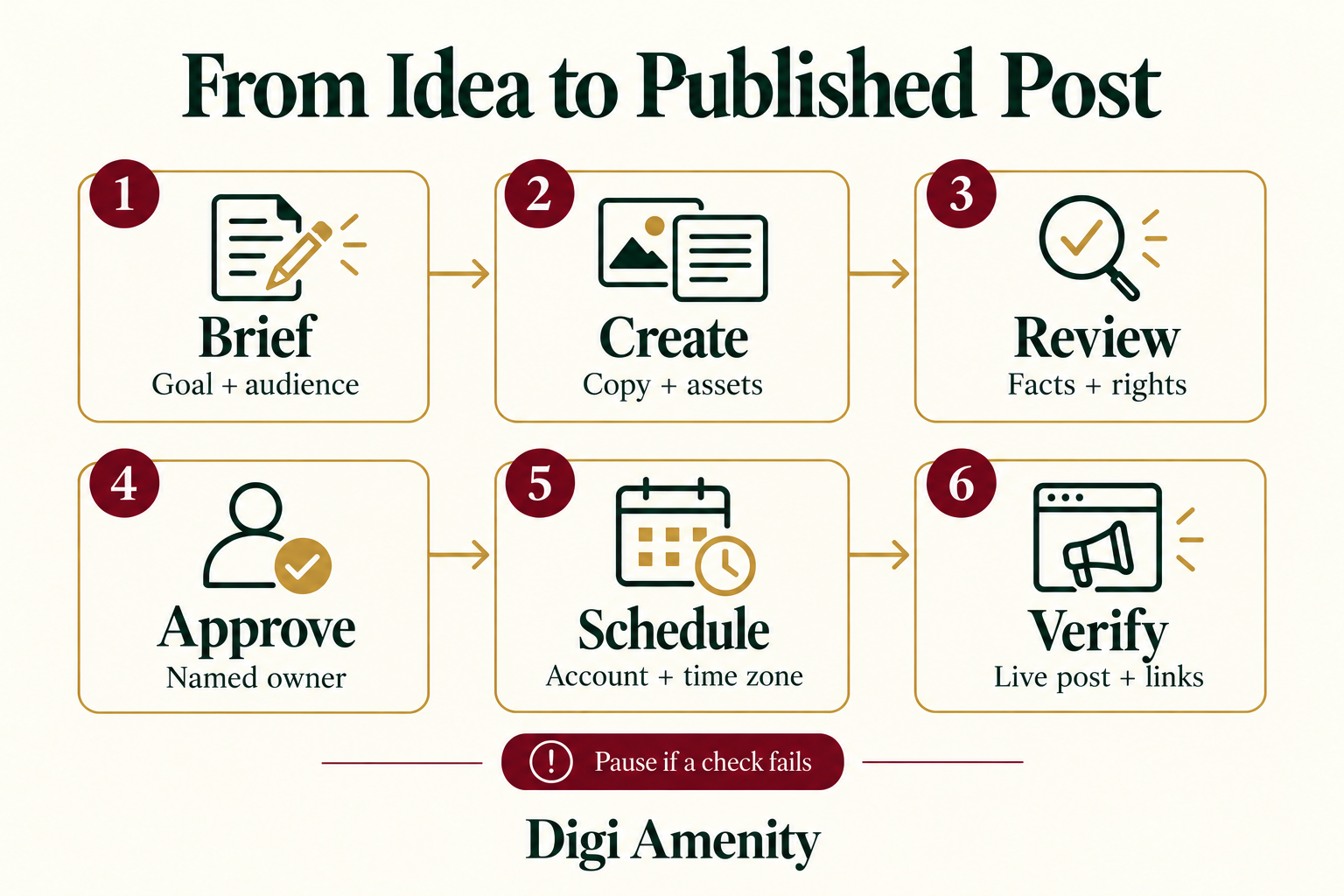
An illustrative production schedule is to brief seven days before publication, prepare assets three days before and finish approval one day before. These are internal planning suggestions, not platform requirements. More complex or regulated content may need longer.
Before approval, check the following:
- The post answers a real question and the CTA matches its purpose.
- Prices, availability, dates, claims and examples are accurate.
- Images, music and testimonials have the necessary permissions.
- Captions, on-image text and video subtitles are readable on mobile.
- The destination opens correctly and the form or contact route works.
- A response owner knows what is being offered and when to reply.
An “approved” status should refer to a specific version. Changing a price, claim, asset or destination afterwards should return the record to review. Silence in a group chat is not a dependable approval process.
Add a paused status for stock problems, incorrect information, an unresolved complaint or an event that makes the planned post inappropriate. Name the person who can pause the queue and the person who can approve restarting it. If a scheduling attempt gives an ambiguous result, inspect the queue before trying again; otherwise you may create a duplicate.
After publication, open the live post and check its copy, crop, links and account. Save its URL and actual publication time. “Scheduled” is not evidence that the right post appeared successfully.
Which calendar and scheduling tools should you use in 2026?
Start with the simplest tool that supports your real workflow. A shared spreadsheet is often sufficient for a small volume of posts and a straightforward approval process. A project tool or database can help when briefs, assets and several reviewers need to stay together. A dedicated scheduler becomes useful when supported account connections and publishing workflows reduce enough manual work to justify the cost.
| Situation | Sensible starting point | Check before committing |
|---|---|---|
| One owner, modest volume | Shared spreadsheet plus native publishing tools | Access control, version history and a reliable status process |
| Several creators and reviewers | Project board or database with calendar view | Ownership, deadlines, approval records and asset access |
| Several brands or channels | A dedicated social publishing platform | Supported accounts, formats, approval controls, pricing and export options |
Notion’s social media calendar template describes database, calendar and board views. Asana’s template illustrates production and review responsibilities. These are examples of planning approaches, not claims that either is the best tool for your business. A template’s existence does not prove that it can publish every format you need.
For a verified scheduling example, LinkedIn’s current Pages documentation says super admins and content admins can schedule Page posts. It also lists unsupported formats, including polls, reshares and multiple-photo posts. Check the live documentation and your Page composer before planning around a particular format; personal-profile capabilities should not be assumed to match Page capabilities.
The practical scheduling sequence is: select the correct account, check format support, load approved content, inspect the preview, confirm date and time zone, schedule, and verify the queue entry. For Facebook and Instagram, confirm the current options in your own Meta Business Suite account. Do not build a quarter’s production plan around an unverified scheduling limit.
Keep paid promotion separate. An organic post record should link to a paid campaign record only after budget, targeting, tracking and creative approval are confirmed. A plan to publish a post is not approval to boost it.
How should Indian businesses handle festivals and regional content?
Use an annual occasion list as an input, not as your entire social media content plan. Select dates that matter to your audience and business. Verify the year, region and observance using an appropriate official or authoritative local source before creating the asset.
Plan backwards from the customer’s decision. A gift supplier may need enquiries before dispatch cut-offs; posting only on the celebration date could be too late. Record order deadlines, stock confirmation, office closures and response coverage alongside the publishing date.
For multilingual content, assign someone who can review meaning and tone in the audience’s language. Automatic translation needs human review, especially for offers, cultural references and technical terms. Keep each approved language version identifiable.
Leave some production capacity uncommitted for timely questions or changes. A trend belongs in the calendar when it helps the audience and fits the brand. A trending sound or hashtag alone is not a business reason to use it.
Can AI help create the calendar?
AI can help turn a clear brief into candidate topics, formats and variations. It should not invent customer evidence, confirm an offer or approve a post. Use public or synthetic inputs when experimenting, and follow your organisation’s data-sharing rules.
Illustrative prompt, not a tested result:
Create twelve topic ideas for a hypothetical Indian B2B operations consultancy. Audience: operations managers. Goal: help suitable buyers understand a process-review service. Use education, process explanation, objections and consultation preparation. For each idea, give the customer question, format, proposed CTA and facts requiring human verification. Do not invent clients, testimonials, results, statistics, prices or product features. Return ideas for review, not a publishing schedule.
Check the output against actual service scope and customer language. Remove repetition, unsupported promises and topics your team cannot explain credibly. Then choose the useful ideas and complete the normal approval process. More generated ideas do not solve limited production capacity.
How do you measure whether the calendar is working?
Measure the operating process and the customer response separately. First ask whether approved work appeared correctly and on time. Then ask what it helped the audience do.
Use consistent definitions and denominators:
- On-time publication rate: posts verified live by their agreed deadline ÷ posts due in the period × 100. Record cancellations separately so they are not quietly removed after the fact.
- Qualified enquiry share: qualified unique enquiries ÷ all unique enquiries in the same tracked cohort × 100. Define qualification before judging results.
- Website enquiry rate: valid website enquiry conversions ÷ relevant tracked website sessions × 100, using an aligned date range and attribution definition.
For a service business, qualification might require a service match, a location you serve and enough information for a meaningful follow-up. A phone-link click or a “Hi” message is an interaction, not automatically a qualified lead. Revenue, when available, needs a later CRM outcome rather than an assumption based on engagement.
Hypothetical arithmetic: twelve unique enquiries from a consistently defined cohort include five that meet the agreed qualification criteria. Qualified enquiry share is 5 ÷ 12 × 100 = 41.7%. This small example illustrates the calculation; it is not a benchmark, a forecast or evidence of calendar effectiveness.
Use consistent campaign tags on links from social posts to your website where that format supports a clickable destination. For example:
https://example.com/consultation/?utm_source=linkedin&utm_medium=social&utm_campaign=operations_guide_2026&utm_content=w1_scope_post
Google’s campaign URL guidance explains how these parameters identify referred campaigns in Analytics. Keep spelling and letter case consistent; do not put personal information in URL parameters. Confirm the resulting source, medium and campaign in your reporting setup.
Tracking links help identify visits; they do not prove that a post caused a sale. Consent choices, copied links, cross-device journeys and conversations outside the website can leave gaps. Keep unavailable data labelled unavailable, not zero. Compare equal complete periods, consistent post ages and similar formats, and separate paid activity.
If posts generate interest but visitors abandon the destination, review the offer, page clarity, mobile experience and contact route. Improving the website and landing-page journey may matter more than increasing posting frequency.
What should you do during the first 30 days?
Days 1–3: agree the audience, business goal, qualification rules, response owner and available production hours. Audit existing accounts and collect customer questions.
Days 4–7: create the calendar, choose a manageable set of topics, brief the first batch and check the destination. Assign reviewers and an approval deadline.
Weeks 2–3: publish approved work, verify each live post, answer enquiries and record production time. Keep notes on questions and objections that appear repeatedly.
Week 4: review both delivery and outcomes. Decide what to keep, improve, replace or investigate. A missed deadline may indicate a production bottleneck; strong engagement with poor enquiries may indicate an audience, CTA or offer mismatch. Do not treat either as an automatic instruction to post more.
Make a small number of changes for the next month so you can interpret what happened. Keep the previous plan and results as a baseline, with any limitations clearly recorded.
Frequently asked questions
What is the difference between a social media calendar and a content strategy?
A strategy defines the audience, positioning, goals and channel choices. The calendar turns those choices into specific posts, assets, owners and deadlines. If the strategy is unclear, a full calendar can still produce disconnected content.
Can I make a social media calendar in Google Sheets or Excel?
Yes. Use one row per platform-specific post, consistent status labels and links to the approved assets. Assign owners and record the live URL after publication. A spreadsheet manages the plan; publishing still requires a separate process or integration.
How far ahead should I plan social media content?
Start with a four-week outline and prepare the immediate batch in more detail. Work further ahead when launches, photography or approvals require it. Keep space for changes, and distinguish your planning horizon from the scheduler’s supported booking window.
How often should a small business post?
Choose a frequency your team can sustain while maintaining quality and handling responses. The three-post example in this guide is a capacity exercise, not a platform recommendation. Adjust after reviewing actual production effort and relevant audience outcomes.
Should I publish the same post on every platform?
You can reuse the underlying idea, but adapt the format, opening, asset and CTA to the account and audience. Check mobile readability and the available link route. Record each version separately so its approval and results remain clear.
Do I need paid social media calendar software?
Not necessarily. Start with the workflow you need and assess whether a tool removes a meaningful bottleneck. Before paying, verify supported accounts and formats, approval features, plan limits and how you can export your records.
How should festival posts fit into the calendar?
Include occasions that genuinely matter to your audience and verify their dates. Plan around buying and fulfilment deadlines as well as the day itself. Balance occasion content with useful explanations, objections and product or service information.
Does a social media calendar guarantee more leads?
No. It supports consistent execution, review and learning, but results also depend on audience fit, creative, the offer, the destination and follow-up. Track qualified enquiries with an agreed definition and investigate the wider journey when results are weak.
Need a calendar connected to your sales process?
If your team posts regularly but struggles to connect content with relevant enquiries, Digi Amenity can review the audience questions, creative plan, approval workflow, landing pages and follow-up process. Explore our social media planning and management services to build a calendar around those decisions.