
“Discovered – currently not indexed” means Google knows a URL exists but has not yet crawled it in the reported state. Start by inspecting the exact published URL, checking that it is accessible and intended for indexing, and reviewing its sitemap and internal links. Then investigate patterns across affected pages. An indexing request can ask Google to revisit a URL; it cannot guarantee inclusion or rankings.
For a business, the useful question is not simply how to make the warning disappear. It is whether an important service, product or article is missing from search, what evidence explains the next action, and who owns that action. This guide gives you a practical sequence without unnecessary URL changes or blanket website edits.
What does discovered currently not indexed mean?
Discovery, crawling and indexing are separate steps. Google can learn an address from links or a sitemap before fetching its contents. Google’s Page indexing documentation describes this status as a discovered URL awaiting a crawl, commonly with an empty last-crawl field. It does not, by itself, diagnose a penalty, prove that your content is poor or establish that your hosting plan needs upgrading.
Read the status as an observation that starts an investigation. Also note when the report was updated: a grouped report and a fresh inspection may reflect different points in time.
| Observed state | Meaning | Useful next check |
|---|---|---|
| Unknown to Google | No known record for this exact URL in the inspection result | Published address, sitemap and incoming links |
| Discovered, currently not indexed | Known URL, crawl still pending in the report | Access, discovery signals and affected-page patterns |
| Crawled, currently not indexed | Fetched, but not currently indexed | Rendered content, duplication, canonical and usefulness |
| Indexed | Present in Google’s index | Search visibility and business outcomes, not more requests |
Which pages should you investigate first?
Build a small list of URLs that should genuinely appear in search. Exclude private account pages, intentional duplicates, staging pages and other content you deliberately keep out. A larger indexed count is not automatically a better website.
Prioritise by business importance and the breadth of the problem. A key service page that has disappeared deserves attention before a newly published supporting article. Several affected pages using the same template suggest a shared setting worth investigating. One recent article with no other symptoms may justify checking its basics and setting a review date.
For each URL, record the page type, publication date, last meaningful update, exact status and reason, inspection date, and owner. Keep unknown values blank. Do not interpret “N/A” as a historical proof that a page has never been requested by any crawler.
How do you confirm the current status in Search Console?
Open the correct property and paste the complete URL into URL Inspection. Check HTTPS, the hostname, path and trailing slash against the final address visitors reach. An inspection of an old redirecting address is not the same as an inspection of its destination.
Record the stored index result first. If a technical check is needed, use Test Live URL and examine the fetch result and tested page. A successful live test is evidence about current accessibility and potential indexability; it is not proof that the URL has entered the index. Google’s URL Inspection documentation explains the difference and the test’s limits.
Keep the screenshot or export alongside the date and URL. This prevents a common reporting mistake: putting yesterday’s status next to today’s request and presenting both as a fresh indexing confirmation.
What should you check before changing anything?
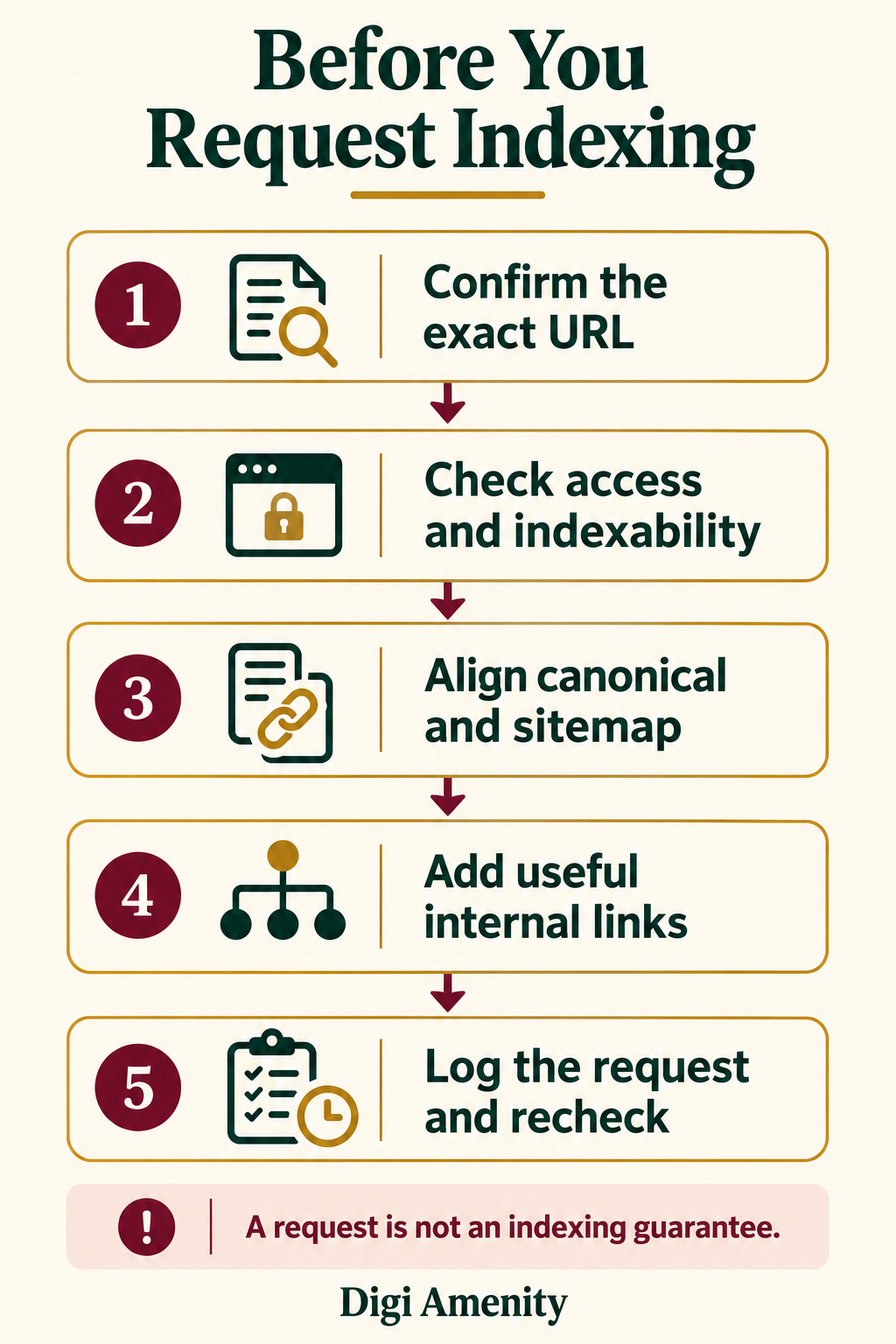
1. Check the response visitors and crawlers receive
Open the page without signing in. Confirm the intended content loads, rather than an error template, login screen or challenge. Ask the developer to record the HTTP status and redirect destination. A page can look normal while an intermediary returns an unexpected response, so visual inspection alone is incomplete.
When many important pages are affected, compare incidents with hosting logs and Search Console crawl information. Intermittent failures matter even if the page opens successfully now. Give the hosting team exact URLs and timestamps; “Google cannot see us” is too broad to diagnose.
2. Separate crawling restrictions from indexing instructions
Review relevant robots.txt rules, page-level robots metadata and HTTP X-Robots-Tag headers. Keep intended restrictions in place. A private page should not be made public merely to improve an indexing dashboard.
A robots.txt restriction controls crawling; a noindex directive tells a search engine not to index the content it can access. Google needs to crawl a page to see its noindex instruction. These mechanisms should not be swapped casually. See Google’s noindex guidance and our explanation of robots meta tags before changing a setting.
If an SEO plugin setting looks correct, verify the actual response as well. Cached output or a second configuration layer may differ from what an editor displays.
3. Make the canonical address consistent
For a unique page intended to stand alone, check that its canonical points to the intended URL. For genuine duplicates, a canonical pointing elsewhere can be deliberate. Compare the declared canonical, any Google-selected canonical available in the report, the sitemap entry and the destinations of internal links.
Canonical signals help Google consolidate duplicate URLs; they are not a command guaranteeing the selected address. Google’s canonicalization guidance supports using consistent signals. Avoid changing a working slug just to make the page look new. Our SEO-friendly URL guide explains why existing URLs need a considered change plan.
4. Check the sitemap and the route through the website
Confirm the intended canonical URL appears in the relevant sitemap and that Search Console can read that sitemap. Do not fill it with redirects, private content or redundant variants. If you use last-modified dates, make them reflect meaningful page changes rather than resetting every entry automatically.
A sitemap assists discovery; it is not an indexing receipt. Google’s sitemap documentation explains how to provide the preferred URLs and meaningful modification information.
Next, try to reach the page from a useful related page. Is the link visible, descriptive and genuinely helpful? A buried article with no contextual route deserves a linking review. Add links where they answer a reader’s next question, using the approach in our internal linking strategy guide. Do not attach every new article to every footer.
5. Review the page’s job and the surrounding content
Ask what decision this page helps someone make. Does it provide information missing from other pages, or repeat an existing article with a different title? Could a visitor understand the offer, process, limitations and next step without contacting you for every basic fact?
Use Google’s people-first content guidance as a quality reference. Improvements should solve a real reader problem. Adding paragraphs purely to reach a word count, rewriting dates or multiplying similar location pages is not a useful diagnostic response.
For example, a service page may need a clear scope, suitable customer profile and delivery process. A product comparison may need meaningful differences and accurate limitations. These are editorial opportunities, not proof that Google rejected the specific page for those reasons.
When is crawl budget a serious consideration?
Google distinguishes crawl capacity from crawl demand. Server errors, rate limiting and slow responses can affect crawling, while perceived URL inventory and usefulness also matter. Its crawl-budget guide covers large or rapidly changing sites and sites with a substantial proportion of discovered-but-not-indexed URLs.
For a small business website, do not start with the assumption that you have exhausted a fixed quota. First establish whether there is a repeated technical pattern, excessive duplicate URL generation or a broader accessibility problem. If the evidence points to hosting constraints, a developer can investigate those constraints. If it points to thousands of unnecessary parameter URLs, the remedy is an intentional URL-management plan.
A faster hosting package cannot, on its own, make overlapping pages useful. Conversely, rewriting content will not solve a server that repeatedly refuses crawler requests.
When should you request indexing?
For a small number of important new or meaningfully updated URLs, use Search Console’s Request indexing after checking the basics. For many URLs, maintain and submit the sitemap. Google says crawling can take days to weeks, that requests have a quota, and that repeating the same request does not make crawling faster. It does not promise indexing. See Google’s recrawl instructions.
Record an accepted request only after the confirmation appears. A button click, a live test, a CAPTCHA error or a timeout is not a successful submission. If the tool fails, save the error and leave the status as pending rather than making repeated ambiguous attempts.
Choose a practical follow-up schedule, such as checking after a week and again after another week if necessary. That is a team operating rhythm, not Google’s service commitment. Review sooner when important pages lose visibility together or technical failures appear.
What would this look like for an Indian service business?
Hypothetical example: a B2B supplier has one recently published installation guide showing “Discovered – currently not indexed.” Its service pages remain indexed. The guide loads normally, has a self-referencing canonical and appears in the sitemap, but no related page links to it.
The team’s next action is to add one genuinely useful contextual link from the relevant service page, review whether the guide answers installation questions distinct from existing content, and record an indexing request if accepted. It keeps the URL stable and schedules a follow-up inspection.
If the next inspection shows “Crawled – currently not indexed,” the team records that change and examines the rendered content and duplication more closely. If it shows indexed, it moves on to impressions, relevant queries and enquiries. Neither outcome is promised here; this example demonstrates how the evidence changes the next task.
A practical evidence and action worksheet
Copy these fields into your team’s existing task tracker. One row per URL is enough to begin:
- Identity: canonical URL, page title, page type and business priority.
- Observation: tool, checked date, report date, exact status/reason and available last crawl.
- Checks: HTTP response, access restrictions, robots directives, canonical, sitemap and relevant incoming links.
- Decision: monitor, fix access, align signals, improve content or investigate a shared pattern.
- Delivery: owner, proposed change, approval if needed, completion date and verification evidence.
- Request: not attempted, failed, quota-limited or accepted, with the actual confirmation date.
- Follow-up: next inspection date, observed change and next action.
Keep “first observed indexed” separate from “last crawl.” The first date your team sees an indexed result is an observation, not necessarily the exact moment Google indexed the page.
Frequently asked questions
Is discovered currently not indexed a penalty?
The status itself is not a penalty notification. It identifies a discovery/crawl state. Investigate separate manual-action or security notices if present; do not infer them from this label.
How is it different from crawled currently not indexed?
In the crawled state, Google has fetched the URL but it is not currently indexed. That shifts attention toward what was fetched, its canonical and its distinct value. A repeated request alone does not explain or resolve that decision.
Should I change the URL to get Google to notice it?
Not as a default response. First inspect the existing URL and diagnose the evidence. A URL change creates extra work for redirects, internal links and measurement continuity and may leave the original problem unresolved.
Does a successful live test mean the page is indexed?
No. It tests the current page’s accessibility and potential indexability within the tool’s scope. Check the stored index result separately and keep both observations dated.
Can a sitemap guarantee indexing?
No. It provides preferred URL information to help discovery. A sitemap submission, a successful read and an indexed URL are different observations.
How often should I request indexing?
Avoid repeatedly submitting an unchanged URL. Make a justified request, keep the confirmation and monitor. If it remains unindexed, investigate the reason and any new evidence rather than treating request frequency as an optimization tactic.
Should I remove every noindex tag?
No. Keep intentional exclusions for private, duplicate or otherwise unsuitable pages. Remove an accidental noindex only after confirming that the specific page should be public and indexed.
What should I measure after indexing?
Track relevant search impressions, clicks and query patterns, then verified enquiry or purchase outcomes where measurement is configured. An indexed page can still have weak relevance or poor conversion. Keep missing analytics data separate from a measured zero.
Turn the warning into a clear action
If important pages remain unindexed, Digi Amenity can review URL-level evidence, technical access, canonical signals, internal links and content overlap, then prioritise the changes worth making. Explore our SEO services for a review tied to your business pages and enquiry journey.