
Google DV360, short for Display & Video 360, is Google’s demand-side platform for buying and managing programmatic advertising. It brings media planning, audience management, creative, inventory buying and reporting into one system. Businesses use it for display, video, connected TV and audio campaigns across eligible inventory—not as a replacement for keyword-based Google Search advertising.
For an Indian business, the important question is whether you need its buying capabilities enough to justify the fees, creative production and specialist management. A different platform will not repair weak tracking, an unclear offer or slow lead follow-up.
Researched and checked on 27 October 2026. Features, inventory and commercial terms depend on the account and agreement.
What is Google DV360?
Imagine your business wants to reach potential customers across several publishers and streaming environments. Buying each placement separately creates multiple negotiations, campaign setups and reports. DV360 provides a workspace for managing much of that media-buying activity.
A demand-side platform, or DSP, works for the advertiser buying ad space. Publishers make inventory available through their own advertising systems and exchanges. The DSP evaluates eligible opportunities against your settings and participates in the buying process.
Programmatic advertising means software helps transact and manage media. It does not mean every impression is bought in an open real-time auction: negotiated and reserved deals also exist. Google positions Display & Video 360 around coordinated media buying, collaboration and control.
That coordination can be useful. It still leaves important business decisions with you: whom to reach, what to say, what to pay, which environments to avoid and what outcome will justify the investment.
What can you manage inside Display & Video 360?
Google organises the product into five modules. Think of them as connected work areas rather than five separate products.
| Module | What it helps the team manage | Question the business should answer |
|---|---|---|
| Campaigns | Campaign planning, insertion orders and line items | What are we trying to achieve within this flight and budget? |
| Audiences | Audience information and eligible audience activation | Why should this audience be relevant to our offer? |
| Creatives | Creative assets and their use in campaigns | Does the message fit the format and buying stage? |
| Inventory | Publisher opportunities and deals | Where do we want the ads to appear? |
| Insights | Reporting and performance analysis | What decision should this report support? |
The module names and roles are described in Google’s DV360 overview. Available targeting and creative options vary by format and inventory; a feature appearing in product documentation does not mean it applies to every line item.
How is a DV360 account structured?
A practical starting model is:
Partner → Advertiser → Campaign → Insertion order → Line item → Assigned creative(s).
A partner can contain multiple advertisers. An advertiser represents the business or brand being promoted. A campaign groups the initiative; an insertion order groups related line items and controls shared budget and timing. Line items contain buying settings such as bids, targeting and creative assignments.
Creatives are assets assigned to line items, not necessarily unique children of one line item. Some formats add further structure, so this is an orientation model rather than a complete technical schema. See Google’s documentation on partners, insertion orders and line items.
Hypothetical example: a Mumbai-based home furnishings brand launches in three cities. It could separate prospecting video from remarketing display so budgets, messages and results remain understandable. Splitting every minor variation into a separate line item, however, can leave too little evidence in each segment to make useful decisions.
Where can DV360 ads appear, and how is inventory bought?
DV360 supports multiple media formats, including display, online video, YouTube, audio and connected TV. Availability depends on publisher participation, geography, account access, deal terms and creative eligibility. Do not assume a publisher is available in India simply because its logo appears in a global presentation.
The buying arrangement matters as much as the channel:
| Buying route | Basic arrangement | What to check before committing |
|---|---|---|
| Open auction | Eligible buyers compete for available impressions | Placement quality, exclusions, bids and actual delivery |
| Private auction | Selected buyers compete for a publisher’s inventory | Invitation/access, floor price, eligible inventory and competition |
| Preferred deal | Negotiated fixed-price access without a guaranteed volume commitment | Price, priority, availability and whether the opportunity fits your targeting |
| Programmatic Guaranteed | Buyer and seller agree a reservation with negotiated terms | Contracted volume, dates, rate, creative requirements and change/cancellation terms |
Google documents non-guaranteed auctions, Preferred Deals and Programmatic Guaranteed separately. A guaranteed media agreement does not guarantee enquiries, sales or ROAS.
Ask for a proposed inventory plan with specific formats and environments. “Premium reach” alone is not enough to assess whether the audience, context and cost suit your business.
DV360 vs Google Ads: which should you use?
Google Ads includes Search, Display, Video, Shopping, Demand Gen, App and Performance Max campaigns. It is neither search-only nor manual-bidding-only. Google’s campaign-type guide explains the different roles.
The useful distinction is the buying job you need to accomplish.
| Decision | Google Ads | DV360 |
|---|---|---|
| Capture people searching for a service | Keyword-based Search campaigns are a direct fit | Does not replace a Search campaign |
| Run display or YouTube advertising | May meet the requirement within available campaign options | Consider when the wider buying plan needs DV360-specific inventory or controls |
| Negotiate and organise publisher deals | Do not assume the same deal workflow | A central reason to evaluate DV360 |
| Operate a complex multi-publisher media plan | Assess whether existing campaign tools cover the plan | Designed to coordinate programmatic buying and related workflows |
| Evaluate business results | Requires sound conversion definitions and business reconciliation | Requires the same discipline, plus careful cost and attribution reconciliation |
Digi Amenity’s recommendation: write the media requirement before choosing the platform. If the business needs more qualified enquiries from existing search demand, start by checking search terms, location targeting, the landing page and sales response. If it needs a coordinated publisher-deal and video strategy, investigate whether DV360 supplies a capability the current setup lacks.
For businesses already using Google Ads, our channel prioritization guide explains why budget decisions should begin with the outcome definition. A larger feature set is not evidence that moving spend will improve performance.
Is DV360 the same as Campaign Manager 360?
No. DV360 is the buying platform. Campaign Manager 360 supports ad serving and measurement and can work alongside it. Google describes this relationship on its DV360 product page.
When comparing proposals, ask which products are actually included, why they are needed and how each is charged. A proposal saying “Google Marketing Platform” is not sufficiently specific to establish your access, tracking setup or invoice.
How do you get DV360 access in India?
Google’s official overview directs prospective customers to its sales team for a new account. An agency or platform provider may also offer managed buying or access under its own arrangement. Those are different commercial relationships: establish who contracts with whom and what you receive.
Before paying, request written answers to these questions:
- Is this managed service, advertiser access under a provider’s partner account, or another arrangement?
- Which account and reporting permissions will your team receive?
- Who controls the advertiser, creative assets, audience configuration and measurement setup?
- What happens to historical reports and assets if the relationship ends?
- Which India inventory and formats are confirmed for this proposal?
- Who is responsible for billing, campaign changes, troubleshooting and spend approval?
Google offers distinct user roles and permissions. “You will get access” should therefore be followed by the exact role and scope. Do not share a single login across the team.
There is no claim here that Digi Amenity is a DV360 reseller or holds a particular Google certification. Verify a provider’s stated credentials and contracted services separately.
What does DV360 cost?
DV360 pricing is contract-dependent. Do not treat a universal percentage, monthly subscription or minimum spend quoted in a blog as Google’s price for your business.
Google’s fees and billable-cost documentation separates media cost, the platform fee, add-ons, third-party fees, surcharges and applicable taxes. The platform fee is a percentage of media cost with rates defined by the contract. Your agency or provider may charge additional services under its own agreement.
Request an itemised estimate showing the charging basis for every line: percentage of media, percentage of a larger subtotal, CPM, flat fee or another basis. Also check whether quoted budgets are media-only or include fees. Otherwise two apparently similar proposals may buy very different amounts of advertising.
A hypothetical all-in cost example
These are invented planning figures, not Google rates, a supplier quote or a recommended budget:
| Cost item | Illustrative amount |
|---|---|
| Media | ₹2,00,000 |
| Platform and other technology charges | ₹20,000 |
| Campaign management | ₹30,000 |
| Creative production | ₹25,000 |
| Planning total before applicable taxes | ₹2,75,000 |
Suppose the campaign produces 100 enquiries, of which sales accepts 20 as qualified. Media-only cost per qualified enquiry is ₹10,000. Including all four example cost lines, it is ₹13,750. Neither figure proves profitability; you still need the number that becomes customers and the contribution those customers generate.
The arithmetic is simple, but the definition matters. Use the same cost scope and lead definition when comparing channels. The DV360 reporting term “revenue” can reflect a partner’s configured revenue model; do not automatically interpret every such column as your ecommerce sales revenue.
When is DV360 a sensible next step?
Use this buying-readiness check before requesting a proposal. It is Digi Amenity’s planning framework, not a Google eligibility test.
| Readiness question | Evidence to have | If the evidence is missing |
|---|---|---|
| Do we need a capability beyond our existing setup? | Named inventory, deal or coordination requirement | Clarify the requirement before adding a platform |
| Can we fund a useful pilot after fees and production? | Itemised budget and realistic delivery estimate | Reduce scope or defer the pilot |
| Do we know what a valuable outcome is? | Qualified-lead definition or paid-order economics | Agree definitions with sales/finance |
| Can the destination convert relevant visitors? | Working mobile page, form/checkout and follow-up | Fix the customer journey first |
| Can someone operate and review the campaign? | Named buyer, analyst and approval owner | Resolve responsibility before launch |
| Can we assess added value? | Baseline, comparison plan and review date | Design measurement before buying reach |
Hypothetical contrast: a local repair business with unanswered enquiries may gain more from fixing follow-up than adding programmatic reach. A multi-city consumer brand with suitable video assets and a documented publisher requirement has a clearer reason to explore DV360. These are decision examples, not claims that either business achieved a result.
How should you plan a first DV360 campaign?
Treat the first campaign as a controlled pilot with a written question. The following process is a recommended planning workflow, not a report of a campaign we ran.
1. Choose one business question
For example: “Does this video-and-display plan add qualified product enquiries in our serviceable cities at an acceptable total cost?” Avoid bundling awareness, cheap clicks and immediate sales into one unexplained success score.
2. Define the outcome and measurement owner
For lead generation, distinguish form submission, contactable enquiry, sales-qualified lead and customer. For ecommerce, reconcile purchases with paid orders, cancellations and returns. Document who validates outcomes and how long results need to mature.
3. Confirm the inventory and commercial scope
List formats, countries, devices, publishers/deal IDs where applicable, dates, creative deadlines and all cost components. Check the cancellation and change terms of reservations before accepting them.
4. Build a manageable structure
Separate materially different objectives or buying arrangements so their budgets and results remain interpretable. Google’s standard workflow creates an insertion order inside a campaign, then line items inside the insertion order. Objectives influence available settings. Keep new line items in Draft while completing QA; assigned creatives need approval before they can serve. Use the current line-item instructions, because labels and eligible options change.
5. Check the complete ad-to-outcome journey
Review creative specifications, readable text, landing-page relevance, mobile loading, tracking parameters, consent behaviour and form or checkout completion. Test rejected submissions as well as successful ones. A button click should not silently count as a completed enquiry.
6. Approve spend controls and monitoring
Set the intended budget, pacing, dates and applicable frequency controls. Record who can approve changes. Inspect early delivery for wrong geography, unsuitable placements, rejected creatives and unexpected costs. Fix those issues before trying to optimise a headline performance number.
7. Review mature outcomes and decide
Agree the review window in advance, allowing for the business’s conversion delay. Compare compatible periods and record concurrent changes to offers, creative, website and follow-up. Decide to continue, revise or stop based on the original question—not merely because the planned budget was spent.
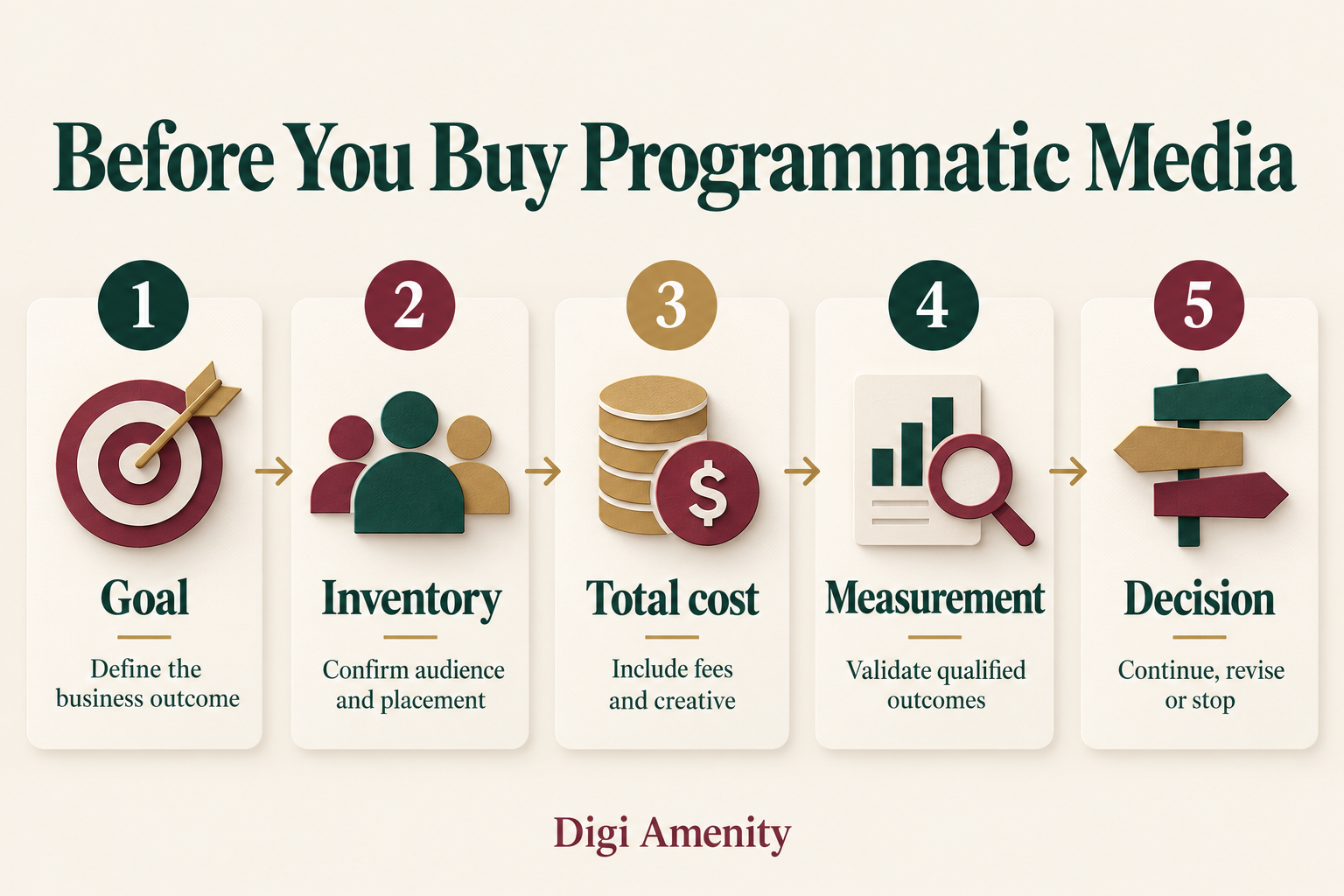
An original planning illustration, not a DV360 interface or a promise of results.
Which metrics should the business review?
Separate delivery, response and business value. A report with more columns is not necessarily a better decision tool.
| Layer | Useful checks | What the figures do not establish alone |
|---|---|---|
| Delivery | Spend, impressions, inventory, geography, pacing and applicable reach/frequency | Whether the people reached needed your product |
| Media quality | Viewability, completion and verification metrics where available | Attention, persuasion or commercial value |
| Website response | Sessions, engaged visits and correctly defined conversions | Lead quality or incremental sales |
| Business outcome | Qualified enquiries, paid orders, acquisition cost and contribution | Causality without an appropriate comparison design |
Use explicit formulas. CTR = clicks ÷ impressions × 100. All-in cost per qualified lead = agreed campaign costs ÷ qualified leads. If there are no qualified leads, report that fact; the cost-per-qualified-lead ratio is undefined, not zero. For viewability, the denominator is measurable impressions, not automatically all impressions; confirm the metric definition in the report.
Google Analytics can be linked to DV360 to support campaign reporting, audiences and conversion-related use. The current GA4 linking instructions specify permissions, link settings and Enhanced Attribution requirements; historical data are not backfilled by creating the link. Review audience-export settings and applicable consent requirements before activation.
Do not assume an Analytics event automatically becomes the bidding signal for every campaign. Google distinguishes direct linking and Floodlight integration, including differences in bidding, attribution and reporting. Have the measurement owner document which route is being used.
Click-through and view-through credit, conversion windows, time zones and reporting scope can differ between systems. Do not add conversions from several advertising platforms and call the sum unique customers. Attribution allocates credit; it does not by itself show how many sales would disappear without the ads.
Our lead-quality guide explains the business-side distinction between cheap enquiries and customers. That discipline remains relevant when the buying platform changes.
What limitations should you plan around?
Frequency control has boundaries. Google describes using available identifiers and modelling across mixed inventory. Treat frequency caps as platform controls with documented limitations, not proof that every person across every device has been recognised perfectly. Review Google’s frequency guidance for the formats being bought.
Brand suitability needs active decisions. Agree acceptable environments, exclusions, verification scope and a placement-review owner. A premium deal label does not replace a business-specific suitability policy.
Automation follows the signal you supply. If the measured conversion is a low-value action, efficient acquisition of that action may still disappoint the business. Confirm the event and cost definitions before changing bids repeatedly.
More targeting can restrict delivery. Evaluate overlapping geography, audience, inventory and creative requirements before concluding that a campaign needs higher bids. Forecasts are planning inputs, not guaranteed outcomes.
Customer data needs governance. Use approved data sources, permissions and consent processes. Do not upload a CRM list simply because the interface allows a file upload. Document retention, access and who is accountable for the audience setup.
What changed in DV360 during 2026?
Google announced Vertical Video Unification on 28 September 2026, describing a more unified approach to buying and measuring vertical video across publishers.
For a business, the practical action is to ask whether the relevant account, publishers and markets support the proposed workflow, and which creative specifications and measurement rules apply. The announcement alone does not confirm availability for every Indian advertiser. Nor does a featured brand’s campaign result establish the return your business should expect.
The broader planning principle remains the same: identify a useful buying capability, verify access and economics, then test it against a business outcome.
Frequently asked questions
1. What does DV360 stand for?
DV360 stands for Display & Video 360, Google’s programmatic media-buying platform within Google Marketing Platform. It combines campaign, audience, creative, inventory and reporting workflows. The “360” name does not mean every advertising channel or publisher is automatically available.
2. Is Google DV360 a DSP or an ad exchange?
It is a demand-side platform used by buyers. An exchange connects buying demand with available advertising inventory. DV360 can access eligible inventory through exchanges and negotiated arrangements; it is not simply another name for an exchange.
3. Is DV360 better than Google Ads?
Neither is universally better. Google Ads can serve search, shopping, video and other needs. DV360 is worth evaluating when its programmatic buying and deal capabilities solve a defined requirement. Compare the whole operating cost and measurement plan, not just feature lists.
4. Is DV360 free, and what is the minimum budget?
DV360 has contract-based platform charges in addition to media and other applicable costs. This research did not establish a single public minimum that applies to every customer. Ask the contracting provider to separate Google terms, its own minimum commitment and service fees.
5. Can a small Indian business use DV360?
Explore access with Google sales or the proposed provider, but assess commercial fit separately. A small business needs enough budget, creative and operating support for a useful test. If its immediate problem is search-demand capture or poor enquiry handling, address that before expanding the media plan.
6. Can I buy YouTube and connected TV through DV360?
DV360 supports YouTube and connected-TV buying workflows, subject to eligibility and inventory. Confirm the exact formats, publishers, locations and deal terms in your account. Do not interpret global product coverage as a guarantee of a specific Indian streaming placement.
7. Do I need Campaign Manager 360 or paid Analytics 360?
Do not assume every proposal requires both. DV360 has measurement workflows with and without a linked Campaign Manager account, and current GA4 documentation describes its own linking process. Ask which specific integration is needed and verify its permissions, capabilities and charges rather than relying on old Universal Analytics guidance.
8. How do I know whether a DV360 pilot worked?
Define the outcome, total cost scope and comparison approach before launch. Check delivery quality first, then mature qualified leads or paid-order economics. Use an appropriate lift or controlled comparison when the question is incremental impact. A low CPM, high completion rate or attributed ROAS alone is insufficient.
What should you do next?
Write down the specific capability you want from DV360, request an itemised quote and complete the buying-readiness checklist before committing. If your team is weighing DV360 against its current advertising mix, Digi Amenity can review the paid-media plan, tracking definitions and landing-page journey so the decision starts with business requirements and measurable outcomes.