
Shopify WhatsApp marketing automation sends messages when a customer meets a defined condition, such as leaving checkout without buying. Shopify Messaging now supports WhatsApp recovery automations, but a successful setup still needs explicit WhatsApp opt-in, an eligible connected account, approved templates and checks that prevent competing workflows from contacting the same shopper.
This guide focuses on Shopify’s native Messaging route for Indian stores. It is different from installing a chat button or using a third-party WhatsApp platform. Product details and prices were checked on 5 November 2026.
What changed in Shopify WhatsApp marketing automation?
On 28 October 2026, Shopify announced WhatsApp support for prebuilt abandoned-browse, abandoned-cart and abandoned-checkout automations in Shopify Messaging, plus the option to add WhatsApp to custom automations. That gives merchants another channel inside their automation workflow; it does not make every customer contactable or every ecommerce use case a ready-made WhatsApp template. Read Shopify’s announcement.
The practical opportunity is to connect a relevant shopping event with a useful reminder. The operational risk is adding another sender without checking what email, SMS and an existing WhatsApp app already do. Digi Amenity’s recommendation is to start with one clearly owned recovery journey and prove that it behaves correctly before expanding.
Can an Indian Shopify store use it?
India is not excluded from Shopify’s supported regions, and its published WhatsApp price table includes India. Your store still needs to pass onboarding eligibility and connect a WhatsApp Business Account through Meta Embedded Signup. Customer destination matters: marketing messages to US recipients are currently unsupported through this route, even if the merchant operates elsewhere. Review the current eligibility and regional restrictions before planning an international campaign.
Prepare Shopify Messaging, a Basic-or-higher plan, Shopify Flow for full automation functionality, and appropriate Marketing and app permissions for the staff member doing the work. Shopify Messaging also requires Shopify Network Intelligence to be enabled. Review that privacy setting deliberately; do not treat enabling a channel as a purely creative task. See Messaging requirements and automation requirements.
For a permissions handover, use our Shopify Flow permissions guide. Give the operator the access required for the workflow rather than sharing an owner login.
Which WhatsApp integration are you actually choosing?
| Route | What to evaluate | Important distinction |
|---|---|---|
| Shopify Messaging | Native marketing automations, channel setup and Shopify billing | This article’s setup path |
| Meta’s WhatsApp app for Shopify | Its own order-update and abandoned-cart capabilities | A separate official app, not the same configuration screen |
| Third-party provider | Required inbox, COD, routing, reporting and support features | Verify each provider’s integration, charges and permissions |
| Click-to-chat button | A convenient way for a shopper to begin a conversation | A button alone does not establish a recovery automation |
Meta’s official Shopify app listing describes order updates and abandoned-cart marketing. Do not assume its instructions, billing or available controls apply to Shopify Messaging. Similarly, a third-party guide showing COD confirmation or a shared team inbox is not evidence that the native recovery template includes those functions.
Choose against a written requirement: “Send one approved reminder to eligible checkout abandoners” is different from “Confirm COD orders, assign replies to five agents and synchronize a CRM.” An integration that fits the first task may not cover the second. Our broader WhatsApp marketing guide explains the channel strategy behind these choices.
How should you set up the first automation?
1. Audit existing senders before connecting a number
List every active cart, checkout and promotional workflow, including email, SMS, Meta’s app and third-party tools. Record who owns each trigger, which customers enter, when messages go out and how customers exit after buying. Pause an overlapping journey only after documenting the replacement and rollback plan.
Migration deserves a separate check. Shopify’s setup documentation warns that a connected account with an existing payment method can require a new WhatsApp Business Account. It also describes potential sending delays when disconnecting a previous provider during the first four or last three days of a month. Confirm the exact cutover with the providers before disconnecting anything; a working customer-support number should not become a launch experiment. Follow the current WhatsApp setup and migration instructions.
2. Establish genuine channel-specific consent
A checkout phone number is not the same thing as WhatsApp marketing permission. Nor should an email subscription be treated as WhatsApp consent. Make the opt-in clear about the channel and purpose, and preserve where and when it was obtained. Import only contacts whose permission you can substantiate.
Build a negative test into the launch: a customer without WhatsApp marketing consent must not receive the recovery message. Include a second test for someone who withdraws permission after entering a workflow. The broader campaign requirements above require explicit opt-in; do not use an abandoned-checkout email exception as permission for WhatsApp.
3. Connect the channel, then configure the recovery template
In Shopify admin, open Apps → Messaging → Settings and connect WhatsApp. Complete the account and phone-number steps shown during onboarding. Next open Messaging → Automations → Create automation, choose the relevant recovery template and select WhatsApp. Review the message, template status and available test options before turning it on.
The three abandonment events represent different stages: browse is product interest, cart is an added item, and checkout is a started checkout. Choose the stage that matches the problem you are investigating. Meta approval is required for WhatsApp templates. Shopify’s built-in welcome and post-purchase templates should not be assumed to support WhatsApp merely because recovery templates do. Check the current automation creation documentation.
4. Write a reminder that solves a real hesitation
Hypothetical copy example: “Your selected items are still available to review. Check the delivery estimate and order total before completing checkout. Need help choosing? Reply with your question.” Use this only if availability and reply handling are accurate, adapt it to the approved template fields, and retain the platform’s unsubscribe wording.
A discount should not be the automatic answer to abandonment. If shipping charges arrive late, the payment step fails or the product page omits dimensions, another coupon leaves the underlying problem intact. Review the purchase journey with our abandoned-checkout recovery checklist before increasing message volume.
How do you prevent duplicate and badly timed reminders?
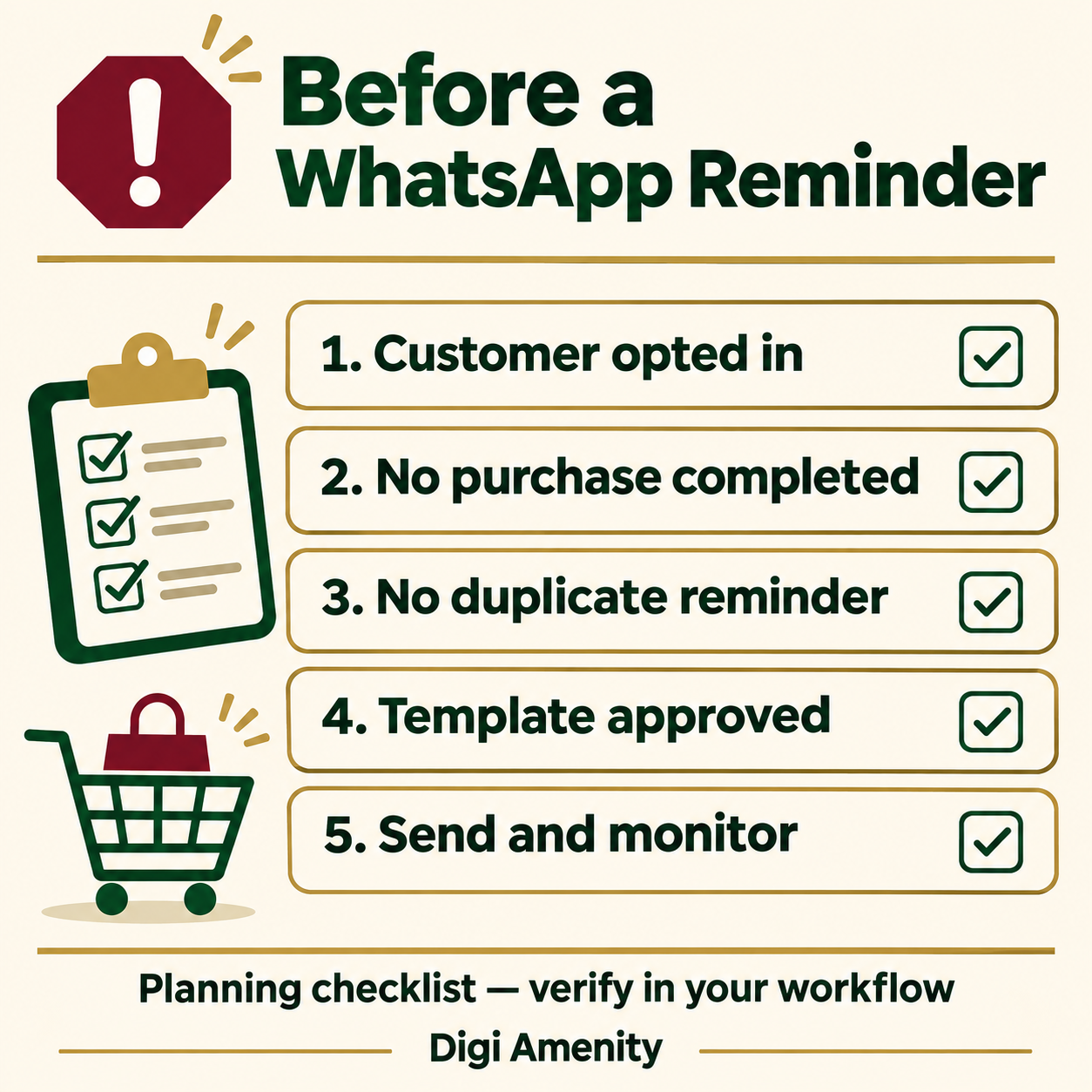
Define one owner per trigger. If an existing app already sends a checkout reminder, do not activate a second journey for the same audience without an explicit coordination rule. Shopify warns that overlapping automations can generate duplicate messages. Cross-channel suppression must be designed and verified in the actual stack; do not assume separate apps exchange all their send history.
A useful design specification answers five questions: who qualifies, what must be true immediately before sending, what suppresses the send, what stops later reminders, and who responds if the shopper replies. If the native controls cannot enforce a necessary condition, simplify the pilot or use a suitable integration instead of documenting a safeguard that does not exist.
Hypothetical pilot: a homeware store starts with one checkout reminder for eligible subscribers. It tests a completed purchase during the waiting period, an unsubscribe, two simultaneous recovery tools and a broken destination link. The team records actual outcomes before enabling the flow for customers. This is a proposed test plan, not a reported client implementation.
What does it cost, and how should you budget?
As checked on 5 November 2026, Shopify lists India-destination pricing of US$0.024 per marketing message and US$0.0014 per chargeable service message. Its documentation describes 1,000 free service messages per WhatsApp Business Account per month across connected platforms. These are Shopify Messaging prices, not a universal quote for every WhatsApp provider. Confirm current billing before launching. See Shopify’s pricing and billing table.
For a simple planning example, 2,000 chargeable India marketing messages at US$0.024 would cost US$48 in message charges alone. That is arithmetic, not a forecast or an all-inclusive bill. Allow separately for other applicable charges, currency conversion, store subscriptions, creative work and support time. Use the recipient-region mix rather than your business address alone when estimating a campaign.
A monthly spending threshold is an alert, not a guaranteed stop button. Assign someone to review usage and pause the automation when its agreed budget is reached. A low message price does not justify sending irrelevant reminders.
What should the team test before launch?
Use this original launch worksheet. “Pass” means observed evidence, such as a test message, workflow log or recorded account setting—not an assumption based on a green toggle.
| Test | Expected result | Owner / evidence |
|---|---|---|
| No WhatsApp opt-in | No marketing send | CRM owner; consent record and run log |
| Purchase before reminder | Recovery message suppressed | Automation owner; test order and run outcome |
| Opt-out before next send | No further marketing message | CRM owner; subscriber state and test |
| Two tools share a trigger | Only the designated journey sends | Operations; both tools’ logs |
| Template or channel unavailable | Failure identified; no blind retry loop | Automation owner; status and alert process |
| Mobile checkout link | Correct cart, readable total and usable checkout | Web owner; phone test |
| Customer asks a question | A named operator can respond | Support lead; test conversation |
Keep the pilot small enough for manual review. Inspect failed and skipped runs as well as delivered messages. A skipped send can be correct suppression; forcing it through may defeat the safeguard.
How should you measure whether it helps?
Shopify’s automation reports include activity metrics such as sessions, orders and attributed sales. Open Messaging → Automations and use the activity’s report option. Read each metric’s definition and attribution scope before comparing channels. Shopify explains the reporting fields here.
Attribution is not proof that every reported order was caused by the reminder. Some shoppers would have returned without it. Where the implementation supports a properly randomized holdout, compare eligible customers who receive the reminder with an eligible group that does not, using the same observation window. If a holdout is unavailable, describe before-and-after results as directional and record changes in offers, acquisition traffic and stock availability.
- Net contribution: incremental order contribution minus messaging and operating costs. Include returns, discounts and fulfilment costs when calculating order contribution.
- Operational quality: duplicate sends, failed runs, unsubscribe handling and response time.
- Customer experience: complaints, blocks and questions that reveal missing product or delivery information.
Hypothetical calculation: if a controlled test establishes 10 additional orders contributing ₹400 each, incremental contribution is ₹4,000. If the pilot’s total messaging and operating cost is ₹2,500, the remainder is ₹1,500. Without evidence for those additional orders, calling the same figure incremental profit would be misleading.
What should you do when delivery or performance drops?
Check consent, template status, phone-number status and workflow conditions before rewriting the offer. Shopify explains that blocks and reports affect WhatsApp quality, and repeatedly problematic templates can be paused or deactivated. Review the account in WhatsApp Manager and the templates in Messaging; reduce unnecessary frequency and resolve the cause before expanding. See Shopify’s deliverability guidance.
If messages arrive but sales do not improve, inspect the landing and checkout experience, delivery promises, total price and support responses. Marketing automation cannot compensate for an unusable checkout or an offer customers do not understand.
If your Shopify reminders are reaching customers but the purchase journey still loses them, Digi Amenity can review the workflow specification, mobile checkout and measurement plan before you add more sends. Explore our website development services for the storefront side of that review.
Frequently asked questions
Is Shopify WhatsApp marketing automation free?
No. Installation and messaging charges are separate questions. Budget for the chosen integration, message usage and operating work, and use its current rate card. Do not apply a free-install label to the cost of a live recovery programme.
Can I message every customer who abandoned a cart?
No. A shopping event does not establish WhatsApp marketing permission. Build your audience from eligible contacts with channel-specific consent, and test that non-subscribers are excluded rather than relying on a phone-number field.
Should I replace my existing WhatsApp provider immediately?
Only after comparing the workflows you actually need and confirming the migration path. Document support coverage, account ownership, existing automations, billing and rollback. A new native option is a reason to evaluate your setup, not proof that replacing it will improve results.
Does a WhatsApp chat button automate abandoned-checkout messages?
A button provides an entry point for conversation. A recovery journey also needs an event, eligible recipient, approved messaging method and tested send conditions. Verify those separately when evaluating an app that bundles several functions.
How many reminders should a store send?
There is no universal number that makes a programme profitable. Start with a narrowly scoped pilot and inspect customer response, duplicate exposure and incremental contribution. Adding messages should follow evidence, not a competitor’s sequence length.
Should every reminder include a discount?
No. First establish why the shopper stopped. Product uncertainty, unexpected delivery charges and payment failures require different fixes. Test discounts against margin and purchase behaviour, and avoid training customers to wait for an automatic offer.
What is the first sign that an automation is ready to scale?
It passes the negative tests, has a clear operator and produces interpretable results. Correct suppression and reliable support matter alongside sales. Increase scope only after the team can explain both successful sends and skipped or failed runs.