
To use GTIN for Google Shopping correctly, verify the number assigned to the exact product you sell, map it to the matching catalogue variant, and check the item Google actually receives. Do not fill a missing GTIN with your internal SKU or a number copied from a similar product. The useful outcome is accurate product identification—not merely a field that contains digits.
For Indian ecommerce businesses, this is a joint catalogue and advertising task. A media buyer can spot an error, but the supplier may hold the evidence and a store or feed integration may control the value. Fixing only one screen can leave the original mistake in place.
This guide explains the decisions, a practical audit process and how to measure the result. It also covers Shopify’s October 29, 2026 GTIN suggestions update. Documentation checked: November 4, 2026.
What is a GTIN, and how is it different from a SKU?
GTIN means Global Trade Item Number. It identifies a trade item; a SKU is the code your business uses to organise inventory. Your SKU and a supplier’s SKU can differ even when both refer to the same product. That does not make either SKU a suitable substitute for its GTIN.
Keep three questions separate: which row is this in our system, which manufacturer product is it, and which offer are we selling? Confusing those questions creates errors during imports and feed migrations.
| Field or reference | What your team should use it for | Audit question |
|---|---|---|
| Internal SKU | Your stock and catalogue operations | Can we trace this row back to the correct store variant? |
| GTIN | The assigned product identifier | Does our evidence match this exact item and pack? |
| Manufacturer part number (MPN) | A manufacturer’s part reference | Is this genuinely the manufacturer’s value, rather than a code we invented? |
| Merchant Center item ID | Finding the submitted offer during diagnosis | Are we reviewing the same item, market and data source? |
Google’s guide to finding a GTIN recommends checking the packaging or contacting the manufacturer. Common formats include UPC, EAN and ISBN. If you use a third-party lookup, verify that it is legitimate and that its result belongs to your product. A search result with a similar title is insufficient evidence.
Is a GTIN required for every Google Shopping product?
No single rule fits every product. Google’s current GTIN specification recommends submitting a GTIN for products that have one assigned by the manufacturer. Missing or incorrect identifiers can limit visibility or eligibility. Follow the requirement for your actual product and issue; do not interpret an empty field as proof that no identifier exists.
Only submit a number you know is correct. For variants, use the identifier for the specific version being sold. Google also validates number format and check digits. A format-valid number can still identify the wrong product.
The identifier_exists field is not an error-suppression switch. Google says to use no or false only when you are certain the product does not have assigned unique product identifiers. Some custom or one-of-a-kind items may qualify; a reseller who has not yet asked the supplier has not established that. See the official identifier_exists rules.
For bundles, multipacks and customised manufacturer products, consult the specific examples in Google’s GTIN specification. Do not apply the single-unit rule to every package configuration.
What changed in Shopify’s GTIN suggestions update?
On October 29, 2026, Shopify announced GTIN suggestions and autocomplete. It checks barcode values against the GS1 registry, can recognise an entered GTIN, and offers suggestions for saved custom barcodes. Its bulk editors can accept or dismiss suggestions together.
Shopify describes these as checking signals. Saved barcodes do not change unless you accept a suggestion, and the feature does not prevent saving. A registry comparison does not require you to rewrite your product title or vendor to match the registry wording.
Practical implication: inspect a sample before accepting suggestions in bulk. A recognised number still needs to belong to the variant on that row. Confirm the controls available in your own admin; this guide has not tested availability across every Indian store, plan or feed connector.
If the controls are absent, use the manual evidence-and-mapping workflow below. A UI suggestion is helpful, but the audit should not depend on it.
Where should an Indian business get the correct GTIN?
If you resell another brand’s product: start with its packaging, supplier product sheet and manufacturer confirmation. Ask for identifiers at variant and pack level. A spreadsheet with only a parent product name is not enough to resolve colour, size or quantity differences.
If you own the brand: review the official GS1 India registration guidance and its current application process. GS1 India describes registration and product-data management through DataKart. Confirm the applicable documentation, allocation needs and charges directly before paying; this guide does not quote a fixed fee or turnaround time.
Before buying anything, establish whether an identifier has already been assigned. A retailer should not create a competing identity simply because its supplier file is incomplete. Record the evidence and the person who approved it so the next catalogue import does not restart the same investigation.
How do you audit GTIN for Google Shopping step by step?
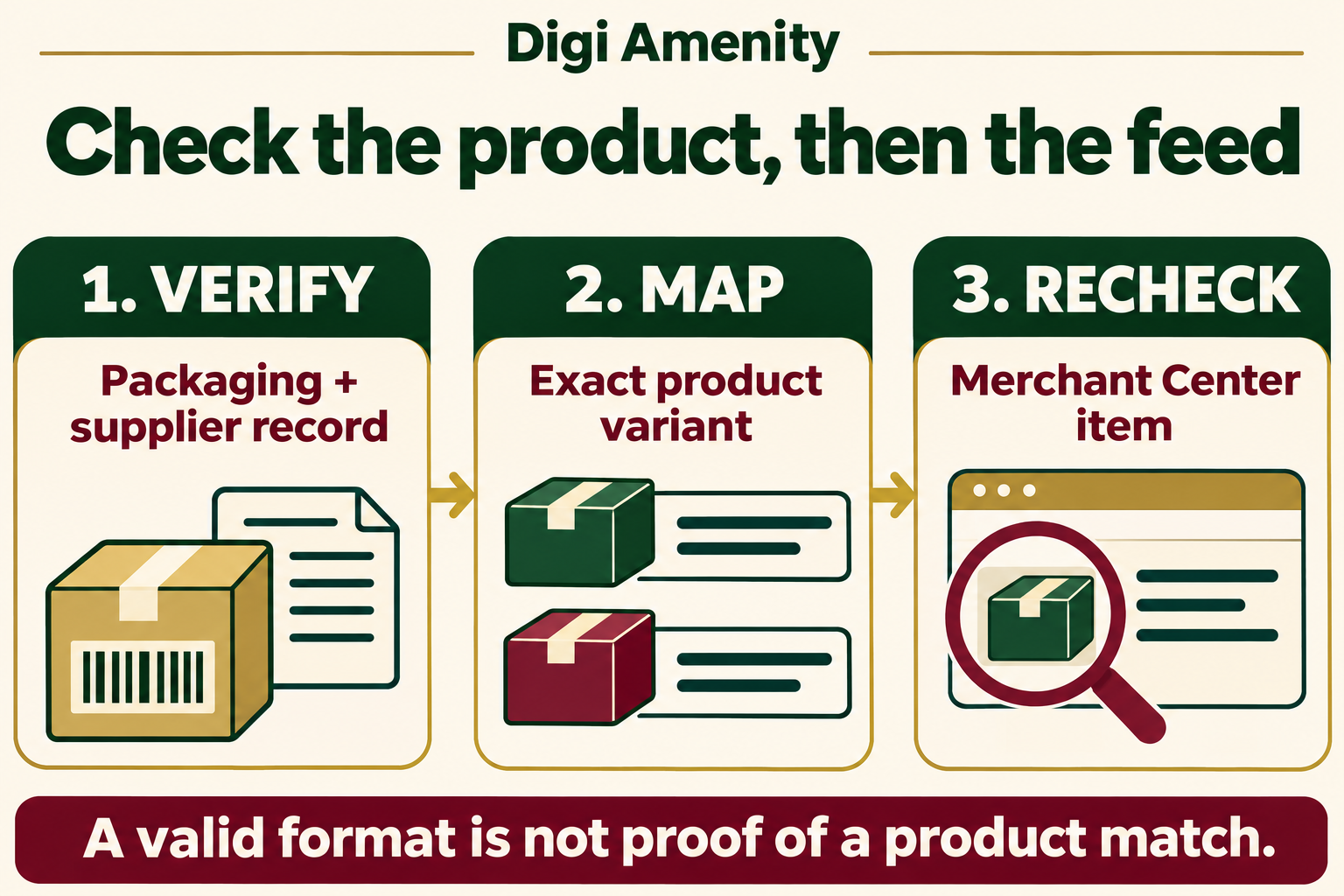
1. Choose a small, useful batch
Start with items carrying identifier issues and commercially important products that your team can verify. Keep the scope manageable: one supplier or collection is easier to investigate than a mixed export with no owner.
Save the existing values before editing. Include the store variant ID, SKU, Merchant Center item ID, market, data source and current issue text. This creates a rollback reference and prevents someone from “fixing” the wrong row.
2. Build an evidence record
For each row, collect a clear packaging reference or supplier/manufacturer record. Match product name, model, size, colour and pack quantity where relevant. Mark uncertain cases as awaiting evidence instead of guessing.
Ask the supplier a precise question: “Please confirm the assigned identifier for this model, this size and this pack quantity.” A general request for “all barcodes” often returns a file that still requires interpretation.
3. Review the stored value as text
During spreadsheet handling, keep identifier columns as text so a spreadsheet does not remove leading zeros or display long values in scientific notation. Inspect the exported file, not only how the cell looks in the workbook.
Run format checks as a first filter, then compare the evidence. Passing a length or check-digit test is not approval to use a number. Assign a reviewer for product matching rather than asking an automated validator to decide product identity.
4. Fix the system that owns the field
Draw the actual path: supplier file → store catalogue → feed app or integration → Merchant Center. Identify where the value is introduced, transformed or overwritten.
If a scheduled import restores the old value each night, a manual edit downstream is temporary. Correct the authoritative record and the mapping rule, then let the agreed sync run. Avoid simultaneous edits by catalogue, developer and paid-media teams without one change log.
For Shopify, confirm which barcode value and type your particular connector sends. Do not assume accepting a suggestion proves that the external feed has already updated.
5. Inspect the processed item
Open the matching Merchant Center item after processing. Compare its identifier with the approved value and record the time checked. Separate “saved in Shopify”, “sent by the connector” and “received by Google” in the audit log.
If the value is wrong downstream, investigate the connector’s mapping or source priority before editing more products. If the value is correct but an issue remains, record the exact message and follow that issue’s guidance. Do not assume every product problem is a GTIN problem.
6. Expand only after the pilot is stable
Check the same sample again after the next routine import. If old values return, fix that recurrence before scaling the batch. Once the path is stable, work through the remaining rows with the same evidence standard.
Keep an exceptions queue for ambiguous supplier data, special package configurations and unresolved platform issues. An honest pending row is more useful than a falsely completed audit.
How should you handle invalid GTIN and identifier errors?
| Observed problem | First check | Useful action |
|---|---|---|
| Value fails a format check | Compare exported text with the original evidence | Investigate truncation, spreadsheet conversion or a copied SKU |
| Number is valid but matches another variant | Check size, colour, model and pack quantity | Correct the row mapping; do not treat syntax validation as product verification |
| Store value differs from Google’s item | Check sync time, source and connector mapping | Fix the responsible source and inspect the processed result again |
| No identifier has been found | Ask the manufacturer and document the response | Keep the case pending until absence is established |
| Incorrect product identifier issue | Check whether identifier_exists was set to false | Follow Google’s issue-specific correction with reliable product evidence |
Google’s incorrect product identifier guidance describes a specific situation: the feed says identifiers do not exist, while Google believes a GTIN exists. It instructs merchants to supply the correct GTIN and correct the identifier setting. In Merchant Center, use Products → Needs attention to locate affected items. Google notes that changes for this issue may take 24–72 hours to appear there; that is not a promise of approval or indexing by a deadline.
What would this look like for an Indian retailer?
Hypothetical example—not a client result: an Indian kitchenware retailer imports a supplier file for a bottle range. One code has been copied into rows for two capacities and a twin-pack. The feed contains digits everywhere, so a completeness check alone looks reassuring.
The catalogue owner asks for packaging evidence for each sellable version. A reviewer compares that evidence with the row-level mapping. The developer checks whether the feed app reads the variant field or a parent-product field. The media buyer then inspects the corresponding Merchant Center items.
The team logs three separate outcomes: evidence confirmed, mapping corrected, and processed item checked. It does not call the work successful because every cell is non-empty, nor claim that subsequent sales changes came solely from the correction.
The same discipline should extend to the destination page. A shopper selecting one capacity should not land on an unclear or mismatched offer. Our Shopify product-page optimisation guide covers the customer journey after the click, while the ecommerce category-page guide explains how product discovery fits into the wider store structure.
What should your GTIN audit worksheet contain?
Use one row per sellable variant and market where the submitted offer differs. Copy the following fields into your existing catalogue tracker. Keep confidential supplier material in your own workspace.
- Identity: store variant ID, SKU, product/variant name, pack quantity, Merchant Center item ID and market.
- Evidence: current GTIN, approved GTIN, packaging or supplier reference, evidence date and reviewer.
- Data path: authoritative source, connector, mapped field, sync time and received value.
- Resolution: issue text before/after, change owner, action date, next check and rollback reference.
- Status: awaiting evidence, ready to change, synced, verified, or exception requiring investigation.
Do not use “verified” until the evidence matches the product and the intended value appears in the processed item. A supplier reply alone completes the evidence stage, not the entire workflow.
How do you measure whether the work helped?
Measure data quality first. For your chosen batch, calculate verified coverage = fully verified rows ÷ all rows in that batch × 100. Keep the denominator fixed, and report unresolved exceptions separately. This is an operational metric proposed here, not a Google score.
Then track the number of affected items with the specific issue before and after processing. Keep a separate count of items with other problems. Otherwise, a corrected GTIN can be credited or blamed for an unrelated availability, policy or landing-page issue.
For commercial analysis, compare equal complete periods and the same product cohort, market and campaign scope. Record changes in spend, price, stock, promotions and conversion measurement. Use impressions, clicks and purchases as observations; a before-and-after change by itself does not prove causation.
If visibility improves but purchases do not, review the offer and landing-page journey before buying more traffic. Correct identifiers help establish product identity; they do not repair poor pricing, unclear shipping information or checkout friction.
Frequently asked questions
Can I use my SKU as a GTIN?
No. Keep the internal stock code in its own field. Obtain and verify the assigned product identifier instead of copying a convenient code into the GTIN field. A numeric SKU is not automatically a GTIN.
Can I advertise a product that has no GTIN?
Some products genuinely lack assigned identifiers. Check the applicable Google rules and the available product evidence before choosing the no-identifier path. “We have not found it yet” and “none has been assigned” are different conclusions; neither guarantees Shopping eligibility.
Should I accept all Shopify GTIN suggestions at once?
Only after reviewing the underlying catalogue quality. Sample several variants and package sizes, confirm the evidence and inspect the downstream mapping. Bulk acceptance saves time on a well-understood dataset; it also scales a mistaken assumption.
Does a valid check digit prove the product match is correct?
No. Treat it as a format check. The reviewer still needs to compare the identifier with the exact item, including relevant variant and packaging details. Keep both checks visible in your audit record.
Why does an error return after I correct it?
A recurring import or connector rule may be restoring an earlier value. Compare the authoritative catalogue, exported data and processed item in sequence. Record timestamps so you can identify which stage changed the value rather than repeatedly editing the final screen.
Do I need to buy new codes when I resell branded goods?
First investigate the identifiers already assigned to those goods. Ask the manufacturer or supplier for exact product evidence. Brand owners evaluating new allocation should consult GS1 India’s current process; a missing supplier spreadsheet column is not a reason to invent another identity.
Will correcting GTINs lower my advertising costs?
There is no guaranteed cost or return improvement. Verify the data and issue status, then assess commercial performance while accounting for budget, demand, stock and offer changes. Avoid treating catalogue hygiene as a promised ROAS increase.
Need help connecting product data to campaign decisions?
If your Shopping campaigns contain product identifier errors, Digi Amenity can review the catalogue evidence, feed mapping and landing-page consistency before you increase spend. Explore our Google Ads services for a review that connects product data with the buying journey.
