
To implement marketing automation, start with one measurable customer journey, decide what should happen at each stage, connect reliable data, and define when the workflow must stop. Test it with representative records, launch a controlled pilot, and measure business outcomes before adding more channels or workflows.
The software comes after the process. If enquiries are not assigned, customer records are duplicated or purchase data arrives late, automation can repeat those problems faster. A useful first project makes one process dependable: a new enquiry reaches the right person, a subscriber receives the promised resource, or a customer stops receiving checkout reminders after buying.
This guide explains how to implement marketing automation for Indian service businesses and ecommerce brands, from the first workflow brief to launch checks and measurement. The examples are hypothetical planning examples, not Digi Amenity client results.
Research checked on 2 November 2026. Product menus, permissions and plan limits can change; confirm them in your account before implementation.
What does marketing automation actually mean?
Marketing automation uses software to carry out predefined marketing tasks when an event, condition or schedule calls for them. A workflow might respond to a form submission, assign a sales task, send an eligible follow-up and stop when the prospect books a meeting.
A CRM stores customer relationships and sales activity. An email platform delivers messages. An automation layer decides what happens next and can connect those systems. One product may provide several of these functions, but they remain different responsibilities. Salesforce’s marketing automation guide describes workflows across channels and the customer journey.
Automation also differs from AI. A fixed rule can route a lead without generating anything. AI may help draft content or suggest a category, but its output still needs appropriate checks. You do not need an AI agent to build a useful welcome or follow-up workflow.
Which process should you automate first?
Choose a recurring problem with a clear input, an agreed owner and an observable result. Avoid starting with a complicated journey simply because a template is available.
| Business problem | Suitable first workflow | Result to verify |
|---|---|---|
| Enquiries wait in an inbox | Validated enquiry → CRM record → owner task | Correct assignment and timely human follow-up |
| Subscribers do not receive the promised resource | Eligible signup → resource delivery → relevant welcome sequence | Delivery, useful clicks and replies |
| Customers receive reminders after paying | Checkout follow-up with purchase and suppression checks | Eligible reminders only; no post-purchase recovery messages |
| Sales repeatedly chases unsuitable leads | Qualification fields → review queue → reason-coded outcome | Sales acceptance and qualified opportunities |
Before approving the project, write a measurable goal such as: “Every valid enquiry has an owner and a recorded next action during our staffed hours.” Then measure the current gap. If enquiry quality is poor, fix the offer, targeting or form before building a longer nurture sequence. Our lead-generation form guide covers that starting point.
What should your marketing automation strategy contain?
A useful strategy fits on one page before it becomes a workflow diagram. State the audience, problem, desired outcome, entry event, information required, responsible team and measurement window. Agree what will remain manual.
Draw the journey from the customer’s perspective: discover an offer, enquire or subscribe, receive useful information, evaluate, buy, and get support. Identify the next helpful action at each stage. A prospect asking for a quotation may need a salesperson rather than another generic email.
Assign three responsibilities even if one person holds all three: a business owner approves the purpose and messages; a builder manages the workflow and integrations; an evidence owner checks records and results. Record a backup person who can pause the workflow. This prevents a campaign from depending on one employee’s account or memory.
How do you implement marketing automation step by step?
1. Establish your baseline and acceptance criteria
Record the present process before changing it. For lead generation, examine assignment delays, contact attempts, sales acceptance and appointments. For ecommerce, examine eligible checkout events, completed orders, cancellations and customer complaints.
Use a comparable period and explain exclusions such as staff tests or duplicate submissions. Decide what would block launch: an opted-out person receiving a promotion, two records triggering the same message, or an integration failing without an alert. An attractive workflow diagram does not demonstrate readiness.
2. Map the minimum data and its source of truth
List each field the workflow needs, where it comes from and which system is allowed to change it. Keep a stable contact or customer identifier. For individual actions, retain an event or transaction identifier as well. A customer can submit more than one legitimate enquiry; deduplicating everything by email alone can erase a real second request.
A compact data map might include contact ID, event ID, source campaign, submission time, service interest, channel eligibility, lifecycle status, assigned owner and last completed action. Store timestamps consistently and display operational deadlines in the team’s chosen timezone, such as Asia/Kolkata.
Resolve conflicts before connecting systems. If the CRM says “customer” but a mailing list still says “prospect”, decide which record controls suppression. Do not copy an older consent state over a newer opt-out. Keep failed synchronisations visible rather than treating a missing value as permission to send.
3. Choose tools against your workflow requirements
Evaluate the actual job, not the longest feature list. Demonstrate your trigger, required fields, branching, delays, exclusions, reporting and recovery process in the proposed setup. Confirm which subscription includes each needed action.
- For a service business: prioritise contact history, assignment, sales tasks and updates after meetings or deals change.
- For ecommerce: prioritise reliable order and product data, purchase exclusions, refund handling and lifecycle messaging.
- For a small team: start by checking whether the existing CRM or email platform can handle the first workflow before adding an integration service.
- For complex systems: include implementation support, access controls, exportability, failure logs and an accountable technical owner in the evaluation.
Calculate the full cost: subscription, contact or send limits, connector usage, messaging charges, setup, content, monitoring and maintenance. A cheap plan can become expensive if every useful action needs another product. There is no defensible universal implementation price without knowing the scope.
4. Define entry, exclusions, exit and re-entry
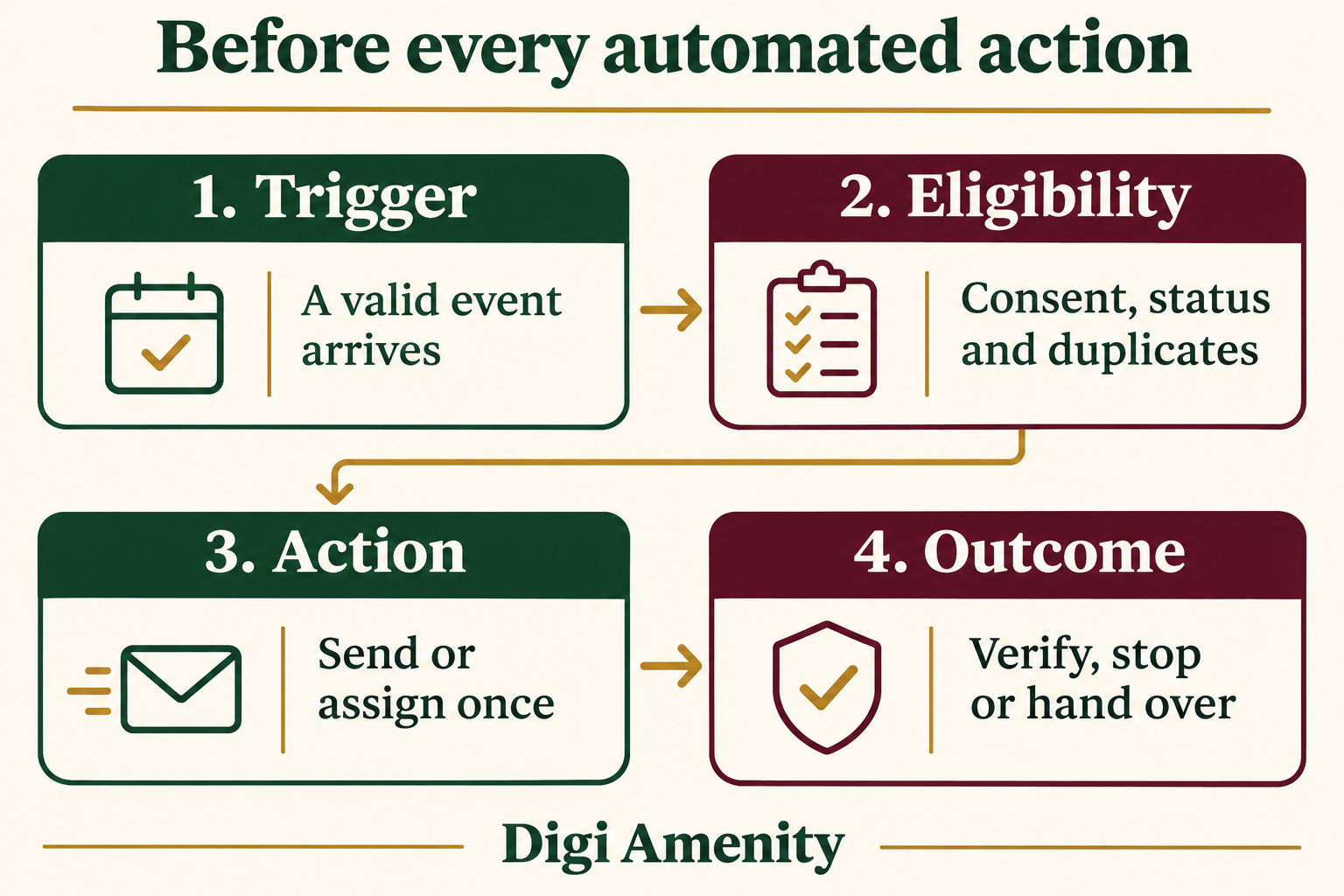
For every workflow, answer four questions: what starts it, who must be excluded, what stops it, and whether the same record can enter again. Add checks immediately before a delayed customer-facing action, not only at the initial trigger.
Consider someone who subscribes on Monday, unsubscribes on Tuesday and reaches a scheduled message on Wednesday. The workflow needs the latest eligibility state at send time. Similarly, a purchase or booked meeting should remove a person from incompatible follow-ups.
Platforms implement these rules differently. HubSpot’s enrollment documentation describes separate controls for re-entry and removal, including goals and suppression segments for contact workflows. Do not assume that switching a workflow on makes those decisions correctly for your business.
5. Connect systems and prevent repeated actions
Trace a test event from its source to the destination record. Confirm field mapping, time, ownership and delivery status. A connector showing “connected” proves little about whether the right information arrives.
Design protection against repeated delivery of the same event. For example, keep a record that enquiry E-104 has already created its sales task. If that event is received again, update or reconcile it instead of creating another task automatically. This is a design requirement to implement with the tools available, not a promise that every connector supplies it.
Handle ambiguous failures carefully. If a message request times out, check the sending platform’s record before retrying; it may already have been accepted. Route unresolved cases to a review queue with an owner. Repeated retries can turn one technical error into multiple customer messages.
6. Prepare messages and channel rules
Each message needs a purpose, an accurate promise and a useful next step. Check fallback text when a name or product is missing. Confirm the offer, stock, landing page and reply destination. An automated response should not promise a callback outside the hours your team can actually cover.
For email, review domain authentication, unsubscribe handling and sending practices. Google’s Gmail sender guidelines distinguish requirements for all senders from additional bulk-sender requirements. Treat email setup as part of the implementation, rather than discovering delivery problems after launch.
For WhatsApp, follow the current Business Messaging Policy: obtain the required opt-in permission, respect opt-outs and apply the Business Platform’s approved-template rules. Outside the 24-hour customer service window, approved templates are required; automated responses also need a clear escalation path. Having someone’s phone number alone is not permission for a promotional sequence.
For a welcome journey, plan the content around the reason the person subscribed. Our welcome email sequence guide explains how to make those messages useful without turning every email into a sales pitch.
7. Test the whole journey before enabling live sends
Use synthetic records and inboxes controlled by your team. Test both eligible and ineligible cases. Record the expected result before running a test, then compare it with evidence from the source, workflow and destination.
A preview is not an end-to-end integration test. HubSpot’s workflow testing documentation distinguishes checks of enrollment and workflow paths. Whatever platform you use, confirm what its test mode executes, simulates or skips before relying on it.
| Test case | Expected behaviour |
|---|---|
| Valid new enquiry | One correct record and one assigned next action |
| Same event delivered twice | No duplicate task or message |
| Missing required information | Review or safe fallback; no broken personalisation |
| No promotional permission | No promotional enrollment |
| Opt-out during a delay | Pending promotion suppressed |
| Purchase or meeting before follow-up | Incompatible follow-up stops |
| Integration unavailable | Error recorded and owner alerted |
| Ambiguous send timeout | Reconcile delivery before retrying |
| Out-of-hours enquiry | Accurate expectations and next staffed-period task |
| Manual pause and resume | Queued actions reviewed; no unexpected bulk release |
8. Launch a small pilot and define rollback
Start with a manageable eligible segment and a named reviewer. Check the first records individually. Keep a versioned copy of the workflow specification and approved message content.
Write the pause procedure before launch: who can stop new entries, what happens to records already waiting, who checks external send queues, and how unfinished customer requests will be handled manually. Pausing one workflow may not cancel a message already queued in another system.
Scale when the evidence supports it. Fix recurring exceptions before adding branches. If the process is failing because an offer is unclear or sales does not update the CRM, adding more automation will not resolve that underlying problem.
What does this look like for a lead-generation business?
Hypothetical example: a Mumbai commercial-interiors business receives quotation enquiries. Its first automation handles assignment and follow-up ownership, rather than sending a long generic nurture series.
- A valid enquiry creates or updates the contact and a separate enquiry record.
- The workflow checks service area, project type and required fields. Ambiguous records enter a manual-review queue.
- An owner is assigned using documented routing rules. An acknowledgement states the team’s actual response hours.
- The owner receives a task with the source, enquiry details and due time. An overdue task alerts the backup person.
- A meeting booking, disqualification or explicit stop request ends the relevant follow-up. Any promotional nurture is handled separately under the appropriate permission.
Measure assignment accuracy, staffed-hours response time, sales acceptance and attended meetings. Do not call every form submission a qualified lead. If you use lead scoring, define the criteria with sales and compare scores with actual outcomes. A pricing-page visit or email click alone is weak evidence that someone is ready to buy.
How should an ecommerce brand adapt the workflow?
Hypothetical example: an Indian home-accessories store wants to improve checkout follow-up. Start with an identifiable, eligible checkout event. Before each reminder, check whether the order was completed, the person remains eligible to receive the message, and the advertised product and offer are still valid.
Choose a delay based on the buying journey and operating constraints, then test it. Do not copy another brand’s timetable as a benchmark. Do not automatically add a discount to every sequence: it may reduce margin or train customers to wait for a coupon.
Exit recovery when a valid purchase is recorded. Handle cancellations and refunds through an appropriate service process rather than silently sending customers back into a promotion. Our Shopify checkout recovery guide explores the message and purchase journey in more detail.
Evaluate completed orders and contribution after discounts, returns and relevant variable costs. A platform’s attributed recovery revenue does not prove every reported order was caused by the messages.
How should you measure marketing automation results?
Separate three levels: whether the system worked, whether people took a useful action, and whether the business gained something it would not otherwise have gained.
- Operational reliability: correct assignments, duplicate actions, missing data, failures and unresolved exceptions.
- Journey outcomes: qualified opportunities, attended appointments, completed purchases or successful onboarding.
- Commercial impact: incremental contribution, retained customers or evidenced time saved after maintenance effort.
Define denominators and windows. For example, sales acceptance rate can mean accepted leads divided by reviewed leads from the same intake cohort. Label that definition; it is not interchangeable with accepted leads divided by all visitors. Keep unknown or unreviewed records visible.
Mailchimp explains that Apple Mail Privacy Protection can inflate recorded opens. Avoid using opens as the sole signal of intent or the sole success measure. Review clicks alongside replies, destination activity and confirmed outcomes.
Hypothetical measurement example: two randomly assigned, comparable eligible groups each contain 400 contacts. The automation group produces 32 purchases and the comparison group produces 24 during the same defined window: 8% versus 6%, a difference of 2 percentage points. That is an estimated eight additional purchases in the treated group, subject to sampling uncertainty and the quality of the test.
If contribution per additional order were ₹900, the estimated additional contribution would be ₹7,200 before automation costs. Subtract the relevant incremental software, messaging and operating costs. These invented numbers explain the calculation; they are not a benchmark, a statistically conclusive result or a promised return. Never withhold necessary service messages to create a marketing experiment.
Preserve campaign source information consistently, but keep personal data out of analytics URLs and event parameters. Google’s Analytics guidance prohibits sending recognisable personal information, including email addresses and personal mobile numbers. Operational customer records and web analytics serve different purposes.
What is a realistic implementation timeline?
For a small, well-defined pilot, the following four-week plan is a useful planning example—not a delivery commitment. Existing data quality, approvals, access and integrations can extend it.
- Week 1: define. Pick the journey, record the baseline, map the data and approve the owner and success criteria.
- Week 2: build. Connect the necessary systems, write messages, configure entry/exit rules and prepare reporting.
- Week 3: verify. Run the test matrix, fix failures and rehearse pause and recovery.
- Week 4: pilot. Launch to a limited eligible group, review exceptions and decide what to improve before expansion.
A simple existing-platform workflow may take less time. A migration involving multiple databases and teams may take substantially longer. Use passed checks as the launch gate rather than a calendar date alone.
Can AI help with implementation?
AI can help turn a workflow brief into draft messages, possible branches and test cases. Use synthetic examples and approved business facts. Keep credentials, private customer records and confidential commercial information out of unapproved tools.
Try this planning prompt: “Using this fictional workflow brief, list entry conditions, exclusions, exit rules, missing fields and negative test cases. Do not assume consent or invent product capabilities. Mark decisions that need a human owner.” Review the result against the actual platform and business process. This is an example prompt, not a tested automation or evidence of tool performance.
Keep approval around claims, offers, audience rules and customer-facing actions. Automating a generated draft is a separate decision from asking AI to help write it.
What should your implementation checklist include?
Copy these fields into one document for every workflow:
- Workflow name, purpose, version, business owner and backup.
- Audience, entry event, unique record/event identifiers and source systems.
- Required fields, authoritative system for each field and missing-data behaviour.
- Channel eligibility, exclusions, frequency limits and timing.
- Actions, approved messages, destination and human handoff.
- Exit conditions, permitted re-entry and duplicate-event handling.
- Failure alerts, retry reconciliation, pause procedure and recovery owner.
- Test cases, expected outcomes, actual evidence and sign-off.
- Baseline, success metric, denominator, reporting window and review date.
Download the workflow implementation worksheet and fill it in with your team before launch.
The checklist is complete only when someone can show the evidence behind it. A tick beside “tested” without the record, scenario and observed result is not enough.
Frequently asked questions
Can a small business implement marketing automation?
Yes. Start with a process you already understand, such as assigning enquiries or delivering a promised resource. Use the simplest suitable setup and retain a human owner. A small number of reliable workflows is more useful than a large collection nobody maintains.
Do I need a CRM before starting?
Not every workflow needs a separate CRM product. A basic subscriber journey may run in an email platform. Lead-generation processes involving several people usually need a dependable shared record of ownership, status and previous contact. Decide what information must be shared before choosing the software.
Which marketing automation platform is best?
There is no universal winner. Compare platforms using your required trigger, data fields, permissions, integrations, channel support and reporting. Demonstrate the difficult cases before buying. Confirm paid-plan requirements rather than assuming features shown in a vendor demo are included in a starter subscription.
Can I start for free?
You may be able to validate a simple process with tools you already have, but free access does not imply unrestricted automation. For example, HubSpot’s full workflows documentation lists qualifying Professional and Enterprise subscriptions, with some features requiring additional entitlements. Verify the exact capability and account limits.
What should stop an automated sequence?
Define stop conditions for the sequence’s purpose. Common examples are a relevant purchase, a booked meeting, an opt-out or an issue that needs human handling. Recheck eligibility before delayed actions. Also inspect messages already queued in connected systems when pausing a workflow.
How do I prevent automation from becoming spam?
Send expected, useful messages to eligible recipients, coordinate frequency across journeys, honour opt-outs and stop irrelevant follow-ups. Check the customer’s total experience across channels. A reasonable email sequence can still feel excessive when another team sends overlapping WhatsApp messages and promotions.
How often should workflows be reviewed?
Monitor closely during launch, then set a review rhythm based on volume and consequences. Recheck after changes to forms, offers, integrations, roles or data definitions. Assign someone to errors and unanswered customer replies; scheduled reporting alone does not provide operational ownership.
Will automation fix poor lead quality or low sales?
It can improve consistency and reveal where a process breaks, but cannot guarantee demand or sales. Poor results may come from targeting, the offer, landing pages, tracking, pricing or human follow-up. Diagnose those systems alongside the workflow before increasing message volume.
Start with the workflow your business needs most
If enquiries or customer follow-ups are getting lost between your website, inbox and sales team, Digi Amenity can help map the data, messages, ownership and measurement before you add another tool. Explore our email marketing support to plan a focused first workflow with clear launch checks.
