
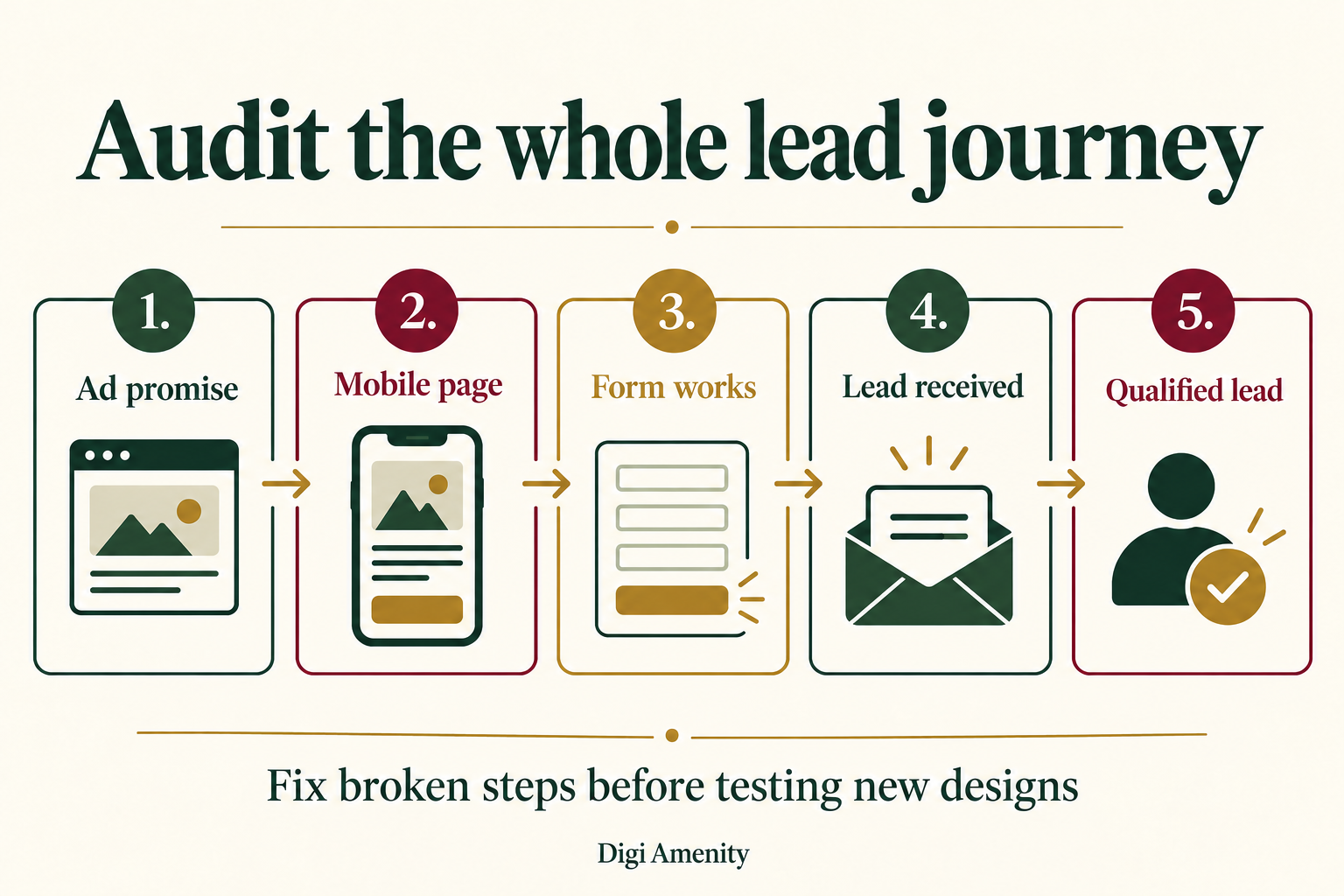
A useful landing page audit checklist follows the whole journey: the ad promise, the mobile page, the form, the received enquiry and the qualified lead. Start by checking that visitors can complete the action and your team receives it. Then review the offer, proof and friction. Change design elements only when you have a specific problem to solve and a way to measure the result.
For an Indian service business buying Google or Meta traffic, a low cost per form submission can hide a costly problem: irrelevant enquiries, duplicate events or leads that never reach the right person. This guide explains how to audit that journey, prioritise fixes and decide what deserves a test before you increase spend.
What is a landing page audit?
A landing page audit is a structured review of a page and the conversion path connected to it. It asks whether the right visitor understands the offer, can take the intended next step and reaches the business successfully. The output should be a short action list with evidence, an owner and a retest—not just a score.
A landing page can be a dedicated campaign page, a service page or a product page. The checks depend on its job. A quotation page should help someone assess fit and request a quote; a product page must also explain variants, availability, delivery and checkout. A download page has a different commitment level from a consultation request.
At Digi Amenity, the practical recommendation is to evaluate the channel and destination together. A page cannot resolve irrelevant search terms, and better ad targeting cannot repair a broken enquiry form. Treat the audit as a connected business process.
What should you measure before changing the page?
Choose one primary business outcome and document what counts. For lead generation, separate these stages:
- CTA interaction: someone clicks a form, telephone or WhatsApp button.
- Successful request: the submission is accepted, rather than merely attempted.
- Received enquiry: the request appears in the intended inbox or CRM.
- Qualified lead: the enquiry meets criteria your sales team has agreed, such as service need, location and commercial fit.
Google lists generate_lead as a recommended Analytics event for a form submission or request for information. Recommended events require implementation; the name does not prove that your site sends it correctly. It also does not establish that a request is qualified. See Google’s recommended event definitions.
Record a baseline using complete dates, the same timezone and consistent channel filters. Keep sessions, accepted requests and unique qualified leads separate. Document spam, tests, duplicates and qualification delays. If the data is missing, write “unknown”; do not fill the gap with zero.
Break the baseline down by device and campaign where volume allows. A healthy desktop average can hide a mobile failure. Likewise, comparing all website traffic with one paid campaign can make a page change look better or worse for the wrong reason.
Does the page deliver what the ad promised?
Open the destination alongside the actual ad and relevant search term or audience message. Check the service, location, offer, eligibility and next step. A visitor who clicks “Shopify website quotation” should not need to decode a general agency homepage to find the relevant service.
The first screen should answer three questions: what is available, who it suits and what happens next. Replace vague claims with useful scope. “Discuss your Shopify build, required integrations and launch constraints” provides more decision information than “Take your business to the next level.” Do not invent a delivery deadline or price to make the copy sound specific.
Use a primary action that reflects the commitment. “Request a quote” and “Book a consultation” are different promises. Repeated buttons can lead to the same action; they need not introduce competing offers. Keep essential contact, accessibility and privacy information available.
Check search terms and location settings as part of this step. If irrelevant demand is the problem, a page rewrite alone is unlikely to solve it. Our Google Ads services connect campaign structure and search intent with the landing-page journey.
Can someone use the page comfortably on a phone?
Test on a real phone as well as a narrow browser viewport. Use the devices and browsers relevant to your audience. Try the page with the on-screen keyboard open, after scrolling and with any consent banner or sticky contact button visible.
- Can you read the headline, price conditions and field instructions without zooming?
- Do buttons remain visible and distinguishable from ordinary text?
- Can you open and close the navigation without trapping focus or covering the form?
- Do floating WhatsApp or call controls overlap the submit button or error message?
- Can keyboard users reach controls in a sensible order and see where focus is?
- Do links work without relying only on a subtle colour difference?
For text contrast, WCAG’s minimum criterion generally requires 4.5:1 for normal text and 3:1 for large text, with defined exceptions. Check the actual foreground and background, including hover and error states. Passing a contrast check alone does not establish full accessibility compliance. The W3C contrast guidance explains the criterion.
Preserve working layout while fixing a specific barrier. A clearer link colour, a corrected label or an unobstructed control can address an observed issue without changing the entire page. For implementation support, assess the page as part of the wider website development and maintenance workflow.
How do you test the form and the enquiry handoff?
A green success message is not enough. Arrange a clearly labelled test with the website owner and the person who receives enquiries. Use synthetic test details that your team can recognise, exclude the test from reporting, and avoid sending real customer information to testing tools.
- Test incomplete input. Submit an empty required field and an invalid email. Confirm that an understandable error identifies the right field and preserves other entered information.
- Test valid input. Submit a single authorised test. Record the time, page, device and a non-sensitive test reference.
- Confirm acceptance. Check the response and success state. A network error should not display a misleading confirmation.
- Confirm delivery. Have the owner locate the request in the inbox or CRM and verify the intended routing.
- Inspect measurement. Confirm the intended event occurs at the correct successful stage. A button click before validation should not masquerade as a completed request.
- Check duplicates. Examine repeated clicks, page refreshes and revisits to a thank-you page. Determine whether one request produces multiple lead records or conversion events.
- Close the loop. Record the test result, remove or label test records according to the agreed process and verify the sales owner’s next action.
Visible field labels should remain understandable after someone starts typing. W3C recommends associating labels with controls; for explicit HTML labels, the label’s for value must match the control’s id. A placeholder alone is a poor substitute for a persistent instruction. See W3C’s form-label tutorial.
Do not apply a universal “three fields maximum” rule. Remove fields nobody uses, but keep information needed to route or assess a request. A service area or project-type field may reduce wasted follow-up. Test the trade-off using qualified enquiries, not just submission volume.
For telephone and WhatsApp paths, distinguish a click from a connected conversation. An app opening is not evidence that a message was sent or answered. Document who owns replies, working hours and the fallback when the primary owner is unavailable.
Does the page provide believable evidence and clear conditions?
Review each strong claim. Can you substantiate certifications, customer counts, results, awards and response-time promises? Remove or qualify unsupported statements. A generic “best agency” claim is less useful than a clear explanation of deliverables, exclusions and how a project is evaluated.
Use customer testimonials only with appropriate permission and accurate context. A result should specify what was measured and over which period; it should not suggest that every buyer will obtain the same outcome. If no approved case study exists, show the process, sample deliverable or a clearly labelled hypothetical example instead.
Explain what follows the enquiry: who contacts the person, what information is needed and whether the next step carries a fee. State only commitments the business can meet. The purpose is to help a suitable buyer decide, not to manufacture urgency.
Which speed checks matter in a landing page audit?
Use PageSpeed Insights or comparable diagnostics to identify specific loading and interaction issues. Google’s Core Web Vitals guidance defines good thresholds as LCP at or below 2.5 seconds, INP at or below 200 milliseconds and CLS at or below 0.1, evaluated at the 75th percentile of page loads. See the current Web Vitals guidance.
Keep laboratory tests and real-user field data separate. A single test run is not a conversion forecast, and a page without sufficient field data has an evidence gap rather than an automatic failure. Repeat comparable diagnostics when investigating a change, and check actual usability.
Investigate oversized hero images, unnecessary scripts and layout movement around the form. Preserve tracking and consent behaviour during performance changes. Broadly delaying scripts may improve one lab number while breaking a form or analytics event; test the whole journey after any change.
Should you audit SEO and paid traffic in the same way?
Some checks overlap: usable pages, relevant content, functioning links and clear information help both journeys. Their objectives can differ. A permanent service page intended for organic discovery needs an indexing and internal-linking strategy; a temporary campaign variant may have a deliberate indexing decision. Do not remove intentional noindex settings or change URLs simply to satisfy a generic checklist.
Google Ads Quality Score includes landing-page experience as a component, alongside expected click-through rate and ad relevance. Google describes Quality Score as a diagnostic tool, not a KPI or a direct auction input. Use it to investigate relevant issues, not as proof that a page will generate profitable enquiries. Read Google’s Quality Score explanation.
A Meta visitor may arrive with less explicit purchase intent than someone searching for a specific service. Review whether the destination explains enough context for that audience. Do not assume that an identical page, offer and form commitment will work equally well for every channel.
What should you fix first? Use this audit action sheet
Copy the structure below into your working document. Mark each item Pass, Fail, Not checked or Not applicable. Attach evidence rather than assigning a decorative score.
| Priority | Observed issue | Evidence to collect | Acceptance check |
|---|---|---|---|
| P0: broken journey | Form fails or requests do not arrive | Authorised test, response and delivery record | One valid request reaches the correct owner |
| P0: unreliable measurement | Invalid attempts or duplicate events counted as leads | Event sequence matched to test reference | Defined success counted correctly; tests separated |
| P1: decision barrier | Offer mismatch or inaccessible controls | Ad/page comparison and mobile reproduction | Relevant promise and usable action verified |
| P1: trust or clarity | Unsupported claim or unclear next step | Claim source and business-owner confirmation | Accurate scope and next step visible |
| P2: optimisation hypothesis | Alternative headline, proof order or field choice | Baseline, hypothesis and test plan | Qualified-lead outcome evaluated with guardrails |
Add these columns for every finding: page URL, device, date, owner, proposed change, protected elements, rollback method, retest evidence and review date. These priorities are an editorial framework, not a measured prediction of revenue impact. Adjust urgency to the scale of the confirmed problem.
For example, “button could be brighter” is a hypothesis until you establish a readability problem. “Submit button hidden behind the sticky footer on the tested phone” is a reproducible functional issue. Those findings should not compete for the same priority.
What does a qualified-lead example show?
Hypothetical example—not a Digi Amenity client result: a Mumbai B2B service firm spends ₹30,000 over a defined campaign period. Its dashboard reports 60 form submissions, while a reconciled CRM list contains 45 unique genuine enquiries, of which 12 meet the agreed qualification criteria.
- Cost per reported submission: ₹30,000 ÷ 60 = ₹500.
- Cost per unique genuine enquiry: ₹30,000 ÷ 45 ≈ ₹667.
- Cost per qualified lead: ₹30,000 ÷ 12 = ₹2,500.
The gaps do not prove a specific technical fault. Investigate duplicates, spam, attribution differences, delivery failures and qualification timing before drawing a conclusion. Keep spend and lead cohorts aligned; a lead that qualifies next month should not disappear from the original campaign’s assessment.
If a clearer eligibility statement reduces unsuitable submissions, the headline conversion rate may fall while sales workload improves. Conversely, reducing all form friction might increase submissions without increasing suitable opportunities. Judge the trade-off against business value and capacity.
How should you test changes safely?
Take a recoverable backup or revision before editing. Record the exact scope and protect working URLs, tracking, consent and unrelated layout. Fix confirmed failures first. Recheck mobile controls, form delivery and measurement immediately afterwards.
For an optimisation experiment, write a hypothesis before implementation: “Explaining the required project scope before the form may improve enquiry fit.” Choose a primary outcome, minimum observation plan and guardrails such as form errors, lead quality and response workload. Avoid changing the offer, audience, page and bidding simultaneously if you want to understand the page’s contribution.
A before-and-after comparison can be useful operational evidence, but it does not isolate causation. Seasonality, budgets, traffic mix and sales follow-up can change at the same time. Randomised experiments can improve causal inference when implemented correctly and supported by enough data. With low traffic, prioritise direct usability evidence and treat small numerical differences cautiously.
Schedule another review after a form, plugin, offer, tracking or template change. Keep routine delivery checks lightweight. The audit is complete when important failures are resolved and verified, while remaining hypotheses have owners—not when every possible design preference has been implemented.
Frequently asked questions
What belongs in a landing page audit checklist?
Include the conversion definition, message match, mobile usability, accessibility, form validation, enquiry delivery, tracking, proof, speed and a prioritised action log. A visual review alone misses failures between submission and sales follow-up.
How often should a landing page be audited?
Recheck critical paths after material changes and when performance changes unexpectedly. Set a routine review frequency around spend, traffic and operational risk. A frequently edited paid campaign page needs closer attention than a stable low-traffic information page.
What is a good landing page conversion rate?
There is no single useful target across all offers and channels. Define the action and denominator, compare consistent traffic segments, and examine qualified-lead cost and commercial outcomes. A download and a qualified consultation request are not equivalent conversions.
Should I remove fields to get more leads?
Remove unnecessary requests, but retain information used for routing or qualification. Measure both completion and lead suitability. Explain why sensitive or unusual information is needed, and avoid collecting it unless it is appropriate for the request.
Can free tools complete the audit?
A browser, authorised analytics access, performance diagnostics and a simple action sheet cover many checks. They cannot replace business confirmation of lead receipt, qualification criteria or claim accuracy. Tool findings still need interpretation and verification.
Does improving speed guarantee more conversions?
No. Performance is one part of the experience. Faster loading cannot compensate for an irrelevant offer, misleading ad or unanswered enquiry. Fix measurable performance problems and evaluate business results without promising a fixed uplift.
Do I need a new landing page or a full redesign?
Start with the evidence. A broken form, unclear next step or contrast issue may need a narrow fix. A different offer or fundamentally unsuitable structure may justify a new page. Establish the problem, preservation requirements and validation plan before choosing the scope.
Before you increase the budget
If your campaigns generate clicks but few qualified enquiries, Digi Amenity can review the search terms, landing page, tracking and lead handoff together. Start with one important page and a verified baseline so the next change addresses an observed problem.
