

Choose Google Business Profile categories by starting with the most specific available label that accurately describes your core business. Add a few other categories only for genuine, distinct business activities. Put individual offerings in Services, keep a record of any edit and check what happens to relevant enquiries—not just profile views.
For a Mumbai business, the difficult part is often deciding what the business actually represents. An interior design studio may also manage contractors. A salon may sell products. A repair business may visit customers without operating a retail shop. These differences matter more than copying the category of whichever competitor appears first.
This guide provides a category decision worksheet, hypothetical local examples and a practical review process. Google’s guidance was checked on 26 October 2026. Category examples below are candidates to confirm in your own profile’s current picker, not a claim that every label is available to every Indian business.
What do Google Business Profile categories tell customers?
A category identifies the kind of business a customer is looking at. Google says category selection affects local ranking, but it does not publish a guaranteed position for selecting a particular label. Its category guidance recommends a specific, accurate primary category and a broader appropriate option when the exact type is unavailable.
Keep the different profile fields separate:
| Field | Question it answers | Practical use |
|---|---|---|
| Primary category | What is the core business? | Classify the main business customers can actually hire or visit. |
| Additional categories | What other distinct business activities genuinely operate here? | Represent relevant activities without turning the field into a keyword list. |
| Services | What work can someone book? | Explain specific offerings, with accurate details where the editor supports them. |
| Attributes | What useful characteristics does this location have? | Complete applicable options, such as accessibility features, truthfully. |
| Service area | Where does the business serve customers? | Describe actual coverage rather than trying to express geography through categories. |
Google’s services editor documentation allows custom services for eligible business types. That does not mean you can invent a custom business category. For example, a design studio can explain a kitchen-planning service without treating every project type as a separate business identity.
How should you choose a Google Business Profile primary category?
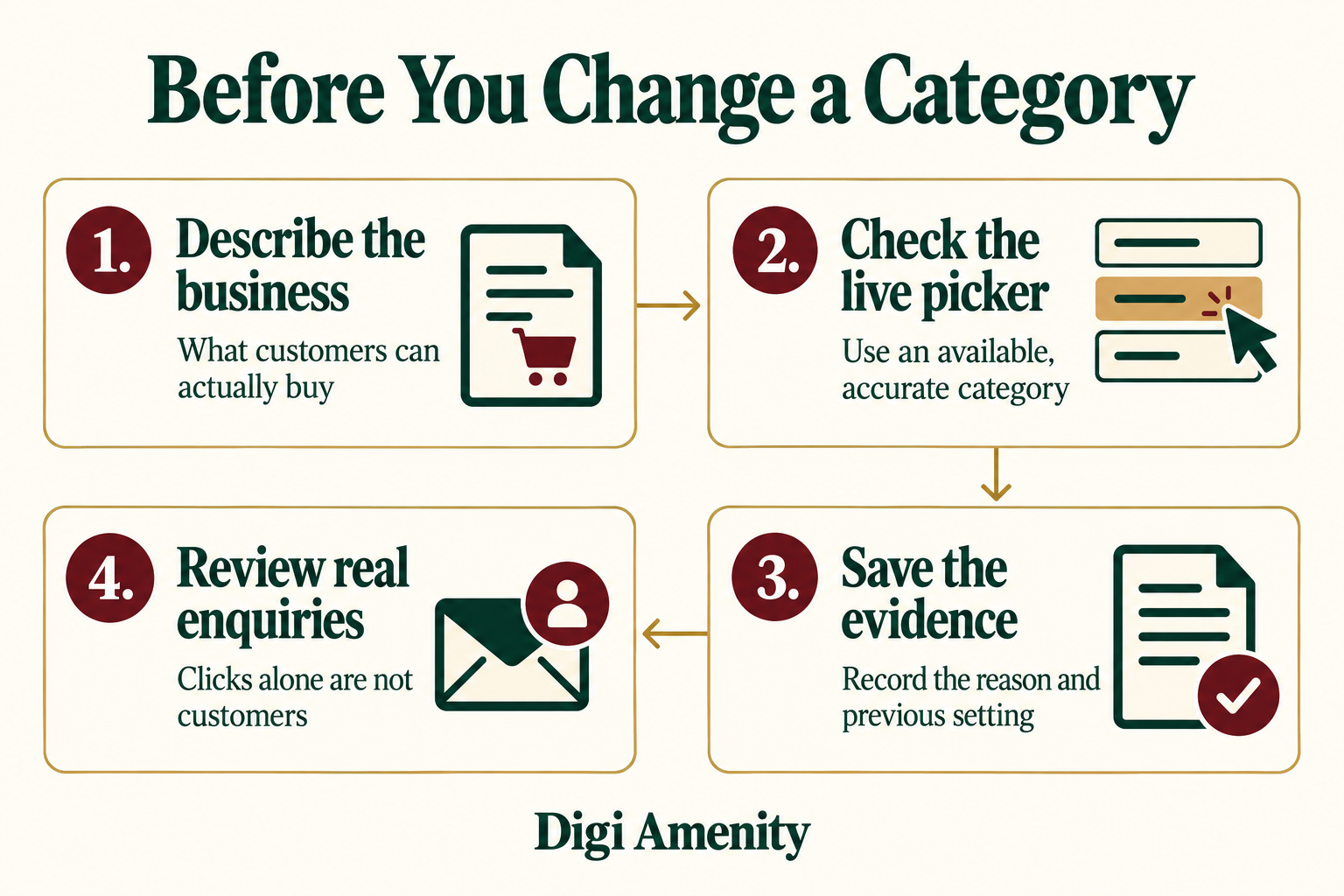
Start with a short description that your customers and operations team would both recognise. Write it before opening a category list: “We design residential interiors and manage the agreed project,” or “We repair appliances at customers’ homes.” This reduces the temptation to choose a label simply because it sounds valuable.
Then use three checks for each candidate:
- Customer expectation: would someone selecting this type of business find the service they reasonably expect?
- Operating evidence: can you point to your current offer, team capability, completed work you are allowed to show and the way customers buy?
- Public consistency: do the website, premises and business description present the same business?
Revenue and enquiry records can help identify the core operation. They are evidence, not an automatic rule that the highest-margin service must become the primary category. A one-off lucrative project should not redefine a business that mainly does something else.
If two candidates seem equally accurate, document the distinction. One may describe the whole organisation while the other describes a narrow specialism. Choose the specific option only when that specialism genuinely represents the business. Do not change the website merely to manufacture support for an inaccurate category.
Use this category decision worksheet
Copy the following fields into one row per candidate. This is a decision aid, not a Google ranking score.
| Field | What to record |
|---|---|
| Location and candidate label | Exact business location, category spelling, language and date checked in the picker. |
| Actual business activity | What customers buy and who delivers it. |
| Evidence | Relevant service page, current offer and operational confirmation. Keep private customer records private. |
| Fit | Core identity, distinct additional activity, individual service, attribute or not applicable. |
| Decision and reason | Primary, additional, describe elsewhere, or reject—with a short explanation. |
| Owner and review trigger | Who checks the public result, and what business change would justify revisiting it. |
When do additional categories help?
Add a category when it describes a substantial activity the business really operates. Avoid adding one for every item sold, every occasional request or every neighbouring business. Google’s business representation guidelines call for the fewest categories needed to describe the core business and explain that more specific categories can already cover broader ones.
Do not turn an interface allowance into a target. A small specialist business may need very few entries. A business with distinct operations may need more. There is no useful universal instruction to add exactly three, five or all available slots.
For each proposed addition, ask who owns the activity, whether it is currently offered and whether the customer journey supports it. A tenant operating inside your premises is not automatically part of your business. Chains, separate departments and individual practitioners have specific eligibility rules; review those before combining activities or creating another profile.
Where should you check the Google business category list for India?
Use the current category picker in the managed profile as the final check. Third-party lists can help you discover terminology, but their country, language, update date and collection method may differ. Google’s category reference includes region and language parameters, which is one reason a list from another market should not be treated as universal.
Search with ordinary business-type terms. Compare plausible options, record their exact spelling and stop if none accurately represents the operation. Choose the closest truthful broader category and explain the specific offering in the appropriate service content. Do not add “Mumbai,” “best” or a search phrase to a label as a workaround.
You can also inspect the publicly displayed category of comparable businesses. Record the location and date, and compare businesses with similar operating models. A large retailer with a repair department is a poor model for a repair-only technician. Competitor visibility does not prove its category caused the result—or that its setup complies with policy.
What would these decisions look like for Mumbai businesses?
The following are hypothetical planning examples, not client results or confirmed category recommendations. Verify the exact available labels and the business facts before applying them.
An interior studio that coordinates renovations
Suppose a studio sells design consultation and detailed residential plans, then coordinates independently hired contractors. Its owner is considering both a design category and a construction category. The worksheet should establish what the studio contracts to deliver, who employs the execution team and what the website promises. Coordinating work does not by itself establish that the studio operates as a construction company.
If execution is a genuine contracted part of the business, examine an appropriate additional category. If it is simply coordination within a design package, explain that scope clearly on the service page. The next useful improvement might be a clearer project enquiry form rather than another category.
A salon with a product shelf
Imagine a salon earns most of its business from appointments and sells a few products used during treatments. A product shelf does not automatically justify positioning the business as a dedicated retail shop. Ask whether customers can genuinely use it as that kind of shop, with a defined range, service and buying process.
Keep appointment services specific enough for someone to understand what can be booked. If customers frequently ask for unavailable services, investigate the wording of the offer and booking page alongside the category choice.
A repair team working across suburbs
A mobile repair team should distinguish repair work from selling appliances. A storefront-sounding retail category can create the wrong expectation if customers cannot visit and purchase there. Record the actual service coverage separately and explain visit charges or booking requirements clearly where appropriate.
Distance remains part of local search. A category change cannot make a team equally prominent from every search location across Mumbai. Google describes local results through relevance, distance and prominence; the entire profile and customer journey still matter.
How do you change a category without losing the audit trail?
Google’s documented route is Edit profile → Business category → Edit. Select the primary category from the offered list, add or remove relevant additional entries, then save. Adding or editing a category can trigger a request to verify the business again. Follow the current account notice rather than assuming every edit is immediately live.
Use this practical handoff around the edit:
- Confirm the correct business and location, the responsible owner and the reason for the change.
- Save the previous categories and a dated screenshot. Record the proposed labels and supporting evidence.
- Record a baseline of relevant enquiries and profile interactions before the change, where reliable data exist.
- Make the justified category edit. Avoid bundling unrelated experiments into the same review window; correct materially inaccurate information when necessary and log it.
- Check the owner view for review or verification notices. Then check the public profile separately.
- Record the accepted setting and review date. If the result is wrong, correct the factual error or follow Google’s support process.
A saved setting is not the same as a verified public result. If the whole profile needs attention, start with our Google Business Profile audit checklist so category edits do not distract from an incorrect phone number, address or destination page.
How can you tell whether the change helped the business?
Define a useful enquiry before reviewing the result. For a service business, that could mean a real person requesting work you provide, in an area you serve, with sufficient information to respond. The business should decide its qualification rules. A phone-button tap, spam message and confirmed project are different outcomes.
Google’s Performance definitions describe Calls as clicks on the profile’s call button and Website clicks as clicks on its website link. The report can include activity from organic results and Google Ads, and not every metric appears for every business. Search-term reporting also has a monthly update delay. Do not interpret these numbers as a count of qualified customers.
For a practical review, use equal-length complete periods and record other changes such as promotions, holidays, opening hours or advertising. A 28-day window before and after an accepted edit is a useful planning starting point, not a promised Google response time. If enquiry volume is low or demand is seasonal, extend the observation rather than forcing a conclusion.
Keep a simple change record: previous category, accepted category, reason, acceptance date, comparison dates, other changes, relevant enquiries, unsuitable enquiries and next action. Use the same definitions in both periods. When data are unavailable, write “not measured,” not zero.
For example, a hypothetical business receives 20 enquiries before an edit, of which 8 meet its documented qualification rules. Afterward it receives 18, of which 10 qualify. The qualified share changes from 8 ÷ 20 = 40% to 10 ÷ 18 ≈ 55.6%. That may warrant investigation despite fewer total enquiries. It does not prove the category caused the improvement: the samples are small and the offer, advertising or follow-up may also have changed.
Use three decisions:
- Keep: the category remains accurate, customer expectations fit and no contradictory evidence requires action.
- Correct: the chosen category or public information misrepresents the actual business.
- Investigate: enquiry quality or visibility changes, but the cause is unclear. Check the query mix, destination page, booking friction and response process before another category edit.
Our Business Profile performance guide explains the broader reporting workflow. Category selection is one part of local SEO, alongside accurate services, useful pages and a working contact journey.
Which mistakes should you avoid?
The most costly mistake is choosing an attractive label that the operation cannot support. Others include copying a competitor with a different business model, treating a downloaded list as current India availability, filling categories with loosely related activities and repeatedly switching settings after small day-to-day movements.
Do not assume a category unlocks a guaranteed ranking or a specific feature for every account. Do not create extra profiles simply to pursue extra category combinations. Check eligibility and the real organisational structure first. Finally, do not blame categories for enquiries that are lost because nobody answers the phone or the mobile form fails.
Frequently asked questions
What is the best Google Business Profile category for my business?
The most specific available category that accurately represents the core operation is the right starting point. Write down what customers actually buy, compare plausible labels and check that the website and operating model support the choice. There is no universally best category across industries.
How many additional categories should I use?
Use only those needed to represent genuine, distinct activities. Do not aim to fill a numerical quota. If you cannot explain an entry with current business evidence, leave it out or describe the individual offering under Services instead.
Can I create a category that includes Mumbai?
No custom business category can be created. Select from the available picker. Describe your actual location and service coverage in their appropriate fields; a city keyword is not a substitute for an accurate business classification.
Should I copy categories from the top Maps result?
Use comparable profiles to discover possibilities, then assess your own business. Their location, reputation, services and operating model may differ. A ranking snapshot cannot isolate the effect of the category, and a competitor’s setting is not proof that it is appropriate for you.
What if the category I need is missing?
Choose the closest accurate broader option and explain the specific offering in the relevant service content. Record the limitation so it can be revisited when the operation or available options change. Do not select an inaccurate speciality merely because it is available.
Will changing my primary category require verification?
Google may ask for verification after a category edit. Keep owner access and accurate business evidence available, follow the notice shown and check the accepted public result. Do not promise an immediate completion time to the team.
Should every branch use the same categories?
Equivalent locations of the same business should represent the same core operation consistently. Genuine differences in activities can require additional assessment. Use Google’s chain, department and practitioner guidance rather than copying every setting across locations without checking what operates there.
How soon should I judge the results?
Confirm factual accuracy as soon as the edit is accepted. Judge business outcomes over complete, comparable periods with enough enquiries to interpret. Allow for reporting delays and seasonality. There is no fixed period after which a category edit must produce better rankings or leads.
Need help checking category fit and enquiry quality?
If your Mumbai business is appearing for unsuitable searches or receiving enquiries for work you do not offer, Digi Amenity can review category fit, service-page clarity and the contact journey together. Request a local SEO review with your profile link, core services and the types of enquiries you want to improve.