

GCLID stands for Google Click Identifier. It’s the value you may see after gclid= in a landing page URL when someone clicks a Google ad. With auto-tagging enabled, Google adds the identifier to eligible clicks. If your website saves it with an enquiry, you can later send Google Ads the outcome of that enquiry, such as a qualified sales opportunity. That helps answer a question a form submission alone leaves open. Which ads brought people your sales team could actually serve? Google’s GCLID definition.
What does a GCLID look like in a URL?
Imagine a visitor lands on example.com/quote?gclid=Demo-AbC123. The page is /quote, the parameter name is gclid, and its value is Demo-AbC123. This is a synthetic example. In production, preserve the value Google supplies, including uppercase and lowercase letters. Treat it as an identifier. Look up campaign performance in your connected reporting tools instead of trying to read a keyword, customer name or campaign name from the string.
If the URL already contains a parameter, add the next parameter with an ampersand. In /quote?city=mumbai&gclid=Demo-AbC123#form, the click ID belongs before the fragment #form. This matters when a developer tests a link that scrolls directly to a form. Google’s URL testing instructions.
When do you need GCLID, UTMs or another Google identifier?
Use GCLID for Google Ads click matching. When the identifier reaches the relevant Google tags, auto-tagging lets connected products associate activity with Google Ads information. Linking the correct Google Ads account to the intended GA4 property is a separate configuration step. Seeing the parameter in your address bar confirms only that it reached that URL.
Use UTM parameters for readable campaign labels. Your team might use utm_campaign=monsoon_quotes to group visits in a CRM report. Hundreds of visitors can share that label. Keep campaign labels and click IDs in separate fields so you can answer both “Which campaign did we name?” and “Which eligible ad interaction can Google match to this sale?”
Keep GBRAID and WBRAID in their own fields when present. Google also uses these identifiers in certain privacy-related measurement contexts. Preserve the identifier names your integration supports. A blank GCLID on its own is insufficient evidence to reclassify a lead as organic. Google’s guide to identifiers for offline imports.
How do you capture the GCLID from a landing page into a CRM?
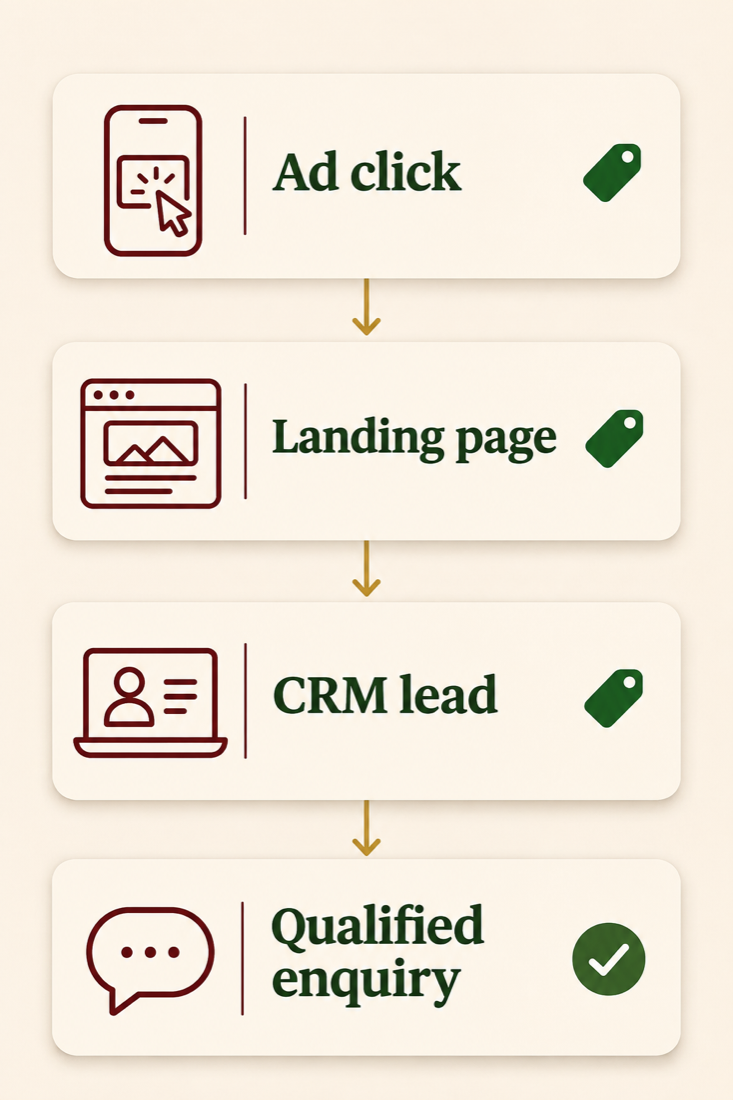
- Check the advertising account and destination. In Google Ads, open Admin, then Account settings, and check Auto-tagging. Copy the actual destination used by the campaign, including any tracking template or redirects. A campaign sending mobile visitors to a different page needs its own test.
- Preserve the value until the visitor enquires. A visitor may land on a service page and open the contact form several pages later. Have the developer capture the incoming value under the site’s consent settings, retain it for the agreed journey and populate a hidden form field when appropriate. For a separately hosted booking form, confirm that its integration can receive and return that field. The address bar on the original site cannot establish what the booking provider saved.
- Map the submitted field to the enquiry. Store the exact string in a text field alongside the lead ID and creation time. Check the form submission, integration mapping and resulting CRM record. Decide what happens if an existing contact submits another enquiry after a later ad click. Retaining the identifier on each enquiry or opportunity helps a contact merge preserve both histories.
- Record a meaningful sales stage. Define what counts as qualified, who can mark it and which timestamp the CRM records. A distributor might require a supported delivery area, an eligible product and a confirmed quantity. Sales staff can record those facts without ever handling the click identifier.
Limit access to identifiers and lead records to the teams that operate measurement. Use the site’s consent choices for storage and transmission, and keep real identifiers out of public screenshots. Google provides a worked implementation for capturing the value and passing it through a form. Google’s GCLID setup guide.
How can you test for a missing GCLID without buying an ad click?
Use a staging form or a clearly labelled test lead excluded from live conversion uploads. Open the ad destination in a fresh browser session with a mixed-case test value such as Demo-AbC123. Open the browser’s Network panel before loading the URL, and record the first point where the expected value changes or disappears.
- At the redirect. Inspect each redirect destination and the page where the tag loads. If the first redirect changes the hostname and drops the query string, give that URL pair to the web team.
- At the form. Follow the normal route through one more page, then submit. If a direct landing-page submission works but the second-page form is blank, investigate persistence and when the hidden field is filled. Inspect the actual submitted field.
- At the CRM. Compare the submitted value character for character with the saved lead. If the form contains the ID and the CRM is blank, the integration mapping is the next place to inspect.
- On a fresh untagged visit. Submit from a separate clean session. It should not inherit the other test lead’s ID. Also repeat with the site’s alternative consent choice and verify behaviour against the agreed configuration.
A synthetic value can demonstrate that your website transports text correctly. Verifying attribution requires an eligible, genuine ad interaction, a real business event and a review of the resulting import diagnostics. Keep a private worksheet with one row per test and columns for the landing URL, redirect result, submitted field, CRM field, consent state and repair owner.
How does Google Ads connect a qualified enquiry or sale to the click?
Choose the offline conversion action that represents the event your sales team recorded. Map the stored GCLID, conversion action and actual event time with its time zone into the supported import workflow. If you send monetary value, define the amount and currency consistently. Use a stable event or order ID where supported so retries can be reconciled. A lead ID can identify one enquiry that later produces several distinct business events.
Hypothetical Mumbai example. A packaging supplier receives an enquiry on Monday. On Wednesday at 15:20 IST, sales confirms that the buyer’s quantity meets the minimum order and the delivery PIN is serviceable. The CRM should record Wednesday’s qualification time for the qualified-lead event. If a ₹48,000 order is confirmed on Friday, its amount and event time belong to the sale. Reporting ₹48,000 at both stages would overstate the value if the two stages were added together.
After import, check the diagnostics for rejected rows, the action name, the account that owns the conversion action and the configured conversion window. Compare equivalent date bases when reconciling Ads and CRM reports. Google Ads can report conversions against the ad interaction date, while a sales report often groups them by the day the deal closed. Connector lookback and processing also matter. For a custom integration, check Google’s current Data Manager API guidance before reusing an older upload script. Google’s offline import troubleshooting guide.
If you also collect eligible first-party data for matching, review how enhanced conversions for leads work. Keep a genuine GCLID on the event when available and supported by your chosen method.
How should a business measure whether the repair worked?
Start with enquiries for which you observed a permitted GCLID at landing. In a hypothetical audit, 24 such enquiries reach the form and 18 CRM records retain the same value. Capture completeness for that group is 18 ÷ 24, or 75%. Investigate the six missing records by form, device and booking provider. Dividing by every lead in the CRM would mix this transport issue with referrals, direct visits and other identifier types.
Then follow the same lead IDs into sales. Count how many qualified, how many qualified outcomes were sent, and which import errors remain. If all six missing records came from the mobile booking form, fix that handoff and rerun the same checks before using a change in reported cost per qualified lead to guide spend.
Frequently asked questions
Where can I find the GCLID for a specific enquiry?
Start with the saved form submission and the corresponding CRM lead. If neither captured the identifier, a campaign name or approximate enquiry time cannot reliably reconstruct it. Check any authorised original landing or integration records before treating it as missing.
Should I add a GCLID manually to my ads?
Enable auto-tagging so Google can supply the appropriate identifier. Reserve invented values for controlled tests and keep test leads out of production uploads.
Does GCLID replace my GA4 setup?
GA4 still needs measurement on the destination site, the appropriate account link and events for the actions you want to analyse. Check those separately if the CRM retains click IDs but Analytics reports look incomplete.
What if the customer moves to WhatsApp?
Test what your enquiry integration actually saves before the visitor leaves the website. A click on a WhatsApp button records intent to start a conversation. Confirming a qualified conversation requires a reliable link to the business record and a recorded sales outcome.
How long can I wait before importing a conversion?
Google documents a maximum of 90 days from the associated click for GCLID-based uploads. A shorter conversion window or a particular connector’s retrieval rules can limit what will be counted. Use a regular import schedule and check the rules for your source. Google’s offline import FAQs.
Can two enquiries from the same person share one CRM contact?
Yes. Give each enquiry its own record or event history. When the later enquiry arrives, verify that updating the contact preserves the earlier opportunity’s identifier and qualification time.
If your campaigns generate enquiries but the sales team cannot trace qualified opportunities back to ads, Digi Amenity’s Google Ads team can follow one permitted enquiry through the landing page, form, CRM and import report to identify where the evidence stops.
