

A duplicate Google Business Profile needs an identity and access check before a removal request. Compare the listings, establish whether they represent the same real business, and choose the appropriate route: request ownership, report a duplicate for merge review, remove a mistaken account copy, or appeal an incorrect duplicate classification.
Do not choose which profile to keep purely by its review count. First establish which business, location and customer journey each listing represents. For Mumbai businesses sharing commercial buildings, a matching street address is a reason to investigate, not sufficient evidence to delete another listing.
This guide explains the decisions, the information to collect and the checks that show whether the problem is actually resolved. It includes a practical worksheet and hypothetical examples, not claimed client results.
What does a duplicate Google Business Profile mean?
Google generally permits one profile per business, subject to its eligibility rules for locations, departments and practitioners. Its duplicate-profile guidance says a profile classified as duplicate does not appear on Search or Maps. That is different from simply seeing two entries in an account dashboard.
Start by comparing the public Maps links with the profiles you can manage. One public listing and an access problem require a different investigation from two public listings with conflicting information. Save what you actually observe; do not turn an account notification into an assumed diagnosis.
A useful distinction is between the business, its public listing and the Google account managing it. Changing the person who manages the account does not mean the business has become a new location. Treat these as separate questions in your notes.
What should you collect before changing anything?
Build a side-by-side record. It helps the owner, agency and support team discuss the same listings instead of referring vaguely to “the old one.” For a broader check of the surrounding information, use our Google Business Profile audit guide.
| Evidence to record | Profile A | Profile B |
|---|---|---|
| Public Maps URL and profile ID, where available | Copy exact link/ID | Copy exact link/ID |
| Name, address or service area, phone and website | Record current values | Record current values |
| Business identity and location | What does this represent? | Same business, branch or different entity? |
| Access and visible status | Owner, manager, no access; record status | Owner, manager, no access; record status |
| Reviews, replies and owner-uploaded content | Dated screenshots and notes | Dated screenshots and notes |
| Customer destination | Where do website/booking links lead? | Where do website/booking links lead? |
Keep sensitive ownership evidence in an appropriate private support channel. Do not paste identity documents, account credentials or customer information into a public help thread. A screenshot is useful documentation, but it is not a backup that can restore deleted profile content.
Ask the business owner about relocations, former names, previous agencies and genuine additional locations. These facts can explain apparent contradictions. Do not alter the name or address merely to make two records look identical for a merge.
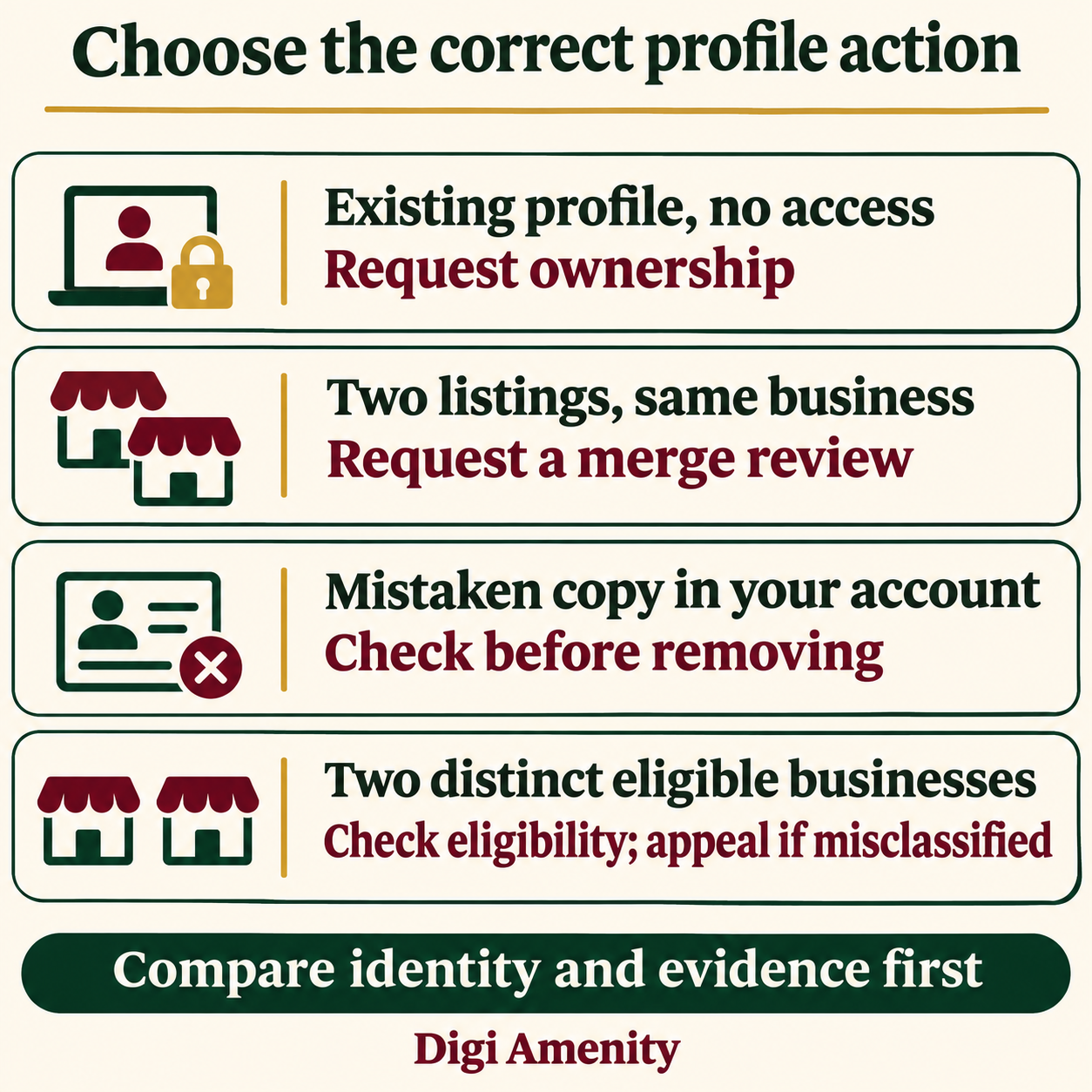
Which action fits your situation?
Use the table below as a triage checklist. The action should follow the evidence, and Google still reviews the relevant requests.
| What you found | Next step | What to avoid |
|---|---|---|
| The correct existing profile is managed by someone else | Follow the ownership-request route | Creating a replacement because access is inconvenient |
| Two public listings appear to represent the same business | Document the identity match and request merge review through Maps | Assuming the listing with more reviews must be the correct one |
| You created an unnecessary copy in your account | Confirm the exact target and understand content-removal consequences | Removing the active profile by mistake |
| Two distinct eligible businesses were classified together | Prepare evidence and ask support to review the classification | Changing real business facts to fit a mistaken classification |
| You cannot tell whether the records are duplicates | Pause changes and resolve the identity question | Submitting contradictory requests from several accounts |
How do you request access to an existing profile?
For a storefront or hybrid business, Google’s ownership instructions direct you to business.google.com/add, find the existing business, choose it and request access. Complete the form only if you are authorised to manage the business.
The existing owner has three days to respond. A request may be approved or denied; after no response, a claim or verification option may become available, but Google says it is not always offered. For a service-area business without a physical shop or office, Google specifies a support route using “Transfer ownership of listing.”
Keep the confirmation email and record the request date. Assign one person to monitor the response. If the former agency still has access, coordinate a proper handover instead of starting parallel profiles. For businesses visiting customers, our service-area guide for Mumbai businesses provides related setup context.
How do you request a merge on Google Maps?
Google’s duplicate guidance directs merge requests for the same business to a suggestion on Maps. Requests are reviewed; matching records do not create an automatic entitlement to a merge. Its guidance says reviews are combined when profiles merge, while review replies may be lost.
The current Google Maps instructions use this path: open the place, select Suggest an edit, choose Place closed or not here, then Duplicate of another place and submit. Follow the actual controls shown in your account. Do not select a permanent closure simply because it appears beside the duplicate option.
Before submitting, open both recorded Maps links again. Check that you have not switched to a different branch or a similarly named business. If the correct target cannot be identified confidently, use support rather than guessing.
Record the submission and any case reference. A sent suggestion is not a completed merge. The Maps help page states that edits are reviewed and may take time to appear; it does not supply a universal completion deadline for this situation.
Does removing a profile from your account remove it from Maps?
No. Google’s account-removal documentation distinguishes removing content and managers from removing a public place. The business may still appear on Maps and Search after account removal.
Only the primary owner can remove profile content and managers; new owners and managers face a seven-day restriction on specified removal actions. Removing content and managers is permanent: owner or manager posts, photos, videos and review replies are removed, while user-generated reviews remain. Read the confirmation carefully before proceeding.
This is why the evidence worksheet includes both the public URL and access status. “I no longer see it in my account” answers an account question; it does not confirm the public duplicate has disappeared. If the intention is only to hand over management, investigate ownership transfer instead of content removal.
Can two businesses at the same Mumbai address keep separate profiles?
Potentially, when they are genuinely distinct and eligible. Google’s representation guidelines include specific treatment for departments and individual practitioners. Eligibility depends on the real business setup, not a different spelling of the name or an added service keyword.
Hypothetical example: a Mumbai commercial building contains a repair shop and a separate accounting office. An administrator notices the same building address and assumes one listing is redundant. The useful investigation is to compare the actual businesses, signage, customer access, phone contacts and destinations. Shared premises alone should not decide the outcome.
Contrast that with one repair business creating a separate listing for each service at the same operation. Different service labels do not, by themselves, establish separate eligible businesses. Check the applicable rules before creating or retaining extra profiles.
If distinct eligible businesses have been incorrectly merged, Google’s duplicate guidance provides a support appeal route and may require permanent signage evidence for shared locations. Present a factual explanation of the distinction rather than promising that an appeal will succeed.
What if the business moved or changed ownership?
Do not treat a move or ownership change as an automatic reason for a fresh profile. Google’s review-transfer guidance advises against creating a new profile for these changes and explains when reviews may transfer or remain. Significant business changes can affect eligibility for review transfer.
Prepare a timeline: previous address, new address, move date, ownership change and any profile created during the transition. This is more useful than forcing a simple “old versus new” story onto a complicated case. If a replacement profile was already verified, give support both records and the real history.
Review the website at the same time. A corrected listing that sends visitors to an old address or an obsolete booking page still creates customer confusion. Profile accuracy, website content and the actual business operation need to agree.
What should a support request contain?
Use this original template as a starting point. Replace every placeholder with verified information and adapt the requested outcome to the actual case.
Business: [real-world name]. My role: [authorised owner or manager]. Profile A: [Maps URL and available ID]. Profile B: [Maps URL and available ID].
Observed issue: [two public listings / duplicate status / ownership conflict / distinct businesses classified together]. Checked on: [date].
Identity explanation: [why these represent the same business, or why they are distinct]. Relevant history: [move, name or management change, if applicable].
Requested review: [merge review / ownership assistance / incorrect duplicate classification]. Evidence available: [accurate signage, location and business documentation]. Previous case reference: [if any]. Please advise on the appropriate resolution before any destructive change.
Keep one clear case history. Record what was submitted, what was requested in response and what remains pending. Avoid adding unrelated ranking complaints to an identity-resolution request; they obscure the action you need reviewed.
How do you verify the issue is resolved?
Digi Amenity’s recommended acceptance checklist looks at the customer journey, not only the dashboard label:
- Reopen the saved public links and record what each displays.
- Confirm the intended business name, location or service area, phone and website.
- Check authorised management access separately from public visibility.
- Inspect reviews and replies; document differences without assuming every change was caused by the merge.
- Test the website and booking destinations on mobile.
- Check that the website’s contact details agree with the actual operation.
- Save the observed result, date, remaining issue and responsible person.
Track business enquiries separately. A corrected record does not prove a ranking increase or additional revenue. Changes in demand, opening hours and promotions may affect calls or bookings during the same period. Report the resolution itself as the verified result unless performance evidence supports more.
Frequently asked questions
Should I keep the profile with the most reviews?
Review history is relevant, but it is not sufficient on its own. Confirm identity, location, current accuracy and ownership first. Record a preferred outcome with reasons, while recognising that Google reviews the request.
Can I remove a duplicate Google listing without owning it?
You can submit an accurate Maps suggestion for review. That is different from deleting content inside an account you manage. Use the duplicate-reporting route when it fits the evidence; do not claim management rights you do not have.
Will all my content survive a merge?
Do not assume a complete transfer of every item. Review replies may be lost, and you should inspect the resulting profile’s details and content. Keep dated records before the request and verify the actual outcome afterwards.
Is “permanently closed” the right duplicate fix?
Not simply because two records exist. Maps provides separate duplicate and closure reasons. Select the reason that accurately describes the situation; a business that is still trading should not be labelled closed to make cleanup easier.
Can I create another profile while access is pending?
Work through access recovery for the existing business record instead. A second record can complicate the identity question. Keep the ownership request and the business facts documented while awaiting the next available step.
How long does duplicate-profile resolution take?
There is no universal merge deadline established by the cited guidance. The ownership-request response window is a separate process. Keep the case status and observed Maps result distinct, and follow the instructions supplied for your request.
Does fixing duplicates guarantee better local rankings?
No. The immediate objective is an accurate, manageable business presence and a clear customer destination. Evaluate search visibility and qualified enquiries with their own evidence rather than treating cleanup as a promised growth result.
Get the identity and destination checks right first
If two listings show conflicting business details, Digi Amenity can review the profile evidence, ownership route and website destination before you request removal or merging. Our local SEO support connects profile accuracy with the information customers need to call, visit or book.