

Updated: 3 October 2026
How to run Google Ads in India starts with a clear offer, a working landing page and a measurable customer action. Create the account with appropriate billing settings, configure conversion tracking, choose relevant Search keywords and locations, write accurate ads, set an affordable budget and test the full journey before spending.
This guide is for an Indian business launching or improving a Google Search campaign in 2026. Google also offers Shopping, video, display and other formats; their setup and charging models differ. Interfaces and feature availability change, so use the current labels in your account alongside the official resources linked below.
Quick launch checklist
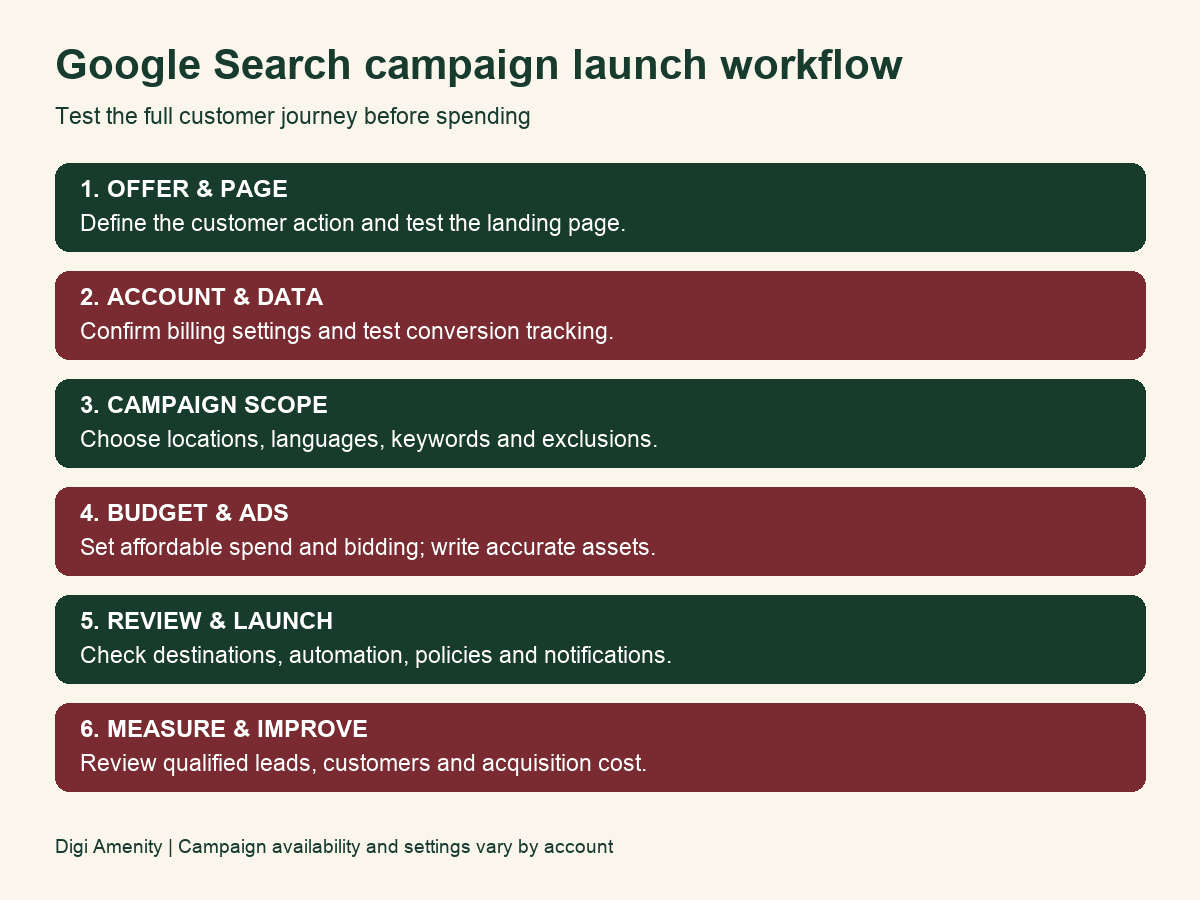
- Define the offer, service area and valuable conversion.
- Prepare a mobile landing page and test forms or checkout.
- Create the account and confirm billing country, currency, time zone and payment settings.
- Set up and test conversion measurement.
- Create a Search campaign with relevant locations and languages.
- Build keyword groups and negative keywords.
- Set a budget and bidding approach that fit the goal.
- Write responsive search ads and useful assets.
- Review automation, destinations and policy requirements.
- Launch, check delivery and measure qualified customer outcomes.
1. Decide what you want the campaign to achieve
Choose a concrete business action: a qualified enquiry, a booked appointment, a completed order or another outcome your team can verify. A visit or button click can help diagnose behaviour, but it should not automatically be treated as a customer.
Write down who is a fit, what you sell, where you can fulfil it and what happens after contact. For a Mumbai service business, a lead outside the service area may have little value even if the form was submitted successfully.
Before account setup: decide your testing allowance, who responds to enquiries and what counts as a qualified lead. This will guide the campaign and prevent cheap but unsuitable submissions from being mistaken for success.
2. Prepare the landing page
The landing page should match the specific ad. Clearly explain the service or product, who it is for, coverage, price or price factors, important terms and the next step. Use genuine evidence and photos where available. Do not promise results, availability or discounts the business cannot deliver.
- Test the page on a phone and a slower connection.
- Check forms, confirmation messages and notification delivery.
- Make phone, booking or checkout controls easy to use.
- Explain data collection with an appropriate privacy notice.
- Remove broken links, distracting popups and obsolete offers.
A specific campaign should usually lead to a relevant page rather than making visitors search your home page for the offer.
3. Create and configure the account
Start at Google Ads with a business-controlled Google account. Follow the current onboarding flow. New-account screens can differ, so an old instruction to always switch to “Expert Mode” may not match what you see.
Confirm the billing country, appropriate currency and reporting time zone before finalising setup. For an India-based business paying in rupees, check that INR and the intended billing details are selected. Some foundational account settings are difficult or impossible to change later without a new account; read the confirmation carefully.
Add accurate business and billing information. Available payment methods depend on country, currency and payment settings; Google’s payment-method documentation explains the differences. Use the options displayed in your account rather than assuming every Indian account supports the same method.
Keep invoices and use the tax details appropriate to the business. Check tax treatment and any input-credit eligibility with your accountant; this guide does not assume every advertiser can claim the same treatment. Give staff or an agency appropriate access while retaining business ownership.
4. Set up conversion tracking before launch
Use the current conversion setup in Google Ads, normally within the Goals/Conversions area, and connect the website measurement method appropriate to your site. The exact flow depends on whether you use Google tag, Google Tag Manager, an eligible platform integration or an imported analytics event.
- Define the conversion action and whether it is a primary optimisation goal or a secondary diagnostic action.
- Implement the tag or integration and test a genuine completed action.
- Check that the event is not triggered by every page view or counted twice.
- Assign meaningful values where justified, rather than making every click look like revenue.
- Maintain a lead or order record so campaign reports can be reconciled with the business.
For lead generation, consider qualified-lead or completed-sale feedback where supported and compliant. Enhanced or server-side measurement needs appropriate consent and implementation; it does not remove privacy obligations or recover every missing action.
A click on a phone or messaging button indicates an attempt, not necessarily a completed conversation or sale. Verify outcomes separately.
5. Choose the campaign type and settings
A Search campaign is a practical starting point when people already search for your service and you want to learn which queries produce suitable enquiries. It is not automatically the best format for every business. A visual product or new offer may need a different discovery approach.
Choose the campaign goal and type deliberately. Review network options rather than accepting them without understanding where ads may appear. If testing Search separately, keep the scope clear so a different inventory source does not confuse the result.
Locations and languages
Target the places you can actually serve. Check advanced location options: targeting people present in a place differs from reaching people who have shown interest in it. Review geographic results after launch, and remember location signals are estimates rather than perfect boundaries.
Choose languages your audience understands and that your ads and landing pages can support. Do not target Hindi or Marathi solely because they are relevant locally if the destination cannot answer the user in a useful way.
Schedule and follow-up
Use schedules where appropriate to the service and lead handling. A business taking enquiries overnight should explain when it will respond. A schedule is not a substitute for reliable notifications and ownership of new leads.
6. Research keywords and match types
Use customer language, Search Console data where relevant and Keyword Planner to explore demand. Forecasts are planning inputs, not guaranteed clicks or customers. Group closely related intent so ads and pages can answer the same need.
Example: an AC repair business might group repair searches separately from installation searches. “AC repair Andheri” and “buy a new AC online” represent different offers; mixing them may produce misleading performance.
| Match type | What it means | Practical implication |
|---|---|---|
| Exact: [keyword] | Searches with the same meaning or intent | More steering, but not restricted to a literal identical phrase |
| Phrase: “keyword” | Searches including the meaning of the keyword | Can include more specific searches; not a fixed word-order rule |
| Broad: keyword | Related searches, potentially beyond the direct wording | Needs strong conversion feedback, suitable Smart Bidding and active review |
Google’s keyword matching guidance explains these meaning-based rules and recommends Smart Bidding with broad match. Broad is not universally bad, and exact is not a guarantee of perfect relevance. Choose the level of expansion your measurement and budget can support.
Negative keywords
Exclude searches that are clearly unrelated to the offer. A service provider may not want employment or training searches, but do not add a generic negative list without checking the business context. Negative matching works differently from positive matching; include appropriate variants where necessary.
Review the search terms report regularly. It may not expose every query, so use it with landing-page, location and customer-quality data rather than assuming it is a complete list.
7. Set an INR budget you understand
An average daily budget is not a strict daily spending cap. For most campaigns using that budget type, Google can spend up to twice the average daily budget on a day, with a monthly spending limit generally based on 30.4 times the average daily budget. Exceptions and adjustments apply; see Google’s budget guidance.
Illustrative example: ₹500 average daily budget corresponds to a usual ₹15,200 monthly limit when unchanged through the month. A day can spend up to ₹1,000 for most eligible campaign types. Changing budgets or using another budget type affects the calculation. Review billed cost and account limits rather than assuming every day spends exactly ₹500.
Separate media spend from management, creative, landing-page work and taxes. Set alerts or a review process, and choose a testing amount the business can afford to lose while learning.
Calculate an affordable lead cost
Allowable qualified CPL = allowable customer acquisition cost × qualified-lead-to-customer rate.
If a customer contributes ₹5,000 after direct fulfilment costs and the business allocates ₹1,500 to acquisition, a 20% close rate gives a ₹300 qualified-lead allowance. This is an illustrative planning calculation, not a promise that Google Ads will deliver leads at that cost.
Turnover per customer is not the same as profit. Account for refunds, sales effort and cash flow. Use reliable repeat-purchase value only when your own records support it.
8. Choose bidding for the outcome
Smart Bidding strategies use conversion signals to optimise outcomes, while other approaches serve different goals. Maximise conversions or conversion value can be appropriate when measurement is reliable; restrictive targets should reflect evidence and economics. A click-focused strategy does not automatically optimise for qualified customers.
There is no universal rule that every new account must start with Maximise Clicks or wait for a fixed number of conversions before using another strategy. Choose based on the goal, tracking, available data and budget, and review the platform’s current requirements and recommendations.
Do not repeatedly change bidding and budgets without a hypothesis. Allow for conversion lag while promptly correcting tracking faults or clearly irrelevant traffic.
9. Write responsive search ads and useful assets
A responsive search ad accepts several headline and description options that Google can assemble in different combinations. Current responsive search ad guidance allows up to 15 headlines and four descriptions; an ad does not always display three headlines and two descriptions.
Make each asset accurate and understandable in combinations. Cover the service, coverage, benefits, evidence and next step. Avoid repeating the same headline with minor punctuation changes.
Illustrative headline ideas: “AC Repair in Andheri”, “Book a Technician Visit” and “Clear Repair Quote Process”—only if the business can fulfil those statements. A description might explain coverage and booking requirements. Do not claim “24/7”, “guaranteed” or “lowest price” without support.
Add relevant sitelinks, callouts, structured snippets or other eligible assets where they help customers. Keep business information and contact details accurate. Ad Strength and optimisation scores can help diagnose setup, but are not profit measures.
Quality Score is a diagnostic tool. Google’s Quality Score explanation states that the score itself is not an auction input. Improve ad and landing-page relevance for customers rather than treating a score of ten as a guarantee of cheap traffic.
10. Review AI Max and automated settings in 2026
Search automation now includes AI Max capabilities such as expanded matching, text customisation and Final URL expansion. Review what is enabled in your account, the destinations it can choose and the claims generated assets may make. Google’s AI Max documentation explains its controls.
If URL expansion is active, check URL exclusions and tracking compatibility so paid traffic does not land on unsuitable pages. Inspect search terms, asset combinations and landing-page reporting. Test automation against meaningful business outcomes rather than assuming enabling every recommendation is always an improvement.
Google announced upgrades from some older Search features to AI Max during 2026. Check account notices and current documentation before following an old Dynamic Search Ads or automatically-created-assets workflow.
11. Launch and troubleshoot
Review the destination, settings, budget, ads and conversion goal before publishing the campaign. Ads undergo review; approval timing and delivery depend on policy, billing and account conditions. Launch does not guarantee an immediate top position.
| Problem | What to check |
|---|---|
| No impressions | Ad/policy status, billing, campaign/ad group status, dates, targeting, keyword eligibility and bids |
| Clicks but no recorded leads | Form/checkout functionality, event implementation, notification delivery and conversion lag |
| Leads outside the service area | Location options, actual geographic reports, ad wording and qualification |
| Many unsuitable leads | Search intent, offer, negatives, landing-page context and CRM outcomes |
| Spend higher than expected on a day | Average daily budget rules, recent changes, shared budgets and billed-cost reporting |
| Reported conversions differ from sales | Duplicate events, primary goal definitions, attribution windows and actual customer records |
12. Review performance and decide the next step
Check delivery and obvious faults soon after launch. On an ongoing basis, review spend, queries, locations, conversion accuracy and lead quality. Record changes so you can assess their impact.
Use click-through rate and CPC diagnostically, then qualified CPL, customer acquisition cost and contribution to judge the business result. For ecommerce, reported ROAS is attributed revenue divided by spend, not profit. Scale when outcomes and fulfilment capacity support it; improve or stop tests that do not meet the business limits.
Use our Google Ads vs Meta Ads lead generation comparison for channel fit and the marketing funnel template for the landing-page and follow-up journey. Discuss Google Ads support with Digi Amenity if you need help planning measurement and campaign execution.
Frequently asked questions
How much money do I need to start Google Ads in India?
There is no universal profitable starting budget. Choose an affordable test based on demand, expected click costs, the buying cycle and allowable acquisition cost. Separate media spend from fees, creative and taxes.
Can Google spend more than my daily budget?
Yes. An average daily budget is not a hard daily cap. For most campaigns, daily spend can reach twice that amount, with the usual monthly limit based on 30.4 times it when unchanged. Check the rules for your budget type.
Do exact-match keywords only match identical words?
No. Exact match can match searches with the same meaning or intent. Phrase and broad matching also use meaning and context, so review actual search terms and customer quality.
Should a beginner turn on AI Max?
Understand the goal, tracking and available controls first. Review expanded matching, generated text and URL destinations, then test against qualified outcomes within a spending limit.
Do I need a website to advertise?
Available lead destinations depend on the campaign and account. For the website Search workflow in this guide, a useful, tested landing page gives customers context and enables measurement.
How quickly will Google Ads generate sales?
A campaign can deliver after approval and eligibility checks, but sales depend on demand, offer, landing page and follow-up. No launch timetable or spend guarantees profitable customers.