
When choosing an online platform for your website or e-commerce business, two names dominate conversations: WordPress and Shopify. Each brings its own strengths, trade-offs and ideal use-cases. As your digital marketing strategist for DigiAmenity, I’ve dug into the latest insights so you can decide which platform suits your goals, budget, technical comfort and growth plan.
1. Understanding the Platforms
What is WordPress?
WordPress is an open-source content management system (CMS) that powers a large portion of websites across the web. With the plugin WooCommerce, it becomes a full-fledged online store.
Pros: Highly flexible, vast plugin/theme ecosystem, control over hosting and code.
Cons: Requires more setup, technical decisions (hosting, security, updates) fall on you or your team.
What is Shopify?
Shopify is a software-as-a-service (SaaS) platform built specifically for e-commerce. It provides hosting, store-management tools and a user-friendly dashboard.
Pros: Quick setup, managed infrastructure, built-in store functions.
Cons: Less deep customization (in some cases), monthly fees and app/plugin costs can add up.
2. Key Comparison Areas
Here are the major factors you should compare when deciding between WordPress and Shopify.
Ease of Use
- Shopify: Intuitive setup. Many tutorials, fewer technical decisions. Beginners often prefer this.
- WordPress: Steeper learning curve if you self-host, install WooCommerce etc. But if you (or your team) are comfortable technically, you gain flexibility.
Customization & Flexibility
- WordPress wins when you need full control: themes, layout, code edits.
- Shopify is more constrained by its platform—great for standard store needs, but if you want highly custom features you may bump into limits or pay for apps.
Costs
- WordPress itself (software) is free, but you’ll pay for hosting, domain, plugins, themes, maintenance.
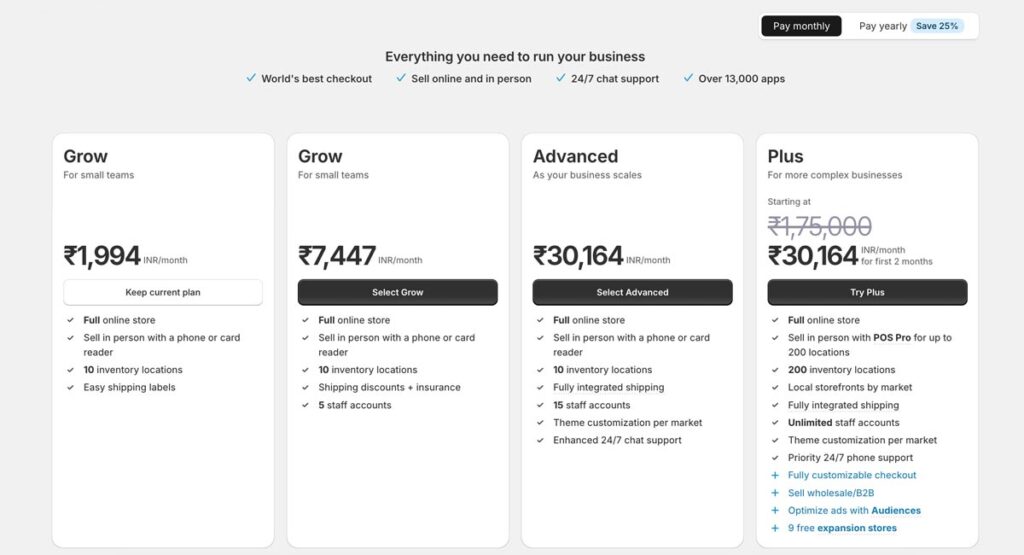
- Shopify has defined plans (monthly), hosting and store features bundled—but you’ll still pay for apps and transaction fees depending on the plan.
Ecommerce & Store Features
- Shopify is built primarily for stores: products, checkout, payments, shipping, inventory out of the box.
- WordPress + WooCommerce can match almost all store features—but you’ll need to add and configure plugins, integrations, maybe custom code. If you have varied business models (membership, content + store) WordPress gives more options.
SEO & Content Strategy
- WordPress gives you full control over your SEO stack: hosting speed, code, URLs, custom fields etc.
- Shopify handles many things for you but gives less server-level control (for example you may not change .htaccess rules). However, for many small/medium stores it is sufficient.
Scalability & Maintenance
- Shopify manages hosting, security and updates for you. Less to worry about operationally.
- WordPress gives you control but also responsibility—if you scale you must ensure hosting, caching, security and performance keep up.
3. Which Platform for Which Scenario?
Here are practical decision-guidelines based on your business type, team, budget and goals.
| Your Situation | Recommendation |
|---|---|
| You’re launching a store fast with minimal technical involvement, want simplicity and support | Shopify |
| You already have a website or blog with content and want to add an e-commerce arm, or you value content + store together | WordPress |
| You have a larger budget, expect rapid growth, need lots of custom functionality & integrations | WordPress if you have dev team / Shopify Plus if you want managed growth |
| You want to focus on content marketing, blogs, SEO-driven traffic, membership, complex site structure | WordPress |
| You care more about “set it up, let it run,” less about heavy customisation | Shopify |
4. Practical Tips to Choose (and Succeed)
- Map your goals: Write down what you need (store, blog, membership, global shipping, multi-currency, content hub).
- Consider team & skills: If you have a technical team (or will invest), WordPress gives freedom. If you are solo or small team and want managed infrastructure—Shopify may be smarter.
- Calculate true cost: Don’t only look at monthly fee / hosting. Factor in plugins/apps, themes, security, support, custom code.
- Think about long-term: If your business will expand rapidly, needs complex integrations, think about platform’s scalability.
- SEO & content are critical: If you plan heavy content marketing and want full SEO control, WordPress edges ahead. But Shopify is still capable for many e-commerce operators.
- Test and prototype: If unsure, try a trial (Shopify offers one) or build a small version in WordPress to assess comfort and cost.
- Maintenance & updates: WordPress sites require you to manage backups, updates, security; Shopify handles much of this for you.
5. Final Verdict
There’s no one-size-fits-all answer, but here’s the summary:
- If your primary goal is to sell products quickly with minimal fuss and technical overhead, Shopify is likely the better fit.
- If you value content, flexibility, long-term control, and you’re willing (or able) to handle more of the technical side, then WordPress (plus WooCommerce for e-commerce) is likely the smarter choice.
As your digital marketing partner at Digi Amenity, I recommend assessing your business model, growth path and team capabilities first—then choose the platform. Once chosen, align your content strategy (blogs, SEO, social media) accordingly to get the most value.